Showing posts with label  haproxy. Show all posts

2018-09-27

Replacing the AWS ELB - Final Thoughts

This is the last part in the Replacing the AWS ELB series.
  1. Replacing the AWS ELB - The Problem
  2. Replacing the AWS ELB - The Challenges 
    1. Replacing the AWS ELB - The Design
    2. Replacing the AWS ELB - The Network Deep Dive
    3. Replacing the AWS ELB - Automation
    4. Replacing the AWS ELB - Final Thoughts (this post)

    If you haven't already read the previous posts in the series - please take the time to go through them.

    So here are some additional thoughts and ideas about the whole journey.

    First and foremost - none of this would have been possible without group effort of the team that worked on this.
    Udi, Mark, and Mike - thank you all for your input, help and hard work that went into this.

    Was it all worth it?

    Yes, yes and hell yes!! The cost of having to refactor applications to work with the way that the AWS ELB works - was not financially viable and would take far to long . There was no way we could make our delivery dates and have all the applications modify the way they worked.

    So not only was it worth it - it was a necessity, without this - the project was a non-starter.

    What was the hardest part of the solution?

    Definitely the automation. We had the solution white-boarded out after a an hour or two, brought up a PoC within another hour or two.

    As I said somewhere else in the post - if this was a one-off then it would not have been worth while - but we needed about 10 pairs of haproxy instances in each deployment - and there were 10- 15 deployments - so manual was not going to work here. There was a learning curve that we needed to get over and that took some time.

    This can't be all you were doing with haproxy..

    Of course not.. The configurations in the examples are really basic and simple. The actual haproxy.cfg was a lot more complicated and was generated on the fly using Consul and consul-template. This allows for some very interesting and wonderful things that can be accomplished. The instances were what could be considered as pets, because they were hardly re-provisioned, but the configuration was constantly changing based on the environment.

    So did you save money?

    No! This was more expensive than provisioning an ELB from AWS. The constraints dictated that this was the chosen solution - not cost. Well in a way this was wasted resources, because there are instances that are sitting idle most of the time - without actually doing anything. The master-slave model is not a cost effective solution because you are spending money to address a scenario when (and if)  you lose a node.

    Does this scale? How?

    We played around with this a bit and also created a prototype that provisioned an auto scaling group with that would work active-active-active with multiple haproxy's - but this required some changes in the way we did our service discovery. This happened a good number of months after we went live - as part of the optimization stage.  Ideally - this would have been the way we would have chosen if we could do it over again.

    For this example the only way to scale is to scale up the instances sizes - not to scale out.

    So to answer the question above - in the published form - no it does not.

    Any additional benefits to rolling your own solution?

    This could be ported to any and every cloud - or deployment you would like. All you need to do it change the modules and the parts that interact directly with AWS with the cloud of your choice - and it would probably work. It is not a simple rip and replace - but the method would work - just would take a bit of extra time and coding.

    What about external facing load balancers - will this work?

    Yes, all you will need to do is replace the routes - with an elastic IP, and have the keepalived script switch the EIP from one instance to another. I should really post about that as well.

    So why did you not use an EIP in the first place?

    Because the this was internal traffic. If I was to use an external facing load balancer, the traffic would essentially go out to the internet and come back in - for two instances that were in the same subnet in the same AZ. This does not make sense neither from a financial nor a security perspective. 

    Can I contact you if I have any specific questions on the implementation?

    Please feel free to do so. You can either leave a comment on any of the posts in the series, ping me on Twitter (@maishsk), or use the contact me on the top.
    2018-09-02

    Replacing the AWS ELB - The Design

    This is Part 3 in the Replacing the AWS ELB series.
    1. Replacing the AWS ELB - The Problem
    2. Replacing the AWS ELB - The Challenges
      1. Replacing the AWS ELB - The Design (this post)
      2. Replacing the AWS ELB - The Network Deep Dive
      3. Replacing the AWS ELB - Automation
      4. Replacing the AWS ELB - Final Thoughts

      So how do you go about using an IP address in a VPC and allow it to jump between availability zones?

      The solution to this problem was mentioned briefly in a slide in a re:invent session - which for the life of me I could not find (when I do I will post the link).

      The idea is to create an "overlay" network within the VPC - which allows you to manage IP addresses even though they don't really exist in the VPC.

      A simple diagram of such a solution would look something like this:

      standard_haproxy

      Each instance would be configured with an additional virtual interface - with an IP address that was not part of the CIDR block of the VPC - that way it would not be a problem to move it from one subnet to another.

      If the IP address does not actually exist inside the VPC - how do you get traffic to go to it?

      That is actually a simple one to solve - by creating a specific route on each of the subnets - that routes traffic to a specific ENI (yes it is possible).

      add_route

      The process would be something like this:

      start

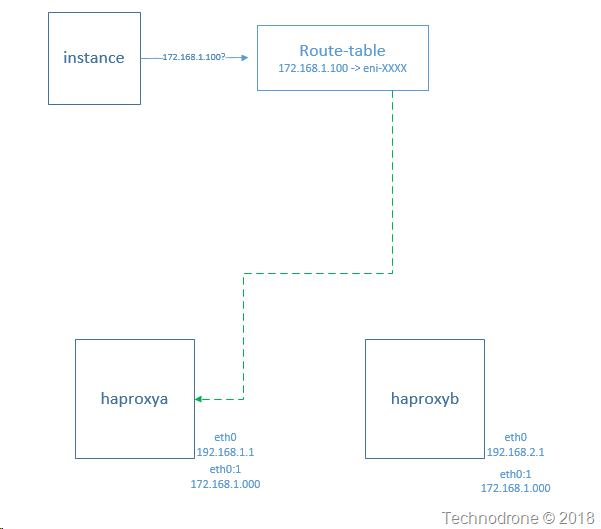
      An instance will try to access the virtual IP - it will go to the Route table on the Subnet and and because of the specific entry - it will be routed to a specific instance.

      The last piece of the puzzle is how do you get the route to jump from one instance to the other instance of haproxy, this would be the initial state.

      initial

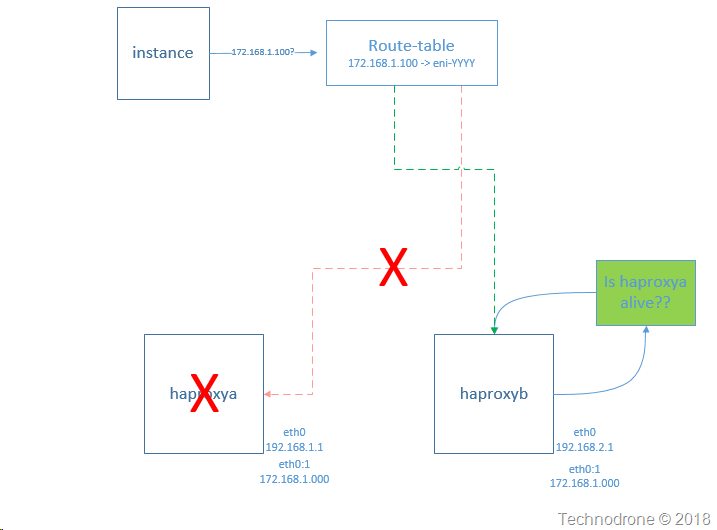
      haproxya fails or the AZ goes down

      haproxya_fail
      haproxyb recognizes this failure
      recognize_failure

      And then makes a call to the AWS API to move the route to a different ENI located on haproxyb

      move_to_haproxyb

      In the next post - we will go into a bit more detail on how the network is actually built and how the failover works.

      2018-08-29

      Replacing the AWS ELB - The Network Deep Dive

      This is Part 4 in the Replacing the AWS ELB series.

    3. Replacing the AWS ELB - The Problem
    4. Replacing the AWS ELB - The Challenges
    5. Replacing the AWS ELB - The Design
    6. Replacing the AWS ELB - The Network Deep Dive  (this post)
    7. Replacing the AWS ELB - Automation
    8. Replacing the AWS ELB - Final Thoughts

    9. Why does this whole thing with the network actually work? Networking in AWS is not that complicated - (sometimes it can be - but it is usually pretty simple) so why do you need to add in an additional IP address into the loop - and one that is not even really part of he VPC?

      To answer that question - we need to understand the basic construct of the route table in an AWS VPC. Think of the route table as a road sign - which tells you where you should go .

      directions
      Maybe not such a clear sign after all
      (Source: https://www.flickr.com/photos/nnecapa)


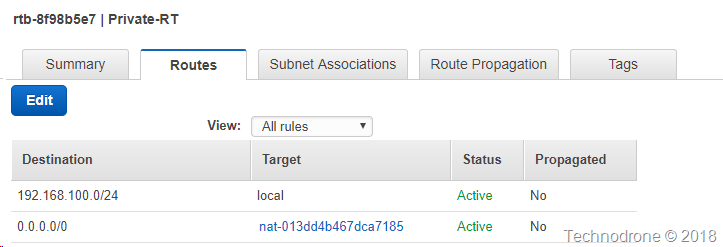
      Here is what a standard route table (RT) would look like

      route

      The first line says that all traffic that is part of your VPC - stays local - i.e. it is routed in your VPC, and the second line says that all other traffic that does not belong in the VPC - will be sent another device (in this case a NAT Gateway).

      You are the master of your RT - which means you can route traffic destined for any address you would like - to any destination you would like. Of course - you cannot have duplicate entries in the RT or you will receive an error.

      route_error1

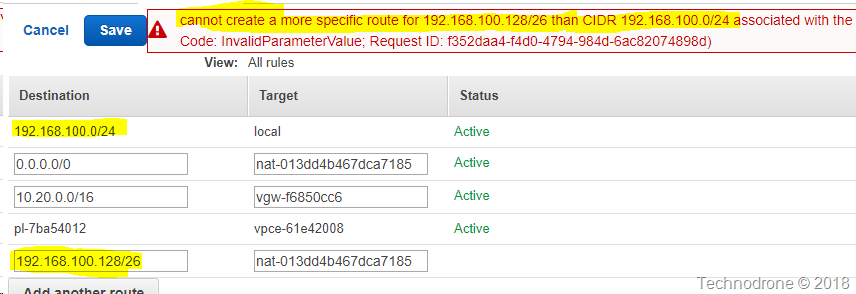
      And you cannot have a smaller subset the traffic routed to a different location - if a larger route already exists.

      route_error2

      But otherwise you can really do what you would like.
      So defining a additional interface on an instance is something that is straight forward.

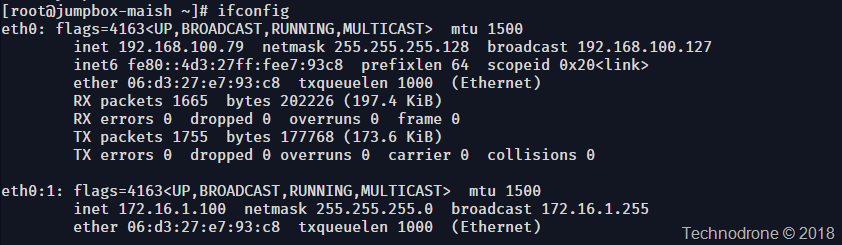
      For example on a Centos/RHEL instance you create a new file in /etc/sysconfig/network-scripts/
      DEVICE="eth0:1"
      BOOTPROTO="none"
      MTU="1500"
      ONBOOT="yes"
      TYPE="Ethernet"
      NETMASK=255.255.255.0
      IPADDR=172.16.1.100
      USERCTL=no

      This will create a second interface on your instance.

      ip

      Now of course the only entity in the subnet that knows that the IP exists on the network - except the instance itself.
      That is why you can assign the same IP address to more than a single instance.

      network_4


      Transferring the VIP to another instance

      In the previous post the last graphic showed in the case of a failure - haproxyb would send an API request that would transfer the route to the new instance.

      keepalived has the option to run a script that execute when the it's pair fails - it is called a notify

      vrrp_instance haproxy {
        [...]
        notify /etc/keepalived/master.sh
      }


      That is a regular bash script - and that bash script - can do whatever you would like, luckily that allows you to manipulate the routes through the AWS cli.

      aws ec2 replace-route --route-table-id <ROUTE_TABLE> --destination-cidr-block <CIDR_BLOCK> --instance-id <INSTANCE_ID>

      The parameters you would need to know are:

      • The ID of the route-table entry you need to change
      • The network of that you want to change
      • The ID of the instance that it should be

      Now of course there are a lot of moving parts that need to come into place for all of this to work - and doing it manually would be a nightmare - especially at scale - that is why automation is crucial.

      In the next post - I will explain how you can achieve this with a set of Ansible playbooks.

      Replacing the AWS ELB - The Challenges

      This is Part 2 in the Replacing the AWS ELB series.
      1. Replacing the AWS ELB - The Problem
      2. Replacing the AWS ELB - The Challenges (this post)
        1. Replacing the AWS ELB - The Design
        2. Replacing the AWS ELB - The Network Deep Dive
        3. Replacing the AWS ELB - Automation
        4. Replacing the AWS ELB - Final Thoughts

        Now that you know the history from the previous post - I would like to dive into the challenges that I faced during the design process and how they were solved.


        High Availability


        One of the critical requirements was "Must not be a single point of failure" - which means whatever solution that we went with - must have some kind of High availability.

        Deploying a highly available haproxy cluster (well it is a master/slave deployment - it cannot really scale) is not the that hard of a task to accomplish.

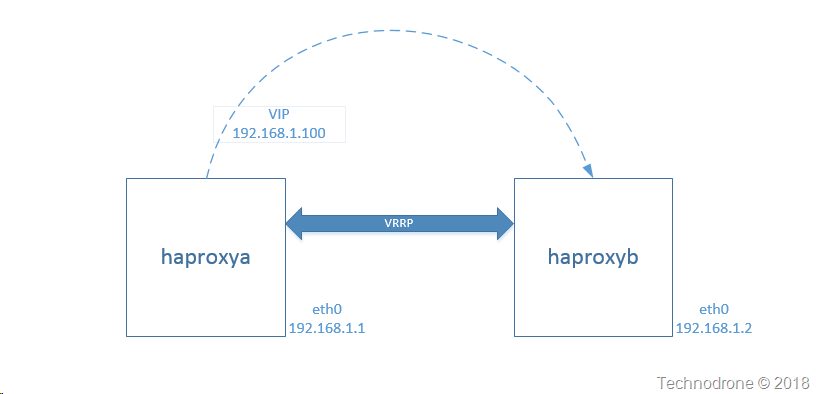
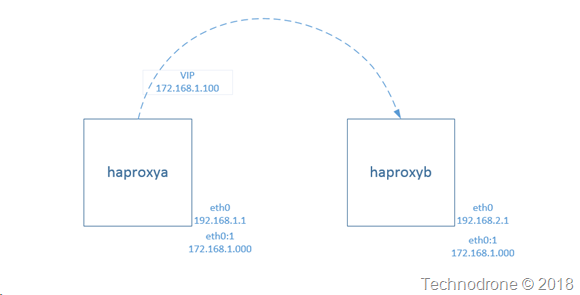
        Here is a simple diagram to explain what is going on.

        haproxy-ha

        Two instances, each one has the haproxy software installed - and they each have their own IP address.

        A virtual IP is configured for the cluster and and with keepalived we maintain the state between the two instances. Each of them is configured with a priority (to determine which one of them is the master/slave) and there is a heartbeat between them vrrp is used to maintain a virtual a virtual router (or interface between them). If the master goes down - then the slave will take over. When the master comes back up - then the slave will relinquish control back to the master.
        This works - flawlessly.

        Both haproxy's have the same configuration - so if something falls over - then the second instance can (almost) instantly start serving traffic.


        Problem #1 - VRRP

          VRRP uses multicast - https://serverfault.com/questions/842357/keepalived-sends-both-unicast-and-multicast-vrrp-advertisements - but that was relatively simple to overcome - you can configure keepalived to use unicast - so that was one problem solved.

          Problem #2 - Additional IP address

          In order for this solution to work - we need an additional IP address - the VIP. How do you get an additional IP address in AWS - well that is well documented here - https://aws.amazon.com/premiumsupport/knowledge-center/secondary-private-ip-address/. Problem solved.

          Problem #3 - High Availability

          So we have the option to attach an additional ENI to the cluster - which would allow us to achieve something similar to what we have above - but this introduced a bigger problem.

          All of this would only work in a single Availability Zone - which means that the AZ was a single point of failure - and therefore was in violation of requirement #2 - which would not work.

          As it states clearly in the AWS documentation a subnet cannot span across multiple AZ's

          vpc-faq

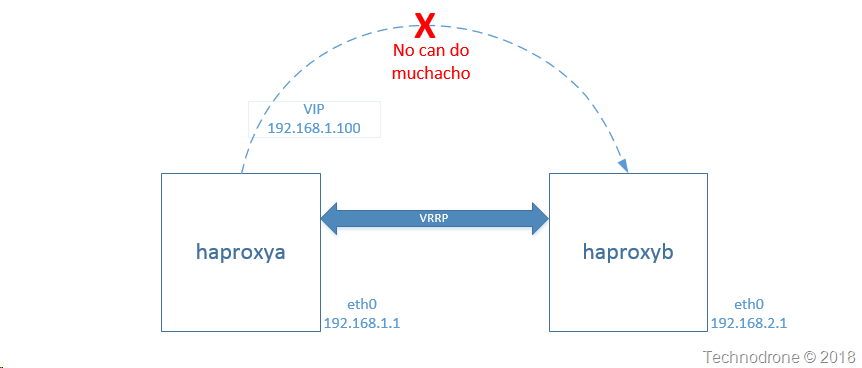
          Which means this will not work..

          cross-az

          Let me explain why not.

          A network cannot span multiple AZ's. That means if we want the solution deployed in multiple AZ's - then it needs to be deployed across multiple subnets (192.168.1.0/24 and 192.168.2.0/24) each in their on AZ. The idea of taking a additional ENI from one of the subnets and using it as the VIP - will work only in a single AZ - because you cannot move the ENI from one subnet in AZ1 - to another subnet in AZ2.

          This means that the solution of having a VIP in one of the subnets would not work.

          Another solution would have to explored - because having both haproxy nodes in a single AZ - was more or less the same as having a single node not exactly the same but still subject to a complete outage if the the entire AZ would go down).

          Problem #4 - Creating a VIP and allow it to traverse AZ's

          One of the biggest problems that I had to tackle was how do I get an IP address to traverse Availability zones?

          The way this was done can be found in the next post.

          Replacing the AWS ELB - The Problem

          This topic has been long overdue.

          This will be a series of posts on how you can replace the AWS ELB’s inside your VPC’s with a self managed load balancing solution. This will be too long for a single blog post so I decided it was best to split it up into parts.

          1. Replacing the AWS ELB - The Problem (this post)
          2. Replacing the AWS ELB - The Challenges
            1. Replacing the AWS ELB - The Design
            2. Replacing the AWS ELB - The Network Deep Dive
            3. Replacing the AWS ELB - Automation
            4. Replacing the AWS ELB - Final Thoughts

            Let me start at the beginning.

            The product I was working with had a significant number of components that were communicating with each other. A long while back the product had decided to front all communication between components with a load balancer - for a good number of reasons such as:

            • scaling
            • high availability
            • smart routing

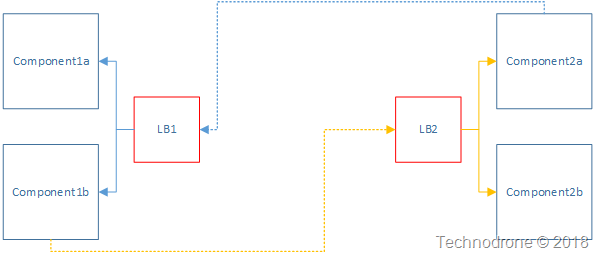
            Here is a basic view of what the communication between component1 to component2 would like (and just to clarify - there were just over 50 components that were in this solution - not just one or two)


            simple_diagram


            Simple load balancing example - something that you can see anywhere. The load balancers - were HAproxy.

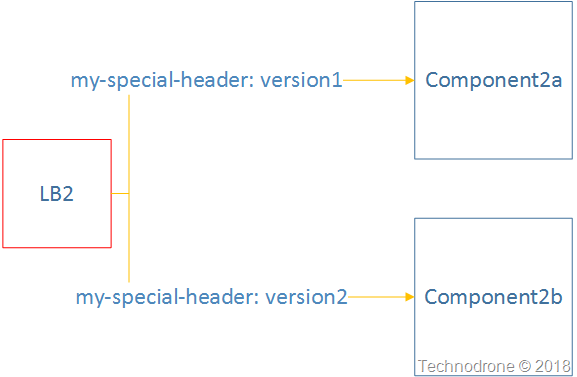
            There was some additional logic going on inside the traffic between the components which was based on HTTP headers which allowed us to route some to certain instances and versions of the application (you can think of it as blue/green or canary routing


            A simple visualization of this would look something like this.

            routing 


            The team had already deployed this product and now it was time to move over to AWS.

            The first part of the discovery was to identify how we could accomplish as much as possible of the solution while using the services that were provided by AWS - instead of deploying our own. one of the items for  discussion that came was of course the Load balancers we were using - and if they could be replaced with AWS ELB's.

            Here were the list of requirements (and the current solution that was used met all the requirements):

            1. Must be able to serve as a load balancer
              • Define frontends
              • Define backends
            2. Must not be a single point of failure
            3. Provisioning will have no manual interaction
            4. Must be able to route traffic based on specific custom HTTP headers

            AWS met all the requirements except for #4.

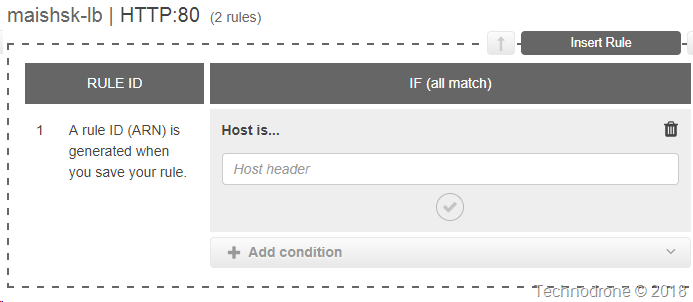
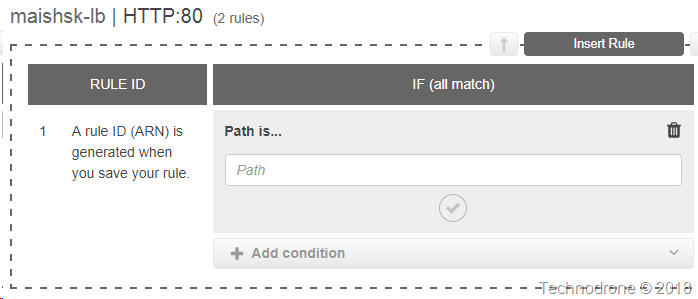
            There are options to route traffic based on HTTP headers in the AWS Application Load Balancer but they are limited (to say the least), you can only used a Host header or a path in the URL.


            hostname_route     path_route


            This was not an option, the engineering teams were not going to refactor the applications just to adapt to the AWS ELB. This caused me to go back to the drawing board an see how we could still use the know HAproxy solution inside of AWS - despite the well known problems.

            More about those in the next post.