Showing posts with label Upgrade. Show all posts

2013-05-07

Upgrading to VMware's Latest Release of …

Jason Boche posted a great article vSphere 5.1 Update 1 Update Sequence and there he pointed to an excellent KB article released by VMware - Update sequence for vSphere 5.1 Update 1 and its compatible VMware products (2037630) 

I would like to add some of my thoughts about the mass release of products that happened last week.

First look at the screenshot below.
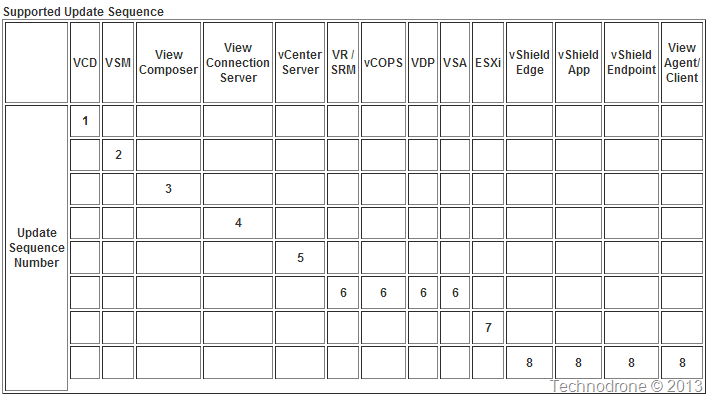
Update sequence

The first thing that I noticed - the number of products that are intertwined - is becoming larger and larger. 14 at the moment in this document.

I am extremely grateful to VMware for many things but two specific things in this context.

  1. They have provided a detailed document stating the order that you should perform the upgrade.
  2. They have released all of the versions at the same time - now the chance of having one component in my infrastructure that will not work with the new versions - is less likely to occur.

But on the other hand…

If I want to update your environment then you are in for a long …. ride.

Any enterprise that is using some or all of these components will not be able to © Thethirdman | Stock Free Imagesperform the upgrade in a day, probably not a week, and maybe it will take them months. A while back in my post Release Cycles and Why We Are Chasing Our Tails? I wrote about the effects of having rapid release cycles and why this will make things even more complicated. I agree that most of the components can be replaced with minimal or no substantial downtime to the end user, but there will always be edge cases of course.

It is now May 2013, and if we can assume that VMware will release a new version of their products sometime around VMworld (which is what they historically do), then it seems that your organization will have to go through this process, again, sometime in Q4 of 2013.

The question then arises - is it worthwhile to do this now, and then again start the whole process again in another 4 months?

If you are to upgrade the whole stack (or at least part of it - and please make a note that VMware does recommend that you upgrade/update everything to the latest version), when should it be done?
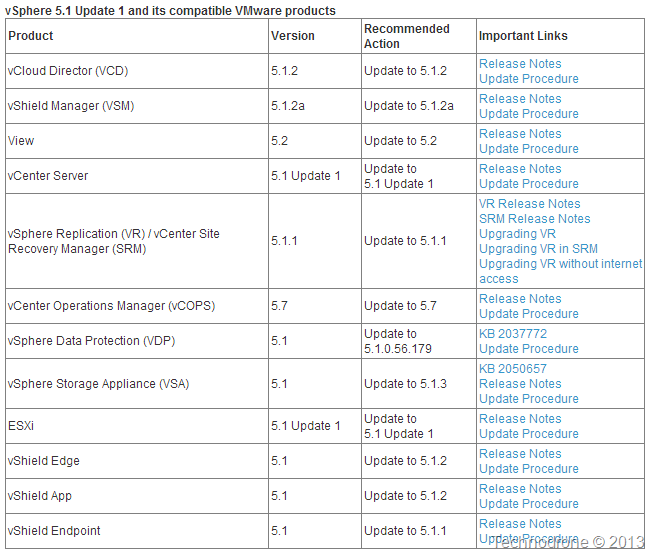
Update recommended

Should you do it now because of the new functionality that was added with Update 1?
Or perhaps wait for the next version - where historically substantial additional functionality is added (again based only on previous years and releases).

I admit this is a bit of a guessing game - but it is one that you should definitely consider and understand the ramifications of such a decision, and that is ..

When and how often should you upgrade your environment?

2012-07-04

IBM ESXi Customized Offline Bundle

Oh…..  how I have searched for this… For hours… really. And to just come across this by chance today. Duh!

Search for a customized bundle for HP hardware and it is very easy to find.

Try the same search for IBM – no…….

My frustration has been expressed on Twitter a number of times – because this is not the way it should be.

I would like to thank Darryl Miles for his post IBM’s customized ESXi 5.0 FAQ’s – and just by chance – I see that he had another post about the VIB’s IBM VIBs for VMware ESXi 4.1U2 and 5.0 – which I had never noticed before.

Thank You!! Thank You!! Thank You!!

1. Package Contents  =================================================================
This is a VMware ESXi patch for IBM IMM CIM providers. The following CIM providers are included:

fupb                  5.01-7.170
concretejob           500-2ACE12AUS
filetrans             500-2ACE12AUS
fwupdate              500-2ACE12AUS
hwckvm                500-ESXI01ACN
immpassthru           500-2ACE12AUS
pciinfo               500-PRIVATE
soibms                500-ESXI01ACN
ilfu              500-1.01.20120504
brcmfwup          500-1.00.20120507

2. Hardware Support =================================================================
The bundle can be applied to the following servers:

http://www-03.ibm.com/systems/info/x86servers/serverproven/compat/us/

3. OS Support
===================================================================
The bundle can be applied on the following OS platforms:

    * VMware ESXi 5.0u1 build 623860

4. Additional Notes ===================================================================
1. This IBM bundle only includes the providers created by IBM.
2. ilfu/brmfup have no added value without LSI and Broadcom providers installed.

After the bundle is installed on ESXi system, IBM ToolsCenter UpdateXpress System Packs Installer can be used to upgrade ESXi system, or to update firmware of IMM, uEFI, pDSA and FPGA. IBM ToolsCenter Dynamic System Analysis can be used to get information of IBM IMM and other hardware devices.

The links he provided there did not really work for me – IBM’s search engine did not find what I wanted. Here are the correct links (you will need an IBM ID to download) – I did not find any differences between the models – so here are the links to each package

IBM Fix Central - IBM CIM Providers for VMware vSphere Hypervisor 5.0u1

IBM Fix Central - IBM CIM Providers for VMware vSphere Hypervisor 5.0

IBM Fix Central - IBM CIM Providers for VMware vSphere Hypervisor 4.1 U2

This is what is inside the package that you download.

Package

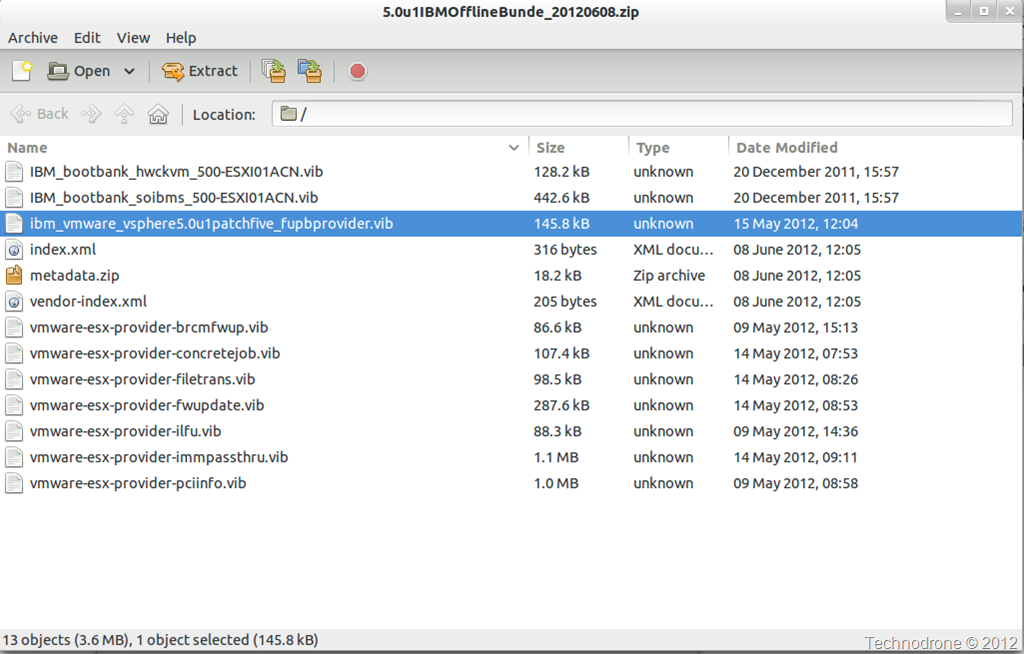
And the bundle itself contains

Bundle

One last request to IBM. Please make this available as a depot so that it can be added to Update Manager and the CLI tools. PLEASE!!!

Perhaps I should just create my own depot….. (but I do not know how legal that is…)

2011-02-15

Upgrade vCenter to 4.1 U1

I upgraded my lab to vSphere 4.1 U1 on Friday.

vCenter was simple.

A quick set of screen shots

Pre-Check 1Pre-Check 2Pre-Check 3Pre-Check 4Pre-Check 5Pre-Check 6Pre-Check All GoodPre-Check ReportPre-Check CompleteChoose DSNSQL CredentialsUpgrade DBvCenter Service CredentialsPortsJVM MemoryGoing..Going..

And I was done.

1 Small thing though. On the credentials screenshot above which is a different color, I was asked to enter credentials for the vCenter Server Service. In My lab I have the Domain Administrator account MAISHSK\Administrator and on the vCenter Server there is a local Administrator account as well.

The Service was configured to run under a the Domain Admin account as per the vSphere 4.1 Hardening Guide

vSphere Hardening Guide

After the installation - my vCenter services would not start

A quick look at the vpxd vCenter logs located at
C:\ProgramData\VMware\VMware VirtualCenter\Logs
gave me this

Logs - Wrong Credential

I looked at the Services of the vCenter server and found that the credentials to start the service were changed to .\Administrator - instead of MAISHSK\Administrator

Services

So of course they would not start. A quick change of the credentials and all was fine

Logs - all OK

The problem arises I think - because you have no option of changing the username - only the password during the upgrade - some of the options are greyed out as you can see below.

Credentials

Quick question for VMware. If you present with a screen that allows to set the credentials - why are the options greyed out? And also we are way past 2008!

2008??

And after all that I was upgraded.

Upgraded

Onto the vSphere hosts.

2010-12-09

VMware Communities Downtime this weekend

For those of you who have not already noticed.

image

VMware will be upgrading Communities systems between 10-12 December 2010. During this time, the system will be placed in read-only mode. While we work on the upgrade, you will not be able to log in, and only public content will be available. All data will be preserved and become available again once the upgrade is complete.

This is a sneak preview of the demo site.

image

If you need urgent support during the upcoming weekend, please submit a Support Request.

2010-08-24

SQL Upgrade Error - vCenter 4.1 Upgrade

As I said today on Twitter - this one took up some of my time today.

This bit me in the butt today http://twitpic.com/2hr42l #vCenter Upgrade. Butt - I bite back!!!!Tue Aug 24 13:37:57 via TwInbox


During the upgrade of a vCenter 4.0 Server to 4.1 - which included installing a new 64 bit Windows 2008 R2 Machine and moving the Database from one server to another, I encountered an error during the process of the upgrade of the SQL database which stopped the installation.

The installation log (which is usually located under C:\Users\<username>\AppData\Local\Temp\<digit>\vminst.log gave me an error

The SQL upgrade log in the same location said:

Error: Failed to execute command: create unique clustered index VPXI_DEVICE_COUNTER_INDEX on dbo.VPXV_DEVICE_COUNTER(entity_id, device_name, stat_id)

[24-08-2010 13:50:26] Got exception: ERROR [42000] [Microsoft][SQL Native Client][SQL Server]CREATE INDEX failed because the following SET options have incorrect settings: 'ARITHABORT'. Verify that SET options are correct for use with indexed views and/or indexes on computed columns and/or query notifications and/or xml data type methods.

Which in-turn sent me to Prof. Google and KB 1024449 which in essence says that you will have to make a change to the database server configuration due to some SQL options not being set. Which struck me as strange because this was a default installation - the same as many before.

Which brought me to this thread which suggested an issue with the compatibility mode of the database itself, which was spot on.

A quick change of the compatibility level from 2000 to 2005 and the installation went on without a hitch.

image

Another successful upgrade completed!!

2010-08-23

Issue with vCenter Versions

I noticed something that I thought was an issue with my the vCenter installation and perhaps a change in location of the SQL database. But it turns out not to be the case.

Many of us have, are in the process or will soon upgrade to vSphere 4.1.

I personally like to test things before I do an upgrade so I currently have two environments running simultaneously

image

image

When you install your new 4.1 vCenter you will need to install a new vCenter client of course an now you will now have 2 versions of the vSphere client installed

image

The good thing is that when connecting to each of the versions you will not need to choose which client to connect with, that is done automatically

image

image

From the VMware vCenter Server Performance and Best Practices one of the recommendations are:

image

Yep it is that small box on the top right hand side of your vSphere client

image

So on my 4.0 vCenter,  I tried to find a VM. I entered the VM Name (MAMA) and what I got was this

image

and no results. and this was really strange. It was working before, so I tried to do the same on the 4.1 vCenter, looking for a VM (Maish)

image

VOILA, worked!! Now this was strange

So I decided to try this out on the vCenter 4.0 Server itself – where only one version of the client was installed, and also it worked

image

I tried this again on the vCenter 4.1 server. I tried to connect to the4.0 vCenter and was presented with the option of downloading the old client

image

And when connecting to the 4.0 vCenter – the same issue occurred.

image

I actually had a SR open with VMware on this issue on 07/19/2010 – but did not really get a solution.

Hello Maish, We have opened a bug with our development engineering group for this issue. I will keep you updated as to the progress of this issue, however, I do not know when a solution will be available.

Workaround at the moment – and it is not optimal

  1. Do not connect to multiple versions of vCenter from the same machine. If you need to use 4.0 then make sure you have only the 4.0 Client installed.
  2. Take the plunge and upgrade to 4.1 - (something I am not 100% ready for yet)

This does not affect searching a 4.1 vCenter when you have both 4.0 and 4.1 clients installed.

I have also heard of issue regarding problems with Storage Views, and a memory leak in the vpxclient when left running for long periods of time – if both clients are running simultaneously

Thanks to @hyperviz0r, @wilva, @chuckgman, @chouse for their help in testing the issue.

Hope you enjoyed the ride!

*** Update 05/10/2010 ***

I would like to thank Michael for his comment that pointed me to a KB that VMware released regarding a workaround for this issue. It does not exactly describe the issue I encountered but maybe could solve the problem

KB Article: 1024493

Symptoms
  • vCenter Server search function does not work
  • vCenter Server search results appear blank, as if the search never completed
  • This issue occurs when vSphere Client 4.1 is used to access vCenter Server 4.0
Resolution

This issue can occur if you try to connect to a mix of vCenter Server 4.0 and 4.1 from one machine but do not have both vSphere Client versions installed on the machine.
However, simply installing each Client version in different folders does not work. When you install the first Client you are asked where you want to install it. When you install the second Client, you are not asked for a location. Instead, the installer sees that you have already installed a Client and automatically tries and install the second client in the same directory.
To install vSphere Client 4.0 and 4.1 in separate directories:

  1. Install vSphere Client 4.0 in C:/Client4.0.
  2. Copy C:/Client4.0 to an external drive (such as a share or USB).
  3. Uninstall vSphere Client 4.0. Do not skip this step.
  4. Install vSphere Client 4.0 in C:/Client4.1.
  5. Copy the 4.0 Client folder from the external drive to the machine.
  6. Run vpxClient.exe from the 4.0 or 4.1 folder.

2010-03-29

Install EMC PowerPath/VE with Update Manager

I was looking into this a short while ago – after updating the hosts to Update 4.01.

This VMware KB – 1018740 will show you the way.

Download the the Powerpath/VE 5.4 SP1 package from Powerlink

(if you are looking for the document location manually - Home > Support > Software Downloads and Licensing > Downloads P-R > PowerPath for VMware).

Once the package is downloaded extract the zip package to a folder which is accessible to a web browser.

image

Once you confirm that the package is accessible from a web browser – you are ready to go.

image

The beauty of it all is that this can be done in Update Manager.

image

Make sure you put the full path to the xml file!!

image

Apply and Download Now

image

image

And the progress shoots off

image

We then create a new Host Extension Baseline to deploy the package

image

image

You will then have a new Extension Baseline

image

You can then Attach that baseline to your host/s - stage and remediate..
(Mind you it requires maintenance mode and a reboot)

image

This is not including the licensing that needs to be set up for PowerPath.

Noticeable mentions on the topic are:

HOWTO: Download, Install and License EMC PowerPath/VE – Chad Sakacc

White Paper: Third Party PSPs – EMC Power Path for VMware – Mike Laverick