Showing posts with label Tools. Show all posts

2018-08-21

Scratching an itch with aws-vault-url

I think that aws-vault is a really nice tool. It prevents you from saving your AWS credentials in plain text on your machines (which is always a good thing)

Since I started using it – I found a number of difficulties along the way.

  1. aws-vault does not support aarch64 #261

    To solve this - I created my own binary - aws-vault on a Chromebook

  2. aws-vault only supports storing credentials when using a fully blown GUI. Here is a really good walkthrough how to get this working https://www.tastycidr.net/using-aws-vault-with-linux/

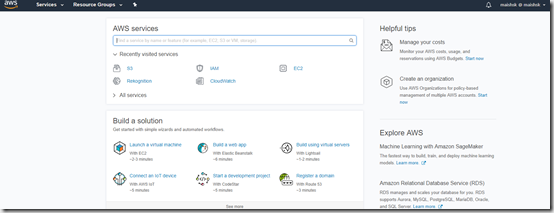
  3. aws-vault login will give you a URL with which you can paste into a browser and it will log you in automatically to the AWS console. My pet peeve with this was that it always brings you to the default console page.
    image

    So I was thinking – why would I not be able to open up the specific console that I would like to access – such as S3 or EC2 – I mean come on … these are just different URLs that need to be opened in the same way.


Now if I was a go developer – I would happily have contributed this back to the original project – but I am not. I am not really a developer at all. I can play with code – I can also create stuff – but I would not dare call myself someone who can write an application.

So I wrote a small wrapper script to provide this functionality.

Say hello to aws-vault-url – an easier way to open a direct conosle for a specific product.

(This is in no way a robust tool – and if you would like to contribute and improve it – please feel free to submit a PR)

Update – 22/08/2018

So I did some thinking about this – and came to the conclusion that it makes no sense to maintain a separate tool – so I decided to take the leap and push myself to go into the code it self – so I sat for an hour or two last night, and extended the current functionality of aws-vault to accommodate this.

Here is the PR - https://github.com/99designs/aws-vault/pull/278.

Once this is merged – I suggest that you move over to the complete tool.
2018-01-25

The #AWS PowerShell Docker Container

I cannot believe it is over 3 years since I created the openstack-git-env container. At the time I was really frustrated at how hard it was to get started with setting up an environment  to start contributing to OpenStack.

Well I have now moved on - focused primarily on AWS - and I have a good amount of PowerShell experience under my belt - but since I moved off a Windows laptop 3 years ago - I hardly use PowerShell anymore. Which is a shame.

Luckily Microsoft have released a version of PowerShell that will work on Mac and Linux - so I can start getting back on the horse.

I looked at the instructions for setting up PowerShell command for AWS - which led me to the AWS documentation page. But the missing link there - is how do you install PowerShell on your Mac/Linux machine - there is no documentation there. This is complicated ands error prone.

So I was thinking - there must be a container already available for PowerShell - it can’t be that everyone goes through the hoops of installing everything locally.

And lo and behold - there is one - https://hub.docker.com/r/microsoft/powershell/

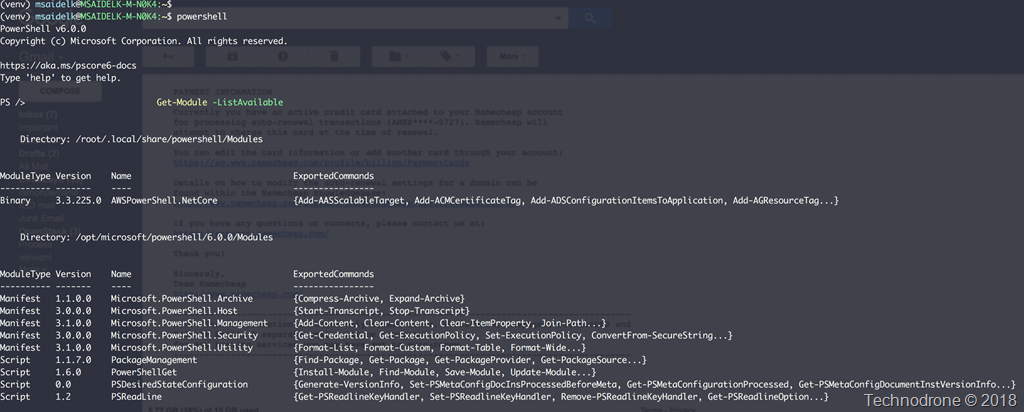
So I built on top of this - the AWS PowerShell container.

All you need to do is set an alias on you machine, add a script that will launch the container - and Bob’s your uncle - you are ready to go.

All the information is located on the repository.

Screenshot at Jan 25 08-59-05

Please let me know if you think this is useful - and if there are any improvements your would like to see.

The code is on Github - feel free to contribute or raise any issues when/if you find them.

2014-12-01

Introducing VIRL Personal Edition

This is an internal Cisco tool which is so useful – that I am really pleased that it is finally available for public consumption.

VIRL Stands for Virtual Internet Routing Lab

What Is VIRL?

VIRL is comprehensive network design and simulation platform. VIRL includes a powerful graphical user interface for network design and simulation control, a configuration engine that can build complete Cisco configuration at the push of a button, Cisco virtual machines running same network operating systems as used in Cisco’s physical routers and switches, all running on top of OpenStack. virl

How Does VIRL Work?

VIRL uses the Linux KVM hypervisor and OpenStack as its virtual machine control layer, with a powerful API enabling the creation and operation of VMs in a simulated network topology. Users design their network using the VM Maestro design and control interface, with network elements such as virtual routers, switches and servers. The design is translated into a set of virtual machines running real Cisco network operating systems.

What Does VIRL Offer?

Design, learn and test with virtual machine running real Cisco network operating systems – IOS, IOS XE, IOS XR  and NX-OS as well as virtual machine running 3rd party operating systems. Build highly-accurate models of real-world or future networks, study the behaviour and configuration of routing protocols, break and fix your network and understand how to troubleshoot with a powerful integrated platform.

The original information can be found here

Cisco VIRL Personal Edition annual subscription license provides a scalable, extensible network design and simulation environment for several Cisco Network Operating Systems for students. This includes IOSv, IOS XRv, NX-OSv, CSR1000v as well as third party images such as Ubuntu Linux.

Educational pricing is available for this product for college students, parents buying for a college student, or teachers, homeschool teachers and staff of all grade levels – limited to one purchase.

VIRL enables users to:

• Build highly-accurate models of real-world or future networks.

• Learn and test with ‘real’ versions of Cisco network operating systems – IOSv, IOS XRv, NX-OSv and CSR1000v.

• Integrate virtual network simulations with real network environments.

• The download includes VIRL Personal Edition 1.0 Pre-Release software with a single-user annual license to manage up to 15 Cisco nodes.

You can view a short demo of the product in the link below.

VIRL Demo

2012-10-07

You Can’t Use Onyx with the Web Client

The Web Client will be VMware’s direction going forward. It was stressed more than once. There was even a slide from one the sessions to state that 5.1 will be the last windows based client – as I blogged about before here.

If you stop for a moment to think about this it makes sense. VMware is looking to remove any kid of dependency on the Microsoft operating system. We have seen it with move to a direct of a center appliance and now with the new client. I am sure this will be a glorious day for all the Admins who have a Mac and up until now relied on a Windows VM running onyx.pngin Fusion to manage there vSphere environments. Gone now are those days.

Onyx - remember the fling that VMware have to allow you "peak" into the API? This has proven to be a invaluable tool more than once, not only for me but for anyone who is trying to programmatically perform some kind of operation be it PowerCLI or now more popular – vOrchestrator.

A multitude of posts can be found about the subject – here are just a small few:

But new with the web client this will not be possible (at least not at the moment) until VMware releases an update or some other tool to provide this functionality. Which does become problematic, because there is no way to find the API calls that are now going through the new client. And since a sizeable amount of functionality is no longer available in the Windows client – it will not be so simple to find the correct calls.

I can say that this update is coming - Luc Dekens actually raised this question in session GD26 with William Lam, and they are aware of this problem. When it will be released - I don't know.

This does just show me that this is a perfect example of how things can become complicated, the larger and more intertwined a solution becomes. Who would have thought that Onyx would have become such a useful tool, and that the community would make such good use of it, to a point that they cannot do things without it. And it has to be modified or replaced to continue to support the community.

The new client will make things a lot easier moving forward. It will be interesting to see how people find ways to extend the functionality of the the client. I think we will all be quite surprised.

If anyone has an idea on how to get the API calls going through the new client – please feel free share them in the comments below.

2012-03-16

NetApp Virtual Storage Console 4.0 Released

Thanks to Christopher Wells for the heads up

#NetApp Virtual Storage Console (VSC) 4.0 for #VMware vCenter... Now available for download! http://bit.ly/xnoVVg (NOW account required)Fri Mar 16 02:09:09 via TweetDeck

So What’s New?

Virtual Storage Console 4.0 for VMware vSphere includes enhancements to all four capabilities.

    The Monitoring and Host Configuration capability adds support for the following:

    • Data ONTAP® for Cluster-Mode
    • Management of consolidated storage controller credentials
      These credentials apply to the Monitoring and Host Configuration capability, the Provisioning and Cloning capability, and the Optimization and Migration capability.
    • Scanning for and flagging indirect paths used to access data for Cluster-Mode based NFS exports, and providing a list of potential direct data paths
    • The NFS VAAI Plugin
      This is a software library that integrates with Virtual Disk Libraries and allows VMware software to execute certain primitives on NetApp storage controllers.

    The Provisioning and Cloning capability enables you to perform the following tasks:

    • Provision and manage NFS and VMFS datastores on storage systems running Data ONTAP for Cluster-Mode
    • Use the Monitoring and Host Configuration capability to add and remove storage systems

    A new capability, Optimization and Migration, enables you to perform the following tasks:

    • Review the alignment status of virtual machines
    • Perform online alignment of virtual machines by migrating them into optimized VMFS datastores
    • Migrate a group of virtual machines into new or existing datastores

    The Backup and Recovery capability enables you to perform the following task:

    • Back up and restore a virtual machine even if a VMware consistency snapshot fails

    Access to this tool requires a NOW account and of course a valid license.

    2012-01-23

    InventorySnapshot Fling Updated

    Personally I think this is one of the most useful Fling's I have come across.

    For those of you who do not know what a fling is…

    A fling is a short-term thing, not a serious relationship but a fun one. Likewise, the tools that are offered here are intended to be played with and explored.

    Four days ago the InventorySnapshot Fling was updated to version 1.1

    From the release notes:

    Updates in Version 1.1

    These release notes are intended to supplement and super-cede the documentation in this fling.This release introduces three new features.

    1. Template restoration. We have added snapshot and restore of VM templates. In other words, if you have templates in your hierarchy, when you snapshot and then restore the inventory, the templates should be re-registered properly. Prior to this release, we did not archive template information.

    2. Command-line snapshot. You can now initiate InventorySnapshot from the command line using cmdLineSnapshot.bat or cmdLineSnapshot.sh. This will snapshot the inventory from the command line, but it will use dummy passwords for the ESX hosts. In order to edit the passwords for the ESX hosts, you will need to use the readFromSnapshot.bat (or readFromSnapshot.sh) UI. When you click on this script, a UI will come up that will ask you to specify the directory where the snapshot has been stored. You type in the name of the directory and click on 'Read from snapshot directory.' The UI will then load the snapshot, allowing you to modify host passwords, etc. You can also use the 'Browse for snapshot directory' to find the snapshot directory using the file browser.

    3. Non-unique folder names. In the past, we required all entities (folders, VMs, RPs, etc.) to have unique names. We have now relaxed this restriction for VM and host folders. You can now have the following hierarchy:

    Root
    |
    ->Production A Folder
    | |
    | -->Production Folder
    | |
    | -->Host A1
    |
    ->Production B Folder
      |
      -->Production Folder
         |
         -->Host B1

    Note that the folder name "Production Folder" is repeated. This works for hosts and VMs. It should also work with datastores and networks, though those have not been as extensively tested.

    Below is the original Video  released by the developers Ravi Soundararajan and Balaji Parimi

    Flings are great tools - albeit not officially supported.

    Something tells me we are going to get some new ones soon….

    There is an RSS feed that you can subscribe to for new updates. I for one have update by bookmarks..

    2011-12-19

    vKernel vOPS 4.5 Launched

    vKernel announced the release of version 4.5 of their vOperations Suite today.
    What’s New:
    • New Automation Features - vOPS' automation capabilities are enhanced with auto-deletion of abandoned VM images, auto-merging of unused snapshots, an additional automated remediation for performance issues and auto-calculation of future resource requirements.
    • Automation Controls - vOPS 4.5 also adds the ability to more finally control some automation processes. For example, VMs can be grouped, and then these groups set with minimum and maximum resource amounts that automated right-sizing will respect.
    • vSphere 5 New Feature Support - vOPS 4 introduced compatability to vSphere 5. vOPS 4.5 takes this integration further with support for storage DRS and storage clusters, new HA methods and inclusion of data provided by the VASA storage interface.
    vKernel will try to provide “trusted automation” – and with vOPS 4.5, data center staff will be able to automatically
    • Delete abandoned VMDK Files
    • Merge VM snapshots
    • Solve VM performance issues
    • Power-off Zombie VMs
    • Resize vCPU and VM memory resources based on vOPS’ recommendations
    • Update management dashboards in real-time in external systems
    • Calculate CPU, memory and storage requirements at any point in the future
    Each one of these automation features will help avoid the need to hire in additional administrators as environments grow. For example, a VM administrator can manually delete approximately 60 abandoned VM images in one hour. With automated deletion of abandoned VM images, an unlimited amount of files can be deleted in seconds.

    Other features available in vOPS 4.5 include:
    • Application type tags to denote which application is running inside a virtual machine
    • Storage DRS and storage cluster support (available in VMware vSphere 5)
    • Access to VMware VASA interface storage statistics available in vSphere 5
    • Capacity planning calculation adjustments for vSphere 5 HA methods
    • Improved support and visibility into Raw Device Mapping (RDM) storage objects
    • Additional management reports such as graphs for performance issue counts
    • Auto-set VM metric trend alarms that generate warnings when abnormalities are detected
    Here is a short video on the new features.
    What’s new in vOPS 4.5

    2011-06-01

    NetApp Virtual Storage Console 2.1 released

    NetApp has quietly released an updated version of their Virtual Storage Console Software (you will need a NetApp Now account to access).

    Here is the announcement:

    The Virtual Storage Console software is a single vCenter Server plug-in that provides end-to-end virtual machine lifecycle management for VMware environments running NetApp storage. The plug-in provides the following capabilities:

    • Storage configuration and monitoring using the Monitoring and Host Configuration capability (previously called the Virtual Storage Console capability)
    • Datastore provisioning and virtual machine cloning using the Provisioning and Cloning capability
    • Backup and recovery of virtual machines and datastores using Backup and Recovery capability

    Note: Use of various capabilities in VSC requires the purchase of one or more NetApp software licenses. For more information on required software licenses, see the NetApp Virtual Storage Console 2.1 for VMware vSphere Installation and Administration Guide (HTML, PDF).

    New Features:

    Virtual Storage Console 2.1 includes the following enhancements:

    • The Virtual Storage Console capability is renamed Monitoring and Host Configuration to better describe what it is used for.
    • Monitoring and Host Configuration offers faster discovery, and the discovery now runs as a background task.
    • An updated version of the mbralign program that corrects problems with the mbralign version in Virtual Storage Console 2.0.1.
    • Monitoring and Host Configuration panels display only the resources associated with the selection in the vCenter Client Inventory panel.
    • Support for VMware View 4.6 in the Provisioning and Cloning capability.
    • Support for saving BIOS settings when cloning from template in the Provisioning and Cloning capability.
    • Enabled sense key codes and added domain user support in the Provisioning and Cloning capability.
    • Bug fixes for all VSC capabilities; see the Release Notes (HTML, PDF) for details.

    I would like to thank Vaughn Stewart for the heads-up on the new release. If you would like more in-depth details of the release you can find it on his blog.

    2011-04-10

    Installing the UBER VNX (NFS) v1 - 1st Steps

    Ever since EMC released the the VNX I have been itching to get my hands on a simulator to try it out. Now seeing that Chad and Nick are not ones to leave us hanging for long, I started to ask for it straight after the launch. I was told that it would be out, in the not too distance future.

    Yesterday, I saw that Nick Weaver had done it again. 

    Just some things to note:

    • NFS/CIFS only (at the moment)
    • One datamover only

    So here is my installation experience.

    Download links can be found on Nick's post.

    I will not go into how you import that into your ESX host - that should be pretty straight forward by now.

    The appliance comes configured by default with:

    • 1vCPU
    • 2GB RAM
    • 1 40GB IDE Hard disk
    • 3 e1000 NICs

    VNX settings

    Thin provisioned this takes up 6.5 GB of disk space.

    Resource Usage

    So let us Power on the appliance.

    Boot_1

    So first thing you will be asked to enter an IP for management for the device.
    This will be the eth0 (Network Adapter 1)

    Enter the following info:

    • IP Address
    • Subnet Mask
    • Default Gateway
    • Hostname
    • Domain Suffix
    • DNS server
    • NTP server

    IP Settings 1
    IP Settings 2

    A quick reboot and hup - Bob's your uncle, and for a simple setup you are all set to continue with the Web interface.

    Bob's your uncle

    Default credentials are: nasadmin/nasadmin and here you have it

    Login_1

    Now forget for a minute the error messages that are present - this is because of no access to the NTP servers.

    You can see the new Unisphere interface

    Interface_1
    Interface_2
    Interface_3

    Let us go and create some NFS storage that we can use.

    Create Filesystem

    Wizard

    New_FS_1New_FS_2
    New_FS_3New_FS_4
    New_FS_5New_FS_6New_FS_7

    And now we have a new filesystem,

    Filesystem Complete

    Next we create a network interface that will serve as NFS for this filesystem.

    New Network

    Network Wizard

    This device will use interface cge0 (Network Adapter 2) which in my specific case is not on the same network as the management network but - 192.168.166.x

    Network Wizard_1Network Wizard_2Network Wizard_3Network Wizard_4Network Wizard_5Network Wizard_6Network Wizard_7

    And we now have a new interface on the network.

    Network Complete

    Now to export the storage to the correct subnet.

    Create Export

    Just add in the correct values.

    Export Wizard

    And Done.

    Export Complete

    Now to connect the ESX Hosts to the storage:

    Get-VMHost esx*.maishsk.local  | % {
    New-Datastore -vmhost $_ -Name nfs_1 -Nfs -NfsHost 192.168.166.5 -Path /nfs_1 -Confirm:$false
    }

    And we now have two Hosts connected to the shared storage.

    ESX Connected 1ESX Connected 2

    I have to confess, to actually perform the procedure took less than 8 minutes (really) from power on till I had shared storage that I could access from an ESX host. The screenshots took over an hour.

    My take on this as compared to the UBER VSA. The GUI is much more user friendly. I have not gone into how the snapshots and Data Protection work and how they are configured, but that will come.

    Again my hats off to the EMC Crew for providing us a tool that is fully functional and working that allows us to get a fell of the new products and their features before actually buying the product.

    The usual word of warning though.. This is not supported by EMC.
    Support is through the Everything VMware at EMC community only.

    Happy Uber'ing…

    p.s. My apologies for not being so active lately - too much going on….

    2011-02-03

    Viewing a WebEx on the Road

    Today I wanted to join in on Simon Seagrave's EMC Live Webcast:

    Install & Run the EMC Celerra Virtual Storage Appliance 

    But I was not able to view it from the comfort of my desk, I was on the way back home - on the bus.

    I decided not give the webcast a miss so I decided to view on my laptop using my phone as my internet connection. I have a an HTC Wildfire with Android Gingerbread courtesy of Cyanogenmod. One of the benefits of Froyo is Wireless tethering - which allows you to set your phone up as a Wi-Fi hotspot.

    I use this great application 3G Watchdog to monitor my Mobile Internet usage.

    The statistics from today from my phone during the WebEx:

    image 

    A quick PowerShell line to give that in numbers that I can understand:

    Write-Output "Data Received: $("{0:N2}" -f (81121147 /1MB)) MB" "Data Sent: $("{0:N2}" -f (5838872/1MB)) MB"

    image

    I was happily surprised to find for a webcast that took over hour - including audio, the amount of bandwidth used was negligible.

    That means I do not need to give up live webcasts on the ride home.

    Thanks Simon for the great webcast!

    2011-01-19

    Do You Really Need the vMA?

    This post was triggered by a very informative conversation I had with William Lam this week. Thanks William!

    <Begin Quote>

    vMA - vSphere Management Assistant, is a virtual machine that includes prepackaged software such as a Linux distribution, the vSphere command‐line interface, and the vSphere SDK for Perl. Basically it is the missing service console for ESXi. But it's more than that too.

    This allows administrators to run scripts or agents that interact with ESX/ESXi and vCenter Server systems without having to explicitly authenticate each time. vMA can also collect ESX/ESXi and vCenter Server logs and store the information for analysis.

    </End Quote>

    Ever since VMware announced that ESXi will be be the de-facto platform going forward for the hypervisor starting from 4.1 - a large amount of speculation was raised about how to continue forward, and how we will continue to perform what we were doing up until now on the service console - with the console that is gone.

    VMware is pushing all of us to move to the vMA to do all this administration.

    Now let me share a trail of thought with you. (I would like to stress, these are my thoughts - and are based on my speculation)

    Does the vMA have a future? Will there be a need for it down the road? Up until now one of the two limiting factors that were not available in was esxcli and esxtop. Since PowerCLI 4.1.1 this is no longer a limitation.

    ESXCLI now available through PowerCLI and ESXTOP Available Through PowerCLI

    So my question to you is, what do we need to keep the vMA for? If someone would tell me because of the built-in syslog server which is available - that does not sell me.

    The amount of API objects that are currently available for use in PowerCLI - that are not available or exposed through the Perl SDK, has continuously been rising with each new version released.

    What is the reason to keep the vMA around in the future? What (if anything) is the necessity for you to have a vMA? Is there anything that you cannot do today with PowerCLI that can only be done with the vMA?

    And if that is case - why go down that route and add another VM that has to be managed, has to be patched and will use up resources on your vSphere infrastructure?

    I look forward to your comments and your thoughts.

    2011-01-17

    Windows 7/2008 Deployment - KMS and MAK Keys pt. 3

    I would close up what we have learned from part 1 and part 2. During my work with the VMware Support on this case, one of the questions I asked, was is it possible to to inject a parameter into the customization process, but the only option was to import a full sysprep file. This would in essence break a good deal of the automation process, such as the rename of the OS to match the deployed VM name. So this was out of the question.

    Unfortunately there was not much I could do here. So I rebuilt a new VM. But I had to take some certain precautions. Once your KMS is registered in the DNS and new OS connects to the network and gets an IP, it automatically looks up for a DNS record for the KMS server and will activate - which is exactly what I did not want.

    The machine was started disconnected from the external network. I applied a MAK Key to the machine and then connected it to the network. Once a machine is activated with a MAK key, it will not try to contact a KMS server, so I was set.

    So just to re-cap

    1. Build your VM
    2. Customize the OS - including your default profile settings
    3. Do not connect it to the network
    4. Install a MAK Key
    5. Connect to the network
    6. Activate the MAK key

    The last part of the puzzle was how to change the MAK key to KMS for all the VM's that will be deployed from this template? This was actually the easiest part. In the Customization Spec you can enter a License Key, and yep you guessed it here you insert the MAK key.

    Machine is deployed, the Customization Spec injects the xml (with the MAK key) into the VM, the vm is sysprep'ed (without a problem because you have 3 ReArms left) and when it comes back up automatically is activated with the KMS server.

    A few things still puzzle me though. All of this worked - flawlessly on vCenter 4.0 - I did not have to go through this whole process with MAK and KMS and USD and BS! So did something change? Was there a change in the way the machines are customized from the previous version?

    The deployment and templates were a bit icky after the upgrade.  I could not edit of my previous templates in vCenter - they all had to be re-registered VMware KB………

    I also had another issue of not being able to deploy any templates at all (Windows / Linux) with customization until the vCenter Server got a kick in the butt and was restarted.

    Small little things that do not add up. I am happy to say that I did manage to educate VMware support a bit on how this works, and in turn I learned a decent amount in the process of how the VMware deployment process works as well. All in all it was an educating experience all around. I was told that the information learned from this case will possibly be used in a VMware KB for all of our benefit.

    On to solve the next problem. Hope you enjoyed this series of posts.

    2011-01-12

    What do you use for your VMware monitoring?

    I would be interested in hearing your opinions on what you use for monitoring your VMware environment. I am conducting a study on what tools you find useful for monitoring and Capacity Management/Planning

    If you would be so kind as to answer the poll below and if you could leave a comment below on why you made your choice - it would be highly appreciated.

    What do you use for monitoring your VMware environment?

    Thanks for the co-operation.

    2010-12-23

    Visio Stencils - Happy Holiday's to you all!

    *****Update June 11, 2012******

    The new version is available here

    *****************************

    This has been long overdue.
    I would like to share with you the new Visio Stencils that I have completed.
    But first the legal part
    These are the official icons and diagrams of VMware, Inc. VMware allows the use of these icons and diagrams in derivative works by VMware Community members to illustrate virtualization concepts and IT architectures only if the VMware copyright and terms of use are clearly displayed. The VMware icons and diagrams cannot be altered in any way. VMware does not endorse or make any representations about third party information included in this document, nor does the inclusion of any VMware icon or diagram in this document imply such an endorsement.
    What's new?
    If this is half as popular as the previous versions - then I will be very pleased.
    Happy Holiday's Everyone!
    Box Shots Icons Products
    Box Shots Icons Products

    2010-12-09

    Veeam's Holiday Present

    I would like to tell you a short story about the new present that Veeam has announced today.

    image

    Just under 2 months ago I sent the message above to Doug Hazelman. The text speaks for itself. This is the answer I got back from him

    image 

    So the Hash tags were out #*F*4*C* - which was of course #NFR4VCP

    Isn't it great to have companies like this that actually think of these things before you even have the idea? and even more so - bring these things to fruition!!

    The NFR licenses include 2 sockets of Veeam Backup & Replication v5 with vPower and Veeam One Solution.

    This is a good strategic move on Veeam's behalf, getting the people that deal with virtualization to test drive the products, get to know them, and if the find them useful, then continue to expand their deployment

    The promotion is here: http://www.veeam.com/go/free-nfr-license

    Veeam

    Thank you very much Veeam!!

    ***

    (And this is completely coincidental that there have been two blog posts regarding Veeam
    in two days - I swear!!)