Showing posts with label Virtualization. Show all posts

2016-05-20

Sandboxed Malware Testing with Veertu

A while back I blogged about native virtualization on a Mac, and today I am pleased to host Clarence Chio with a guest post about a very interesting use case for using Veertu.

Clarence is a Security Research Engineer at Shape Security, working on the system that tackles malicious bot intrusion from the angle of big data analysis. Clarence has presented independent research on Machine Learning and Security at Information Security conferences in several countries, and is also the organizer of the “Data Mining for Cyber Security” meetup group in the SF Bay Area.

And without further ado…

Malware testing is a common task in a security professional’s workflow. For the uninitiated, malware testing involves examining the behavior and capabilities of malicious software by executing it in a controlled but realistic environment.

Why do malware testing?

On one level, you will be able to observe the malware’s actions close up, and understand how a piece of malware can impact (or has impacted) your systems. On a deeper level, you can dive into the actual code and use disassembly tools to perform binary analysis. Doing this can help you understand exactly what the malware is doing, and in some cases even find ways to neutralize the threat.

Windows malware often latch themselves onto the system by making changes to the Windows registry and/or filesystem. Malware that make network calls often also “phone home” to a Command and Control (C&C) host to exfiltrate information or receive further instruction on what to do after infection. By performing malware testing, all of what the malicious applications do will no longer be a mystery. You have a chance to peek through the fences and understand how attackers think.

How to do malware testing?

Malware testing is typically done in Virtual Machine (VM) lab environments. In this post, I will walk you through a series of steps that you can follow to set up your own Windows 7 malware testing lab on your Mac OS X machine using Veertu. The benefits of using Veertu over other legacy OS X virtualization software mainly comes from Veertu’s implementation of a native hypervisor using Apple’s newly released Hypervisor.framework, resulting in a lightweight yet well-encapsulated solution for virtualization on Macs. In my comparisons, VMs performed significantly better on Veertu compared with alternatives, with a smaller host memory footprint and CPU utilization. This allows you to use system resources more efficiently and ensure that the malware runs on an environment that is as similar to bare-metal as possible.

In addition, Veertu’s “VM read-only” mode allows you to make a base-VM which you can make ephemeral changes to. Any effects and stored system state that the malware has on the read-only VM will be completely and safely removed simply after restarting the VM process. This is analogous to many legacy virtualization software’s “snapshot” functionality, but comes without the hassle of having to manually snapshot system state, manage snapshots, and potentially accidentally retaining some malicious state stored on the machine after reusing the VM.

Getting started with Veertu malware analysis

First of all, you need a paid version of Veertu OS X native virtualization software, as well as a valid Microsoft Windows ISO. You can get Veertu software from your Mac App Store.The free version of Veertu allows you to run a good selection of Linux VMs included in the Veertu Cloud library, but since most malware still target Windows machines, having a Windows malware analysis lab would be nice. After going through the steps of configuring the Windows VM in Veertu, we will have a clean VM that we can start to configure for malware testing.

In this walkthrough, we will be using Windows 7 Home Premium to analyze the Petya Ransomware that has very recently (~ March 2016) become one of the most popular pieces of ransomware in the wild.

The next thing that you will want to do after launching your Windows VM is to install Veertu Guest Add-ons on your VM. With the Veertu guest VM window selected, click on the “Commands” drop down menu on your Mac menu bar, and select “Install Guest Add-ons”.

image


This will mount the Veertu Guest Add-ons installation disk as a removable disk in your VM. Simply run the installation script by following through the standard Windows software installation procedure. You will need to restart the OS on the VM for the installation to take effect.

install-guest-add-ons


Next, we will set up a shared directory between the Host OS (your Mac) and the Guest OS. (your VM) This allows you to conveniently share files between host and guest systems. In order to do this, open the Veertu VM management window and select the dropdown menu for the VM that we just installed. Click the “Edit VM…” option, and go to the “Advanced” tab. You will be able to configure your shared-folder there.

image
 

Malware execution script

For your convenience, here is a simple Windows batch file (.bat) that does 3 simple things:

copy "Z:\malware.bin" "C:\Users\John\Desktop\"
ren "C:\Users\John\Desktop\malware.bin" malware.exe
start /d "C:\Users\John\Desktop\" malware.exe

Copy the malware named “malware.bin” from the shared folder to the Windows Desktop (the Windows user is John in this example)
Rename “malware.bin” to “malware.exe” for conventional Windows execution.
Execute “malware.exe”

For this environment, we want this script to execute automatically upon boot. To do this, simply create a text file named “run-malware.bat” on your Mac and place it in the Veertu shared directory. By default, the shared directory is mounted as a shared network drive, “Z:\\”.

We want this Windows script (called a batch file) to execute automatically on VM boot. To do this, we first move the script from the shared directory to the VM file system.

copy-run-malware-to-fs

To make this script run automatically on VM system boot, we go to the Start menu and open the “Startup” folder, then create a shortcut to the script (we copied it to the desktop earlier) and drag the shortcut into the “Startup” folder.

This Windows batch script now runs on system boot.

run-batch-script-on-boot

Enabling Veertu’s Read-Only mode

We are now ready to enable Veertu’s Read-Only mode by going to the same “Advanced” tab in the VM settings window, (as we did when we were configuring the shared folder earlier) and checking the “VM Read-only” checkbox.

vm-read-only
After doing this, your VM will be in a read-only state. Any further changes you make to system state will be ephemeral.

Watching the magic happen

Now, you have a malware analysis lab. Let’s demonstrate the efficacy of this lab environment by running malware on it. First, shutdown the VM and prepare your payload.

If you don’t yet have a Windows malware binary at hand, you can find one from reputable online sources such as Malwr.com. Downloading arbitrary binaries from the Internet is as dangerous as it sounds. “Fake” malware analysis sites have been known to exist for the sole purpose of distributing malware. Make sure that your source is reputable. Be extra careful in doing this, and make sure that you do not execute any of the binaries that you download on your host operating system. Most malware binaries that you download from these sites come with the “.bin” extension, as an entry-level measure to prevent you from executing it by accidentally clicking it.

Rename the malware to “malware.bin”, and place it in the Veertu VM shared directory. Then, start the VM. The script should start once the system boots.

ransomware-run

It works! The Petya Ransomware executes, and the system immediately reboots to a fake DOS screen stating that it is “Repairing file system on C:”. What the malware is actually doing is encrypting your “C:”. Once the encryption is done, it promptly informs you that you have fallen victim to the Petya Ransomware, and you need to pay some Bitcoin for the decryption code. We chose this particular ransomware for the demonstration because it is particularly tricky to get rid of. Even though it is possible to decrypt your hard drive without paying the ransom, it requires the physical removal of your hard drive.

Here comes the magic. Simply power-off the VM, remove the malware binary from the shared directory, and restart the VM. No more trace of the malware, and the VM’s hard disk image is no longer encrypted. As you might imagine, this shaves many cycles off the malware testing workflow, and gets rid of any VM snapshot management intricacies. You have a malware testing environment that you can use over and over again without having to reprovision or reinstall any tools on the guest OS.

Performing further analysis

Of course, just observing malware execution behavior by running the executable can hardly be called malware “analysis”. Browse the huge open-source list of Awesome Malware Analysis tools and more in-depth tutorials for how you can get started with observing malware behavior and perform binary analysis to dive into actual malware code.

Once you have identified set of malware analysis tools that you can use to perform deeper malware introspection, simply turn off Veertu’s VM read-only mode to install these tools, then turn read-only mode back on, and continue analyzing malware.

Fin

“To know your Enemy, you must become your Enemy.”
- Sun Tzu’s “The Art of War”

Malware testing allows you to gain a deep understanding of the threats to your system, and understand trends in malicious software. And, if your are a Mac user, then, with Veertu, you can create a highly optimized and streamlined malware analysis lab environment that you can use to dissect malware behavior.

2016-01-05

Native Mac OSX virtualization - with Veertu

I was contacted today by Izik Eidus, an old acquaintance from Ravello which I was really impressed with their technology and introduced them in this post.

I assume that not many of you know that Apple released native hypervisor functionality with their OSX Yosemite release, their Hypervisor.framework.

What this does is it allows you to run a VM natively on OSX, without the need for client hypervisor (such as VMware Fusion or VirtualBox).

Two of the main brains behind the Ravello hypervisor have now released a Native Mac OSX virtualization tool.

Say hello to Veertu.

image

It is light (20MB), supports Windows and Linux Operating Systems, has extensive useability features such as copy/paste between guest and VM, full-screen, and shared folders.

It is the only virtualization tool that is actually available in the Apple store – becuase it does not make any changes to the kernel.

It was really very simple. I downloaded the tool and started it up.

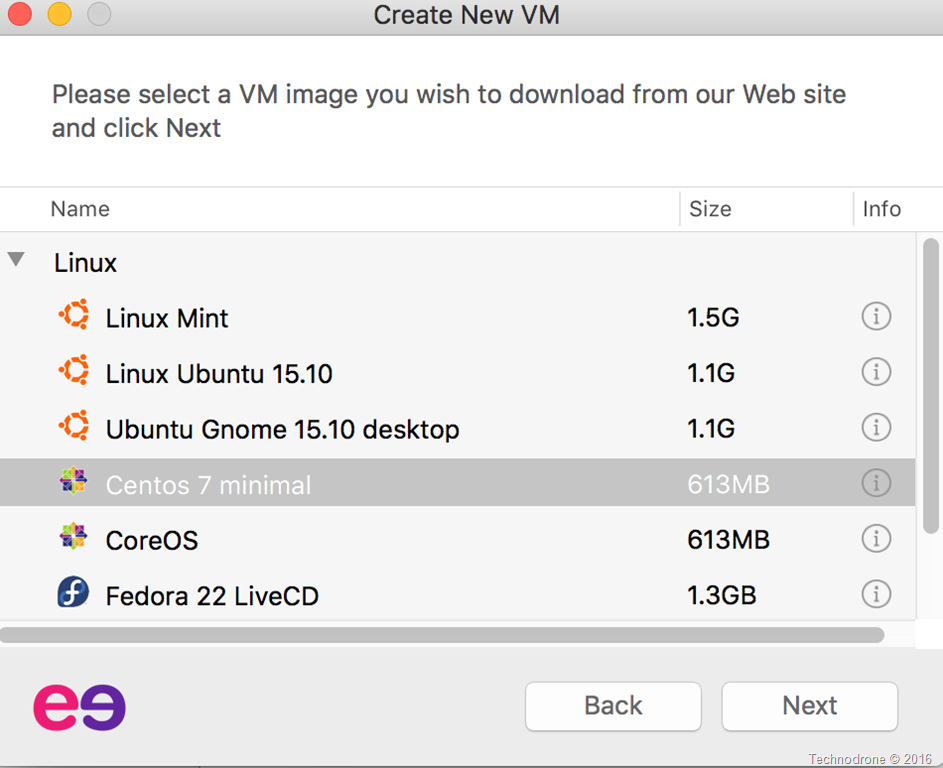
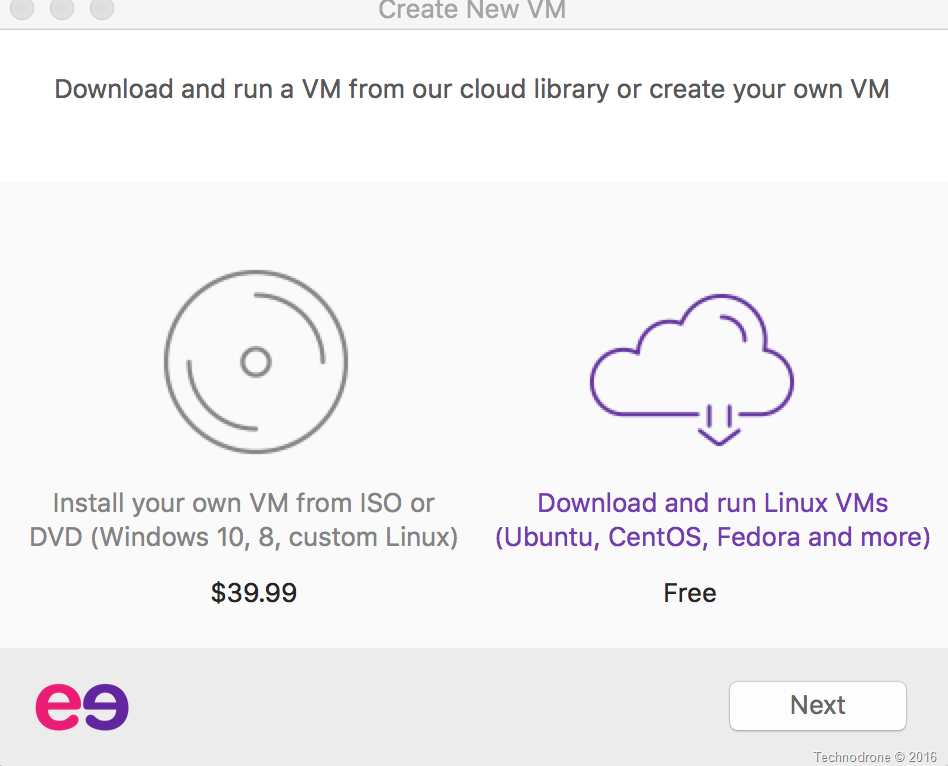
You are presented with 2 choices, create your own VM’s from ISO’s (which is a paid feature) or deploy from Veertu’s servers which has several Linux flavors.

Veertu - splash

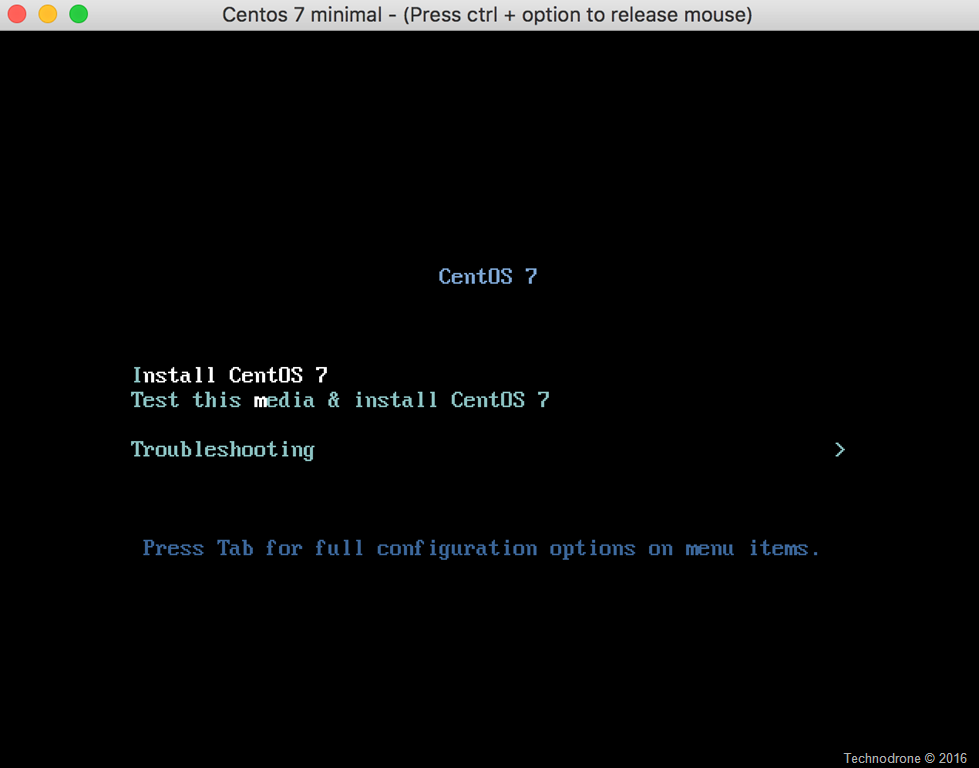
I chose Centos 7 Minimal.

Available OS

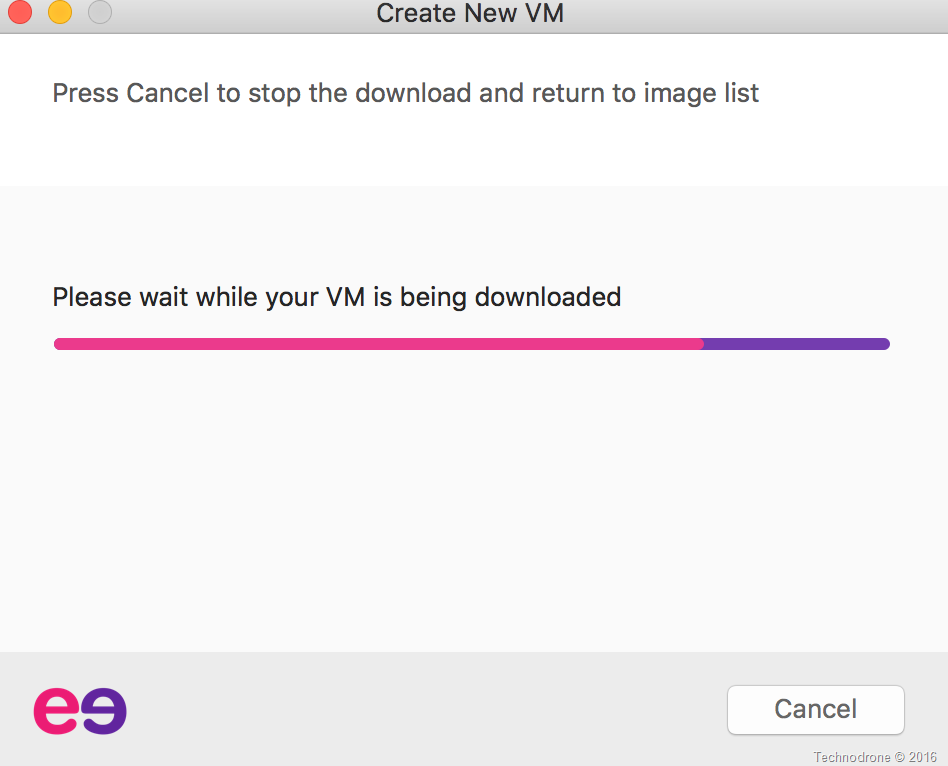
What happens is that the client downloads the appropriate ISO image that you can install the relevant OS.

Download

(I think that the wording above could be improved because it is not actually downloading a VM, rather an ISO image)

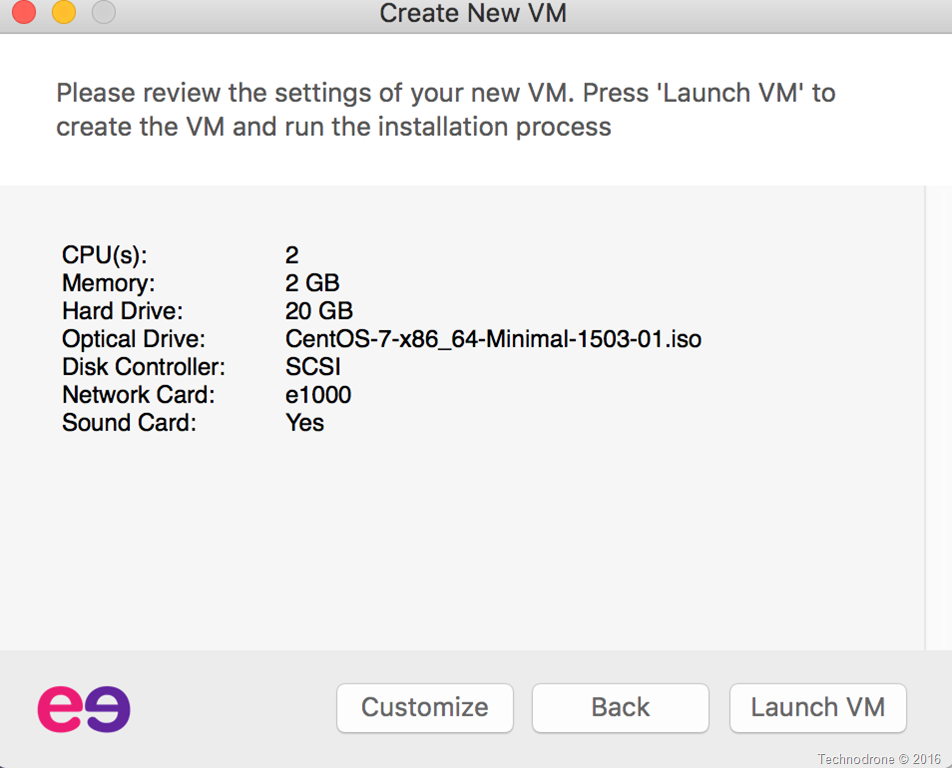
Launch VM

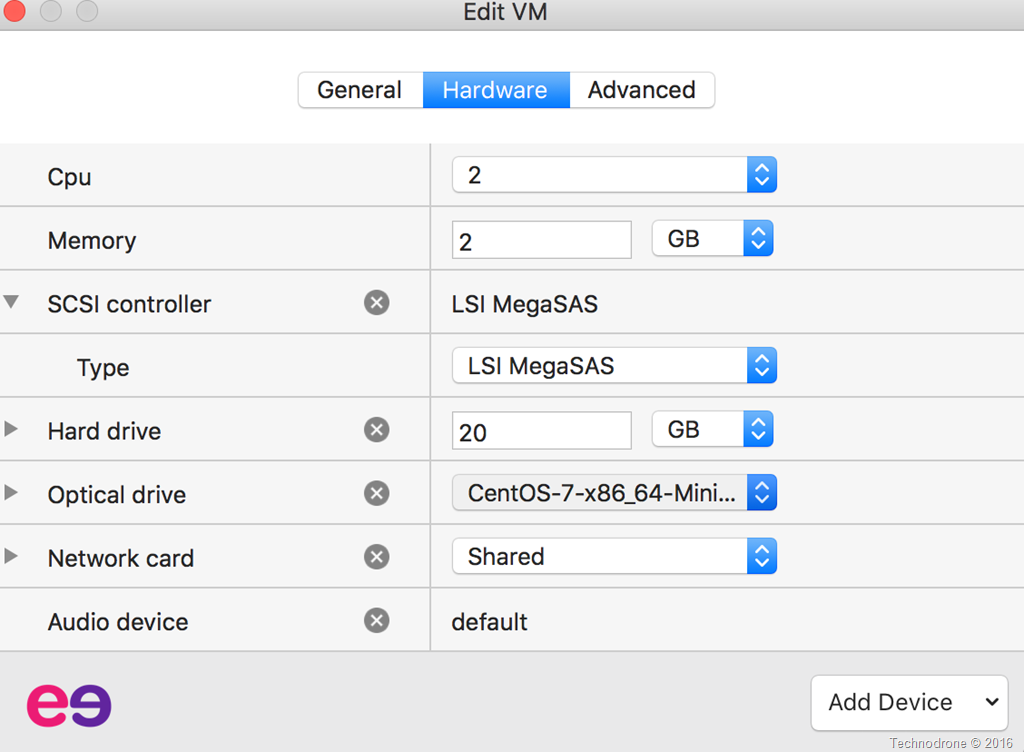
Once downloaded you can change the various settings of the VM.

VM Settings

For example CPU, RAM, Disk, Network etc.

VM boot

Power it on – and your VM goes through the installation process. (this is how I realized that the client is not downloading a full VM – rather the installation ISO)

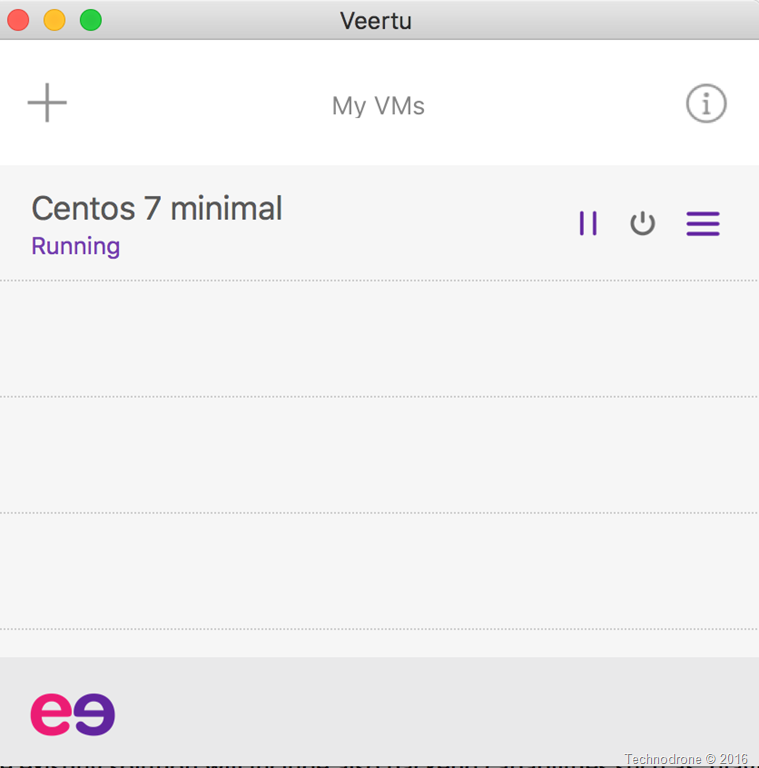
Management interface

Here is the Management interface.

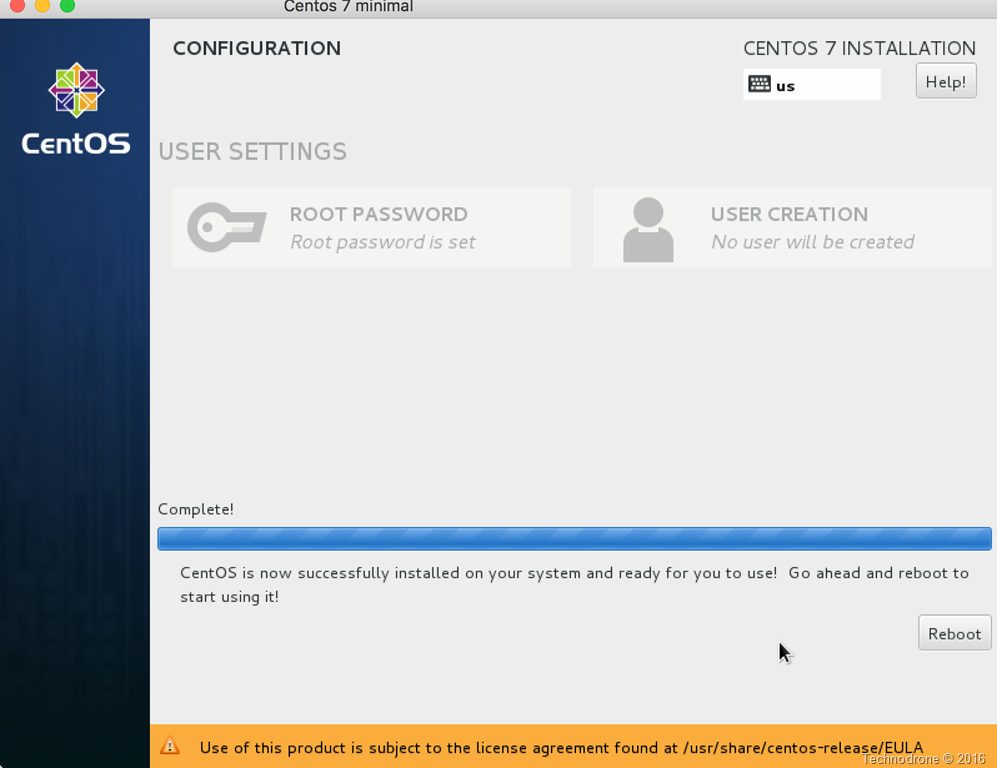
Installation Complete

And after the Centos 7 installation is complete.

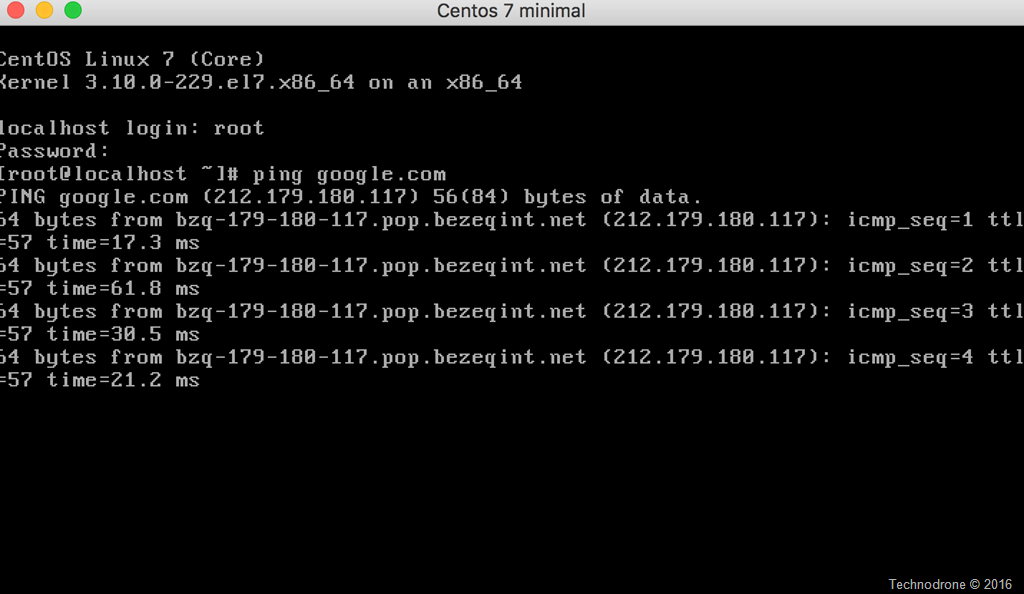
Veertu running VM

And here you have a VM running natively on my Mac.

Now the software is not perfect. And there are things that need to be improved, such as:

  • Each time you create a VM, it downloads the ISO again, which seems a waste of bandwidth to me (it will be changed in a future version)
  • The download was slow for me, and downloading an ISO could be faster from a local mirror – just that the only way to point to a different ISO is paying for the full product.

Of course – what was the first thing I tried to do? Build an ESXi VM

ESXi attempt

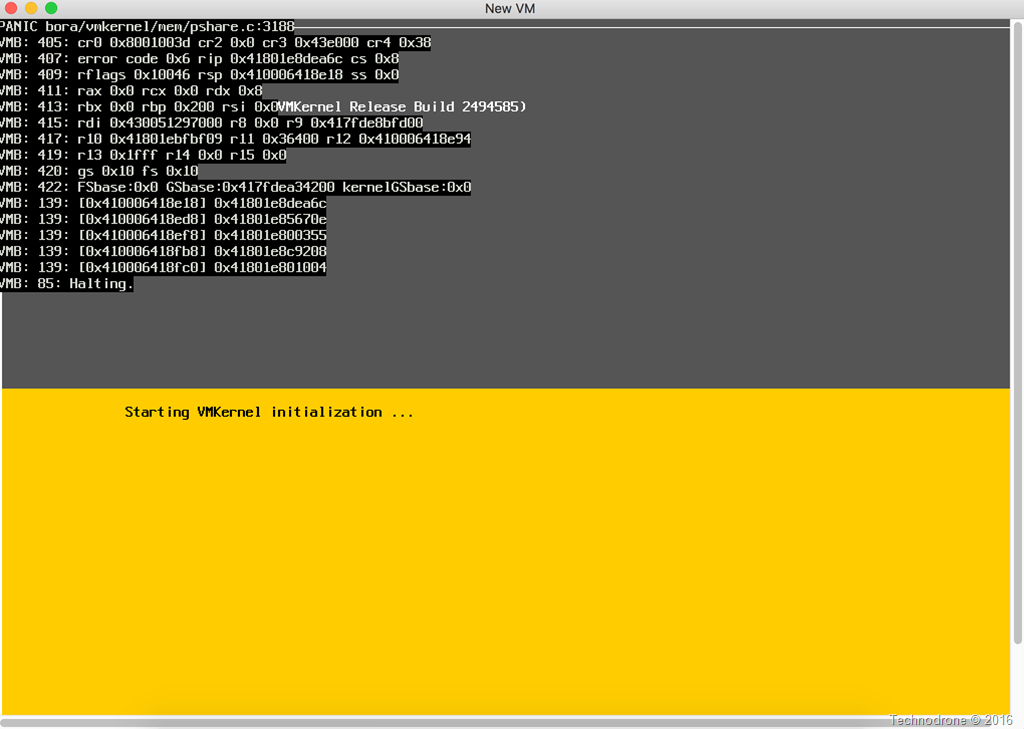
But that did not work because Apple have not enabled supported for nested VM’s (yet).

I liked the native interface. I liked the smooth integration, and would definitely keep an eye on this product. We all know that Ravello has an amazing solution which allows you to run your VM’s on any cloud, I think that this will be an interesting way to do things in the future.

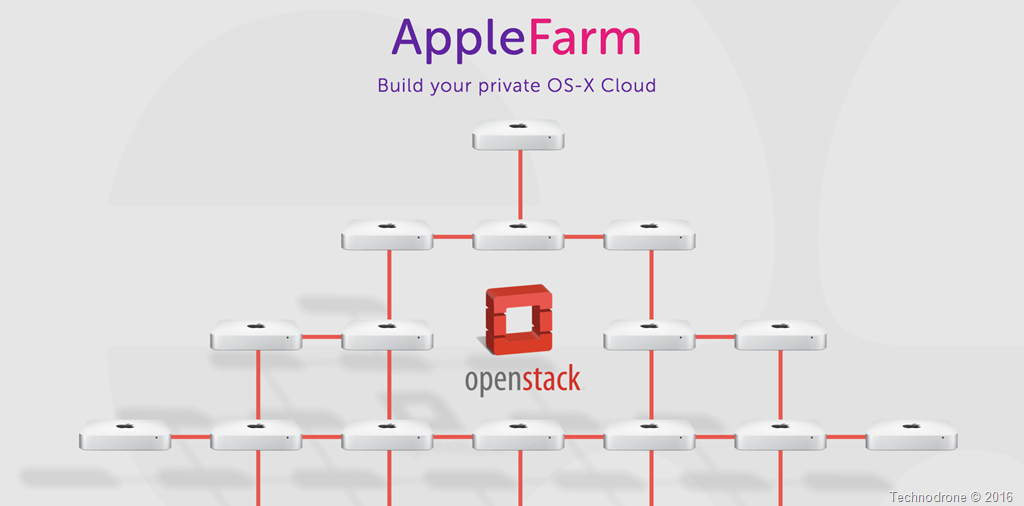
And if Applefarm is hint in to where they are going, then this will definitely be interesting

Applefarm

Disclaimer:

I was approached by Izik to look at the tool. I exchanged a few emails with him, with some questions and suggestions, and I also received a development build of Veertu to test – which is similar (but does not have full feature parity) to the full version which is worth $39.99.

I was not asked to write a review.

2015-04-06

The Chef’s Special and Trusted Solutions

It is funny where one gets the idea for a blog post from. I was sitting in a restaurant last month in San Jose, one of the only two kosher ones in the area, and I ordered the chef’s special.

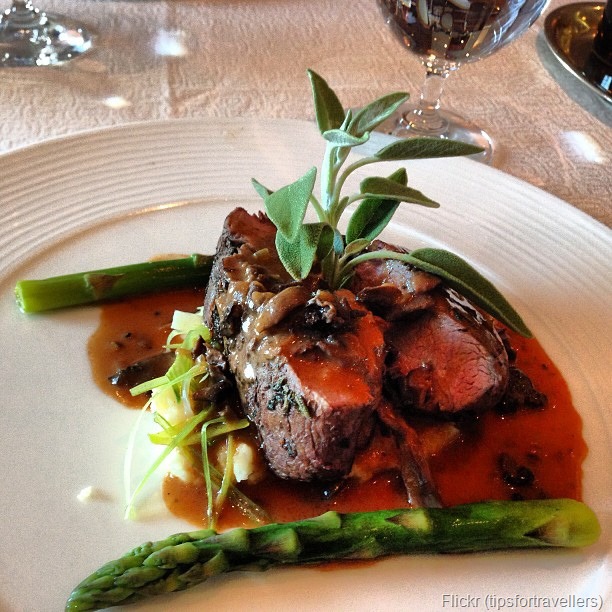
Chef's SpecialSo it was grilled salmon, mashed potatoes and grilled vegetables. It was tasty, the flavors blended very well. Which got me thinking.

What made the chef choose that combination? Why those three? Obviously he had tested different combinations. Pasta, rice, noodles, different kinds of vegetables, different spices. But he chose that combination. Tried and tested.

If I had the to choose what I would have wanted with that dish, it probably would have been rice, not potatoes.

So what does this have to do with trusted solution? But before that – a bit about what I think a trusted solution is.

A trusted solution can be something like a vBlock, a solution that has been validated, Hardware which is tested for a certain workload, guaranteed to provide the proper performance and to work.

It could be the VMware HCL, where Q&A has been done to test if things work and work properly. It could be a validated design from one of the vendors – a Cisco CVD, a Flexpod or another solution.

On the other hand I could also have asked for a mix and match on the menu, what I preferred, what I know that I like, I have tried before.

That I could compare to a home built solution, or perhaps a whitebox that is not on the HCL or a slightly different vendor. Will it work – probably – but it something that is probably unique to your liking.

There are advantages to both options, both can serve you well, both are tasty.

(The things that pop into your mind..)

What do you prefer? What do you think suits your business better? The Chef’s special or your own personal favorite mix and match? And why?

Please feel free to leave your comments and thoughts below.

2014-07-17

The Return of the Container

This is an excerpt of a post published elsewhere. A link to the original is at the bottom of this excerpt

Containers are not a new concept – there are several implementations that have been around for quite a number of years, be it Solaris Containers, Linux-V-Server, OpenVZ, or LXC.

So why has this become a hot topic, something that has many people turning their head and looking at it once more. Well that is quite simple. This is due to a huge amount of interest in Docker.

[Read full article … ]

2014-05-27

The Quickest Way to Get Started with Docker

op12171166215_4ec135c6b2_oContainers are not only those things are used for shipping stuff around – or storing the things you will never use or you don’t want to spoil – they are also used (and if you ask me – might even replace virtual machines in the not to distant future) as a platform to run applications / services / stacks.

Docker is one that is getting a large amount of focus lately

Docker is an open-source engine that automates the deployment of any application as a lightweight, portable, self-sufficient container that will run virtually anywhere.

Docker containers can encapsulate any payload, and will run consistently on and between virtually any server. The same container that a developer builds and tests on a laptop will run at scale, in production*, on VMs, bare-metal servers, OpenStack clusters, public instances, or combinations of the above.

Common use cases for Docker include:

  • Automating the packaging and deployment of applications
  • Creation of lightweight, private PAAS environments
  • Automated testing and continuous integration/deployment
  • Deploying and scaling web apps, databases and backend services

(Source – Docker)

A quick introduction presentation to docker is embedded below

I wanted to share with you a quick and easy way to start looking at docker and what you can do with it. And the most basic part of it is installing and configuring docker.

If you are just looking to play with it – you could install a VM with Ubuntu or and go through the motions of installation on your platform of choice.

But I would like to get you up and running as fast as can be.

Enter boot2docker

Boot2docker demo

boot2docker is a lightweight Linux distribution based on Tiny Core Linux made specifically to run Docker containers. It runs completely from RAM, weighs ~24MB and boots in ~5s.

And to make it even easier Mitchell Hashimoto (the author of Vagrant) has created a vagrant box so you start it up in even less time.

I can understand why this is going to take off – and why containers will have a good use case for a number of reasons and applications.

It is unbelievably fast!!

It takes less than a second – microseconds even, to start a container (i.e. a VM/OS/instance)

Just to emphasize how fast – let me show you a small example

I have a base ubuntu image and I ran a simple test:

  1. list running images
  2. ping the container (to show it is not up
  3. start the container
  4. ping the container again.

#!/bin/sh

docker ps
ping 172.17.0.2 -c 2
docker run -d phusion/baseimage
ping 172.17.0.2 -c 2
exit

At the same time I followed the docker log.

2014/05/27 14:02:27 GET /v1.10/containers/json
2014/05/27 14:02:38 POST /v1.10/containers/create
2014/05/27 14:02:38 POST /v1.10/containers/17029e...c45f1d1f92f899/start
[libcontainer] 2014/05/27 14:02:38 created sync pipe parent fd 14 child fd 13
[libcontainer] 2014/05/27 14:02:38 attach terminal to command
[libcontainer] 2014/05/27 14:02:38 starting command
[libcontainer] 2014/05/27 14:02:38 writting pid 1947 to file
[libcontainer] 2014/05/27 14:02:38 setting cgroups
[libcontainer] 2014/05/27 14:02:38 setting up network
[libcontainer] 2014/05/27 14:02:38 closing sync pipe with child

14:02:27 – I queried to see there were no containers running.
Ping timed out over the next 11 seconds
14:02:38 - Container was created and was available within 1 second

How do you like them apples?

Are you ready to try out docker?

And of course this is a simple demonstration – you can get much more creative than this!

2014-02-25

Let’s Do It Differently - Voting Time. Again….

Last year I asked you Please do not vote for Me! and I still stand by every single word I said in that post last year – nothing has changed.

I would like to re-iterate who I think you should be be voting for and why:

Try not to make this into a popularity contest.
Judge the bloggers on their content.
Judge the bloggers on their writing skills.
Judge the bloggers on their passion.
Judge the bloggers on who they are – not just because they work for company A, B or C.

This year I would even like to take this one step further (and perhaps I might be making a mistake here – but this is the what I feel is right).

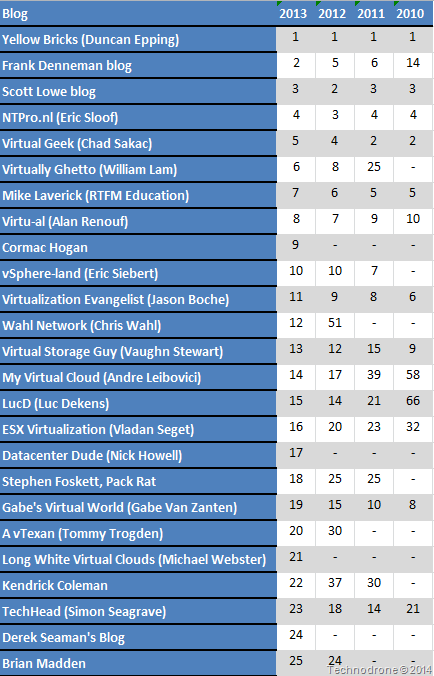
Let’s look for a moment at the current top 25 bloggers and where they have been ranked over the past 4 years.

Top Virtualization blogs over the years

11 of these bloggers have been ranked in the top 25 for past 4 years.
7 of the current top 25 are VCDX’s (which is an amazing accomplishment in its own right)

saluteTo all of those on this list - I salute you. I really do! You guys are doing an amazing job, creating content that is up to date, interesting, and informative, is an extremely difficult job. And of course I would say that the overwhelming majority of the people on the entire list of bloggers do not do this for a living – this is a side project, something they enjoy doing – a passion. All of the hard work and investment is well recognized.

Each of the bloggers in the top 25, are leaders in their field, they are speakers at events, guests on podcasts, authors, well recognized in the industry, and have worked extremely hard to achieve what they have accomplished.

It is time to freshen the ranks, accept new blood, and rejuvenate the community.

“How would like to do that?” - I might hear you ask – well actually quite simple.

I would like to see more new and upcoming bloggers enter the top 25. In 2013 there were 6 bloggers who came into the top 25 from either having no rank the year before, or a rank below 25. In 2012 there were mema lot less.

It looks like we are on the right track.

That is why I will not be voting for any of the top 25 bloggers from last year – but rather choosing bloggers who are
not so high in the rankings – for the sole purpose
of giving them more exposure. I will stick to my guns and vote for the bloggers, based on the principles I noted above.

It is better for them, and when it is better for them, it is better for the community as a whole, and better for us all. I do not think that the traffic and exposure of the current top 25 will take a substantial hit – because they are already well established, and well known. They will keep on doing what they have been doing for past 4 (or more years) regardless of their ranking, which will keep them at their current level of exposure (and hopefully continue to grow and advance) .

What do you think? Please feel free to leave your comments and thoughts down below.

(Disclaimer: I am one of those people who are below the top 25.
I would do exactly the same even if I was ranked in the top 25).

2013-11-06

OpenStack Israel Sessions - Cast your Vote!

I would like to ask your assistance in voting for one of the sessions I proposed for the upcoming OpenStack Israel conference next month.

You can cast your vote here - http://www.openstack-israel.org/#!call4paper/cf4g

opestackIL

The three sessions I submitted are:

Rapid deployment of Openstack with Cisco Openstack Installer 

In this session I will demonstrate the Cisco A Rapid Devops approach to the deployment of Openstack
Using an Open source tools, such as Puppet, Cobbler to rapidly get your Openstack deployment up and running in no time

Openstack for vSphere Admins

During this session we will go into how each of the parts of Openstack correlate to the infrastructure pieces in your vSphere environment, and how you can make use of your current vSphere environment with Openstack.
We will also deal with the limitations and caveats that need to be addressed with the current Grizzly version and its vSphere integration

Does it make sense to deploy vSphere under Openstack?

This session will go over the pros and cons of deploying Openstack on top of vSphere.
Some of the topics will include

  • Does it make sense?
  • Aren't they the same solution?
  • What considerations should you take into account if you go down this path?

Your vote would be highly appreciated!!

Thanks in advance!

2013-08-12

Virtualizing the Management Layer with Intigua

About two weeks ago I spent a very interesting hour with Shimon Hason (Co-Founder & CEO),
Phil Neray (VP of Marketing) and Tomer Levy (Co-founder).

Intigua? Where have you perhaps heard that name before?

Intigua won the Best of VMworld 2012 in the New Technology category.

So what is Intigua? The blurb from their website says…

image

Intigua was founded in 2010. Currently they have an R&D facility in Herzliya, Israel and their headquarters are located in Boston (and not in Palo Alto).

They secured $8.6 million funding in January 2013. They revealed their product at VMworld last year, and that is where I first met them.

(The following is my summary and understanding of the solution they provide)

What is this management stack that they speak about?

Let's take a look at the typical enterprise environment. Your virtual machines could possibly (and probably) have the following agents installed

  1. Anti-virus Agent
  2. IPS/IDS Agent
  3. Backup Agent
  4. Monitoring Agent
  5. Software Management (LanDesk/Altiris for example)
  6. VMware tools
  7. Configuration Management

There could be more, there probably are (here is a list of currently supported applications).
There also could be less, your mileage will vary according to your environment.

There is a great chance that each of the above agents come from a different vendor, and therefore that will require a separate management application to manage all your agents. And of course this will require a separate GUI that you will login for each and every application.

There is a very big chance that each and every of these are managed by different teams, different people, and there is a chance that none of the teams has insight or knowledge of what the other applications are doing.

Virtualization separated the operating system from the underlying hardware - through the use of a hypervisor.

VMware can encapsulate applications (ThinApp) and allow you to separate the application from the underlying OS and have it essentially run in a bubble. This of course is great for a VDI environment.

What caught my attention was something that was said during the session

"5 minutes to deploy a VM - 5 weeks to prepare for production."

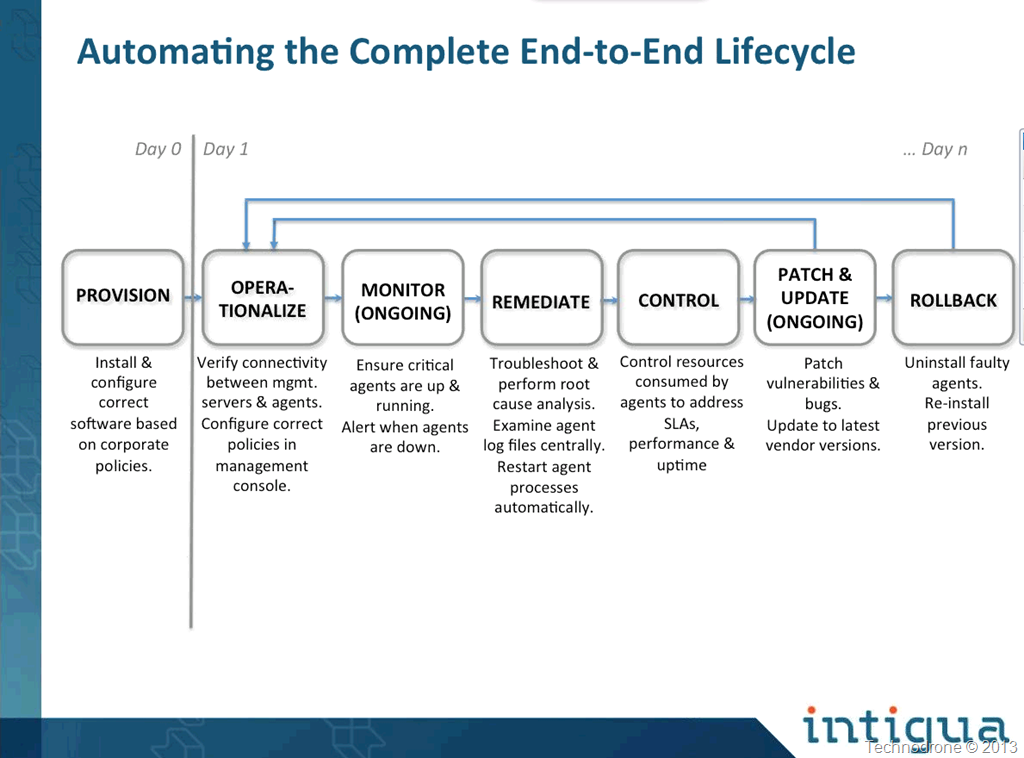
Here is one of the slides that explains it a bit more. 

Too long to go to production

All of the above are a highly resource-intensive, mainly human resources.

Looking at he slide above you can understand why the deployment of a VM is so simple, but getting it just to the correct configuration, and compliance can take time, a considerable amount of time.

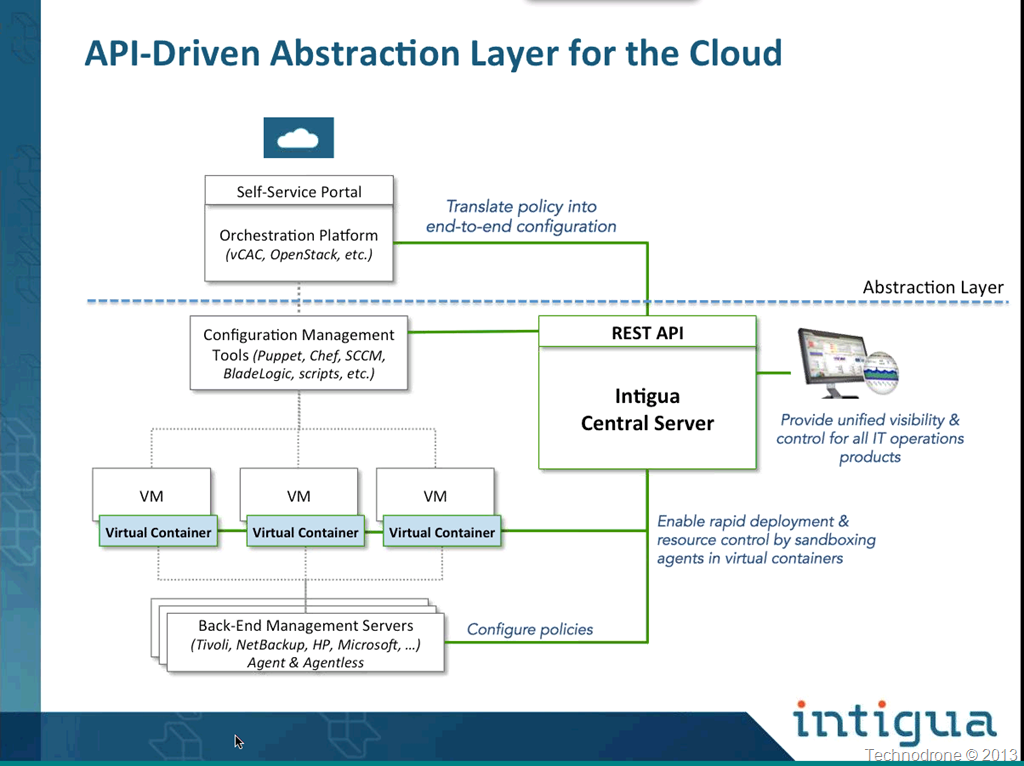
And here is what Intigua does.

Intigua Architecture

They have developed a virtual container that is installed in each VM.
On top of this virtual container all the above agents are installed and interact with the underlying OS.

So why another layer? If you actually think of this, it is actually very necessary.

Take the following example.

DeveloperA spins up a VM, by default VMware tools gets installed, Antivirus of course. The VM will not need monitoring, no backup, no IPS.

The VM then goes from Development to Staging.
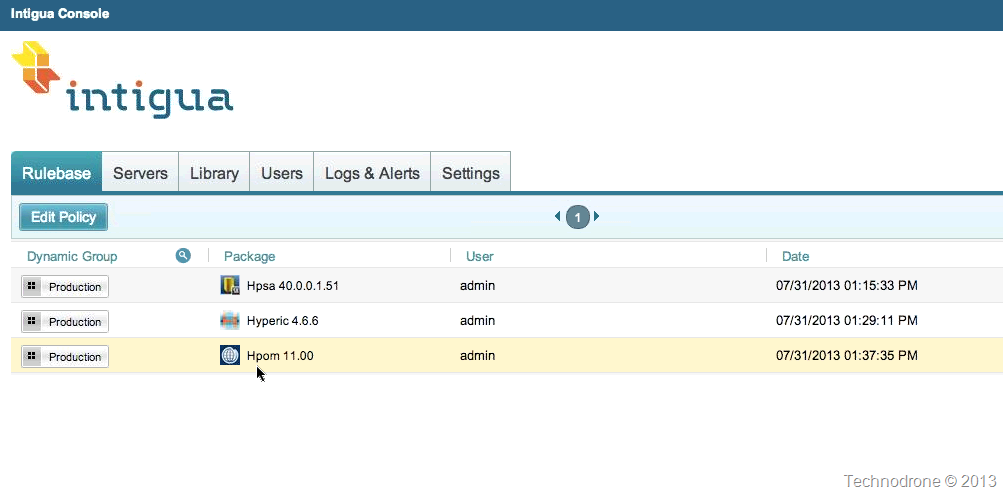
The machine now needs to backed up, but still does not need monitoring or IDS. Policies

Off go the emails to the relevant parties, "Please install this and that but make sure you don't install X or Y".

Why not have a Central point of management that will do this for you?

If you could take the VM, tag it with the Staging Tag, and all the correct agents would be installed. I'll take 3 of those please!

Let's look at another scenario..

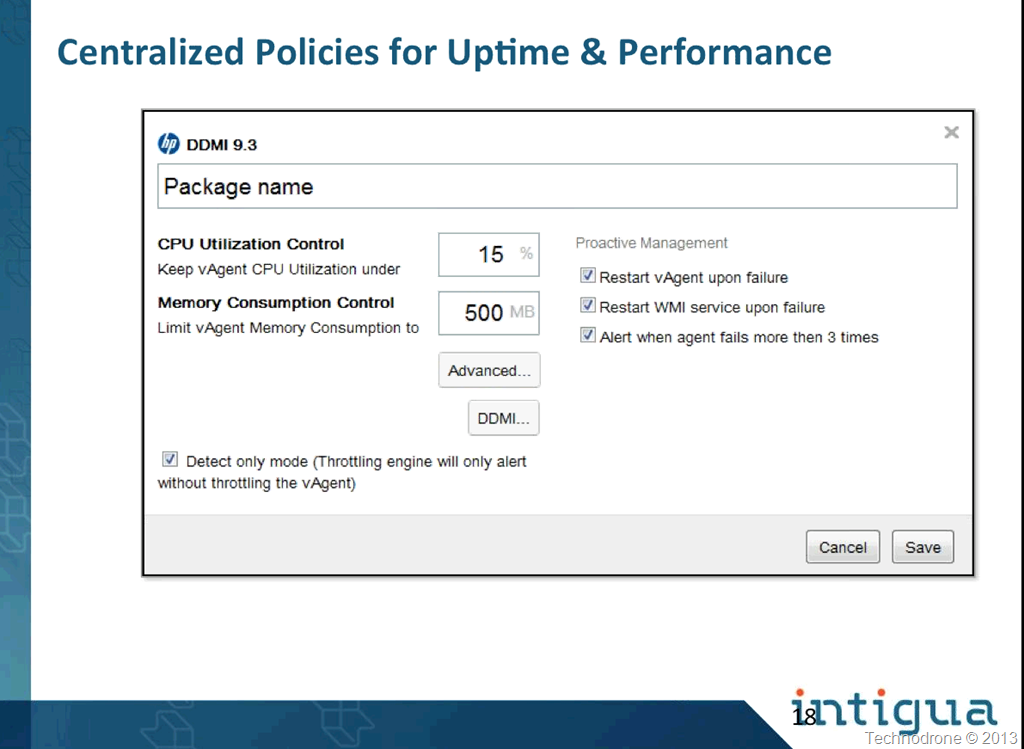
You have 4 agents on a VM, and during the backup window, the Backup agent consumes 100% of your CPU, causing a number of alerts to go out to your NOC, because your monitoring agent is not available. Up until now, there was not much you could do.

Intigua has the ability to throttle each and every agent under its control.

Throttling

So here I can set a limit that my agent will never consume all the available resources on the VM, affecting the applications, or other agents. Or waking me up at 03.00 in the morning!

How about agent upgrades? A vulnerability was exposed in one of the agents, and you need to upgrade all across the board. You could do that with the native tools, or just add a new package , with the new version, edit the policy and it will go out to all the current servers. And if the update cause problems? Rollback? Very simple!

The concept reminds me of VMware Mirage where the operating system is sliced into layers, allowing for maximum portability and flexibility through upgrades.

But it is not only a one way street, i.e. Intigua manages everything, but the backend management application does not have any knowledge of the underlying agent. As of late they have added two way functionality that will also update the backend application of all the changes done on the agents as well. It can also manage the policies and settings on these backend applications. If you would like to create a new Virus scan schedule on you SEP server, Intigua will be able to do this.

With their REST API, the Central server can interact with your orchestration platform and handle all of the installations for you, report back to the management application, a good two way conversation!

A typical flow could possibly be:

  • User deploys from self-service portal.
  • Chooses Machine type (Dev/Staging/Prod)
  • Passes information to Intigua REST API - which will in turn through the VMware API deploy all the correct applications and policies needed for this VM.

So can benefit from this solution? Intigua is aiming for the Enterprise market, the customers that have compliance requirements and have a number of challenges in this area. This kind of solution can reduce so much complexity in managing the lifecycle of your applications.

Of course Cloud option are also there - each endpoint can be managed regardless of it being in your Private Cloud or at a Public Cloud provider.

Intigua will be at VMworld in San Francisco and advise you to go by their booth, and have a look at their product. I am sure you will get a much more detailed (and definitely a better sales pitch) overview from them when you drop by.

Intigua 

Disclaimer: I have not received any compensation for this review. The information here was taken from a personal briefing I had with the 3 gentlemen above. I was asked if they could take me to dinner at VMworld, but I have not yet decided if I will accept that invitation. I wrote this because I find the technology interesting and see potential in this product. (and I am also a bit of a softy for Israeli startups.. )

2013-06-12

Announcements from Red Hat summit

Here is a short summary with links on today's announcements from the Red Hat summit in Boston.

Red Hat Launches Red Hat Enterprise Virtualization 3.2

Red Hat Enterprise Virtualization 3.2 brings a vast array of new features, including:
  • Fully supported Storage Live Migration, allowing virtual machine images to be moved fromimage one storage domain to another without disrupting service
  • Support for the latest industry-standard processors from Intel and AMD, including Intel Haswell series and AMD Opteron G5 processors
  • Enhancements in storage management, networking management, fencing and power management, Spice console enhancements, logging and monitoring, and more.

New Third-Party Plug-ins
Red Hat is already collaborating with several industry leaders to integrate their solutions with Red Hat Enterprise Virtualization via the new plug-in, including high availability and disaster recovery solutions from NetApp (with a VSC), Symantec (HA), and Insight Control from HP

Red Hat Shows OpenStack Ecosystem Strength; Launches Red Hat OpenStack Certification, Unveils Red Hat Certified Solution Marketplace

As part of today’s announcement, IBM joins Cisco and Intel as Alliance Partners in the Red Hat OpenStack Cloud Infrastructure Partner Network.
Red Hat OpenStack Certification Program
Red Hat Certified Solution Marketplace

Red Hat and Mirantis Partner Across Products and Services to Accelerate Adoption of Red Hat OpenStack

Mirantis, and Red Hat today announced that the two companies will collaborate to optimize Mirantis’ Fuel tools for deployment of Red Hat OpenStack, and deliver OpenStack implementation and integration services to joint customers.

Red Hat Announces OpenStack-powered Product Offerings to Deliver on Open Hybrid Cloud Vision

New solutions include extension to Red Hat Enterprise Linux product family and new offering to enable customers on their journey from datacenter virtualization to Infrastructure-as-a-Service. Red Hat today announced two new product offerings with one vision of delivering an Open Hybrid Cloud. The new offerings include Red Hat Enterprise Linux OpenStack Platform, a solution that serves as the foundation for advanced cloud users who are seeking to build an OpenStack-powered cloud, and Red Hat Cloud Infrastructure, a comprehensive offering designed to support organizations on their journey from traditional datacenter virtualization to OpenStack-powered clouds.

2013-03-13

Ravello Systems - and A Bit of Deja Vu

A while back Duncan Epping wrote a wonderful post VMotion, the story and confessions about how people remembered the when they witnessed vMotion for the first time and asked people to add their experiences. I of course remember mine vividly - and also remember that when I first saw vMotion I knew that this would change the way we used computers in the future.

A few weeks ago - I got that feeling again - but this time not with vMotion but rather with a product that IRavello Systems saw for the first time from Ravello Systems.

Some background about the company and its founders

"Ravello was founded in 2011 with the sole purpose of changing the way companies, large and small consume the public cloud. Ravello is brought to you by the team that introduced the KVM hypervisor (now the standard virtualization technology in Linux)

Rami Tamir (Co-Founder, CEO) – was VP of engineering at Red Hat. He joined Red Hat through the acquisition of Qumranet where he was the co-founder and president.

Benny Schnaider (Co-Founder, President and Chairman of the Board) was VP of business development for Red Hat. He joined Red Hat through the acquisition of Qumranet where he was co-founder and CEO.

Navin R. Thadani (SVP, Products) – ran the virtualization (KVM/ RHEV) business line for Red Hat. He joined Red Hat through the acquisition of Qumranet in 2008 which he led as the VP of products.

Ravello Systems is the first company to tackle the problem head-on from an infrastructure perspective. It’s very much like what VMware did back in the early 2000s to the enterprise data center.”

“The leadership team behind Ravello has a track record of developing innovative technologies in the virtualization infrastructure space and backing it up with solid execution,” said Adam Fisher, partner, Bessemer Venture Partners. “Their previous virtualization initiative, KVM has been a tremendous success in the market with record breaking virtualization performance and scalability. This time around, HVX is another ground-breaking technology and if any team can deliver, it’s these guys.”

Enough marketing babble…

I will try and explain to the best of my knowledge how I understand their technology. Ravello have developed what they name a Cloud Application Hypervisor. This hypervisor can be deployed on any cloud provider (at the moment - AWS, HP Cloud and Rackspace are the supported providers, but vCloud environments are expected to be added soon). They name their hypervisor HVX.

So how does it work (at a 10,000 ft. view). You, the user, upload a workload to the Ravello environment, and decide from there where you want to deploy it, it could be on Amazon, Rackspace or another provider. You might ask why is this such a special thing - I mean there are other companies out there that are providing a similar service - for example Cloudify - which allows you to upload an application to virtually (pun intentional)any cloud. Well the difference here is it is not an application you are moving around here - it is a complete VM. You then deploy this VM to a Cloud provider, regardless of what platform they are using underneath.

Think about it for a second. I have a VM running a complex application, in my datacenter, on my VMware environment. Installed with my standard builds, all the correct patches configurations everything I am used to doing in house. I now want to move that workload from my environment to the Cloud. VMware have vCloud Connector which will allow me to move a VM from my vCloud environment to a supported vCloud environment with very little (if any) change needed to perform this migration. That is actually quite amazing if you ask me - but the limitation is - it needs to stay within the VMware platform.

Now you need to do the same - but this time to an Openstack or AWS cloud? How would you go about getting that done? Not as simple… The VMware drivers are not exactly the same and those running on XEN(AWS) or KVM (Rackspace) so how?

Ravello have the technology that allows you to do this.

HVXSo how does it work? When you deploy a VM to a cloud, any cloud, Ravello will deploy a VM that contains an additional layer, a nested hypervisor, that will allow you to run a virtual machine on top of that VM. We have been doing nested virtualization for a while already - vSphere does that very very well. The whole concept of vInception, the VMworld HOL have been using it for years. But here is where the "secret sauce" comes in.

You can deploy a VMware VM on AWS or Openstack and I suppose the plan is to do it on anything. And of of course - vice-versa. HVX will allow you to do that. Please feel free to read about how it works.

I had one briefing with Gal Moav and Navin R. Thadani a few weeks ago where I got a demo of the product.

They have very nice interface where you can upload the virtual images to the Ravello system, and from there deploy them onto the cloud of your choice. Then you can create an application blueprint with a simple interface allowing the connections in between and out of the VM's.

Does it work? Oh YES! very well.

I did some testing with a basic VMware Linux VM - and uploaded it to Amazon. VM powered on - and I felt the urge to confirm - yes it was the same one. VMware tools installed and active in the VM. So there was no streaming of the data portions of the VM - the whole VM was uploaded - as is, encapsulated in their HVX and working. Paravirtualized SCSI drivers and VMXNET3 NIC (if my memory serves me correctly).

One of the interesting use cases that I was presented with - was the economical aspect. Ravello have the ability to identify the VM's needs, and deploy on the most cost effective destination - be it Amazon, Openstack or others in the future. I find that to be a huge advantage for the enterprise. If you are no longer dependent on the cloud infrastructure, you can pick and choose according to a number of considerations, be it cost, location, technology etc… There are several other use cases that they present on their site. Think about how you might use this as well to maximize the use of the Cloud instances you have already. Running multiple VM's the same AWS instance - can save a lot of money.

I plan to get some more information about how exactly the product works and if possible - will be able to post a follow up.

So why Déjà vu? In March 2011 I wrote this post The Datacenter - in a Few Years From Now - where I described the hypervisor for hypervisors.

Hypervisor for hypervisors

Ravello is the first (and only) company that I know of that can do this.

The directions in which this could be taken are more or less endless. And that is what makes me excited about this technology.

Let me give you three examples.

  1. Developers create VM's in their local environment, this could even be on a local laptop, vagrant or what ever they want. Once the application / environment is ready to be moved up the chain to QA / Test / Production - the VM can be imported to the cloud of your choice - whilst maximizing your savings. Minimum or next to no changes needed
  2. Take the other direction - you have an application in the cloud - which is suffering a problem in order to debug - you can either do it in the cloud - but not always is that feasible - so you want to bring it in house - with this kind of technology this will be possible.
  3. Risk management. I do not want to have everything on vCloud or AWS or Openstack - I would like to have my application run in multiple clouds. Up until now that was very difficult to do - I could not deploy the same application the same way to different cloud providers. With this kind of technology this will be possible.

Not all of the features / ideas I have mentioned above are available today - but they will be - and I do not see it being too far away.

The product is not perfect, and has some improvements that can be made over the next few months or years. Performance will improve, support for more Cloud Platforms will be added including in-house cloud environments as well.

There are other companies that have solutions which manage multiple clouds like Rightscale or Enstratius but I think they all do it with software solutions similar to the concept I described here - Orchestration Will Rule Them All #BRC2K11

One last thing. I tried to push the system to a bit of an extreme - and tried to upload a vESXi VM to AWS - but the system did not like it that much …. Perhaps one day we will be able to run ESXi on an AWS instance.

Ravello have a YouTube channel where you can go through their tutorials.

I am excited about the product, and see a real business need for such a technology.

I will keep my eye out on Ravello.

Disclaimer: I received access to Ravello Systems public beta - but it is open to anyone. I was given a briefing on the technology from two of the staff members. I blogging about this because I feel that the technology will make a difference to the way we will consume resources in the cloud, a disturbance in the force if you would like - but one for the better.

2013-03-11

And the Winner is…. You!

So you are all the winners, for participating, for voicing your opinions and making your vote count!

Today Eric Siebert posted the results for the top 2013 VMware and Virtualization Blogs.

I asked you Not to vote for me but it seems that did not work.

The full results and podcast can be found here.

In short.

  • I was ranked at No. 41 in the total count
  • 7th in the Scripting blog category
  • 8th in the Independent blogger category.

I would like to thank you again all for you support!

Some of my own analysis on the results.

  • There is only one independent in the top 10 - Eric Sloof
  • Only eight of the top 25 do not work for a vendor. (EMC, VMware, HP, Dell, VCE, NetApp)
  • 7 out of the top 10 bloggers work for VMware, 1 for EMC and one for HP.
  • There are 4 new bloggers in the top 25.
  • There is 1 new blogger in the top 10.
  • The biggest drop in the list was from 18 to 229 (211 spots)
  • The biggest climb in the list was from 149 to 38 (111 spots)
  • The vBrownbag crew is doing an amazing job - and people appreciate it.
  • The favorite storage blogger - does not even work for a storage vendor, he works for VMware.
  • The top scripting blogger's preferred scripting language is not PowerCLI - it is Perl.

Congratulations to all the other bloggers on their achievements this year. It is a great list.

Thank you Eric Siebert for a job well done!!

You can follow all the bloggers on Twitter in the following updated lists:

Top 25 VMware/Virtualization Bloggers

Top 50 VMware/Virtualization Bloggers

Top Independent Bloggers

Favorite Scripting Bloggers

Favorite Storage Bloggers

2012-03-14

Don’t Let your Datacenter Turn into a Datayard

Last night I tweeted a poll asking this question – (please feel free to add your vote)

The choices that people left are more or less what I was expecting but I still think that this warrants a post explaining my thoughts – and also to get yours.

Virtualization is a godsend!! We are finally able to decouple the operating system from specific hardware. For as long as I can remember this was emphasized (by myself – I admit as well) as one of the many benefits for using virtual machines. You no longer have to rely on specific hardware.

So there are a large number of benefits – but what people sometimes overlook is that this decoupling also has a downside to it – and that is related to the poll above.

But before that, another side to this post. What about the migration of old physical machines to VM’s? Consolidation? Does that sound familiar? Well it probably will. I cannot count the number of times I have seen on Twitter people tweeting about converting physical servers into VM’s – I myself have done this quite a number of times.

So what are the reasons that we would convert physical servers to VM’s. Well if you are reading this blog – then you probably don’t need me to answer that question. But I would like to dwell on one specific reason.

Old (ancient/dying/no support/no spare parts) hardware.

You have an application running on a old server – which is being used by some part of the company – and it is critical to their day-to-day operations (isn’t everything????) But the hardware is old, perhaps failing, not reliable anymore. And moving this application to new hardware will require a re-install of the software. But alas the company that sold you the software 10 years ago, has since then evaporated.. I am sure this sounds familiar.

So why is this problematic? You, the VIAdmin saved the day – and averted a large risk – and now have this ancient application running on a VM (until eternity) – the department that owns the application – can breathe easier.

But is this a good thing? Look at the results again

Poll results

I know that not a lot of people voted – But I am pretty sure that the results would stay more or less the same no matter the size of the poll. And the bottom line comes down the following.

Because of the benefits of virtualization – application owners have less of an incentive to update their applications. And I would like to elaborate a little more on this point.

Before the days of virtualization – when you needed to deploy an application – you would purchase a server with its 3 years warranty and service level (and perhaps even extend that service contract for another two years), install an OS and deploy the application. All parties involved were on board with fact that the server, application and usually also the operating system would need to be re-deployed on new hardware, and perhaps on a new operating system in 5 years time.

In comes the wonders of virtualization. You deploy a VM (no need to install the OS of course) and install the application on top of that. Now you start going into that grey area…

How long will that application / Operating system stay active? 3 years? 5 years? 10? 15 years????

Ladies and gentlemen for those of you who are not aware, Windows NT 4 was released on 29 July 1996, and Windows 2000 on 17 February 2000. End of life for support on both operating systems has long gone by – many many years ago!!! And do you know what Windows 2003 is not that far off? Security Patches are no longer being released. You can only dream of getting support from Microsoft. I am sure that the same goes for the older flavors of Linux as well.

There will always be cases that a dying application needs to be moved to a VM and saved, but in the same breath that you take to revive this server – your next immediate action should be how do you retire this server? The sooner the better.

We are all guilty of hosting old applications and operating systems, I know for sure I am as well. There are benefits to virtualization – but there are drawbacks as well. These can be averted with proper planning – defined standards and a strong will. Without those your virtual infrastructure might one day look like this:

datayard

I would like to thank @tscalzott @TimStephenson @egrigson @tednorris for joining in on the conversation.

If you would like to share your opinions, ideas or your view on this post, on how you prevent your datacenter from turning into a datayard – please feel free to do so in the comments below.

2012-02-08

My Wish for dvFabric – a dvSwitch for Storage

This one has been sitting with me for a while. It would be nice to hear your comments on this.

The dvSwitch (Distributed Virtual Switch) – oh how it has changed our lives…

Do you all remember the days when you had to manually add the all the portgroups and network settings to a new host? We use scripts, we use mega-kickstart deployment scripts, gui applications.  Let us not forget that it is still the case for all those who do not have and Enterprise Plus vSphere license. You do have to pay some extra for the “premium features”, and if you ask me – it not really a premium feature but more of a necessity.

But since I have gotten used to a dvSwitch – those things are all in the past. Network configuration of a host – is really as simple as adding click click click (yes…. I know…. you could also automate it as well….), and I do not have to worry about configuration issues any more. This vmnic is used for vMotion, this one for FT, this for NFS/iSCSI – it is all so simple.

I think it is time that we asked for the next stage. It is time for a revolution!!

Maybe we should call it dvFabric?

Let me explain what I would like to see.

Today when you set up a host you have to setup your NFS/iSCSI/SAN connection more or less manually. Before you say – hey what about Host Profiles – yes you could do that with host profiles – but the way that I see this is – Host Pofiles comes as a band-aid to this issue – not solution to the problem. By applying a profile to a host – you are are running a process that runs a set of actions to set a configuration. You could so the same with a set of scripts (PowerCLI or Perl) but this is packaged very well in vCenter and easy to use.

So how do I envision this dvFabric? Essentially the same as a dvSwitch. A logical entity to which I attach my network cards (for iSCSI/NFS) or my HBA’s (for FcoE or FC). I define which uplink goes to which storage, what the multi-pathing policy is for this uplink, how many ports should be used, what is the failover policy for which NIC, which NFS volumes to mount, which LUNS to add – I gather you see what I am getting at. Here is a diagram trying to visualize this.

dvfabric

Once the dvFabric has been configured correctly – all you would need to do is add in a Host and all the storage will be configured automagically.

Today there are a number of additional benefits available with using a dvSwitch – just to name a few – port mirroring, Netflow, PVLANs, NIOC.

I am sure that there are additional benefits that VMware could come up with – have a distributed virtual Fabric switch. One that just came to me is to perform the zoning in the dvFabric itself – and not to each and every host. This way the storage administrator would only have to zone one entity and the rest will be up to the VI Admin. The same regarding NFS exports.

Will this ever come about? Who knows? It does seem to be to be the another natural stage in the abstraction of the layers which has been the trend of the last few years.

I guess one of the questions we should ask ourselves – and the storage vendors, Are we (and they) ready for it? Is this something that could / should / would happen in the future.

What are the risks? What are the benefits?

Perhaps some brilliant minds in some strange place in Palo Alto are, already thinking about this….?

I would appreciate your comments and thoughts.

2012-01-24

‘Tis the Season to be Voting …..

It seems like only yesterday when the last survey was conducted, and I was actually not going to write this post – because I hate “me too” posts.

So let us try and do this slightly differently.

On my No. 32 - Thank you all so much! post I stated some observations – which I hope you will consider this year, when you choose which blogs you wish to rank in the top 10.

Try not to make this into a popularity contest.
Judge the bloggers on their content.
Judge the bloggers on their writing skills.
Judge the bloggers on their passion.
Judge the bloggers on who they are – not just because they work in company A, B or C.

It is great that there are some changes in this year’s survey:

Bloggers for certain categories:
Storage blog
Cloud Computing blog
End User Computing (VDI) blog
News & Information website
Favorite Scripting blog
Favorite Podcast
Official VMware blog
Best Videos used in a blog
Favorite New Blog (less than a year old)
Favorite Independent blogger

If you find that my blog or my writing deserves your vote or it fits any of the above mentioned categories,
I would be most thankful.

Good luck to all the bloggers!!

Vote Now

As always – once the results are published you can follow the Top 25 Bloggers on Twitter.

2011-08-14

Orchestration Will Rule Them All #BRC2K11

On Wednesday night I participated on session 2 of the Blogger Reality Contest. From the rankings that were published on Wednesday - I am actually not doing so well (so your continued and strengthened support would be appreciated) - but hey this is not about the competition - it is all about the participation. It is great to interact with a whole new set of people, and I am sure that the relationships built during these three weeks will last. But let's get back to the technology part of it.

Wednesday's topic was Converged Systems. I will not bother you all again with the converged part, we covered that all last week, and the three topics covered were:

  • HP VirtualSystem
  • HP CloudSystem
  • HP AppSystems

The one I would like to cover here in more detail is HP CloudSystem. A while back I wrote a post about The Datacenter - in a Few Years From Now where I presented this graphic below.  Hypervisor for Hypervisors  The relevant part I think is the one here below

And what does this have to with cloud though? The way I see cloud vision is having your pool of resources from which you can provision your applications and vApps to your end users. At the moment this is limited to a cloud for each Hypervisor. I cannot have a VMware vCloud that has Hypervisors that are not ESX. I cannot have a Microsoft Cloud with Hypervisors that are not Hyper-V and so on.. Yes, there are some products that will allow you to manage the multiple clouds under one "umbrella" and place the VM in your Hyper-V cluster or ESX Cluster or RHV Cluster according to different criteria. But today they still need to be separate clusters. Utilizing such an idea will make my infrastructure completely vendor agnostic - and I (the customer) could pick and choose whichever hypervisor suits me.

VMware has their cloud product - vCloud Director. Microsoft has their Private Cloud, Redhat has their CloudForms, Citrix has their Project Olympus. The purpose of this post is, not to get into who has the best cloud offering, nor who has the more mature product. The reality of today is that most infrastructures are running mainly on one platform, and one platform only. Will that change in the future? I think so - in my post Why Should you Care about Veeam Support for Hyper-V, I started to talk about the market share that other hypervisors are gaining and will continue to do so in the future.

I spent a hour on a conference call last week with a colleague who had built their own private cloud solution. I was interested in hearing the details behind the platform and how it was built, and I was quite surprised to actually hear that the whole infrastructure was built on VMware - but they had decided on a 3rd party solution for the orchestration of the the cloud and not to use vCloud Director. The reason being mainly because of the lack of integration the system actually has into current business process. The amount of time it actually takes to integrate into their current CMDB, and a number of other reasons as well. Looking back on the conversation I actually am starting to see that the above graphic that I made should actually be changed. A layer that translates the operations from kind of hypervisor to the other will not actually be the correct solution or the right way to go.

The way to actually go would be to create a system that would allow you to manage Hypervisors/Clouds from multiple vendors, all under one management portal. This way you as the Admin 1would still not care if the machine is running on a VMware / Hyper-V / Xen / Redhat cluster - for you the machine will be managed the same way regardless. The Orchestration software will be that to deploy the virtual machine according to your pre-defined criteria of cost / SLA etc. and present a unified interface to the end-user so they will be able to access their machine - again completely ambivalent to the what the underlying  hypervisor is.

HP CloudSystem HP CloudSystemcould be such a platform. Providing a layer of automation that is external to the the actual hypervisor - could actually be the answer. Treating Server / Storage / Network / Application Pools as exactly that - just pools - and to the end-business user who does not care what platform they run on - but rather that they work, this abstraction should work just fine.

You could even take this one level further by adding an external public cloud to your pool of services. Something like Cloudbursting.

Cloudbursting is an application hosting model which combines existing corporate infrastructure with new, cloud-based infrastructure to create a powerful, highly scalable application hosting environment.

To explain this in my terms, you use the public cloud as an extension of your compute resources to extend and scale as needed for your application.

The HP CloudSystem core is built on the HP BladeSystem architecture and includes the Matrix Operating Environment that enables rapid provisioning of complex infrastructure services and adjustment of those services to meet changing business demands. It also includes HP Cloud Service Automation software to manage the entire cloud lifecycle. Cloud Service Automation provisions applications, manages and monitors the cloud, and provides a single service view across the cloud and traditional IT.

HP CloudSystem’s core capabilities can be extended with

• Cloud Maps: tools and best practices that enable CloudSystem to quickly and easily provision various kinds of common application environments from major vendors such as VMware, Oracle, SAP, and Microsoft. Cloud Maps can substantially reduce the time and effort needed to deploy CloudSystem services.

  • HP storage
  • HP networking
  • HP Software

To sum up this post - The future of the cloud (and your datacenter) will be in the automation layer and will look something like this. It will all lie in the orchestration layer.

Orchestration Layer

As this is a contest your vote does count. Please add you vote in box below. Thanks. Your comments of course are always welcome.

(Small Print) HP is not the only one to offer such software or orchestration platforms. There are several other vendors and other 3rd party companies that provide the same or similar technologies. HP is one of the sponsors of this event, which mean they are partially footing the bill for my trip to VMworld this month. I am highly grateful for the opportunity and honor but I am under no obligation to write anything positive (or negative for that matter) about any of the presented solutions. The opinions and thoughts above are my own so take them as they are.

2011-06-21

What if you Start Over and Build it Again??

There are several environments (at least in the beginning) that their initial infrastructure was not designed with virtualization in mind. When they started out - virtualization was something that you were asked to fit into the existing infrastructure - adapt your current processes and procedures, to this new emerging technology.

So most things worked, some didn't and we all learned during this time what the pitfalls were, how things have to change. But the essence here is - the infrastructure was not designed from the ground-up, with virtualization in mind. Some added a new storage array - to deal with the IO demand. Some upgraded to the 10Gb Networks to deal with the network load. Some added 3rd party tools to deal with backup / reporting / security or compliance.

Some datacenters are built from patches on top of patches on top of patches.
And eventually this will bite you in the butt, BIG TIME!!

This is why it essential to regroup - look at things from a different perspective and look with a different set of mind.- this provides the possibility to provide a better solution in the long term.

I gathered several members of our IT department and started a "think-tank". This group includes people from our storage, network, helpdesk and infrastructure group. The main purpose being, to invoke thought and discussion:

If we were to start fresh - how would we envision the infrastructure? If we could wish and get whatever we want - what would our environment look like?

I would like to share with you our journey (we are at the beginning) - because I think it would be beneficial for anyone to take a step back - and to look at the environment from a different view.

Several prerequisites for these discussions for the first stage were established:

  1. We start with a completely clean slate. No vendor lock-in, for anything.
  2. $$$$ - are irrelevant - it can be as cheap / expensive as we want.
  3. Once we have what the vision we would like to go with - then we adapt and fit it into our corporate policy's, politics, and budget.

This does not mean we will be able to implement all of our wishes, this of course has to be aligned with the business, its needs and its resources.

We started to to identify what components are parts of the infrastructure and below is the initial list we identified (I am sure this will grow during the discussions).

Components

Let's go through each area and the questions we would like to address in each area.

Network

  • What do we use for the the core Infrastructure? Vendor? Technology?
  • What kind of bandwidth are we going to be designing for?
  • How do we incorporate BCP/DR into the network design? (Replication, VLAN design, etc.)
  • Planning for IO convergence. Technologies - options - how to manage all this IO?

Storage

  • What kind of disks will we be using? How do we incorporate Tiers into the storage?
  • SAN/NAS? FC/FCOE/iSCSI/NFS?
  • How do we incorporate BCP/DR into the Storage design? (Replication, LUNS, etc.)
  • Backup/Restore. Which tools? What method?

Compute

  • Which servers will we using? Rack mounts / Blades?
  • Which Vendor/s ?
  • Which Hypervisor fulfills our requirements?
  • Is there place for more than one Hypervisor?
  • Hypervisor provisioning?

Management

  • How is a VM installed? What are the criteria for new VM's? Importing? Staging?
  • Reporting and Capacity - providing the proper insight to all levels in the company.
  • How to maximize security for all layers?
  • SLA - definition of what is supported, and how?

Interface

  • How to present the infrastructure to the the end user without exposing too much? Provisioning, Chargeback/  Showback?

Facilities

  • Cooling / Racks / Management / Alerting / Power
  • Providing redundancy on-site and off-site
  • 3rd party facilities - including cloud (and its implications)

As I noted above - this is a partial list - and I am sure it will grow.

I actually look forward to working with my team on these discussions - it will be a good learning experience for us all and will help focus on what areas we should be focusing on in the near future.

If you have any comments on the components or on the process - please feel free to add them below.

2011-06-15

Where Does it All Come From?

Today I received an email with something that I found very moving - and I was also able to project onto the subject of virtualization. Here is the original text (slightly altered).

The Scope of Gratitude

Someone I know described a self-improvement group in which he participated. In order to improve their sense of gratitude, everyone in the group was to select one thing that they do frequently - and then think for 10 minutes about its ramifications.

My friend drank one cup of coffee every morning, and he chose this cup of coffee as his subject. He felt it would be easier to work on the assignment if he wrote his thoughts on paper. To his surprise, the 10 minutes quickly turned into 35. He wrote about how the coffee beans grew in Brazil. Someone planted the trees and took care of them until the coffee reached maturity. Then workers picked the beans from the trees. The beans were roasted and ground, and packed for shipping. He described all the work involved in the shipping industry which allowed the coffee to reach the United States. This alone required hundreds of people. Finally, the coffee arrived at the port in Haifa from where it was taken to his grocery story in Jerusalem.

He wrote about the gas range that boiled the water, and the match he used. (And how much easier it is to use a match rather than have to rub two sticks together!) He wrote about how the gas reached his home and what was necessary to build his stove. He wrote about the water kettle that whistled to let him know that the water had boiled. The milk he added required the work of many people from the time it left the cow until it reached his coffee cup.

At the end of 35 minutes, he saw he had not even begun to write about the actual cup, saucer, or teaspoon nor the table he placed it on, or the chair he sat on!!

Through this exercise, he became aware of so many things he'd been taking for granted.

Would you like to have a similar experience? Try it today: Pick something that you enjoy doing, and write as much as you can about what there is to appreciate.

So how is this connected to virtualization?

Someone requests a virtual machine, and with todays technology - this can be deployed within a matter hours if not minutes. But do people actually think about what actually goes into this magical ability of being able to receive the reply to their request?

  • The ability to actually request something without even to have to speak with someone - perhaps on the other side of the globe.
  • That the process can be almost instantaneous - some years ago in order to communicate you needed to send a letter by sea which took months.
  • We can with the click of a button deploy a server, install all the software and configure the application and settings. This used to be a tedious task not less than 4 years ago.
  • The underlying platform provides the storage, the network, the resilience without you even to have to worry about "all that jazz".
  • The vendors who have provided the software and the technology - that allows us to provide this service.
  • Someone spent a large number of hours designing the environment on which this all magically works
  • Many people actually spend countless hours maintaining this environment - to keep it functional and working properly.

I could go on and on for a lot longer than 35 minutes.

We have a whole lot of things to be thankful for. Every now and again it is good to look back and reflect on what things used to be like, how they are now and how far we have come.

That makes you appreciate it all even more.

Man I love virtualization!!