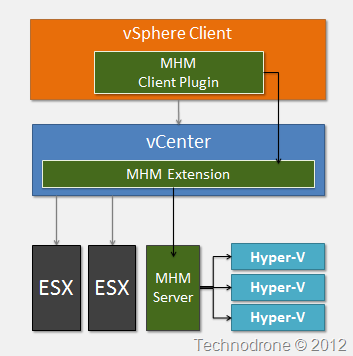
What is VMware vCenter Multi-Hypervisor Manager 1.1
VMware vCenter Multi-Hypervisor Manager is a component that enables support for heterogeneous hypervisors in VMware vCenter Server. It provides the following benefits to your virtual environment:
An integrated platform for managing VMware and third-party hypervisors from a single interface.
A hypervisor choice for the different business units in your organization to accommodate their specific needs.
No single hypervisor vendor lock-in.
When you add a third-party host to vCenter Server, all virtual machines that exist on the host are discovered automatically, and are added to the third-party hosts inventory.
The previous Beta (version 1.0) was released in November 2012.
So what's new in this release?
The VMware vCenter Multi-Hypervisor Manager 1.1 is a minor release which introduces the following new capabilities:
Migration of virtual machines from Hyper-V to ESX or ESXi hosts.
Support for the latest Microsoft Hyper-V hypervisor (as well as earlier Hyper-V versions).
Increased scalability with regards to an increased number of supported third-party hosts to 50 (from 20 in vCenter Multi-Hypervisor Manager 1.0).
Ability to provide custom certificates for the vCenter Multi-Hypervisor Manager server from the installer wizard.
Multiple objects selection in the UI of the vCenter Multi-Hypervisor Manager plug-in and a number of other usability improvements.
vCenter Multi-Hypervisor Manager server and client-side bug fixes.
So if you have not heard by now Veeam have released the 6.1 version of Veeam Backup & Replication.
Here are some of the new features
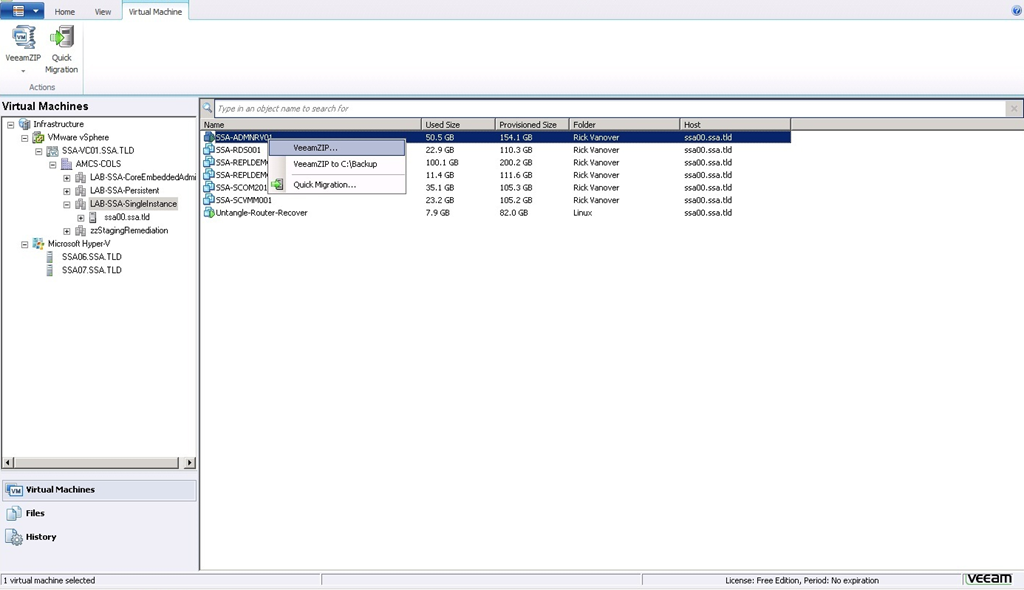
VeeamZIP
Version 6.1 includes a new capability for performing ad-hoc backups. In many ways, it functions like a zip utility for VMs. For this reason, it’s called VeeamZIPTM. Use VeeamZIP whenever you need to:
Backup a VM on-the-fly (for example, before making changes to it). Instead of running the regular backup job (which typically contains multiple VMs and a specified number of restore points) or creating a new backup job, simply VeeamZIP the VM.
Archive a VM (for example, before decommissioning it). VeeamZIP is a powerful weapon in the fight against VM sprawl. You no longer need to keep unused VMs just in case someone comes around later asking for them. Instead, VeeamZIP and then delete unused VMs. It’s a great way to reclaim expensive production storage.
Copy a VM (to your test lab, training center, to give to a client, etc.). To install the VM in a new location, simply restore it from the backup using Veeam Backup & Replication or Veeam BackupTM Free Edition (see next section). Unlike copying, cloning or exporting a VM:
You can VeeamZIP a VM without pausing or powering it off.
VeeamZIP compresses and deduplicates the data to minimize file size.
VMs are fully encapsulated, and all configuration settings are correctly restored.
Thin provisioned disks are maintained as thin throughout the backup and restore process.
You can extract guest files from the backup.
Veeam Backup Free Edition
Version 6.1 introduces a new free mode. The free mode, called Veeam Backup Free Edition, provides a subset of the functionality in the full (paid) editions of Veeam Backup & Replication, including VM and file recovery. So if you ever need to perform a restore but don’t have access to a Veeam backup server, you can simply download and install Veeam Backup Free Edition. You don’t need a license key, and you can recover VMs, VM files and guest files. Veeam Backup Free Edition also includes file management capabilities. For this reason, it is sometimes referred to as “the New FastSCP”.
New console
Enhancements include:
Use of Microsoft design standards.
Dynamic nodes. Reduces clutter by only showing relevant management tree nodes.
Extensibility. Multiple task-focused management trees and Outlook-style tabs provide real estate for new functionality planned for the next major release.
Instant search. Search any object list to quickly find VMs, jobs, backup proxy servers or other objects,even if you have thousands of them. UI performance and virtual infrastructure tree retrieval time have also been improved, so browsing, expanding and searching for objects is faster, especially
vPower for Hyper-V
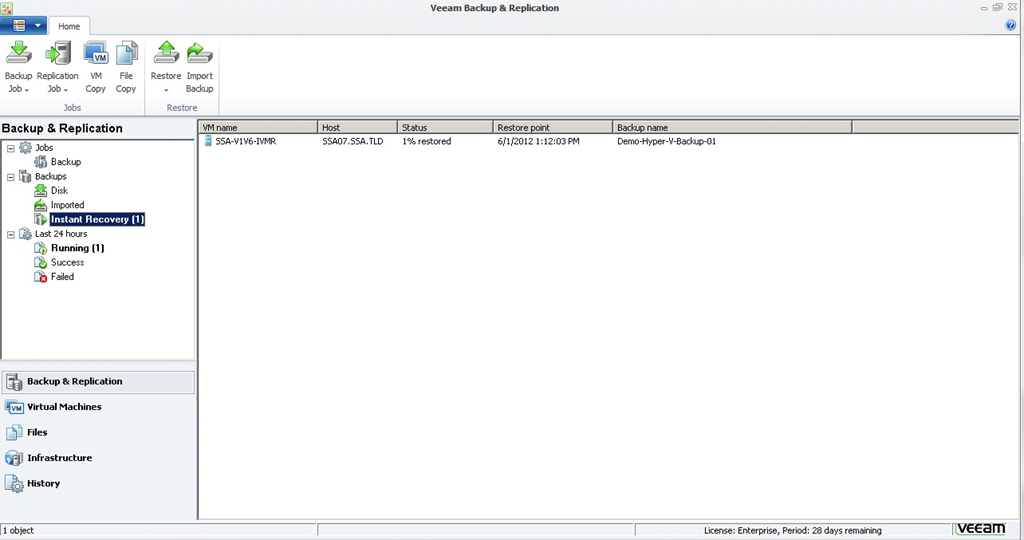
Version 6.1 extends Veeam’s patent-pending vPower® technology—as well as Instant VM Recovery— to Hyper-V. vPower runs a VM directly from a compressed and deduplicated backup file on regular backup storage. You can run a VM from any restore point (full or incremental), without changing the backup. vPower enables Instant VM Recovery, which lets you restart a failed VM from a regular backup in as little as 2 minutes.
There are a number of additional enhancements as well – and I advise you to go over the release notes for the full list.
**Disclaimer**
Even though Veeam is a sponsor on my blog – I was not asked or paid to write this review. I did receive a pre-briefing under embargo until the product was released and a 30-day trial license for the enterprise version (which you can get on their site for free anyways) + some marketing material.
The product looks interesting and having the option to backup your VM’s – albeit in a somewhat limited way – is a great thing to have – so thank you Veeam for thi gift. I have always like FastSCP (even though the product has not been developed actively as of late) – and already had some ideas about how to make use of the new product in unconventional ways – but unfortunately the functionality is not there (moving VM’s between hypervisors…)
vKernel announced the release of version 4.5 of their vOperations Suite today.
What’s New:
New Automation Features - vOPS' automation capabilities are enhanced with auto-deletion of abandoned VM images, auto-merging of unused snapshots, an additional automated remediation for performance issues and auto-calculation of future resource requirements.
Automation Controls - vOPS 4.5 also adds the ability to more finally control some automation processes. For example, VMs can be grouped, and then these groups set with minimum and maximum resource amounts that automated right-sizing will respect.
vSphere 5 New Feature Support - vOPS 4 introduced compatability to vSphere 5. vOPS 4.5 takes this integration further with support for storage DRS and storage clusters, new HA methods and inclusion of data provided by the VASA storage interface.
vKernel will try to provide “trusted automation” – and with vOPS 4.5, data center staff will be able to automatically
Delete abandoned VMDK Files
Merge VM snapshots
Solve VM performance issues
Power-off Zombie VMs
Resize vCPU and VM memory resources based on vOPS’ recommendations
Update management dashboards in real-time in external systems
Calculate CPU, memory and storage requirements at any point in the future
Each one of these automation features will help avoid the need to hire in additional administrators as environments grow. For example, a VM administrator can manually delete approximately 60 abandoned VM images in one hour. With automated deletion of abandoned VM images, an unlimited amount of files can be deleted in seconds.
Other features available in vOPS 4.5 include:
Application type tags to denote which application is running inside a virtual machine
Storage DRS and storage cluster support (available in VMware vSphere 5)
Access to VMware VASA interface storage statistics available in vSphere 5
Capacity planning calculation adjustments for vSphere 5 HA methods
Improved support and visibility into Raw Device Mapping (RDM) storage objects
Additional management reports such as graphs for performance issue counts
Auto-set VM metric trend alarms that generate warnings when abnormalities are detected
On Wednesday night I participated on session 2 of the Blogger Reality Contest. From the rankings that were published on Wednesday - I am actually not doing so well (so your continued and strengthened support would be appreciated) - but hey this is not about the competition - it is all about the participation. It is great to interact with a whole new set of people, and I am sure that the relationships built during these three weeks will last. But let's get back to the technology part of it.
Wednesday's topic was Converged Systems. I will not bother you all again with the converged part, we covered that all last week, and the three topics covered were:
HP VirtualSystem
HP CloudSystem
HP AppSystems
The one I would like to cover here in more detail is HP CloudSystem. A while back I wrote a post about
The Datacenter - in a Few Years From Now where I presented this graphic below.
The relevant part I think is the one here below
And what does this have to with cloud though? The way I see cloud vision is having your pool of resources from which you can provision your applications and vApps to your end users. At the moment this is limited to a cloud for each Hypervisor. I cannot have a VMware vCloud that has Hypervisors that are not ESX. I cannot have a Microsoft Cloud with Hypervisors that are not Hyper-V and so on.. Yes, there are some products that will allow you to manage the multiple clouds under one "umbrella" and place the VM in your Hyper-V cluster or ESX Cluster or RHV Cluster according to different criteria. But today they still need to be separate clusters. Utilizing such an idea will make my infrastructure completely vendor agnostic - and I (the customer) could pick and choose whichever hypervisor suits me.
VMware has their cloud product - vCloud Director. Microsoft has their Private Cloud, Redhat has their CloudForms, Citrix has their Project Olympus. The purpose of this post is, not to get into who has the best cloud offering, nor who has the more mature product. The reality of today is that most infrastructures are running mainly on one platform, and one platform only. Will that change in the future? I think so - in my post Why Should you Care about Veeam Support for Hyper-V, I started to talk about the market share that other hypervisors are gaining and will continue to do so in the future.
I spent a hour on a conference call last week with a colleague who had built their own private cloud solution. I was interested in hearing the details behind the platform and how it was built, and I was quite surprised to actually hear that the whole infrastructure was built on VMware - but they had decided on a 3rd party solution for the orchestration of the the cloud and not to use vCloud Director. The reason being mainly because of the lack of integration the system actually has into current business process. The amount of time it actually takes to integrate into their current CMDB, and a number of other reasons as well. Looking back on the conversation I actually am starting to see that the above graphic that I made should actually be changed. A layer that translates the operations from kind of hypervisor to the other will not actually be the correct solution or the right way to go.
The way to actually go would be to create a system that would allow you to manage Hypervisors/Clouds from multiple vendors, all under one management portal. This way you as the Admin would still not care if the machine is running on a VMware / Hyper-V / Xen / Redhat cluster - for you the machine will be managed the same way regardless. The Orchestration software will be that to deploy the virtual machine according to your pre-defined criteria of cost / SLA etc. and present a unified interface to the end-user so they will be able to access their machine - again completely ambivalent to the what the underlying hypervisor is.
HP CloudSystem could be such a platform. Providing a layer of automation that is external to the the actual hypervisor - could actually be the answer. Treating Server / Storage / Network / Application Pools as exactly that - just pools - and to the end-business user who does not care what platform they run on - but rather that they work, this abstraction should work just fine.
You could even take this one level further by adding an external public cloud to your pool of services. Something like Cloudbursting.
Cloudbursting is an application hosting model which combines existing corporate infrastructure with new, cloud-based infrastructure to create a powerful, highly scalable application hosting environment.
To explain this in my terms, you use the public cloud as an extension of your compute resources to extend and scale as needed for your application.
The HP CloudSystem core is built on the HP BladeSystem architecture and includes the Matrix Operating Environment that enables rapid provisioning of complex infrastructure services and adjustment of those services to meet changing business demands. It also includes HP Cloud Service Automation software to manage the entire cloud lifecycle. Cloud Service Automation provisions applications, manages and monitors the cloud, and provides a single service view across the cloud and traditional IT.
HP CloudSystem’s core capabilities can be extended with
• Cloud Maps: tools and best practices that enable CloudSystem to quickly and easily provision various kinds of common application environments from major vendors such as VMware, Oracle, SAP, and Microsoft. Cloud Maps can substantially reduce the time and effort needed to deploy CloudSystem services.
HP storage
HP networking
HP Software
To sum up this post - The future of the cloud (and your datacenter) will be in the automation layer and will look something like this. It will all lie in the orchestration layer.
As this is a contest your vote does count. Please add you vote in box below. Thanks.
Your comments of course are always welcome.
(Small Print) HP is not the only one to offer such software or orchestration platforms. There are several other vendors and other 3rd party companies that provide the same or similar technologies. HP is one of the sponsors of this event, which mean they are partially footing the bill for my trip to VMworld this month. I am highly grateful for the opportunity and honor but I am under no obligation to write anything positive (or negative for that matter) about any of the presented solutions. The opinions and thoughts above are my own so take them as they are.
I will not go over the details of this announcement that was released today. Both David Davis and Sean Clark wrote very good articles about the release.
I do want to add a small point of my own, and that is why I think this is a big thing - or at least the start of a big thing.
There is no doubt that:
VMware is the current market leader.
Microsoft see VMware as the biggest competitor in the virtualization market.
vSphere is the more mature product (and depends who you ask, more robust as well).
After this announcement it is clear - Hyper-V is here to stay.
I am a VMware fan (if you haven't noticed then you are not following my blog) but part of my job is to provide the best solution to my customer - and that solution depends on the customer. If the solution that suits them best is not based on VMware technology - then so be it - because it is right for the customer.
A year or two ago - the vendor bashing and FUD from both sides was in abundance, Microsoft said you don't need this feature - and VMware said you cannot live without it. VMware said that Microsoft does provide this - and Microsoft played catch up with the technology race to get those features that VMware has. Bad mouthing - from both sides - but I am happy to say - that it has calmed down as of late - and both parties are focusing on what they have - and not on what the competitor's do not.
So back to Veeam's announcement and why is this a big thing (IMHO)? Veeam is a company that has based 100% of their product (and revenue) on VMware. From day one. I think that it has paid off and they have found a very good place in the market for all of their products. And now the announcement that they will be adding support for Hyper-V. If a company that has based their complete business on VMware - are now opening up to different Hypervisors - then is a turning point. Not only is Microsoft getting part of the customer share - and how much is not the issue - they have started to get into the surrounding companies that make their bread and butter off of virtualization. I have - for a while - been asking any vendor that I have tried their technology, what are your plans for multi-platform support. Be it monitoring solutions, backup solutions capacity management or cloud - and I hearing always the same answer - at present we do not - but it is on the roadmap! Some for Hyper-V some for XEN, some for RHEV and some for all of the above. Veeam is not alone - the ISV's realize that they cannot afford not think about supporting multiple vendors and this is a good thing especially for Microsoft
Veeam is going the extra mile here by developing features that do not even exist for Hyper-V, as you can see the slide below
I will not be going into the debate of what the better/faster/cheaper/sexier product is. I do have to agree though, Microsoft is gaining market share - both with the customer and with the ISV's as well.
I recently participated in writing a short piece on the question, "Is the Hypervisor a Commodity Nowadays?" on TechTarget. The consensus there was split 50/50.
I would like to explain a little more. What is a commodity?
A good or service whose wide availability typically leads to smaller profit margins and diminishes the importance of factors (as brand name) other than price. [Source: Webster Dictionary].
So let us give two examples.
Gasoline. Your car needs gasoline to run. But what qualifies gasoline as a commodity? the fact that you can go to any gas station, be it Shell, BP, Paz, Texco - what ever you want.. and fill in the same gasoline into you car and it will continue to take you to where you want to go. You don't have to worry about if your car will be compatible with the gasoline you just put in - since it is the correct octane - it is guaranteed to go. Now mind you - there are certain requirements that need to be considered (octane is one of them). And of course - each company will have their small "extras" that will make their offering more appealing to the customers. The main thing here is that you can put in the gas and your car will drive.
Water. You are thirsty and you go and buy a bottle of water in the store. This helps you wuench your thirst, stops you from dehydrating, and gives the ability to keep on going. Does it make a difference which company the water is from? To serve the purpose of satisfying the need to quench your thirst - no. Will it taste nicer if it is cooled, or has a slight addition of lemon, or peach or bubbles, to each his own preference. And again the main thing, no matter what kind of water you buy, it quenches your thirst.
So that is how I would define a commodity. So back to the question raised before.
Is the Hypervisor a commodity?
Microsoft has one, VMware has one, Xen has one, Redhat has one and who knows what the future will hold. They each have their benefits and their flaws, their ups and their downs, the good and the bad. But the main thing is that - today - you cannot run a Hyper-V virtual machine on ESX, and you cannot run a Xen VM on Hyper-V. It simply is not possible. What the vendors are starting to do is provide you ways to convert a VM from one hypervisor to another. VMware just release a Fling called XVP that will allow you to connect to a Hyper-V server and if you to control certain parts of the Hypervisor, perform certain tasks on the Hosts and the virtual machines themselves. Microsoft SCVMM has boasted support for vCenter for quite a while now.
The point to note here is that in order to run a VM from one vendor on another vendor's hypervisor is not a done deal. There is a decent amount of tinkering around that needs to get this work.
So what does this have to do with the cloud in few years from now?
Let us play what-if for a second.
What if you there was some magic that could provide a translator and act as a buffer between the hypervisor and the VM? Something like the graphic below.
We all know what the problem is with having a non-standard format for virtual machine. Each vendor has their "tools" and optimizations for their own hypervisors and they are completely not compatible with their competitors.
Now I am not holding my breath for any of the vendors to come up with a industry standard that will allow you to run your VM on any hypervisor. That is actually quite counter-productive to what they are trying to achieve by getting their vendor lock-in for their solution.
If there was an additional layer that you could install on your hypervisor, that knew how to make these translations between the VM and the hypervisor below, allowing you to run a Hyper-V vhd on an ESX hypervisor or a ESX vmx on a Hyper-V Host. Granted this layer will have to be very clever and very fast in order to provide the performance that is close to native to that you would have on the hypervisor itself.
Call it a "hypervisor for hypervisors" if you will.
And what does this have to with cloud though? The way I see cloud vision is having your pool of resources from which you can provision your applications and vApps to your end users. At the moment this is limited to a cloud for each Hypervisor. I cannot have a VMware vCloud that has Hypervisors that are not ESX. I cannot have a Microsoft Cloud with Hypervisors that are not Hyper-V and so on.. Yes, there are some products that will allow you to manage the multiple clouds under one "umbrella" and place the VM in your Hyper-V cluster or ESX Cluster or RHV Cluster according to different criteria. But today they still need to be separate clusters. Utilizing such an idea will make my infrastructure completely vendor agnostic - and I (the customer) could pick and choose whichever hypervisor suits me.
This something which is not available but I do think it is only a matter of time until this technology becomes available. The first one to do this will have a great thing going for them.
Perhaps a good idea for a startup….
What do you all think? Please feel free to leave a comment below.
No - I have not gone over to the Dark Side. And forgive me for the Powershell pun, but I read an article by Ronald Beekelaar on the Microsoft Virtualization Team Blog - demonstrating the wonders of Virtualization that were used in MMS 2010 Labs: Powered by Hyper-V, System Center & HP...
The numbers are impressive - very impressive - I would suggest that you read the article.
The numbers were as follows:
6 half racks - ~7 Servers per rack
41 HP Proliant DL380G6 servers (Dual socket, quad-core, Nehalem Processors with SMT, 16 LPs per system) each configured with 128 GB of memory and 4x300 GB SAS drive of local storage striped
All networking was 1 Gb/E switched (no 10 Gb/E) and demonstrates the efficiency of Remote Desktop Protocol (RDP). Even with hundreds of labs going on simultaneously, network bandwidth was never an issue on 1 Gb/E
Windows Server 2008 R2 Hyper-V and System Center
Virtual machines were configured on average with 3-4 GB of memory each and the majority of labs used multiple VMs per lab.
~40,000 Hyper-V VMs for ~80 different labs in 5 days
Ok, so I did a bit of math. I came to the conclusion that the most that they could run on 1 server at any given time would be 40 VM's per server.
Let me explain the calculation - and forgive me for my assumptions, and I not sure that they are 100% accurate but you will see where I am getting here.
My assumptions:
The hosts were not CPU / network / Disk constrained
RAM Usage on each host should not be higher than 120GB (90%) - I was being conservative.
The average RAM used per VM that was quoted was 3-4GB, I assumed that it was 3GB .
Using those assumptions I got to the following numbers.
So 1640 VM's running simultaneously is a good amount of VM's, now of course not all of them run at the same time. and bringing up labs and down throughout the 5 days - I can imagine how they got to the impressive number of ~40,000 Hyper-V VMs.
But I wanted to try an see what would the comparison be with vSphere.
Again I made assumptions (in addition to the ones above) - which I think are safe and conservative.
Since almost all the VM's on the host are the same OS, same configuration - the amount of memory that could be reclaimed was 30%.
I did not calculate any further benefit from the additional shared memory after that.
Using those assumptions I got to the following numbers:
31.5 (Servers) / 7 (Servers in a rack) = 4.5 (Racks)
10 (servers less) x $20,000 (Cost per server) = $200,000 less using vSphere
This is not taking into account:
10 (servers) x 200 (watts per server) = 2000 watts
Additional charges for shipping costs
Network Components
etc.
Perfect example of - even if vSphere is more expensive, it will save you a hell of a lot of money!!!!!! And to quote Microsoft themselves
Still, in the end, the big question to ask yourself is the following: Is it worth all this expense for VMware, when the Microsoft solution offers a comparable or even better feature set for much less cost? Is it worth the extra line item on the invoice, the extra line in the budget, to use VMware virtualization when it's built into Windows? That is a question I think many customers will be asking themselves in the coming months and that is just another reason that you should start using Microsoft Virtualization solutions.
This security update resolves a privately reported vulnerability in Windows Server 2008 Hyper-V and Windows Server 2008 R2 Hyper-V. The vulnerability could allow denial of service if a malformed sequence of machine instructions is run by an authenticated user in one of the guest virtual machines hosted by the Hyper-V server. An attacker must have valid logon credentials and be able to log on locally into a guest virtual machine to exploit this vulnerability. The vulnerability could not be exploited remotely or by anonymous users.
This security update is rated Important for all supported x64-based editions of Windows Server 2008 and Windows Server 2008 R2. For more information, see the subsection, Affected and Non-Affected Software, in this section.
The security update addresses the vulnerability by correcting the way Hyper-V server validates encoding on machine instructions executed inside its guest virtual machines. For more information about the vulnerability, see the Frequently Asked Questions (FAQ) subsection for the specific vulnerability entry under the next section, Vulnerability Information.
So what is so different about this one - I mean Microsoft release patches once a month (and in certain extreme cases - more often).
Read the fine print…
An attacker must have valid logon credentials and be able to log on locally into a guest virtual machine to exploit this vulnerability.
From the details:
An attacker must have valid logon credentials and be able to log on locally to a Hyper-V virtual machine to exploit this vulnerability. The vulnerability could not be exploited remotely or by anonymous users.
What is the scope of the vulnerability? This is a denial of service vulnerability. An attacker who exploited this vulnerability could cause the affected Hyper-V server to stop responding and require it to be restarted. Note that the denial of service vulnerability would not allow an attacker to execute code or to elevate their user rights, but it could cause the affected system to stop accepting requests.
What causes the vulnerability? This vulnerability is caused by Hyper-V server incorrectly validating the encoding of specific machine instructions executed inside the guest virtual machines. Due to this lack of validation, processing of these instructions may cause the Hyper-V server application to become non-responsive.
What might an attacker use the vulnerability to do? An attacker who successfully exploited this vulnerability could cause a user’s system to become non-responsive until the system is restarted. Note that exploitation of this vulnerability could cause the actual Hyper-V server to stop responding, including all guest virtual machines hosted by that server.
How could an attacker exploit the vulnerability? An attacker would have to be an authenticated user in one of the guest virtual machines hosted by the Hyper-V server and would need to have the ability to execute arbitrary code on the system. An attacker could then run an untrusted executable on the system that invokes a malformed sequence of machine instructions and thereby cause the Hyper-V server to become non-responsive.
And again the importance is the details..
Note that exploitation of this vulnerability could cause the actual Hyper-V server to stop responding, including all guest virtual machines hosted by that server.
And yep..
Restart Requirement
Restart required?
Yes, you must restart your system after you apply this security update.
One of the most ridiculous things that Microsoft are saying as of late is that the feature in vSphere that allows you to over commit memory, is not such a big thing and that most people do not use it anyway - herehere and here.
If you saw my previous post you will see that I managed to double the amount of virtual machines running on the same host (from 8 to 16 VM's running Windows 2003 Server 1GB RAM) without changing the 8GB RAM configuration on the host.
Would I be able to do this with Hyper-V? Hell No!
So I will say this again to Microsoft. Customers use Memory over-commit, they use it daily, and use it all the time. As long as you do not have this feature - this will be a strong point against using your product.
vControl Multi-Hypervisor Management provides multi-VM control and task-based automation to reduce VM administration and improve consistency. Furthermore, vControl Multi-Hypervisor Management allows organizations to automate manual and repetitive tasks while enabling a cost-effective solution for high availability in the data center.
Working across multiple platforms, including VMware ESX/ESXi, Microsoft Hyper-V, Citrix XenServer, and Sun Solaris Zones, vControl gives administrators the power to manage single or multiple VMs one-by-one or simultaneously. Finally, vControl Multi-Hypervisor Management provides pre-configured workflows to manage daily tasks, as well as a workflow builder for customization.
vConverter SC freeware from Vizioncore is enterprise-class software that significantly reduces the time, cost, and effort required to convert physical and virtual machines to VMware®, Microsoft®, or XenServer™. vConverter SC is suitable for all types and sizes of server consolidation initiatives where several or even thousands of physical servers need to be virtualized.
vConverter SC enables fast, easy and reliable conversions without disrupting the source physical system during the conversion process. There is no need to reboot, no need to visit machines being converted and no software to install on the source, which means virtually no downtime, thus significantly reducing the time and cost of the conversion process. vConverter SC also automates many time consuming and error prone conversion tasks such as target VM configuration and post conversion clean up.
vOptimizer WasteFinder is powerful freeware product that scans through VMware vCenter Servers (formerly Virtual Center) to locate over allocated virtual storage and misaligned Virtual Machines (VMs). The vOptimizer WasteFinder Space and Alignment Report provides totals of wasted storage and also a potential savings estimate if the space is reclaimed.
This unique storage optimization solution allows organizations to determine whether they are wasting expensive storage assets, to locate which VMs will yield the best storage reclamation results, and to discover how much money they are really spending on unused virtual storage. Potential savings estimates are calculated using customer provided storage costs and free space requirements to ensure accuracy.
vOptimizer WasteFinder also locates all VMs that not properly aligned on 64K partition boundaries. Improperly aligned VMs experience decreased I/O throughput and higher latency. Optionally, vOptimizer Pro from Vizioncore can be purchased to quickly and easily reclaim wasted virtual storage and to align VMs to proper 64K partition boundaries.
I wonder where Microsoft got this "need" from? Perhaps because it is a feature that has been around in ESX 3.5 since January 2008?
Downtime of less than 2 minutes? (need I say more?)
True by default you can only perform 2 simultaneous vmotions, but this is not a hard limit and can be changed - you can see a good review of the her from Simon Long and Jason Boche in this post. I dread to even think if this is true - how long it will take to evacuate a Hyper-V host if they have to be done one by one. At least now you don't have wait for each one to finish before starting the other - Thanks Microsoft for fixing that one!
For full disclosure - granted Storage vMotion is now only available in the Enterprise Plus version of vSphere (which is not something I am very pleased about) and Microsoft claims that this is completely free (I have yet to confirm this)
On a personal note a small message to Microsoft (and their supporters).
Dear Microsoft,
You have come a long way since Hyper-V version 1. Hyper-V R2 is a great product. I personally use both - and will continue to do so. Each one has their use-cases and their appropriate time and place to be used.
There are a number of features that you still have a lot of catching up to do to get to where VMware is today, but I gather you will get there.
The competition is healthy, and welcomed and me as the customer will benefit from it without a doubt.
I personally have a favorite - but that does not mean that I will not continue to explore new and emerging technologies, be it VMware, Hyper-V, Xen or KVM
Will this change completely take over the SMB market with a product like this?
Because of the above what will happen to the enterprise market?
Here is how I see it. If you look at the table that was provided on the post above then the direction in which Microsoft is going is becoming clear.
They presented this table:
Now if we compare any vSphere product that has HA and VMotion – the lowest level possible would be Advanced so the prices seem right (and we will not mention the fact that there is no VC license in here). I am not going into features and everything other reason to continue using VMware.
For the SMB market – the additional feature set is nice but, and especially in times like these, the bottom line will be $$$. And unfortunately for VMware in this battle they are not coming out on top – not by a long shot….
But as always this is the nature of competition and the open market – as soon as another player comes into the equation – the competition between them grows – and in the end – we all benefit, because prices drop.
My bottom line.. VMware is the Rolls-Royce of Virtualization – and anyone that says different needs their head examined. The new kid on the block (and yes believe me they are here) is Microsoft, and Citrix Xensource in my eyes is becoming less and less of a major player.
Being a Rolls is nice – but not everyone can afford it – and those that cannot – will look for something that will save them money – and sometimes at the expense of functionality. Does this change my view of what is the better technology – no it does not, but this is not the purpose of the post.
So for all those folks in Palo Alto – I think it is time to start looking over your shoulder, the competition is creeping up on you…
Reading Hoff’s post I learned that the reason that this happened was:
What Happened?
During a routine operating system upgrade on Friday (March 13th), the deployment service within Windows Azure began to slow down due to networking issues. This caused a large number of servers to time out and fail.
How much do you all want to bet that this “routine operating system upgrade” was a patch installation that Microsoft released? Bets please….
This has been mentioned in several places ..
DO YOU WANT TO RELY ON A WINDOWS OS AS THE VIRTUALIZATION PLATFORM FOR YOUR ENTERPRISE???
If you have to patch your host for vulnerabilities that are discovered every second day (and that is not say that Microsoft does not do a good job in fixing them) and are patched for stupid things like this? (yes the patch is relevant for Windows Server 2008 – and it requires a reboot!!)
Well this is nothing new, we see this all the time, but today it really annoyed me.
During a lecture I participated in today with a Microsoft Partner at Microsoft offices in Israel today, one of the slides were comparing costs between VMware and Hyper-V.
1 Host - 4 guest VM's
Hyper-V
Vmware
Windows 2008 Server
$2,500
$2,500
Hypervisor
- (Built-in)
$5,800 (3.5 Enterprise)
System Center
$1,500
-
Virtual Center
-
$5,800
Total
$4,000
$14,100
Now Come on!!!!! - Where did they get these numbers? I guess that Microsoft think that people do not know how to compare technologies one to another.
If you are only using one host - then why do you need Virtual Center?
Let's say you need the functionality to deploy templates etc. - then you cannot get away with a Standalone License - but the Bundles are much cheaper than what was presented above.
For one host - you will not need an Enterprise License ($5,800) - for the same features that Hyper-V provides - a Foundation license ($1,000) will be more than overkill - you will probably be able to get away with a ESX3i free license (if you do not need central management).
Comparing System Center to Virtual Center is not accurate (and if I was to put it less diplomatically - pure nonsense!!!).
Get your facts straight - and as I have said more than once - compare apples to apples - not apples to oranges.
That was actually meant to be highly sarcastic, it seems that the folks in Microsoft thought this would be a good idea (acutally it would be very good - if it would work properly..)
So you can control vCenter with SCVMM but it seems that when you want to remove it, typically like microsoft does, it leaves a lot of "leftovers" behind. So I personally would like to have my environment back the way it was before Microsoft started to play with and Eric Grey posted on his blog what is left over when you remove SCVMM. He even went as far as to provide a Powershell script that will remove all the muck for you.
Microsoft have published a new book - granted it is on Virtualization - the Microsoft way, but still should be something to go over.
Understanding Microsoft Virtualization
This is the book for IT professionals who want to learn more about the latest Microsoft virtualization technologies, including Windows Server 2008 Hyper-V, System Center Virtual Machine Manager 2008, Microsoft Application Virtualization 4.5, Microsoft Enterprise Desktop Virtualization, and Microsoft Virtual Desktop Infrastructure.
The book also examines other virtualization-enabling technologies from Microsoft including Windows Server 2008 Terminal Services, Roaming User Profiles, Folder Redirection, and Offline Files.
Download here
Ahh..... Come On!!!!!!!!!
VMware vs Hyper-V comparison.
Jason and Scott have said more than enough on the matter.
People should get their facts straight!!!!


 The relevant part I think is the one here below


