Showing posts with label Management. Show all posts

2018-08-21

Scratching an itch with aws-vault-url

I think that aws-vault is a really nice tool. It prevents you from saving your AWS credentials in plain text on your machines (which is always a good thing)

Since I started using it – I found a number of difficulties along the way.

  1. aws-vault does not support aarch64 #261

    To solve this - I created my own binary - aws-vault on a Chromebook

  2. aws-vault only supports storing credentials when using a fully blown GUI. Here is a really good walkthrough how to get this working https://www.tastycidr.net/using-aws-vault-with-linux/

  3. aws-vault login will give you a URL with which you can paste into a browser and it will log you in automatically to the AWS console. My pet peeve with this was that it always brings you to the default console page.

    image

    So I was thinking – why would I not be able to open up the specific console that I would like to access – such as S3 or EC2 – I mean come on … these are just different URLs that need to be opened in the same way.


Now if I was a go developer – I would happily have contributed this back to the original project – but I am not. I am not really a developer at all. I can play with code – I can also create stuff – but I would not dare call myself someone who can write an application.

So I wrote a small wrapper script to provide this functionality.

Say hello to aws-vault-url – an easier way to open a direct conosle for a specific product.

(This is in no way a robust tool – and if you would like to contribute and improve it – please feel free to submit a PR)

Update – 22/08/2018

So I did some thinking about this – and came to the conclusion that it makes no sense to maintain a separate tool – so I decided to take the leap and push myself to go into the code it self – so I sat for an hour or two last night, and extended the current functionality of aws-vault to accommodate this.

Here is the PR - https://github.com/99designs/aws-vault/pull/278.

Once this is merged – I suggest that you move over to the complete tool.

2015-04-06

The Chef’s Special and Trusted Solutions

It is funny where one gets the idea for a blog post from. I was sitting in a restaurant last month in San Jose, one of the only two kosher ones in the area, and I ordered the chef’s special.

Chef's SpecialSo it was grilled salmon, mashed potatoes and grilled vegetables. It was tasty, the flavors blended very well. Which got me thinking.

What made the chef choose that combination? Why those three? Obviously he had tested different combinations. Pasta, rice, noodles, different kinds of vegetables, different spices. But he chose that combination. Tried and tested.

If I had the to choose what I would have wanted with that dish, it probably would have been rice, not potatoes.

So what does this have to do with trusted solution? But before that – a bit about what I think a trusted solution is.

A trusted solution can be something like a vBlock, a solution that has been validated, Hardware which is tested for a certain workload, guaranteed to provide the proper performance and to work.

It could be the VMware HCL, where Q&A has been done to test if things work and work properly. It could be a validated design from one of the vendors – a Cisco CVD, a Flexpod or another solution.

On the other hand I could also have asked for a mix and match on the menu, what I preferred, what I know that I like, I have tried before.

That I could compare to a home built solution, or perhaps a whitebox that is not on the HCL or a slightly different vendor. Will it work – probably – but it something that is probably unique to your liking.

There are advantages to both options, both can serve you well, both are tasty.

(The things that pop into your mind..)

What do you prefer? What do you think suits your business better? The Chef’s special or your own personal favorite mix and match? And why?

Please feel free to leave your comments and thoughts below.

2015-03-10

vCenter is Still a Single Point of Failure - An Update

My previous post vCenter is Still a Single Point of Failure caused a decent amount of discussion on Twitter and comments on the blog. I am actually glad about that because it raised a point that I think has been neglected for quite some time – and is finally being addressed.

Today I learned that the Availability Guide was recently updated – and there were a number of changes (the original version is no longer available – but are we all lucky that I have screenshots). The biggest one was a whole new section was added on the paper about clustering vCenter Services.

New Section

Firstly I would like to commend VMware on putting this out. Let’s go in and see what was added.

WSFC availability

<sarcasm>
“vCenter can be a single point of failure” – I wonder where I have heard that before?
It is good to see that vCenter is now considered to be a critical component.
I wonder why VMware changed their tune as compared to the previous version? (below)
</sarcasm>

What is vCenter HA?

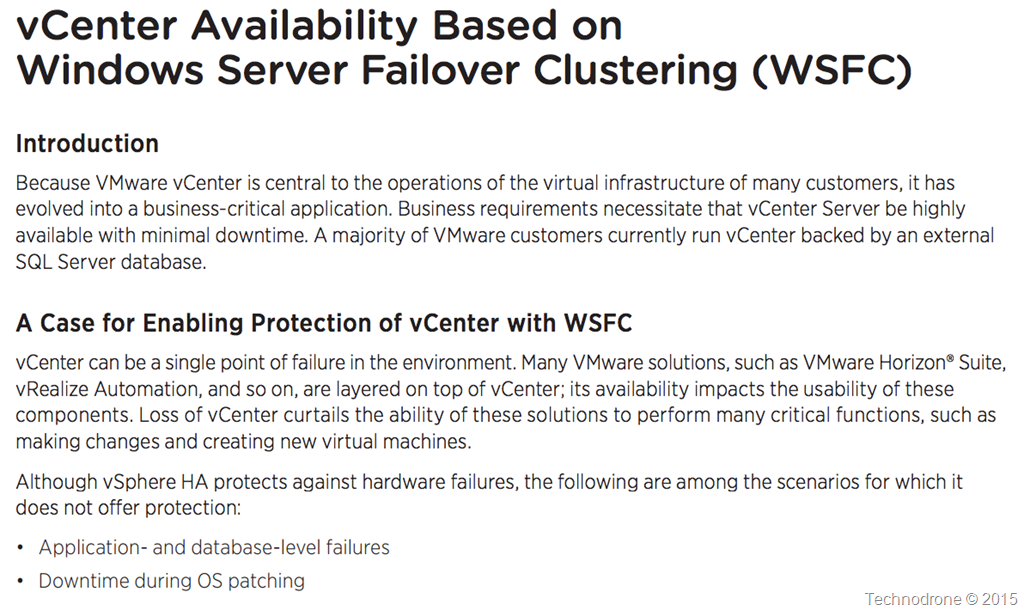
So what would such an architecture look like? This is described in the following diagram

Clustered Architecture

You will need to setup a WSFC which will require a shared disk between the VM’s (RDM only is supported) and the document goes into some detail about how this should be set up. There are a large number of moving parts including DFS, How to perform upgrades, registry settings, certificates you name it. You will also need to protect the SQL / Oracle Database as well – this is not in the scope of this document.

You can see that a decent amount of work has gone into documenting the process. It is also apparent that this will be the same method used to provide the same availability features for vSphere 6.0 when it is released.

But one small caveat. I am sure you are not the only one who has gotten the feeling that VMware have been pushing us all towards the appliance – for a number of reasons, good and bad.

So where is the clustering solution for the vCenter Appliance? All of this is Windows Server vCenter only!

The only mention of such a solution is a tweet from my good friend Niran Even-Chen

Feature parity – is a relative term.

The second update I would like to go into was a performance paper released last week regarding the failover time needed for vCenter 6.0 in the case of a Host failure. The original article can be found here.

Now we have been down this path before – but I would like to point out two things.

  1. A VM protected by vSphere HA – will be restarted in approximately 30-50 seconds after failure – which is pretty fast and what we would expect from HA.
  2. The amount of time required to restart a 6.0 vCenter is even more than that of a 5.5 vCenter. Quite a bit more.

    From the original version of the paper:

    vCenter 5.5

    5 minutes and 12 seconds.

    From the performance document for vCenter 6.0

    vCenter 6.0

    I would like to take the middle scenario – where we are dealing with 32 hosts and around 4,000 VM’s (I think that  is safe to call that a standard environment).

    The restart time has gone up to 7 minutes and 19 seconds – That is a 40% increase in downtime. That is a lot if you ask me – and probably due to the changes made in the architecture – hopefully for the better of us all.

Again I would like to thank the authors for there hard work, also VMware for recognizing that this is something that was lacking in the previous whitepaper – and something they were quick to rectify.

Last minute update
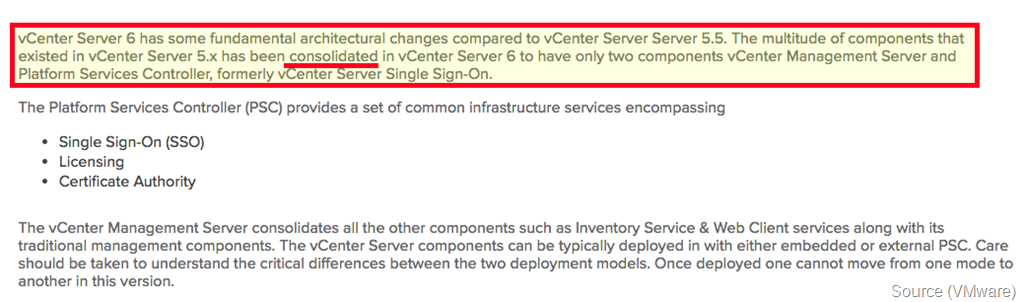
It seems there was an article published yesterday (after I had written this post) vCenter Server 6 Deployment Topologies and High Availability with some more information. It seems that even thought the vCenter Server has been consolidated down into two components – they taken even longer to start up.

Consolidated

It also seems that the Appliance will not be supported (at least not yet)

No vCSA

And one more question I had for VMware.

Windows Requirements

Why is Windows 2012 Datacenter Edition required? According to this document WSFC is included in Standard as well.

As always your thoughts and comments are welcome.

And don’t forget to vote!!!!

2015-02-10

VMware Integrated OpenStack - Cost Analysis

VMware announced last week the launch of VIO and there are a number of things that I think people are missing and should be pointed out.

The information I have taken is from the Datasheet and publicly available information.

Networking

A great part of the the functionality and flexibility that people use is the option for flexible networking, i.e. creating private networks, routers for example.

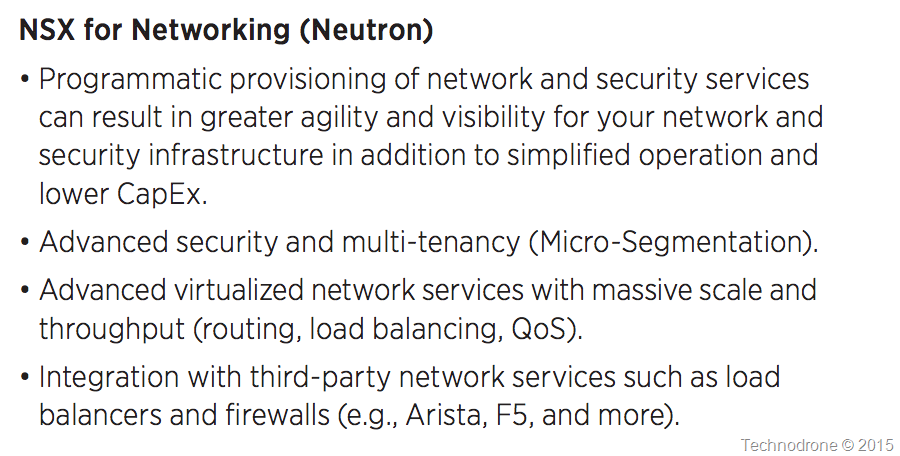
NSX for Neutron

That is great – all the functionality is there – with NSX. But how many people are actually using NSX today? How many people have deployed NSX? In a previous article I went through the reasons why this will not be an easy path. So how does that work with what I currently have in my datacenter?

I think it is safe to assume that this will be deployed in an environment with a Distributed virtual switch – we are talking about environments that are using Enterprise Plus after all (and VMware is giving this away for free to everyone with the Ent+ licenses).

So how does OpenStack work with a DvSwitch today?

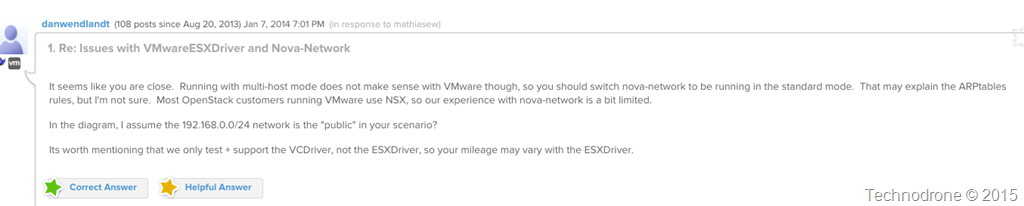
Well I am sorry to surprise you – but it does not. It only works with nova-network (which is supposed to be deprecated – so caveat emptor). VMware themselves have said that most customers that are using OpenStack and VMware are using NSX (and that they don’t really have much experience with nova-network).

nova-network???

** Edited February 11th, 2015 **

According to a twitter conversations with @hui_kenneth and @danwendlandt last night – VIO GA will support the dvSwitch, only that information is currently not public and is only available to the Beta users. The functionality still will not bet the same as that of NSX.

So it boils down to this. The only way to really use OpenStack with vSphere today – in any kind of semi-normal way, is to do it with NSX. Any demo you have seen – Hands-on Labs, presentations all use NSX. And it always something that already exists in the environment you are working with, that is the assumption.

So VMware is giving this away for free (unless you are interested in support – which will cost you another $200 per socket) – but this essentially is giving you a hobbled product – which does not have functionality that you get out of the OpenStack box – because you are using vSphere networking.

So what features will you not be able to use – without NSX?

  • No GRE – standard VLANs only
  • No LBaaS
  • No VPNaaS
  • No FWaaS
  • No security groups

I will say that the number of people that are actually using FWaaS and VPNaaS are not the majority of OpenStack users – but on the other LBaaS – is more or less an essential part of any automated cloud. And even more so – security groups are definitely an essential part of any cloud.

But of course we would like to use all the bells and whistles – actually I would really only like to use Neutron with vSphere – so my options are only going to be to use NSX (until they manage to get this working as will with a dvSwitch).

So what is this going to cost me?

This is going to hurt (and by no means am I licensing expert – and yes I know that no-one really pays list price – but here goes).

You have two options to buy NSX – per vm or per socket. Now we all know that the per-vm model – usually does not run in the customers favor – and the last time a per-vm model was proposed – the was a huge disturbance in the force. So I am going to assume that you will want a per CPU based license.

1 CPU license of NSX for vSphere (NS-VS-C) – $5,996
1 CPU SNS Basic support (NX-VS-G-SSS-C) for 1 CPU – $1,259
1 Year SNS Production support for VMware Integrated OpenStack for 1 CPU – $200
1 CPU license of VMware Integrated OpenStack (assuming you have Enterprise Plus) – $0

Total cost for 1 CPU of VMware Integrated OpenStack – $5,996
Annual support costs for 1 CPU of VMware Integrated OpenStack (and NSX) – $1,459

So let me lay this out in simple terms with an example.

** Post Updated February 11th **

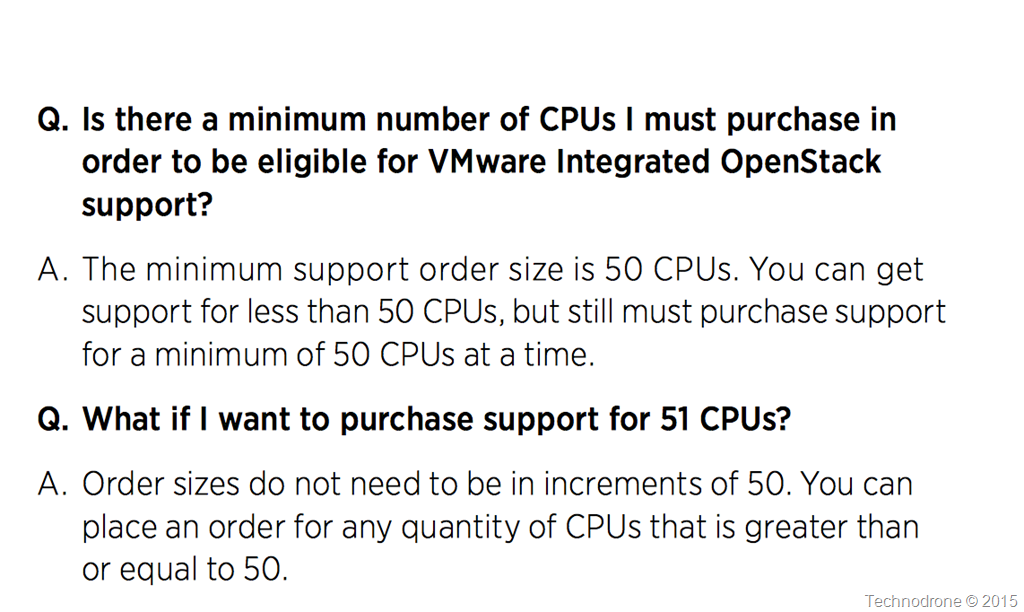
It was brought to my attention that there is a minimum purchase of 50 CPU licenses for OpenStack support as part of the FAQ notes.

Minimum of 50

I did not change my assumption that you would only be using 4 hosts but the purchase of additional OpenStack CPU support s required.

I have therefore amended the numbers below.

If you are interested in really using (i.e. with neutron and NSX) OpenStack on a 4 host (8 socket) cluster this will cost you:

  • Initial cost
    • NSX licensing – 8x$5,996 = $47,968
    • SnS first year – 8x$(1,259 + 200) = $11,672
    • SnS first year – 8x1,259 + 50x200 = $20,072
    • Total – $59,640
    • Total – $68,040
  • Annual costs
    • SnS per year – $11,672
    • SnS per year – $20,072

That is above and beyond the regular licensing fees that you pay for Enterprise Plus licenses (which I have not factored in here – because I am assuming that you already have them. But if you do not, then that is even more of a hit to your CAPEX.

Again I would like to stress – that this is MSRP – and not including any bundles.

My Take

VMware would like to see the whole world run on their platform (obviously), and they have started to make a move to minimize the impact that I think they are starting to feel – due to people moving over OpenStack. This offering is a foot in the door to minimize the business they could lose from people moving off of their platform (seriously speaking though vCloud is a competing product – and I do not know how much longer they can continue to sell competing products). There are a number of benefits of running on top of vSphere of course, the underlying platform – and the hooks and insight into vRO is another one of course.

That is one side of the story. The other side is NSX adoption – I do not think that VMware is seeing the market share that they were hoping to gain with NSX – network virtualization is still not a mainstream concept. Companies are starting to dabble and try – but no – we are not there yet.

openstack

The ironic thing is that even with VIO integrated with NSX when it is released – it still will not support native LBaaS, VPNaaS and FWaaS out of the box (you probably will be able to integrate with 3rd party vendors) – that will probably come in a future release.

So even with their flagship product – it still will not have all the functionality that OpenStack Operators/Users are accustomed to have in their environments today.

There are benefits of having “one neck to throttle” so to speak – but that comes with a price tag – and hefty one. It certainly is not a free product as it is being made out to be – or at a minimal cost (VMware support).

The devil is always in the details.

What do you say? Is it financially viable? Would you use VIO? Why? Or would you rather rough it and go with another vendor?

I would be happy to hear your thoughts, and comments. Please feel free to leave them in the comments below.

2014-12-11

vCenter is Still a Single Point of Failure

A few days ago VMware (Mike Brown, Anil Kapur and Justin King are the authors) announced the updated document for the vCenter Server 5.5 Availability guide.

I would like to make clear a few things from the start.

  • This is not a VMware bashing post. (Even it might be perceived as such)
  • I hold all three of the authors in very high regard.

Here goes.

When reading this document I was hoping to hear something new, something refreshing, something that VMware customers have been asking and verbally complaining about for a very long time.

Alas – this is not the case.

vCenter is a single point of failure. There I have said it. I have said it before, I will continue to say it in the future until this if fixed.

In the following article I will be taking statements directly from the text, providing my thoughts as I go along.

Overview

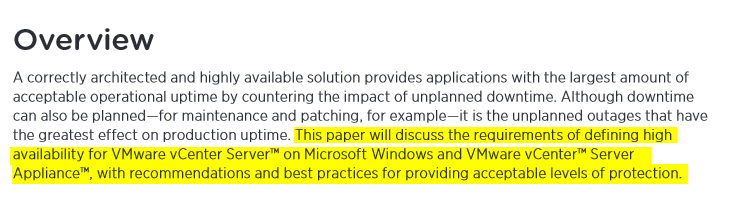
Great start – This document will discuss the requirements… After re-reading that statement – I understood what VMware did. VMware has not provided us with a method of providing HA for vCenter – but rather – have explained what they think should be defined as High Availability be for your vCenter server.

SLA

The authors then go into explaining all about MTBF and MTTR – they did a great job. I will not go into the details here – you should read the document

SLA’s are extremely important – and for and every environment – an SLA is something different – yours may differ from your neighbor, so it is important to understand what you need to achieve.

tests

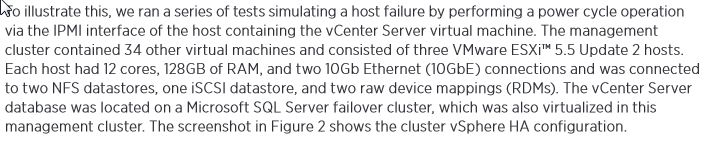
They then go into describing the tests that were run in order to measure the amount of time it would take for a vCenter server to recover. Fair enough.

results

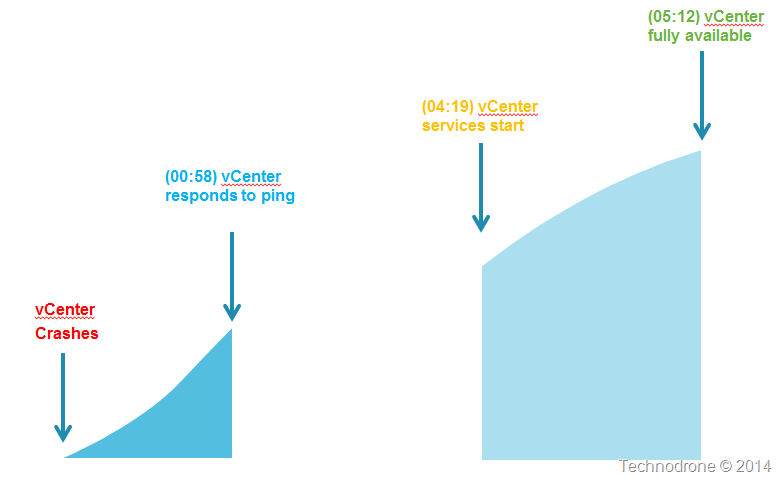
Here is where it starts to get interesting. Let us look at this in a picture.

Timeline

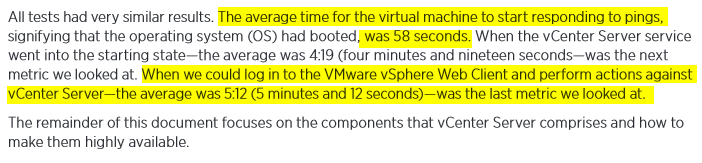
Bottom line is – that once a vCenter server has gone down – it will take a little over 5 minutes until it is fully functional.

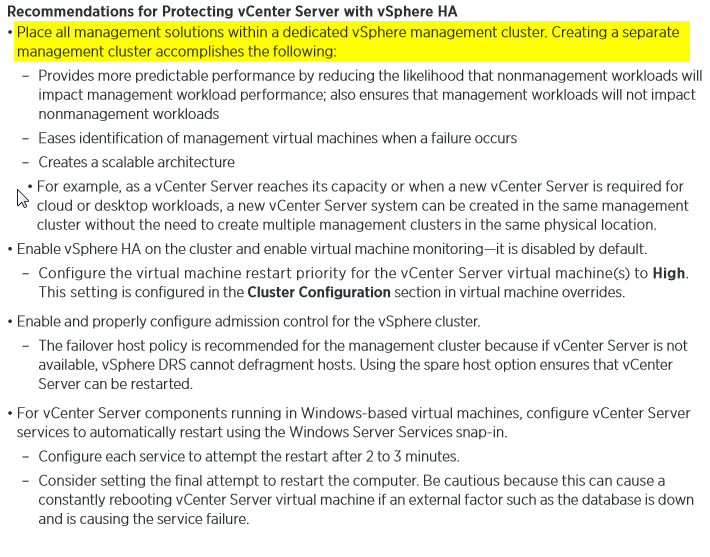
recommendations

This part of the document states that having vSphere HA – and having vCenter running as a virtual machine actually provides some level of protection.

A dedicated management cluster is of course advised – that way you have a dedicated environment to run your management components without having to worry that the client workloads will interfere.

ESXi Hosts

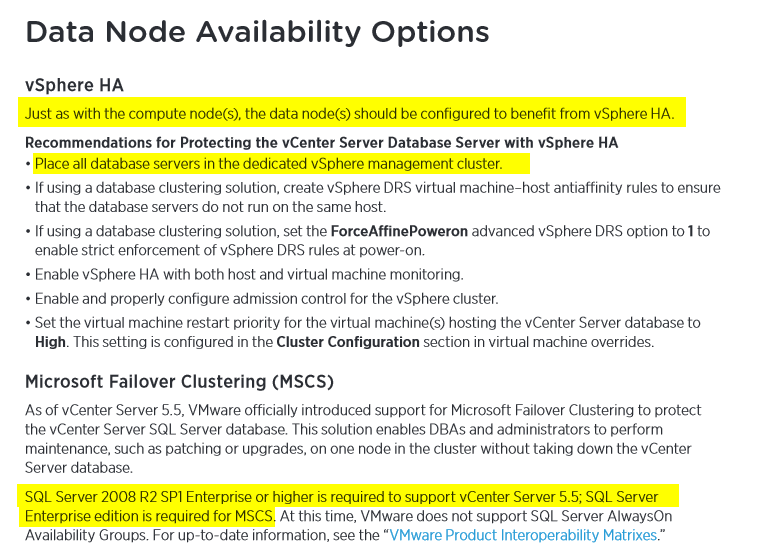
Also putting the database in the same management cluster is recommended – seems logical.

I then noticed that the only SQL version that is supported for vCenter 5.5 is Enterprise and up – which was news to me. I gather this is a documentation bug – because the VMware Product Interoperability Matrix says that Standard is supported.

Matrix

So how do you protect vCenter?

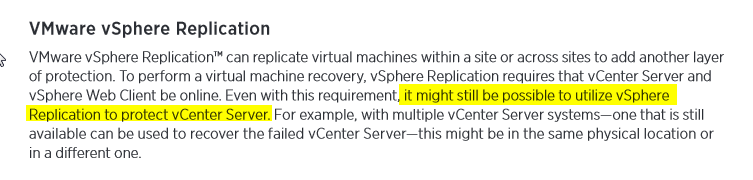
Replication

It would really be great if they would explain exactly how that would be possible and how that should be done. It still might be possible? How exactly? In order to protect vCenter – I will need another vCenter? Licensing? Implications?

VDP

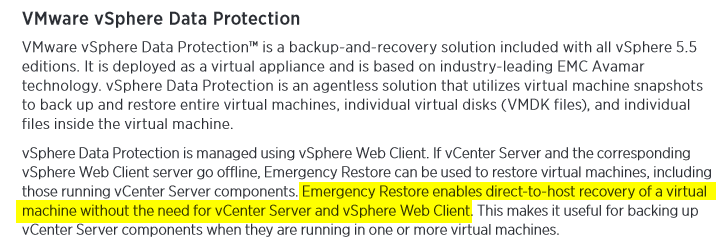
Emergency Restore was a new one to me – but it is only available in vSphere Data Protection Advanced Edition – that is something that was left out – which is approximately $1,500 (list price) / per socket. As a result of the feedback received in the comments – I have amended this. It seems that Emergency restore is also available in all editions of VDP – not only Advanced (more information here).

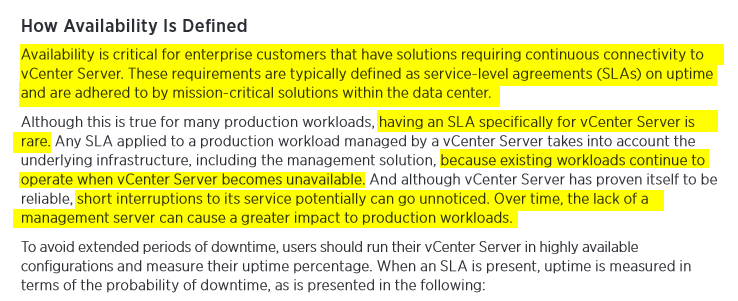
Definition

OK, enough copy and paste. This piece above is what set me off.

Essentially what VMware are saying the following:

  1. Use a separate management cluster
  2. Run vCenter in a VM
  3. Run the Database in a VM
  4. No matter what happens – if your vCenter crashes then it will be down for 5 minutes.
  5. Your  workloads are safe because they are running on your ESXi hosts are protected by HA and can continue running without a vCenter server.

Points 1-4 - I totally agree. With point #5 I also agree.

But there are environments that cannot afford to have a 5 minute outage. VMware might say that having vCenter go done and out for five minutes, is not really an outage per se, but I would very much like to disagree here.

If I cannot provision a new VM because my vCenter is not available – that is an outage.

Where would this be an issue?

  • VDI environments – If a user logs in and his desktop is not provisioned because vCenter is down? How about the whole 100 or 1000 employees?
  • Highly automated environments – ones that use products like vRealize Automation or vRealize Code Stream. Imagine having your code builds fail for 5 minutes because vCenter is not available? The whole continuous delivery process breaks down.

I might be exaggerating a bit – but I have voiced this more than once – I started more than 4 years ago - Troubleshooting Tools for vCenter.

vCenter is probably the most crucial part of your virtual infrastructure. And all that you can expect from from an availability perspective is that you have to accept as a given that vCenter might go down for 5 minutes at a time.

There are environments that will accept this - I would actually say that the large majority are fine with this – but what about those who are not? Those who cannot afford having this kind of outage? What do they do?

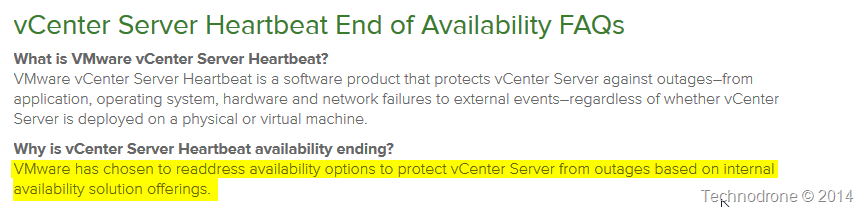
There used to be a product called vCenter Server Heartbeat – which was retired.

Heartbeat

Where are those promised options? When will they be available? What do companies do in the interim? Pray that there vCenter does not crash?

Embedded below is the Twitter conversation that sparked this post.


The scenario on which VMware based their whole presumption was on the fact that the host on which vCenter was running would crash, HA would kick in and the VM would be restarted on another host within 5 minutes.

The whole scenario of having a problem with your database, or a vCenter service problem (and believe me it happens), that was not covered.

Take the following scenario. You have a vCenter appliance. For some reason the vCenter service stops responding on the VM. There is no automatic restart. Eventually you get a call, something is not right. You try and restart the service, nothing happens. You restart the VM, nothing happens.

Now what? Open a call with VMware? Deploy another vCenter appliance and hope that nothing goes wrong? I can guarantee you that will take a hell of a lot longer than 5 minutes.

Why does the document even go into providing a clustered solution for the MSSQL database? Because that might fail? Yes it could happen. But guess what – the whole system is only as strong as its single weakest link. So providing a clustered database solution might give some piece of mind – but it will not protect you from an outage – because there is no way to cluster a vCenter server.

conclusion

In conclusion – yes there are considerations. I would definitely not say that VMware have a High Availability solution for vCenter, they have done their best to minimize the impact it will have when it vCenter crashes – but that is not HA!

What do you think? Am I making a mountain out of  molehill? Or this a real and valid concern? Please feel free to leave your comments and thoughts below.

2014-03-19

The Multi-Cloud Future: Challenges and Benefits

This is a re-post of my article, originally published on The Ravello Blog.

sunset-cloudsOver the last year, as enterprise awareness of the cloud has increased, more and more enterprises outsource their workload deployments to the cloud, in most cases to a single cloud provider or vendor. But the market is rapidly changing with more and more options becoming available from a variety of public IaaS providers, including Amazon, HP, IBM, RackSpace as well as private offerings such as Openstack and VMware.

The new deployment options make it possible to mix and match platforms and cloud providers, as well as to set up hybrid clouds where you keep some of your resources in your on-premises datacenter or private cloud while migrating parts of your workload to one or more public clouds. In this post I will elaborate more about the challenges, as well as the benefits of a multi-cloud environment.


Challenges of multi-cloud deployment

  • Complexity – The biggest challenge of multi-cloud is its inherent complexity – different technologies, different interfaces, different services, and different terminology. There is currently no standardization of terminology, instance sizes, or methodologies across cloud vendors.
  • Interoperability – or lack thereof – between different cloud vendors. This necessitates using workarounds or APIs to make the application set up work on different platforms and clouds. Specialized tools, such as Ravello, can be used to achieve seamless deployment on different external cloud providers.
  • Management overhead – Multi-cloud requires a higher level of expertise in determining what to move to the cloud, where, when and why. This brings with it an increase in overall management overhead, including investments in VPN connections and monitoring. The implementation of different platforms requires expertise in a more diverse range of subjects.

And of course, as with any public cloud solution, the issues of compliance, security, and availability must always be taken into consideration.


Benefits of multi-cloud

  • Autonomy – The ability to deploy your applications on different cloud providers has the clear advantage of reducing dependency on a single vendor. The resulting lower level of lock-in improves your position in negotiating with vendors for better SLA and/or costs. The ability to easily switch vendors means that you can take advantage of the most attractive offers available at any given time.
  • Hybridity – You can keep some applications on-premises and others on one or more public clouds, based on a variety of considerations, such as security, performance or cost optimization. For example, a hybrid cloud solution can also be used to provide faster service, particularly if your customers are located in different countries. Deploying your applications on a cloud that is closer to your customer’s geographical location can result in better response time and performance.
  • Extended capabilities – Different cloud providers support different platforms and offer constantly changing packages of capabilities. Some features, for example, Database as a Service, might not be supported by all cloud providers. It might be a good idea to shop around, comparing the various cloud offerings to identify which providers offer the best fit for you. You might prefer to pay more for specific deployments if it means you get special capabilities, while continuing to take advantage of lower costs offered by a different provider for resources where those capabilities are not relevant.


Bottom line

IMHO, the benefits of utilizing multiple platforms heavily outweigh the challenges. If cloud management is in place, including policies, automation and transparency, moving to a multi-cloud platform configuration can help you lower costs and improve performance. Over time, focusing on product development that is not dependent on a specific single cloud provider will also contribute to creating a better, more robust product that is supported on multiple platforms.

2014-02-11

DevOps and the Fours Sons

I usually do not mix religion and technology together but there are places where they do have something in common.

The Torah refers to four sons: One wise, one wicked, one simple and one who does not know how to ask a question.

What does the wise son say? "What are the testimonials, statutes and laws Hashem our G-d commanded you?" You should tell him about the laws of Pesach, that one may eat no dessert after eating the Pesach offering.

What does the wicked son say? "What does this drudgery mean to you?" To you and not to him. Since he excludes himself from the community, he has denied a basic principle of Judaism. You should blunt his teeth by saying to him: "It is for the sake of this that Hashem did for me when I left Egypt. For me and not for him. If he was there he would not have been redeemed."

What does the simple son say? "What's this?" You should say to him "With a strong hand Hashem took me out of Egypt, from the house of servitude."

And the one who does not know how to ask, you start for him, as the Torah says: "And you should tell your son on that day, saying 'It is for the sake of this that Hashem did for me when I left Egypt.'"

(Passover Haggadah)

Today I would like to talk about the wicked son and how this relates to DevOps.

The inspiration came from the t-shirt that was given out at the DevOpsDays Israel event last year.

devops

I don’t expect you to understand the Hebrew – luckily most of the English translation is below.

What is the problem that DevOps culture is trying to solve? The complete disconnection between the Development organizations and the Operations organizations in trying to deliver a product. In a previous post of mine The Difference between Dev + Ops I went into the differences between the two cultures, why they don’t care about the same things and what the challenges are – to help them along their way to a utopian world.

What does the Wicked Son say?

"What does this drudgery mean to you?" To you and not to him. Since he excludes himself from the community, he has denied a basic principle of DevOps.”

As long as you are in the state of mind that it is “not my problem”, but “your problem” – that is the opposite of the DevOps culture.

When we all work together to solve “our problem” – then you are on the right path.

So what might your answer be to the Wicked DevOps son?

Please feel free to leave your thoughts in the comments below.

2014-01-23

VMware and the Public Cloud – Frenemies

VMWare CloudHistorically, VMware – the pioneer in virtualization – has always been a software/solutions vendor. They were never in the business of selling hardware, they left that to the hardware vendors. With the advent of the cloud, VMware established partnerships with third-party service providers, who have developed cloud-based solutions on top of VMware’s vCloud product. In this way they have continued to be leaders and have advanced cloud technology, without providing a cloud service of their own.

Approximately a year ago, rumors began to emerge that VMware would come out with a public cloud offering. Considering the billion-dollar market already enjoyed by Amazon, Rackspace and others, this wasn’t a total surprise.

VMware’s vCloud hybrid service

About six months ago, VMware announced vCloud Hybrid Service. What is this new hybrid cloud service? In essence it is a vCloud environment that lets you deploy applications onto their public cloud and also allows you to connect seamlessly between the two VMware environments. The actual environments are owned and operated by VMware themselves, but the datacenter belongs to a third party.

VMware has already deployed the service in a number of datacenters in the United States and announced the beginning of Beta operations in the UK, although expansion can be expected in the future. VMware’s entry into the public cloud market has been a source of contention for its partners, concerned about retaining their own market share. VMware partners, however, can continue to offer added benefits, in the form of contract conditions and additional functionality.

How does vCloud compare with pure cloud offerings?

Amazon is the clear leader in the public cloud market. It is the most experienced, with the largest customer base. Amazon cloud offers unique features and services, such as the DBaaS or EBS, that are not available from other providers. Different providers offer various services, including load balancing and scalability.

The cloud is about providing resources on-demand, with infinite capacity and scalability. At present, the vCloud offering does not provide full on-demand infinite capacity and allows for only limited scalability. It uses different terminology, which translates into a greater learning curve for users who are accustomed to platforms such as AWS.

Using Amazon or other cloud providers, you can set up an infinite number of machines and you can get these in matter of seconds, the exact response time will be dependent on a large number of factors. When you choose a VMware cloud offering, you reserve a certain capacity on a monthly basis. You cannot exceed that capacity. This translates into less flexibility and a need for the traditional IT capacity planning.

Overall, VMware’s approach to the cloud has a different feel to it. Whereas most cloud providers tend to treat their virtual machines like cattle – use it and replace it, VMware is treating their cloud offering as a treasured pet, carefully developing and tending it.


VMware – past and future

With the native growth of the native public clouds such as Google and Amazon, their traditional ”growing through partners” approach places them at a disadvantage in today’s cloud market. As a software company, they will expand to provide additional cloud services, including software solutions for networking, storage and more.

Today, vCloud Hybrid cloud Service is VMware’s public cloud. Although VMware started late, I believe that their solution could be a suitable one for many workloads and will evolve to become a significant market player in the future.

2014-01-22

Adopting the Cloud? Importing vs. Building Your Enterprise VMs

This is a re-post of my article, originally published on The Ravello Blog.

Importing vs. Building Your Enterprise VMsThe cloud has brought a change in how we view and manage virtualization, especially for enterprises that need to deploy their sophisticated enterprise workloads around the world. Traditionally, the preferred method was to copy and deploy a virtual machine over a WAN. This can be a difficult and time-consuming process, especially for large VMs and complex IT environments. In recent years, deployment to the cloud has rapidly increased in popularity owing in part to its relative costs and ease of implementation.

As you contemplate the potential for moving to the cloud, inevitably one of the first decisions you will need to make is if you should build your VM from scratch or import it based on a set of templates.


Some Background

Although there is a natural tendency to assume that it would be easier to import an existing VM using one of the migration tools delivered by the cloud provider, this is not always the case.

I first encountered the use of templates for VMs around six years ago, when I became aware of VMware’s Clone or Deploy from Template option, which creates a copy of your virtual machine while leaving the original machine untouched. This approach provides a really easy way to duplicate VMs. However, if you need to deploy your VM on different platforms, which is usually what your developers are looking for, multiple templates will be needed, one for each platform. Ideally, you would try to create a template based on the lowest common denominators, and then add the applications on top of the resulting VMs as needed with your Configuration Management tool of choice. This works pretty well for deploying VMs, but will not be the same as your physical builds. You would still need to have a separate template for physical builds.

Create your Golden Image

Sometimes, it might be easier to just create the VM from scratch. For example, the process of installing a new virtual machine on Amazon, OpenStack, and other cloud providers, is fairly straightforward. If your service installation is performed in an orderly fashion, you can simply follow the instructions and build a new clean application environment.

It is important to state that the ease of rebuilding VMs in the cloud depends on the complexity of the software stack, e.g., database or network-specific configurations. Migrating a VM as part of a whole enterprise IT environment can by very challenging. If you choose to migrate from a VMware environment to take advantage of the cost benefits offered by the cloud, most cloud providers enable you to choose between creating a VM or importing an existing VM using their respective proprietary tools. Some of these tools are not mature, therefore you might hit some bumps on the way.

It is best to always start from a clean image that reflects the most basic common denominators – this will be your “golden” image – your template. This means removing everything you don’t really need from the image. For example, you probably don’t need to include the Windows Media Player or some of the other accessories that are included in a standard Windows installation.

There are tools available to help you prepare a clean installation. For example, Microsoft’s SysPrep tool will help you generalize an installation of Windows. It is important to remove passwords, drivers for default hardware not in use, and basically anything else that you don’t need. A similar tool is also available for preparing a Linux installation, virt-sysprep. Make sure you remove any MAC addresses, passwords, IDs, etc., to provide the next user with a clean installation. Once you have created and saved your clean “golden” image, make sure to configure access control, defining specific permissions for authorized users only.

Using these tools works, but not all of the time. Learn how

Building or creating an individual VM in the cloud can be easy however as noted above, migrating a whole environment including database, storage and network is a much more challenging task for the enterprise IT. The environment components’ configurations and specific enterprise-grade appliances might require great investment and efforts in order to be migrated to the cloud “as-is” with the same on-premise capabilities and performance. Or, it might not be possible at all – and then another solution must be found.


Size does matter

Two of the key factors to consider in planning your deployment are the size of your VM’s and the potential of portability between different platforms. Of course, when you create cloned copies of your VM, the size is identical. The larger the VM, the harder it is to move or the longer it takes to import.

Today, you can choose from a wide range of virtualization options and cloud providers. Unfortunately, there is no conformity between the VMs created by the different cloud providers, not to mention your on-premises images. There are no agreed upon formats or industry-wide standards in place. For example, Amazon uses the Xen, while OpenStack, Google and others are based on variations of KVM. At present, there are no clear methods to allow portability between platforms, be it a public cloud, private cloud or on-premises.

New technology players such as Ravello Systems provide the closest approximation to such a solution. By placing a layer between the VM and the hypervisor, Ravello Systems allows you clone your multi-tiers enterprise applications and deploy it on multiple platforms, using different cloud providers without requiring further modification.

2014-01-15

The Difference between Dev + Ops

This one has been simmering for a while, so lets see where this rolls.

DevOps (a portmanteau of development and operations) is a software development method that stresses communication, collaboration and integration between software developers and information technology (IT) professionals. DevOps is a response to the interdependence of software development and IT operations. It aims to help an organization rapidly produce software products and services.
Source Wikipedia

Devops is hot topic today, I keep on hearing around me - "In order to grow we need to change to a DevOps mindset" or, "We have to start doing DevOps.." Firstly, about those statements, I find them quite amusing because just by saying these things will not cause any change in the way things are done, and from these kind of comments - it is quite apparent that the source does not really comprehend.

I have all the respect for Developers, some of my best friends are developers, and I even dabble every now and again in writing code myself. So if there are any developers reading this, please do not take offence this is going to be exaggerated - it is based on my observations - but it is to prove a point.

Developers write code. That is what they do - and do it very well. Give them a problem and say can you write code that will make ObjectA do X,Y,Z - and provide functionality A,B and C - with the appropriate API's that can be exposed through REST - they will say, "No Problem, just give use the coderequirements of what you want it to do, and we will conjure up the code that will make it happen." Sometimes I am in complete awe of actually can be accomplished.

Most developers do just that. They are not aware of the infrastructure underneath, They have some idea about DNS, DHCP, authentication, Security, firewalls, these are all basic terms that they should know about and will probably have some knowledge of - but if you were to ask them how one of these things actually work - how they can/should be deployed, they really will not have a clue. Replication, load balancing, backup, migration, patching, these are all "dirty words" that a developer usually will not want to be hear on a cold and dark night.

I have all the respect for the the Ops guys (and girls). By this I mean the Storage guys, networking, virtualization, OS, deployment, support etc.. etc.. I have been one of these for many years. These are the people who spend countless hours trying to fix the unknown - because if they don't you will not have any email in the morning - and you won't be able to see the latest Dilbert. And when  you accidently deleted that file that was so important and cannot be retrieved from another location and will cause your boss (and you) to lose your job if you do, they will be the ones to wake up at 02:00 to get it back for you. They are the people that will work 24 hours straight to get your website back up and running - sysadminbecause it was hacked. Sometimes all of the above is one person, sometimes different people and sometimes different teams.

Ops people know how to configure your firewalls, set up a load balancing solution, proxies, clouds, switches and make magic happen when you need to have a secure connection between the support center running from your SUV in Australia - and the NOC in the Antarctica, through a 3g Modem (I am exaggerating of course). Some of them can write some scripts and have been doing so to make their lives easier and manage to control a huge amount of resources with only their iPad. But they are not developers. Ask them to create something - it is not in their comfort zone. Ask them to create a portal that will facilitate workflows that will allow you to provision resources on demand in 16 different locations, based on load and the time of day, is not something that they can do. They would rather sit in the room room and and freeze - and not have to code for a living. But if you tell them that you need a database (with redundancy), and connection between two locations, and an Apache server farm with HAProxy for load balancing - that is something they would gladly create for you - even in their sleep.

Developers are used to working with Agile methodologies, Scrum, Kanban, sprints, releases, Source control, QA, regression testing, performance tests etc.. etc..

Ops people are used to change management, maintenance windows, documented procedures, rollback plans, test labs, DR protocols.

Ask a developer to go through a change management process and he will shudder. Ask an Ops guy to deliver something in the next week as part of a sprint and he will duck for cover. Two different languages, two different cultures, meat and milk, oil and water, potato and potatoe.

Because of this - there emerges a dysfunctional process in the organization. Developers write their code - not aware of the operational aspects of what they are doing. A small example might be (and this is a real story).

Developer X devised a solution to do A, B and C, and the projected amount of data that was to accumulated per year was approximately 1TB. When approached by Admin J to ask why so much disk space is needed - because this will require an additional 3 servers with larger disks raising the price of the solution by a factor of three. Developer X then said - why so much? I can get a 1TB disk from the store next door for a 1/10th of the price and just shove it into a desktop and save the data there.

devopsSometimes developers do not understand the operational aspect. The data needs to be replicated - probably more than once - and backed up and so on and so forth - and if anyone would dare to put a desktop with a cheap SATA drive that purchased next door - they would taken outside and publicly pelted with rotten tomatoes.

Developers get their code out - and usually wash their hands of the operational problems that arise thereafter due to bad code, or bad architecture.

"Dev - We wrote the code - now the operations guys will support it."

"Ops - Why is it that we are the ones that get the SMS alerts at two in the morning when there is a problem with the component, the Dev's should be the ones to fix it"

And so back and forth.

Each of the two species will need to adapt, make changes and evolve - if they are to work together in a efficient manner - in the "Quest for DevOps". Personally I feel that the learning curve needed by the Operations people is much higher than that of the Developer's - but we all have something that we can learn from each other - and that will enable us to deliver, better products with a shorter time to market.

I could be way off - and then again maybe not - please feel free to leave your thoughts and comments below.

2013-08-12

Virtualizing the Management Layer with Intigua

About two weeks ago I spent a very interesting hour with Shimon Hason (Co-Founder & CEO),
Phil Neray (VP of Marketing) and Tomer Levy (Co-founder).

Intigua? Where have you perhaps heard that name before?

Intigua won the Best of VMworld 2012 in the New Technology category.

So what is Intigua? The blurb from their website says…

image

Intigua was founded in 2010. Currently they have an R&D facility in Herzliya, Israel and their headquarters are located in Boston (and not in Palo Alto).

They secured $8.6 million funding in January 2013. They revealed their product at VMworld last year, and that is where I first met them.

(The following is my summary and understanding of the solution they provide)

What is this management stack that they speak about?

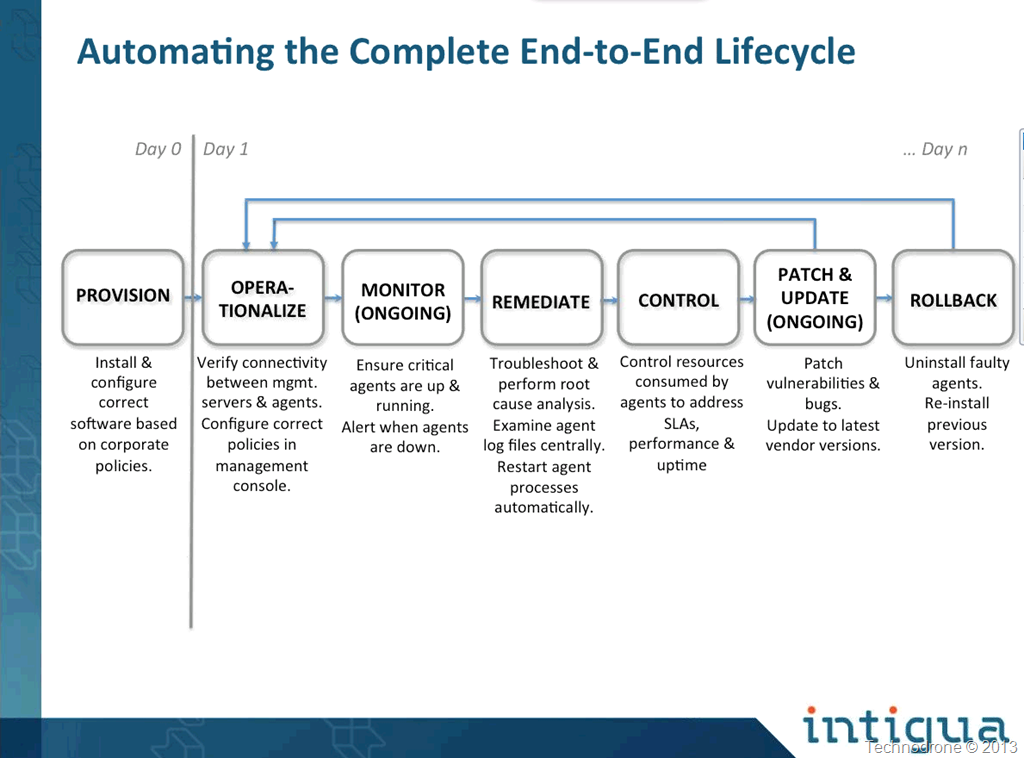
Let's take a look at the typical enterprise environment. Your virtual machines could possibly (and probably) have the following agents installed

  1. Anti-virus Agent
  2. IPS/IDS Agent
  3. Backup Agent
  4. Monitoring Agent
  5. Software Management (LanDesk/Altiris for example)
  6. VMware tools
  7. Configuration Management

There could be more, there probably are (here is a list of currently supported applications).
There also could be less, your mileage will vary according to your environment.

There is a great chance that each of the above agents come from a different vendor, and therefore that will require a separate management application to manage all your agents. And of course this will require a separate GUI that you will login for each and every application.

There is a very big chance that each and every of these are managed by different teams, different people, and there is a chance that none of the teams has insight or knowledge of what the other applications are doing.

Virtualization separated the operating system from the underlying hardware - through the use of a hypervisor.

VMware can encapsulate applications (ThinApp) and allow you to separate the application from the underlying OS and have it essentially run in a bubble. This of course is great for a VDI environment.

What caught my attention was something that was said during the session

"5 minutes to deploy a VM - 5 weeks to prepare for production."

Here is one of the slides that explains it a bit more. 

Too long to go to production

All of the above are a highly resource-intensive, mainly human resources.

Looking at he slide above you can understand why the deployment of a VM is so simple, but getting it just to the correct configuration, and compliance can take time, a considerable amount of time.

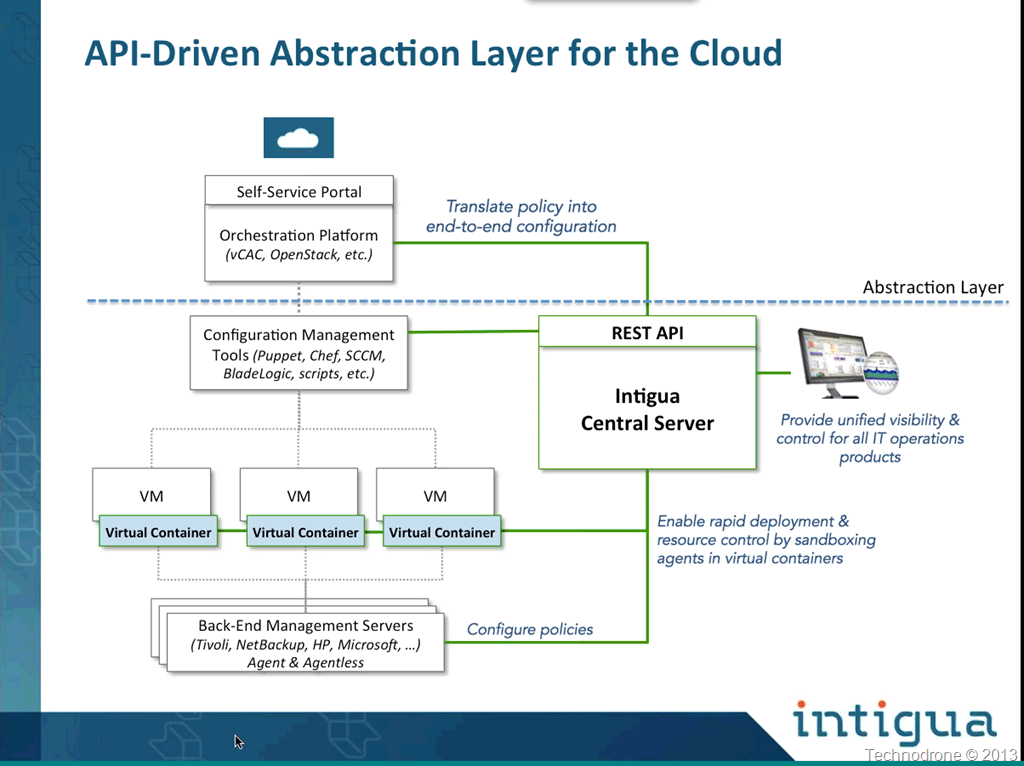
And here is what Intigua does.

Intigua Architecture

They have developed a virtual container that is installed in each VM.
On top of this virtual container all the above agents are installed and interact with the underlying OS.

So why another layer? If you actually think of this, it is actually very necessary.

Take the following example.

DeveloperA spins up a VM, by default VMware tools gets installed, Antivirus of course. The VM will not need monitoring, no backup, no IPS.

The VM then goes from Development to Staging.
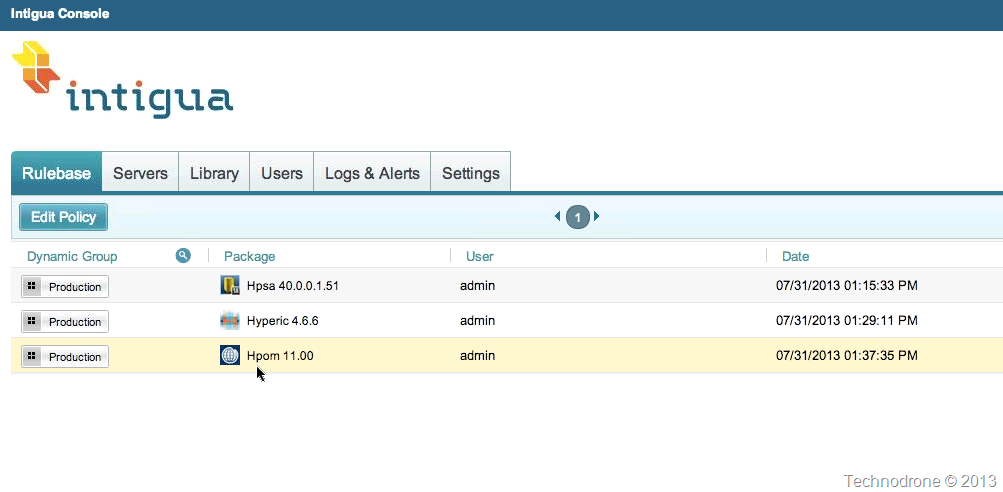
The machine now needs to backed up, but still does not need monitoring or IDS. Policies

Off go the emails to the relevant parties, "Please install this and that but make sure you don't install X or Y".

Why not have a Central point of management that will do this for you?

If you could take the VM, tag it with the Staging Tag, and all the correct agents would be installed. I'll take 3 of those please!

Let's look at another scenario..

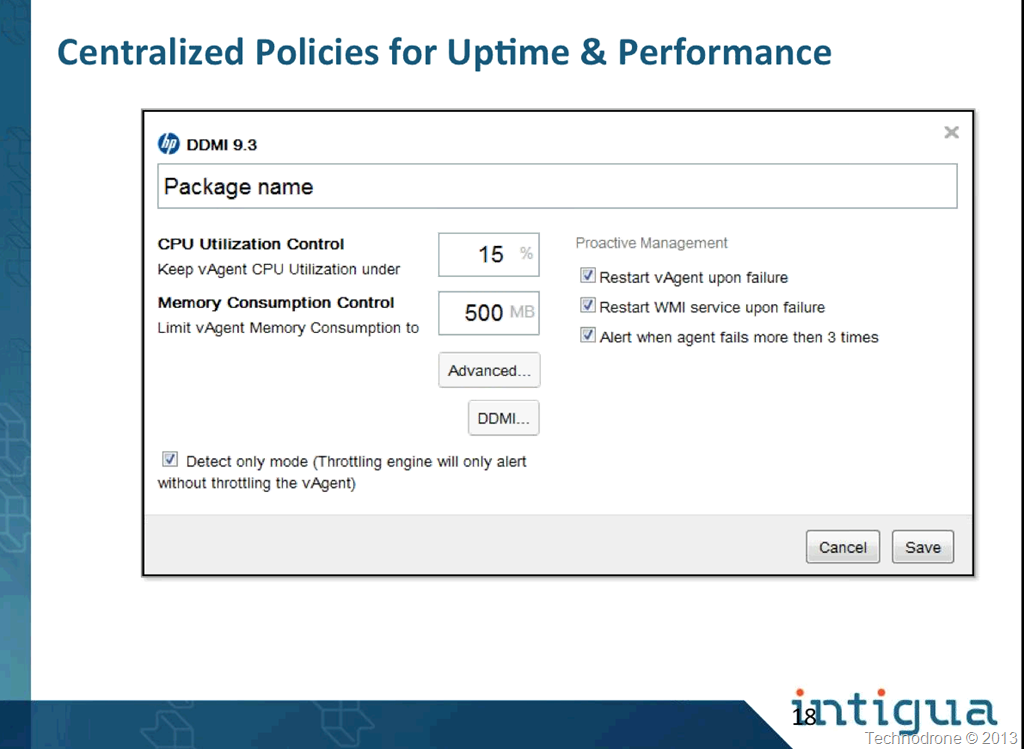
You have 4 agents on a VM, and during the backup window, the Backup agent consumes 100% of your CPU, causing a number of alerts to go out to your NOC, because your monitoring agent is not available. Up until now, there was not much you could do.

Intigua has the ability to throttle each and every agent under its control.

Throttling

So here I can set a limit that my agent will never consume all the available resources on the VM, affecting the applications, or other agents. Or waking me up at 03.00 in the morning!

How about agent upgrades? A vulnerability was exposed in one of the agents, and you need to upgrade all across the board. You could do that with the native tools, or just add a new package , with the new version, edit the policy and it will go out to all the current servers. And if the update cause problems? Rollback? Very simple!

The concept reminds me of VMware Mirage where the operating system is sliced into layers, allowing for maximum portability and flexibility through upgrades.

But it is not only a one way street, i.e. Intigua manages everything, but the backend management application does not have any knowledge of the underlying agent. As of late they have added two way functionality that will also update the backend application of all the changes done on the agents as well. It can also manage the policies and settings on these backend applications. If you would like to create a new Virus scan schedule on you SEP server, Intigua will be able to do this.

With their REST API, the Central server can interact with your orchestration platform and handle all of the installations for you, report back to the management application, a good two way conversation!

A typical flow could possibly be:

  • User deploys from self-service portal.
  • Chooses Machine type (Dev/Staging/Prod)
  • Passes information to Intigua REST API - which will in turn through the VMware API deploy all the correct applications and policies needed for this VM.

So can benefit from this solution? Intigua is aiming for the Enterprise market, the customers that have compliance requirements and have a number of challenges in this area. This kind of solution can reduce so much complexity in managing the lifecycle of your applications.

Of course Cloud option are also there - each endpoint can be managed regardless of it being in your Private Cloud or at a Public Cloud provider.

Intigua will be at VMworld in San Francisco and advise you to go by their booth, and have a look at their product. I am sure you will get a much more detailed (and definitely a better sales pitch) overview from them when you drop by.

Intigua 

Disclaimer: I have not received any compensation for this review. The information here was taken from a personal briefing I had with the 3 gentlemen above. I was asked if they could take me to dinner at VMworld, but I have not yet decided if I will accept that invitation. I wrote this because I find the technology interesting and see potential in this product. (and I am also a bit of a softy for Israeli startups.. )

2013-08-08

Access the DCUI from a Remote SSH Session

I posted a tweet tonight.

I needed to restart the management agent on a ESXi host (it would not reconnect to vCenter)

Restarting the Management agents on an ESXi or ESX host (1003490) is the correct KB for information on how to do it.

If you are at the console - you go in through the DCUI.

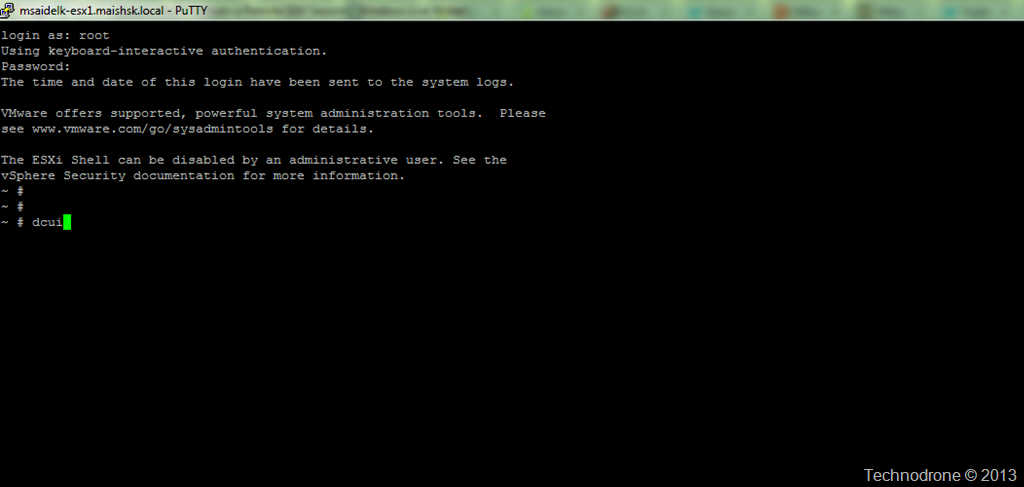
There is a not well known fact that you can also invoke the Direct Console User Interface (DCUI) from a remote SSH session as well.

Accessing Direct Console User Interface (DCUI) from an SSH session(2039638)

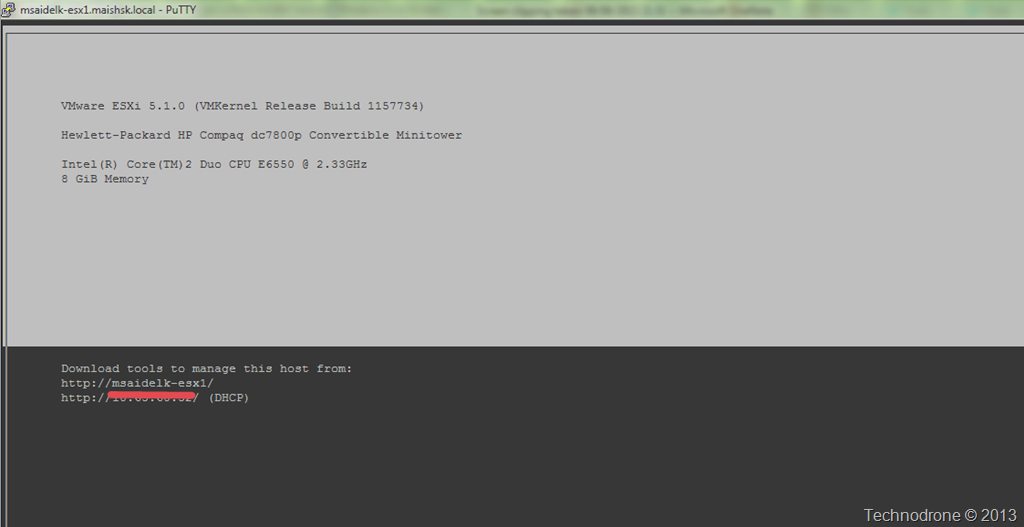
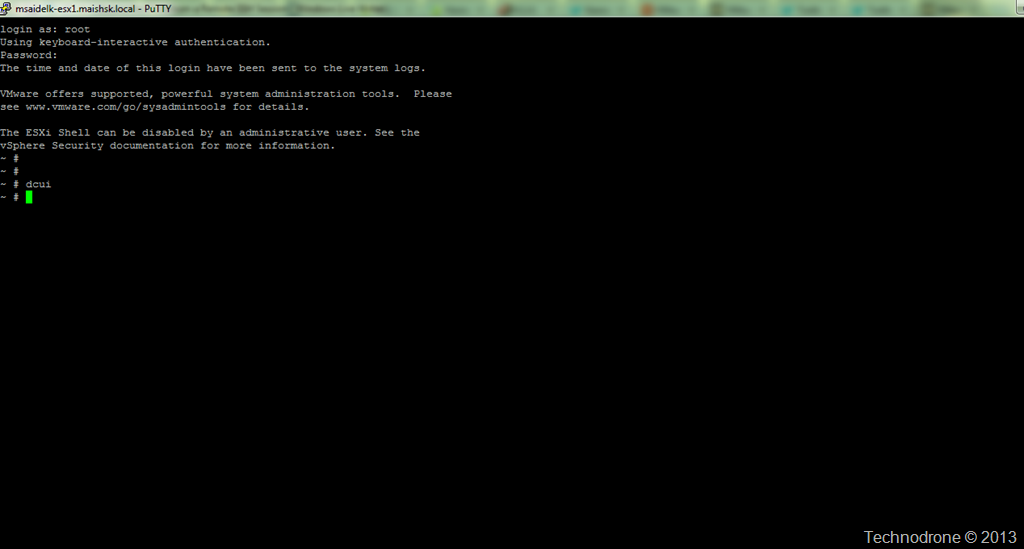
Very simple, just type dcui from the shell prompt. When you are done, Ctrl+C.

Before..

SSH session

After

DCUI invoked

Exit with Ctrl+C

Just have to read the KB's…

2013-07-22

Is DevOps The Answer to Everything?

I was just watching a discussion on DevOps, Automation and Continuous integration and heard the following,

"Chef is a tool for doing infrastructure automation - config management, application deployment - all of that stuff" (Adam Jacob - CPO, Opscode)

Two things that I would like discuss regarding that quote.

What is Infrastructure?

In my current role at Cisco - we have been discussing to great length platform - and what that platform actually is.

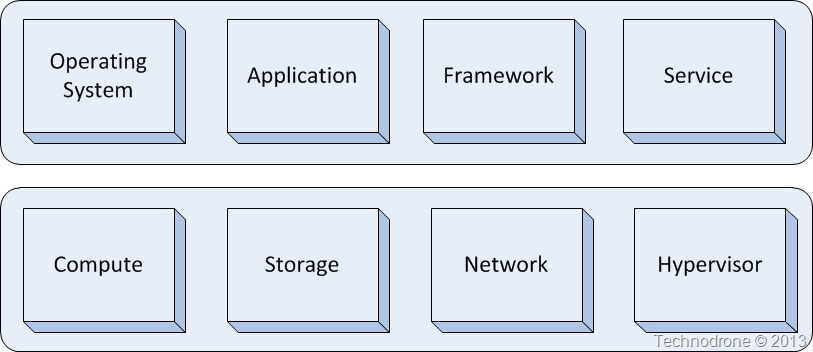
Have a look at the following diagram.

Infrastructure?

Where does the platform fit? What would you call the infrastructure? What is platform?

If you are a typical virtualization guy you most probably would focus on the bottom part of the diagram. You would say that is the basis of any infrastructure - without the compute, storage, network and perhaps some of other parts (hypervisor or OS could actually float up or down between the two halves) - but without those things - you cannot build anything on top.

If you were to ask a typical developer - then they would say it is all in the top half - because without having the java framework, the application foundations - then the end product (what you are selling to the customer) would not work, you cannot develop applications unless you have the infrastructure underneath.

It all depends on your perspective.

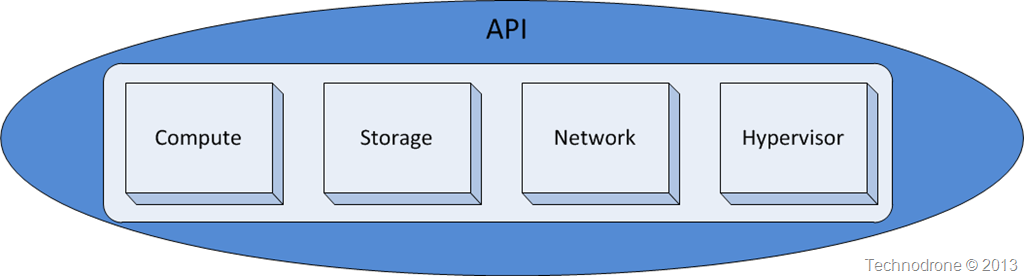
At the moment - the top half of the diagram - developers are making great use of abstraction of the underlying layer. They go to AWS, Openstack, VMware and access an API.

API encapsulation

Developers do not care about the underlying layer - they will place an call to an API to provision a VM - the whole underlying framework is abstracted.

That is why there is such massive use of Cloud for this kind of work. For a developer - just give them a VM and plop it down somewhere - what they really need is an IP and network connectivity to do their work.

But for the IT guys they are very worried about providing everything and piecing it al together to bring up that API and expose to the end user. That is not so simple. Automating the deployment of any of the squares above is not a simple task.

SDDC and SDN are great buzzwords that are trying to define those things today.

Which brings me to the second topic.

Is DevOps the answer to everything?

Again - this will depend on your perspective.

From a developer's eyes - hell yes! I can deploy a full product as code - multiple times a day, it is reproducible, repeatable and just exactly right up my street. I can make an operational change - role it out to hundreds of instances, and if I really find that I messed things up - then role back that change with a small change of the code.

In principle I agree, except for one thing. Tools like Puppet or Chef can do this with what I would define as new generation technologies, NoSQL databases, lightweight web applications, messaging frameworks. This is not valid for the legacy - deeply-embedded enterprise applications, take MSSQL and Oracle for example.

I do not know of a easy to implement solution that will perform a database schema change and easily roll that back with a quick change of a line of code, it is much more complicated than that. I do not say it is not possible - it is - it just takes a lot more planning and thinking. But then again - how many of you are actually using Oracle or MSSQL in the cloud? Not many I think.

Over to the IT guy…

Is DevOps the holy grail? Not by a long shot. Today there is very limited options available to deploy the bottom half of the stack. There are some modules today that can build out an Openstack deployment. Razor provides some of the functionality to deploy a vSphere infrastructure - but again it is not a polished solution and still has a lot of place for improvement.

Do you know of a puppet module that will deploy a UCS/HP chassis? Is there a Chef recipe that can provision a NetApp/EMC storage array? No there is not - at least not today.

So if you were to ask me - DevOps is definitely not the answer to everything - at least not until it can handle the whole stack from top to to bottom

As Robbie Minshall said on the same discussion (39:00),

"What we are trying to do is tie the phases together…  You cannot have DevOps in one space and then have it hit an organizational barrier in another - where they do it completely differently or not all"

For me today this is not a theological problem. It is a technological one. There are very few (if any) tools today that can properly automate a full stack that span both halves of the diagram above.

The vendors are moving into that direction - but are not quite there - yet.

(The original discussion is embedded below)

DevOps and Continuous delivery leveraging Cloud

Please feel free to add your thoughts or comments below.

2013-06-11

vCenter Log Insight Now Available

Hello World….

vCenter Log Insight (Release Notes) - The first public release of the new Log Management and Analytics product.

VMware vCenter Log Insight is the new solution of VMware for log management and analytics for dynamic hybrid cloud environments. It delivers superior technology for automated log management through log analytics, aggregation, and search to extend the leadership of VMware in analytics to log data. Log InsightLog Insight can analyze vast amounts of unstructured machine generated data and enable interactive, real-time search and analytics through an easy to use interface providing superb time to value. It analyzes log data of all types and from all devices, enabling deep, enterprise-wide visibility. With a focus on integrated cloud operations management, and an analytics driven approach, Log Insight provides the operational intelligence needed to proactively enable service levels and operational efficiency in dynamic hybrid cloud environments.

Think of it as something similar to Splunk but different - it is specifically vSphere Centric (at least at the moment), built by VMware people (as a result of the Log Insight acquisition from August 2012) and it integrates with vCOPs (which is a great plus)

There is recommended sizing document

image

Licensing

VMware vCenter Log Insight is available for purchase as a standalone product. It has a simple pricing model, with one flat rate for any server, virtual machine or vSphere host from which you collect logs.

VMware vCenter Log Insight is licensed on a per operating system instance (OSI) basis, which is defined as any server, virtual or physical, with an IP address that generates logs, including network devices and storage arrays.

With Log Insight, you can analyze an unlimited amount of log data per OSI. The advantage of this is a simple and predictable pricing model that is based on the size of the infrastructure; it does not force you to buy additional licenses to cover the worst-case scenario and pay more for increased log volumes.

Given that systems and devices can generate huge amounts of log data during peak times, or while monitoring and troubleshooting for various IT issues, this is an important distinction.

Detailed pricing information will be announced when vCenter Log Insight is ready to ship
in Q3 2013
.

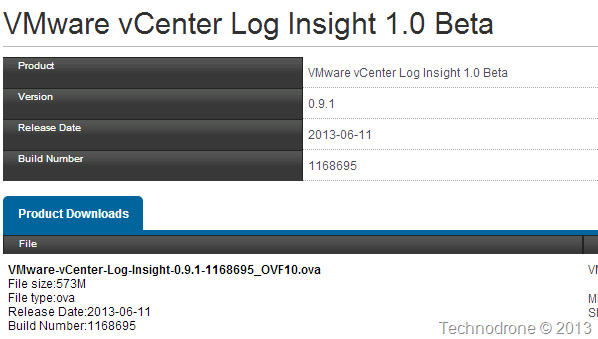
Just as a side note… Version 1.0 should not have a version number of 0.9.1 - that does not make sense…

1.0 or 0.9.1
1.0 or 0.9.1

Give it a spin - and le me know what you think about it?