Showing posts with label Design. Show all posts

2018-10-08

#AWS PrivateLink vs. NAT Gateway from a Pricing Perspective

A customer came to me with a request. They do not want to use a NAT gateway from their VPC to access the AWS API's. They had a number of security concerns regarding the use of a NAT gateway (no control, logs, auditing - but that is a for a different post) and they asked for a solution.

The AWS API's that they needed access to were:Endpoints

  • S3
  • KMS
  • SSM
  • Cloudwatch
  • Cloudformation

Last year at re:Invent AWS announced the option to create VPC Interface endpoints using PrivateLink and have steadily been adding more endpoints over the past year.

With the use of these endpoints you can actually have a VPC with instances that will not have any internet access (at least not through AWS) and still be able to interact with all the AWS API's.

This is technically possible - and can easily be automated, but I wanted to look at the cost perspective.

The VPC in us-east-1 has 2 Availability Zones (you should always have at minimum 2).

That would mean deploying 2 NAT gateways in your VPC (Pricing)

I am going to assume that you have the same amount of data going through both options - so I will not factor this into the price.

Usually you have 730 hours in a month.

Each NAT gateway will cost you 0.045*730 = ~$33.

Total for 2 NAT Gateways would be $66 per month (not including traffic).

What does this look like for Interface Endpoints? (Pricing)

Each Endpoint will need to be deployed in both AZ's in pairs.

Each Interace Endpoint will cost 0.01*730*2 = ~15

Total for all the endpoints above (4 Interface Endpoints - KMS, SSM, CloudWatch and Cloudformation) would be $60 per month.
The S3 endpoint is a Gateway endpoint - and therefore does not cost you any extra.

As you can see - it is not that much cheaper.

Take into account the following scenario - you need API access to 15 out of the 21 possible interface Endpoints

This would run you the steep amount of $225 per month - which is a lot more than just a NAT Gateway.

Design decisions always have tradeoffs - sometimes you prefer security and other times it will be cost. I hope that this will enable you to make an informed decision in your VPC design.

2018-08-19

A Triangle is Not a Circle & Some Things Don’t Fit in the Cloud

Baby Blocks

We all started off as babies, and I am sure that not many of you remember that one of the first toys you played with (and if you do not remember - then I am sure those of you with kids have probably done the same with your children) was a plastic container with different shapes on the lid and blocks that were made of different shapes.

A triangle would only go into the triangle, a circle in the circle, a block in the block and so on.

This is a basic skill that teaches us that no matter how hard we try, there are some things that just do not work. Things can only work in a certain way (of course coordination, patience and whole lot of other educational things).

It is a skill that we acquire, it takes time, patience, everyone gets there in the end.

And why am I blogging about this – you may ask?

This analogy came up a few days ago in a discussion of a way to provide a highly available database in the cloud.

And it got me thinking….

There are certain things that are not meant to be deployed in a cloud environment because they were never meant to be there in the first place. The application needed an Oracle database and it was supposed to be deployed in a cloud environment.

What is the default way to deploy Oracle in highly available configuration? Oracle RAC. There are a number of basic requirements (simplified) you need for Oracle RAC.

  1. Shared disk between the nodes.
    That will not work in a cloud environment.
    So we can try using dNFS – as the shared storage for the nodes – that might work..
    But then you have to make an NFS mount available to the nodes – in the cloud.
    So let’s deploy an NFS node as part of the solution.
    But then we have to make that NFS node highly available.
  2. Multicast between the nodes - that also does not work well in the cloud.
    So maybe create a networking environment in the cloud that will support multicast?
    Deploy a router appliance in the cloud.
    Now connect all the instances in the cloud into the router.
    But the router poses as a single point of failure.
    Make the router highly available.

And if not Oracle RAC – then how about Data Guard – which does not require shared storage?

But it has a steep licensing fee.
And you have to find a way for managing the virtual IP address – that you not necessarily will have control over.
But that can be overcome by deploying a VRRP solution with IP addresses that are manually managed.

ENOUGH!!!

Trying to fit a triangle into a square – yes if you push hard enough (it will break the lid and fit).
If you cry hard enough – Mom/Dad will come over and put it in for you.

Or you come up with half-assbaked solution like the one below…

blocks

Some things will not fit. Trying to make them fit creates even more (and sometimes even bigger) problems.

In this case the solution should have been - change the code to use a NoSQL database that can be deployed easily and reliably in a cloud environment.

As always your thoughts and comments are welcome.

2018-07-05

Getting Hit by a Boat - Defensive Design

In a group discussion last week – I heard a story (I could not find the origin – if you know where it comes from – please let me know) – which I would like to share with you.
John was floating out in the ocean, on his back, with his shades, just enjoying the sun, the quiet, the time to himself, not a care in the world.
When all of a sudden he got bumped on the head (not hard enough to cause any serious damage) with a small rowing boat.
John was pissed…. All sorts of thoughts running through his head.
  • Who gave the driver their license?
  • Why are they not more careful?
  • I could have been killed?
  • Why are they sailing out here – this is not even a place for boats.
And with all that anger and emotion he pulled himself over the side of the boat, ready to give the owner/driver one hell of a mouthful.
When he pulls himself over the side, he sees an empty boat. No–one there, no-one to scream at.
And at that moment all the anger and rage that was building up inside – slowly went away.
We encounter things every day – many of them we think are directly aimed at us – deliberately or not – but we immediately become all defensive, build up a bias against the other and are ready to go ballistic. Until we understand that there is no-one to direct all this emotion and energy at.
And then we understand that sometimes thing just happen, things beyond our control and we cannot or should not put our fate into some else’s hands.
That was the original story – which I really can relate to.
14221418411_385101705b_z
(Source: Flickr – Steenaire)
But before I heard the last part of the story – my mind took this to a totally different place – which is (of course) architecture related.
John was enjoying a great day in the sun – and all of a sudden he got hit in the head by a boat.
Where did that boat come from?
No-one knows.. I assume the owner had tied it up properly on the dock.
  • Maybe the rope was cut.
  • Maybe someone stole it and dumped it when they were done.
  • Maybe there was a storm that set the boat loose.
  • Or maybe there was a bloopers company that was following the boat all along to see who would get hit in the head.
There are endless options as to how the boat got there. But they all have something in common. The boat was never supposed to end up hitting John in the head.. John expected to be able to bake nicely in the sun and not be hit in the head by a boat
But what if John had taken additional precautionary measures?
  • Set up a fence / guardrail around where he was floating
  • Put someone as a lookout to warn him about floating boats
  • Have a drone above his head hooked into a heads-up-display in his sunglasses that he can see what is going around him
There are endless possibilities and you can really let your imagination take you to where you want to go as to how John could have prevented this accident.
What does this have to do with Defensive Design?
When we design an application – we think that we are going to be ok – because we expect to be able to do what we want to do without interference.
For example.
My web server is suppose to serve web requests of a certain type. I did not plan for someone crafting a specific request that would crash my server or bombarding the webserver with such an influx of traffic that would bring the application to its knees.
But then something unexpected happens.
When you design your application you will never be able to predict every possibility of attack or some esoteric ways  people are going to use your software. There is always something new that comes up – or someone thinks of a different way to use your idea that you did not even think of.
What you can do, is put some basic guardrails into your software that will protect you from what you do know or think can happen.
  • Throttling the number of connections or request – to prevent DDOS attacks.
  • Introducing circuit breakers to prevent cascading failures
  • Open only specific ports / sockets
  • Sufficient authentication to verify that you should be doing what you are supposed to
  • Monitoring for weird or suspicious behavior.
Again the options are practically endless. And you will not think of it all. You should address the issues as they happen, iterate, rinse, repeat.
That was a 4 minute read into thing that I think about during the day.
What kind of things do you think about when during your daily work? I would be interested in hearing. Please feel free to leave comments down below.

2015-03-10

vCenter is Still a Single Point of Failure - An Update

My previous post vCenter is Still a Single Point of Failure caused a decent amount of discussion on Twitter and comments on the blog. I am actually glad about that because it raised a point that I think has been neglected for quite some time – and is finally being addressed.

Today I learned that the Availability Guide was recently updated – and there were a number of changes (the original version is no longer available – but are we all lucky that I have screenshots). The biggest one was a whole new section was added on the paper about clustering vCenter Services.

New Section

Firstly I would like to commend VMware on putting this out. Let’s go in and see what was added.

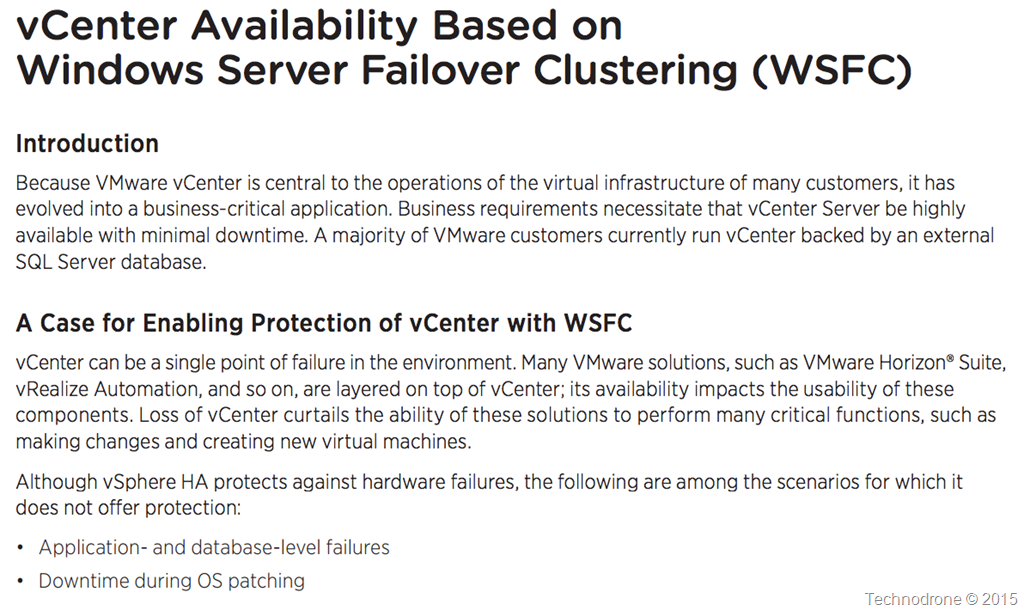
WSFC availability

<sarcasm>
“vCenter can be a single point of failure” – I wonder where I have heard that before?
It is good to see that vCenter is now considered to be a critical component.
I wonder why VMware changed their tune as compared to the previous version? (below)
</sarcasm>

What is vCenter HA?

So what would such an architecture look like? This is described in the following diagram

Clustered Architecture

You will need to setup a WSFC which will require a shared disk between the VM’s (RDM only is supported) and the document goes into some detail about how this should be set up. There are a large number of moving parts including DFS, How to perform upgrades, registry settings, certificates you name it. You will also need to protect the SQL / Oracle Database as well – this is not in the scope of this document.

You can see that a decent amount of work has gone into documenting the process. It is also apparent that this will be the same method used to provide the same availability features for vSphere 6.0 when it is released.

But one small caveat. I am sure you are not the only one who has gotten the feeling that VMware have been pushing us all towards the appliance – for a number of reasons, good and bad.

So where is the clustering solution for the vCenter Appliance? All of this is Windows Server vCenter only!

The only mention of such a solution is a tweet from my good friend Niran Even-Chen

Feature parity – is a relative term.

The second update I would like to go into was a performance paper released last week regarding the failover time needed for vCenter 6.0 in the case of a Host failure. The original article can be found here.

Now we have been down this path before – but I would like to point out two things.

  1. A VM protected by vSphere HA – will be restarted in approximately 30-50 seconds after failure – which is pretty fast and what we would expect from HA.
  2. The amount of time required to restart a 6.0 vCenter is even more than that of a 5.5 vCenter. Quite a bit more.

    From the original version of the paper:

    vCenter 5.5

    5 minutes and 12 seconds.

    From the performance document for vCenter 6.0

    vCenter 6.0

    I would like to take the middle scenario – where we are dealing with 32 hosts and around 4,000 VM’s (I think that  is safe to call that a standard environment).

    The restart time has gone up to 7 minutes and 19 seconds – That is a 40% increase in downtime. That is a lot if you ask me – and probably due to the changes made in the architecture – hopefully for the better of us all.

Again I would like to thank the authors for there hard work, also VMware for recognizing that this is something that was lacking in the previous whitepaper – and something they were quick to rectify.

Last minute update
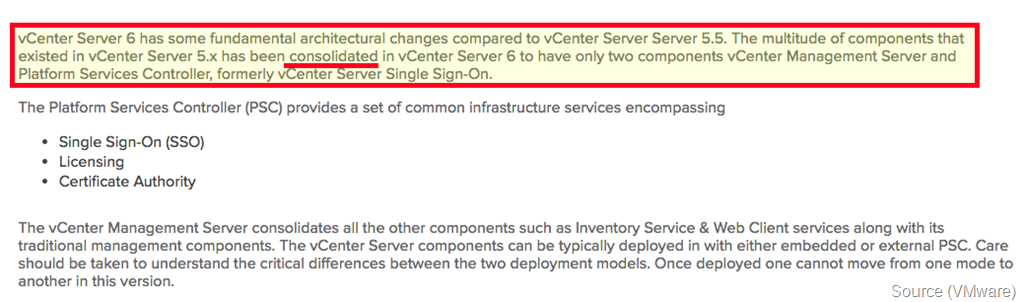
It seems there was an article published yesterday (after I had written this post) vCenter Server 6 Deployment Topologies and High Availability with some more information. It seems that even thought the vCenter Server has been consolidated down into two components – they taken even longer to start up.

Consolidated

It also seems that the Appliance will not be supported (at least not yet)

No vCSA

And one more question I had for VMware.

Windows Requirements

Why is Windows 2012 Datacenter Edition required? According to this document WSFC is included in Standard as well.

As always your thoughts and comments are welcome.

And don’t forget to vote!!!!

2014-12-11

vCenter is Still a Single Point of Failure

A few days ago VMware (Mike Brown, Anil Kapur and Justin King are the authors) announced the updated document for the vCenter Server 5.5 Availability guide.

I would like to make clear a few things from the start.

  • This is not a VMware bashing post. (Even it might be perceived as such)
  • I hold all three of the authors in very high regard.

Here goes.

When reading this document I was hoping to hear something new, something refreshing, something that VMware customers have been asking and verbally complaining about for a very long time.

Alas – this is not the case.

vCenter is a single point of failure. There I have said it. I have said it before, I will continue to say it in the future until this if fixed.

In the following article I will be taking statements directly from the text, providing my thoughts as I go along.

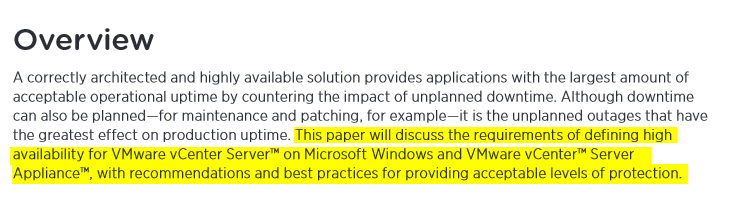
Overview

Great start – This document will discuss the requirements… After re-reading that statement – I understood what VMware did. VMware has not provided us with a method of providing HA for vCenter – but rather – have explained what they think should be defined as High Availability be for your vCenter server.

SLA

The authors then go into explaining all about MTBF and MTTR – they did a great job. I will not go into the details here – you should read the document

SLA’s are extremely important – and for and every environment – an SLA is something different – yours may differ from your neighbor, so it is important to understand what you need to achieve.

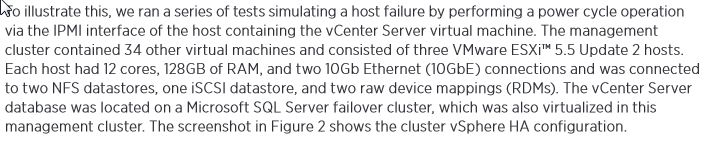
tests

They then go into describing the tests that were run in order to measure the amount of time it would take for a vCenter server to recover. Fair enough.

results

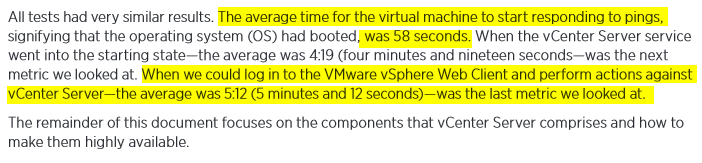
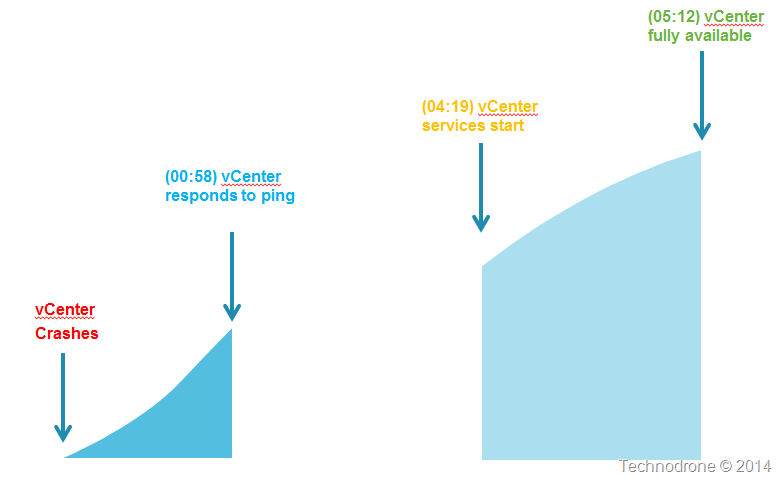
Here is where it starts to get interesting. Let us look at this in a picture.

Timeline

Bottom line is – that once a vCenter server has gone down – it will take a little over 5 minutes until it is fully functional.

recommendations

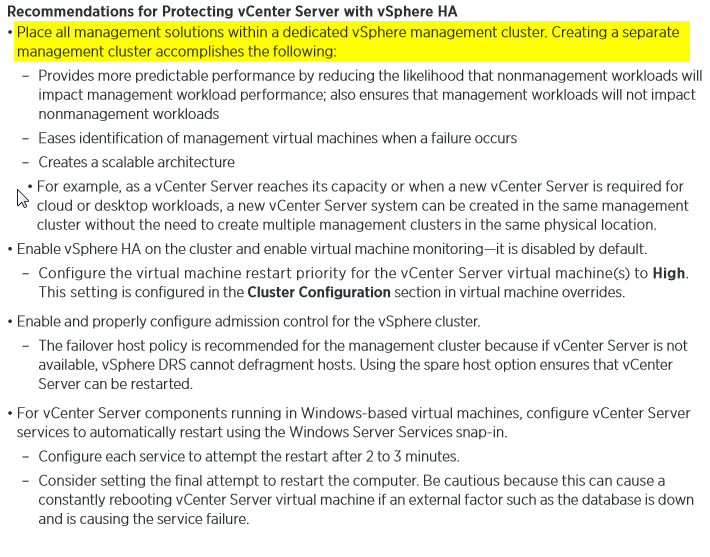
This part of the document states that having vSphere HA – and having vCenter running as a virtual machine actually provides some level of protection.

A dedicated management cluster is of course advised – that way you have a dedicated environment to run your management components without having to worry that the client workloads will interfere.

ESXi Hosts

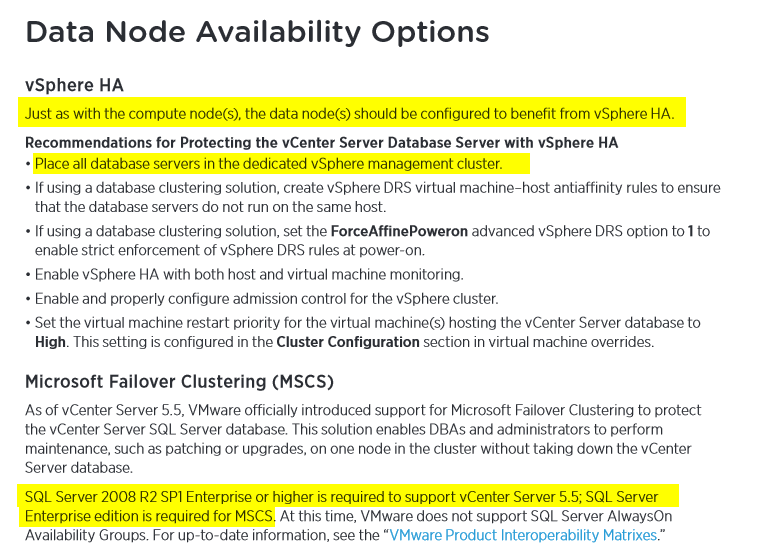
Also putting the database in the same management cluster is recommended – seems logical.

I then noticed that the only SQL version that is supported for vCenter 5.5 is Enterprise and up – which was news to me. I gather this is a documentation bug – because the VMware Product Interoperability Matrix says that Standard is supported.

Matrix

So how do you protect vCenter?

Replication

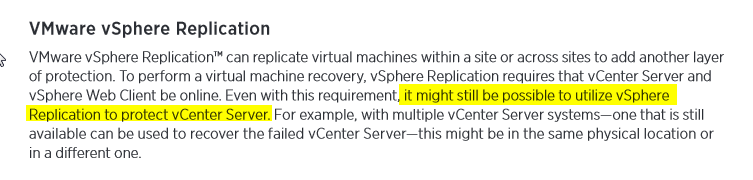
It would really be great if they would explain exactly how that would be possible and how that should be done. It still might be possible? How exactly? In order to protect vCenter – I will need another vCenter? Licensing? Implications?

VDP

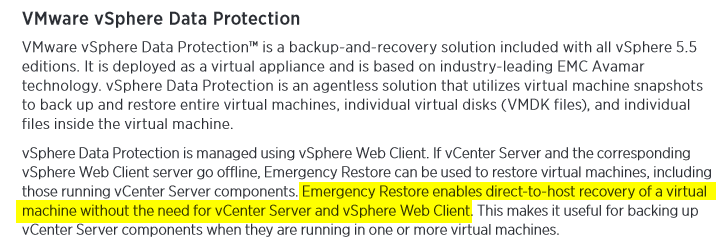
Emergency Restore was a new one to me – but it is only available in vSphere Data Protection Advanced Edition – that is something that was left out – which is approximately $1,500 (list price) / per socket. As a result of the feedback received in the comments – I have amended this. It seems that Emergency restore is also available in all editions of VDP – not only Advanced (more information here).

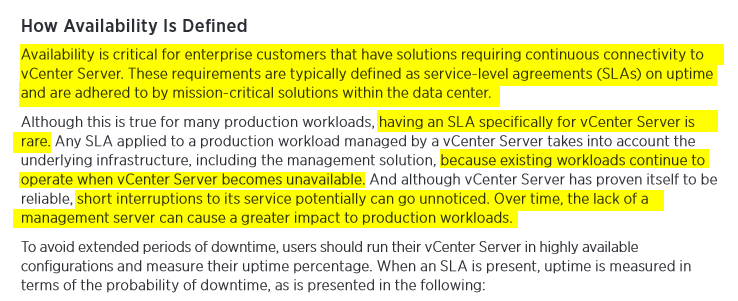
Definition

OK, enough copy and paste. This piece above is what set me off.

Essentially what VMware are saying the following:

  1. Use a separate management cluster
  2. Run vCenter in a VM
  3. Run the Database in a VM
  4. No matter what happens – if your vCenter crashes then it will be down for 5 minutes.
  5. Your  workloads are safe because they are running on your ESXi hosts are protected by HA and can continue running without a vCenter server.

Points 1-4 - I totally agree. With point #5 I also agree.

But there are environments that cannot afford to have a 5 minute outage. VMware might say that having vCenter go done and out for five minutes, is not really an outage per se, but I would very much like to disagree here.

If I cannot provision a new VM because my vCenter is not available – that is an outage.

Where would this be an issue?

  • VDI environments – If a user logs in and his desktop is not provisioned because vCenter is down? How about the whole 100 or 1000 employees?
  • Highly automated environments – ones that use products like vRealize Automation or vRealize Code Stream. Imagine having your code builds fail for 5 minutes because vCenter is not available? The whole continuous delivery process breaks down.

I might be exaggerating a bit – but I have voiced this more than once – I started more than 4 years ago - Troubleshooting Tools for vCenter.

vCenter is probably the most crucial part of your virtual infrastructure. And all that you can expect from from an availability perspective is that you have to accept as a given that vCenter might go down for 5 minutes at a time.

There are environments that will accept this - I would actually say that the large majority are fine with this – but what about those who are not? Those who cannot afford having this kind of outage? What do they do?

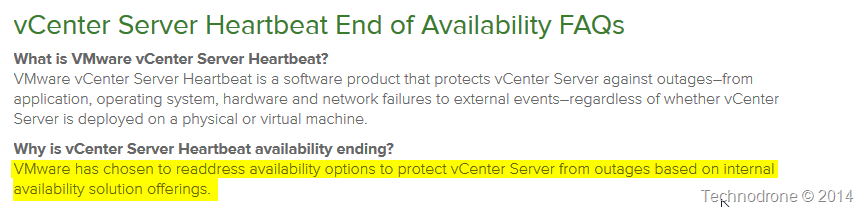
There used to be a product called vCenter Server Heartbeat – which was retired.

Heartbeat

Where are those promised options? When will they be available? What do companies do in the interim? Pray that there vCenter does not crash?

Embedded below is the Twitter conversation that sparked this post.


The scenario on which VMware based their whole presumption was on the fact that the host on which vCenter was running would crash, HA would kick in and the VM would be restarted on another host within 5 minutes.

The whole scenario of having a problem with your database, or a vCenter service problem (and believe me it happens), that was not covered.

Take the following scenario. You have a vCenter appliance. For some reason the vCenter service stops responding on the VM. There is no automatic restart. Eventually you get a call, something is not right. You try and restart the service, nothing happens. You restart the VM, nothing happens.

Now what? Open a call with VMware? Deploy another vCenter appliance and hope that nothing goes wrong? I can guarantee you that will take a hell of a lot longer than 5 minutes.

Why does the document even go into providing a clustered solution for the MSSQL database? Because that might fail? Yes it could happen. But guess what – the whole system is only as strong as its single weakest link. So providing a clustered database solution might give some piece of mind – but it will not protect you from an outage – because there is no way to cluster a vCenter server.

conclusion

In conclusion – yes there are considerations. I would definitely not say that VMware have a High Availability solution for vCenter, they have done their best to minimize the impact it will have when it vCenter crashes – but that is not HA!

What do you think? Am I making a mountain out of  molehill? Or this a real and valid concern? Please feel free to leave your comments and thoughts below.

2014-08-08

The OpenStack Architecture Design Book Authors Speak

In the OpenStack Design Summit I asked the authors the same 5 questions in order to get their thoughts and feelings on OpenStack, the community and the future.
  1. How many years have you been working with OpenStack?
  2. What is your favorite thing about OpenStack?
  3. What is that you dislike about OpenStack?
  4. If there was only one thing you could change/improve in OpenStack - what would it be?
  5. Where do you think Openstack will be 3 years time?
Here are their responses.
Beth Cohen, Cloud Technology Strategist – Verizon
    1. 3 years.
    2. It is a strong community of companies and people who want to build the best cloud platform in the world.
    3. It is a bunch of petty developers snipping at each other from their little fiefdoms.
    4. Better integration of the parts.
    5. Everywhere!
Sean Winn, Cloud Services Network Engineer – CloudScaling
    1. 2 years.
    2. I love that OpenStack is an open-source, community-developed system which, when leveraged properly within an organization, can have tremendous impact on every aspect of how that company does business. The effects of OpenStack on business operational efficiency and agility are incredible to me.
    3. Lack of cohesiveness between projects is one of the biggest problems that I see facing OpenStack. Features are sometimes developed without consideration of other OpenStack projects implementations of same or similar features.
    4. More cooperative efforts between projects to develop features with parity.
    5. The most widely deployed data center and cloud solution.
Kenneth Hui, Business Development Manager, Cloud Solutions – EMC
    1. 2 years.
    2. The collaborative nature of the community.
    3. Lack of focus in terms of development. Too many people chasing the newest shiny thing.
    4. Better product management.
    5. Leading private cloud platform.
Nick Chase, Technical Marketing Manager - Mirantis
    1. 2 years.
    2. The "open" nature of OpenStack means that anybody can get involved, and anybody can make it do what they need it to, if they are willing to put in the work. The possibilities are endless, and I'm passionate about that.
    3. I'm sure there's much that I "dislike" exactly, though there are some things I wish worked better, or were easier to use. Deployment could be a little easier, of course.
    4. Public perception. :)
    5. Complete convergence so that hybrid and multi-cloud are not just normal but transparent.
Kevin Jackson, Principal Cloud Architect – Rackspace
    1. 3 years.
    2. The fact it's an open source, globally collaborated project that is the first choice when discussing cloud technologies that you can deploy yourself.
    3. Release cycle of 6 months with very little support at present to easily upgrade to match this cadence.
    4. Neutron/Networking - we need to quickly move on from the "Nova-network" vs "Networking" discussion ASAP.
    5. We'll see "OpenStack Compatible" stickers on hardware and software showing ease of integration with the standard privately deploy cloud software.
Anthony Veiga, Senior Network Engineer - Comcast
    1. 2 years.
    2. The flexibility to plug the parts I want and omit the parts I don't. Plus, it's open source so I can't parts I need (which my team has done a lot of).
    3. I dislike the primarily vendor-driven nature of its development. More users need to get involved, and the Foundation should recognize that coders aren't the only contributors.
    4. Add community processes for locking out intentional roadblocking.
    5. A multi-billion dollar per year industry.
Sean Collins, OpenStack Developer – Comcast
    1. 2 years.
    2. Being able to make design decisions that affect the entire company I work for.
    3. Gerrit, Nitpickers.
    4. Nitpickers.
    5. Probably where it is currently.
Vinny Valdez, Principal OpenStack Enterprise Architect - Red Hat
    1. 1 year.
    2. I particularly enjoy how expansive, dynamic and flexible all of the projects yet they all come together in unison.
    3. Many concepts sound great in theory but are not always proven or tested.
    4. Move everything to MongoDB.
    5. The de facto standard way to run applications.
Alexandra Settle, Technical Writer – Rackspace
    1. 1 year.
    2. The community involvement and dedication everyone has to the project.
    3. Unfortunately the documentation is not up to the greatest standard it could potentially be. This however is an ongoing project and I hope to see it through.
    4. Documentation.
    5. Hopefully still progressing. Lots of community based projects die once a 'bigger and better' project is introduced.
I would like to thank all the authors for an amazing week in San Jose – and amazing experience – and an amazing outcome.

2014-08-04

The OpenStack Architecture Design Guide Story

Over 6 weeks ago I posted that I was going to embark on a journey, another book journey, and this time it was an OpenStack one.

Go ahead and read the post OpenStack Design Guide Book Sprint.

I have been wanting to write this for a while – but so much has been happening – that I just have not yet got around it until now.

I first would like you all to visit these two posts:

As were the others, I was also skeptical about if such a process was even possible – but it was and I find it was actually a great success.

Everyone I have spoken to since the sprint was surprised that you actually can write a book in 5 days, it just shows that with a group of dedicated, task driven individuals – that have a deadline, and a common goal, it is possible.

So how did it actually work?

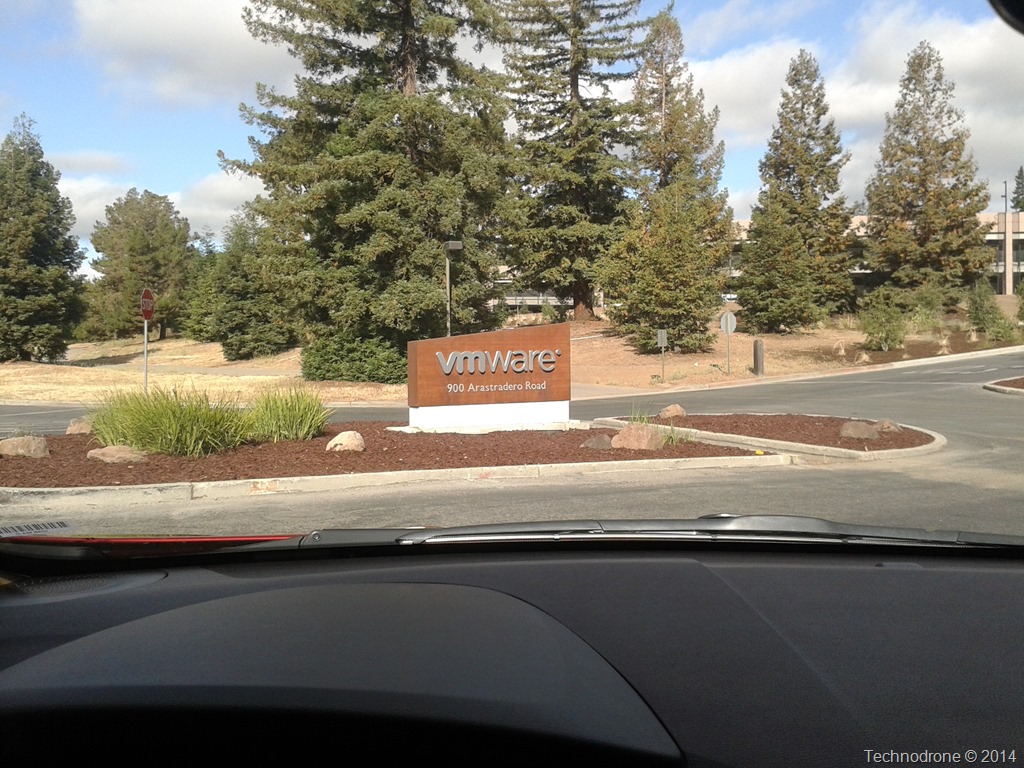
VMware (thanks to Scott Lowe) was kind enough to host us for these five days.

VMware Mothership

It was the first time I had actually been to the VMware campus – so this also was a first for me.

The diversity of the people involved was – I think – a good mix. There were Networking people, Openstack people, Architects, Storage Architects, Writers, Infrastructure Administrators, Project managers, a bit of everything. Each of us had input from a different aspect into the content that was going to go into the book and how it would be written.

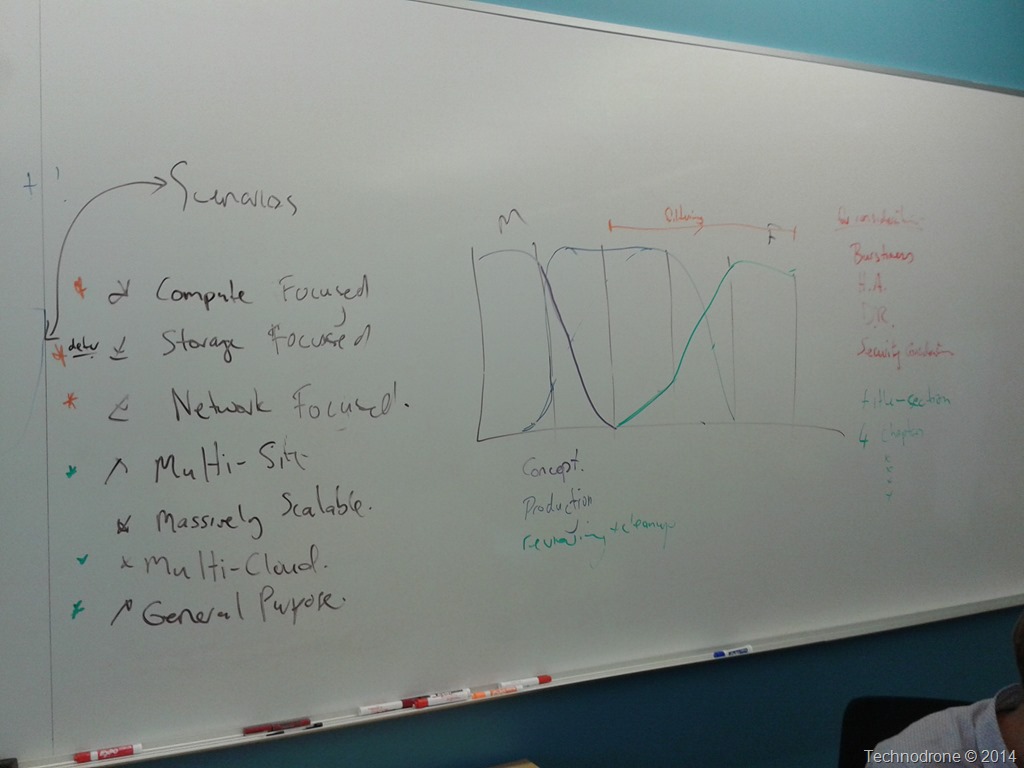
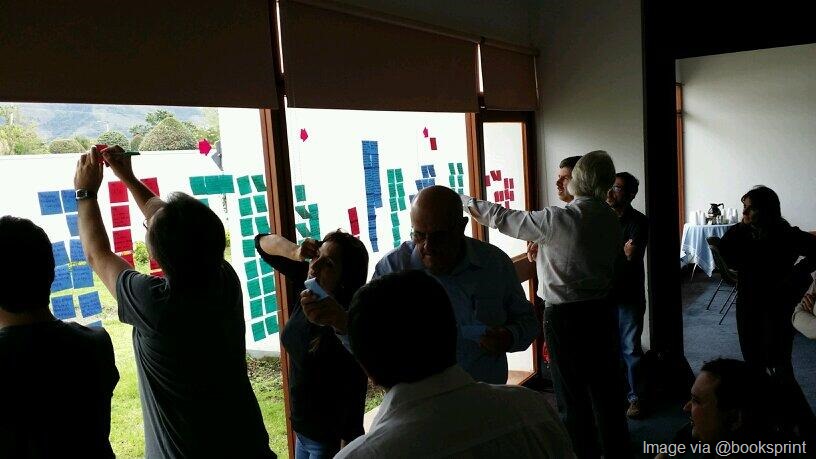
The first day was mostly dedicated to the book structure, what the content should be about – who the audience should be, layout and such.

Scenarios
Lots of Notes

A good amount of brainstorming, discussions – getting to actually know each other – because not everyone was acquainted with everyone else.

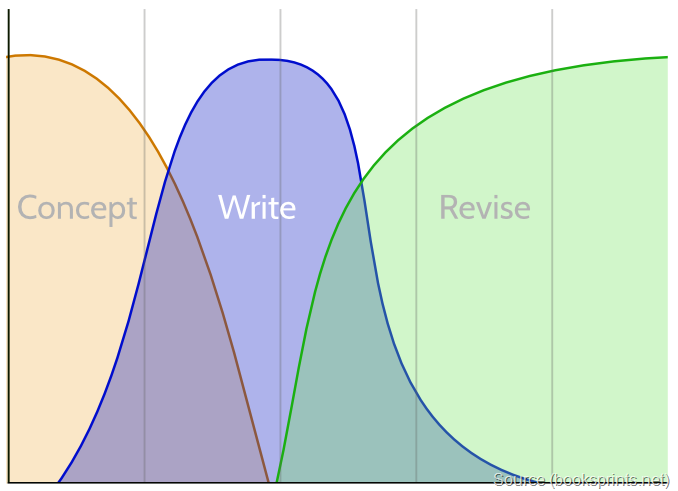
The graph on the picture above is actually better explained here

mapping

Each of the vertical lines is a day. As you can see the concept of what actually goes into the book is mainly done on Day 1 and a bit on Day 2. On Day 1 you also start creating the content where most of it is done on Day 2-4 – where at the end of Day 4 – almost all of the content is actually done. Revision starts on Day 3 and continues all the way till the end. And this exactly how it went.

We broke up into groups that would do the writing according to chapters. At first discussions in each group – what should go into the chapter, then high-level chapter points and then after that churning out content.

We had some problems with the software that we used, mainly because the majority of us are used to having tools where you can collaborate simultaneously on the same document (Google Docs or Etherpad) and here we were limited to one person on a section at a time. We found the middle ground of working with all of the above and synchronizing content – that allowed us all to work efficiently and keep the flow of the Sprint going.

I expected there to be some bottlenecks along the way – due to the fact that in order to have the book come out as though it was written in a “single voice” – it needed to go through what Adam (our moderator) called a “filtering process”. That mean it needs to go through one or two people that will organize the content with the same narrative, line of thought and style. And evidently that is what happened towards the end

Obviously we had different writing styles – so adaptations needed to be made along the way.

And so we trudged on – writing, editing, creating diagrams, and re-editing.

The combination of the constant supply of caffeinated soft drinks, M&M’s and other sugar saturated stuff, was about enough to get us through the sprint.

Getting to the end of Friday with checkmarks across the board was a very satisfying feeling.

All Done!

I had a great time, a wonderful experience. Out of all of the participants I had only ever met Scott Lowe, all the others were either through interaction over Twitter or other means, but not in person.

It was a enlightening experience, very satisfying and something I would definitely do again if I have the opportunity.

I hope my co-authors can forgive me for the Kosher food they had to eat during the Sprint – I must say home-made cooking (especially my wife’s) is a lot better than what we all got. So whenever you guys are are in Israel for a trip – I will be happy to invite you all for a home cooked meal.

And now for the finished product.

The online version…

Online version

Paperback – from Lulu.com

Paperback

You can browse through a full set of pictures taken at the event here.

All the authors have proposed a OpenStack Summit Session for the upcoming Paris Summit -
The OpenStack Design Guide Panel – please feel free to cast your vote!

2014-06-16

OpenStack Design Guide Book Sprint

It is said that once you get a bug in you – it is hard to get rid of it. I have been asked (and I have accepted) to participate in a book sprint commissioned by the OpenStack Foundation.

What is a book sprint you may ask? I am sure this will explain it better than I can – but in short…

A Book Sprint brings together a group to produce a book in 3-5 days. There is no pre-production and the group is guided by a facilitator from zero to published book. The books produced are high quality content and are made available immediately at the end of the sprint via print-on-demand services and e-book formats.

Book Sprint

A full book in 5 days? Is that even possible? Well, yes it is. There are a group of Subject Matter Experts coming together in the week of July 7th in Palo Alto (VMware are being so kind as to host us), where we sit and bash out a Design Guide/Book that will be used as the unofficial “bible” for OpenStack Architects wherever they may be.

Here is some more information about the two previous book sprints that were completed for the Openstack project.

OpenStack Security Guide: One Week, 38,000 Words, A Lot Of Security

OpenStack Operations Guide: One Week, One Book

The participants of this project will include:

And yours truly….

There is good participation from all parts of the globe and the OpenStack community – a diverse crowd – with different skills, experience and backgrounds.

I am really looking forward to this project – meeting such a group of interesting people, working on a new book project, but most of all – contributing back to the community – because that is what it is all about!

You can follow us all with the #openstackdesign hashtag for more information about this project.

2014-01-02

Some Thoughts About Openstack High Availability

As of late I have been putting some thought into how the underlying infrastructure that is needed for running and OpenStack environment and the lack of built-in high availability solutions to provide a robust (and yes I might even go as far as saying - an "Enterprise-Ready") solution.

First let's go over what are the components/services that run in Openstack - the easiest would be to quote the OpenStack documentation.

openstack_havana_conceptual_arch

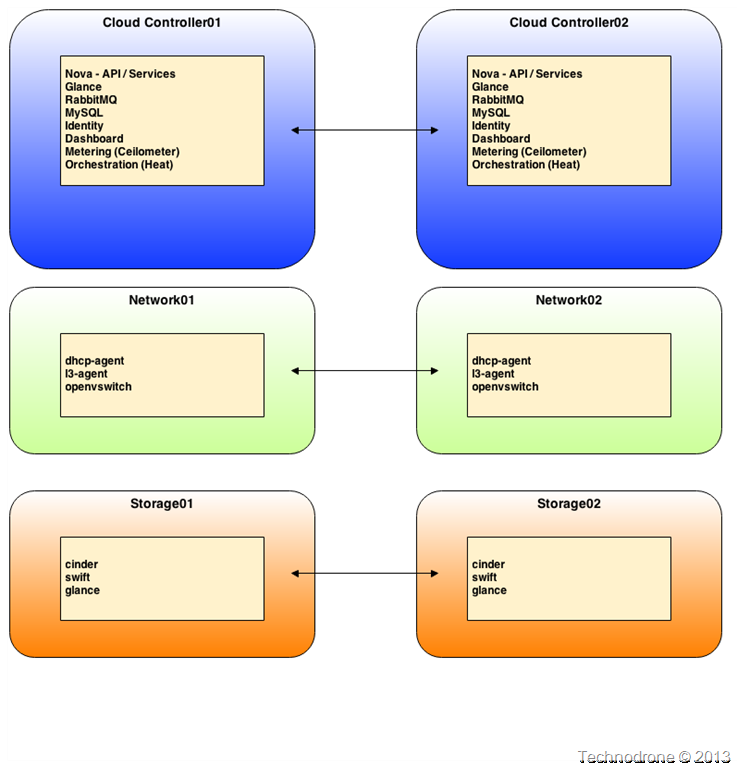
To simplify this I am not going to go into each and every single service that needs to be redundant but rather to go at a slightly higher level (not that much) and propose that the the following architecture could be a possible solution.

I will not go into the exact steps needed to provide the clustering mechanism for each component, I think there are more than enough resources that have done an amazing job already ( I will say though that it is not straight forward, and multiple technologies and solutions are required for the components).

  1. Introduction to OpenStack High Availability
  2. Practical Lessons from Building a Highly Available Openstack Private Cloud
  3. High Availability Update
  4. Openstack HA @Paypal

(Just as a side note - it would be a great idea to write out an article as to what operations will not be possible/what will not be available, if one of the above services/components are down)

If we were to use the basic model above - we would need at minimum 6 servers/instances/VM's - and to simplify for the sake of the article - the amount of resources allocated to each of these VM's are not really the issue.

What has been occupying me lately - is where do you should these workloads be placed? The workloads do not warrant their own physical hardware (in my humble opinion) - because they could easily run as virtual machines. This could you bring you to a solution such as the following (and by no means is this the correct/optimal way)

Openstack HA

Let's see how we can answer that $1,000,000 question.

Obviously you cannot run them under Openstack itself. Firstly the concept of building Openstack hosted on Openstack is quite problematic. In a vSphere environment this is possible because each and every host can be managed on it's own and you can install a full vCenter / vCloud environment on a standalone host - and have that managed by the VM's it is running. Is this a not always a good idea - and the VCAT documentation states that a Management Cluster is a good design practice. Separating the management layer from the actual layer that runs the resource workloads is a very good idea (if it is a viable option for your environment)

I have yet to find a way that will enable you to import instances that are already running on a nova-compute node.
Not possible.

The way I would design this environment is something like the following architecture as a management cluster.

Openstack HA1

It is not a necessity to have an underlying HA solution on the hypervisor layer (although the benefits are obvious). The components themselves will be using an application clustering solution and if one of the hosts go down (with the control nodes), the services will continue to function - albeit in a degraded state - but you should not have any major loss of functionality.

So what could you use as the host for these control nodes? vSphere, Hyper-V, or perhaps KVM? I am sure there are pros and cons for any of the above solutions, and this is again, is something that you need to take into account when deploying your infrastructure.

Some food for thought on the dawn of this new year.

I would be grateful to hear your comments and ideas on this matter. Please feel free to leave them in the comments below.

2013-02-28

How To Deal With a Complex Project

You have been tasked with a task, it could be a long term project, a one-off thing. These usually involve identification of number of tasks and stages that need to be executed in order to complete the whole task.

One such an example that I would like to discuss today is the completion of a complex scripting task.

One script I have been nurturing is a deployment script for Oracle RAC on VMware. It actually has grown to be over 700 lines of code (perhaps one day I will be able to make it public).

I was asked not so long a go, “How do you manage to write such a long script? How or where do you even start?”. The answer to that question is the reason for this post.

I really love working in PowerShell and PowerCLI – that is no secret. I do dabble in other scripting languages as well but Powershell is still my favorite.

Scripting can be used in different ways.

  • One time quick and dirty tasks. You pop out a line of code which gets the specific information you want, and perhaps you will save it (you should) – just in case you need to do it again. These are also referred to as one-liners.
  • Functions – here you think a little more, I want to create a piece of code that can be used on a regular basis – make it re-usable and write it to be robust, mean and lean.
  • A process or a workflow. Now I know some of you will say that Powershell/PowerCLI is not really the ultimate tool to use for running complex tasks with multiple scenarios and use cases – and I must say I agree. On the other hand – vCenter Orchestrator has a steep learning curve. Using a tool that you already know and are familiar with will make it easier. Easier to write, optimize, troubleshoot, and document.

No matter which tool you use the methodology will be the same. This is how I do it – and perhaps this can help you too.

  1. Envision the process from a high level perspective
  2. Layout the steps you need to perform in order to get there
  3. For each step – detail what exactly needs to happen
  4. Write the code you need to get it done.

It is best to explain this by walking through an example (without actually writing the code)

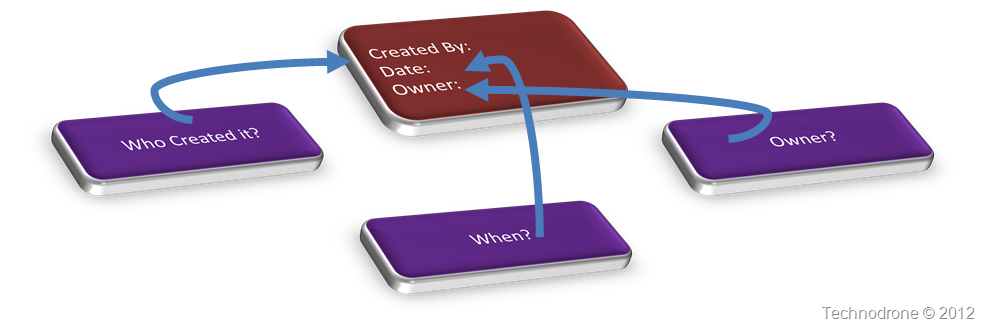
Each VM that is created is usually done by an admin/user. You would like to have some way of knowing who created the VM, when and for whom (owner/department).

So how would you go about doing this?

Step 1 – Envision the process

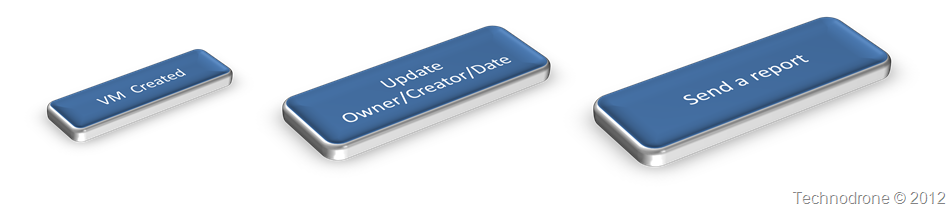
This is how I see this – from a very high level.

Envision the process

Someone creates a VM, the details are filled in, and a report is sent out. Look at it from the perspective of upper management – they do not care about the details, how it works, they look at the process.

That was the easy part.

Step 2 - Layout the steps

When a VM is created it is logged, and these logs can be parsed or checked for specific events. From that information you will extract the information needed (Date, Created) and attach that info to the VM, the easiest way would be to add it to a custom field for the VM. This process will be performed for each of the new VM's that were found.

All of this information should should be collected into a readable format that can be sent as a report, either a file or an HTML page.

Layout the Steps

Step 3 – Describe each step in detail

VM Created

A VM is  born

A VM is born. How do you know that this happens? Well pretty simple. Go through the events that were created in vCenter. But you have to remember of course that there are several ways to create a VM and these could be:

  1. Deploy from OVF
  2. Deploy from Template
  3. Create From Scratch
  4. Clone from Existing VM

Not all of these have the same events registered in the Events and Task so you will have to look for all of them to catch all VM's created.

You really do not want to scan all the events (from time immemorial) so you should decide on a timeframe - an this will be the period you will check against.

So if I were to layout my steps they would be as follows.

## Define Period to search - 24 hours
## Get All events for VM created
    ## Cloned VM's
    ## Deployed from OVF
    ## Created from Scratch
    ## Cloned From Existing

But in order to even begin to get events I would need a few things (seeing that I will be running this as a scheduled script):

  1. PowerCLI
  2. Connection to vCenter

So my steps will change a bit to look like the following:

### Validate connection to vCenter ###

## Check for PowerCLI
## Check for Connection
    ## If not connected then connect
        ## Need vCenter Name and credentials

### Get All VM's Created ###

## Define Period to search - 24 hours
## Get All events for VM created and store in a variable
    ## Cloned VM's
    ## Deployed from OVF
    ## Created from Scratch
    ## Cloned From Existing

OK So now I have all the VM's created within the past 24 hours. Here would be my next steps.

Update Fields

From the event Update Fieldsdetails of each event for each VM - get who the user was that created it and when.
Populate that into a Custom field/Tag for each VM.

So if I were to layout my steps they would be as follows.

### Update details for each VM

## Go through each event
## Update Created By
    ## Extract Username that created the VM
        ## Get proper Name from Active Directory
            ## Need access to Active Directory - AD Powershell Module
        ## Update Custom Field / Tag
        ## Save to report
## Update Date Created
    ## Extract Date when VM was created
        ## Convert date to something that can be indexed
        ## Update Custom Field / Tag
        ## Save to report
## Update Owner
    ## Check if Owner was already updated
        ## If not - send email to user that created it to update the field
            ## Need to get email address of creator
            ## SMTP server variable
            ## From address variable
            ## Subject variable
            ## Body to be sent in email
        ## Save notification to report

Create Report

Now to send out the report.

## Take information from report
## Convert to something readable
    ## Export to Excel file
    ## Convert the information to HTML so it can be re-used
## Send Email
    ## SMTP server variable
    ## From address variable
    ## To address variable
    ## Subject variable
    ## Body to be sent in email

Step 4 – Write the code in detail

Now you know what the steps are, it is now time to write the code for each and every step, and this is where most of the work will be. It could be that during the writing of the code you will see that you need to perform additional steps in order to accomplish what you would like, and if so - continue writing out the stages and fill in the appropriate code. Such an example would be - this should be run as a scheduled task which means you will need to provide a method to pass the credentials to the script. Another example would be - you already sent an email to the Creator saying that they should update the Owner, and if they did not - do you leave it? Send them another email? Escalate the issue? For each of these scenarios, there are steps that need to identified, and the appropriate code written.

Another thing I like about this methodology is that it already partially provides some basic documentation for your script - something that is very important - so the code can be re-used in other scenarios as well.

I will not be providing the code for the steps, I will leave that task for you.

Summary

Envision at a high level what you want to accomplish, identify what are the needed stages for this to succeed, and break each of these stages into small steps, and detailed again further into more steps until you have each and every step as part of your plan.
I used a PowerCLI script here as an example - but this methodology can be applied to any project.

  • VCDX Certification
  • Upgrade from 5.0 to 5.1
  • Implementation of vCloud in your organization
  • Upgrade Active Directory to 2012

This is the methodology that I use - I hope that it will be of some use to you.