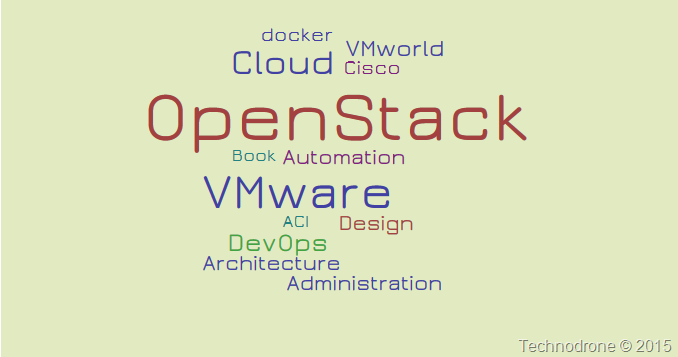
Automation, | Administration, | Architecture, | Design and Docker (5) (Ok I lied – that was more than 5 topics) If you would like more of a graphic presentation – here you go. 
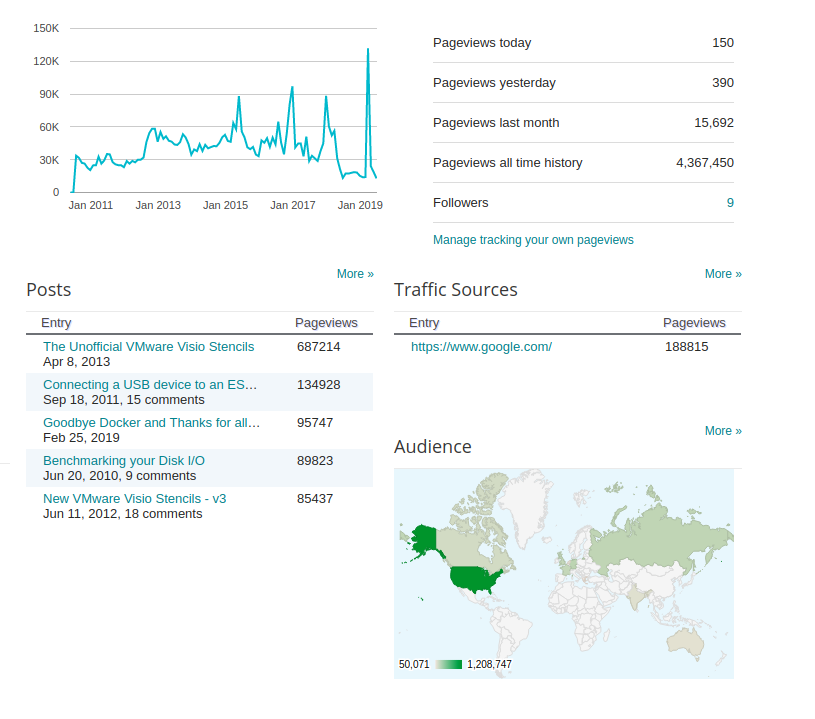
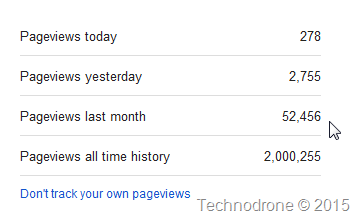
For me it has is interesting to see that my focus has changed, and not VMware centric any more. I guess that is an expected thing – with my current role and also that I have a more overall solution in mind during my daily work – which is so much more than virtualization. I hit a Milestone – on December 03, 2014 where I surpassed over 2,000,000 Pageviews on my blog. 
It took me 5 years to achieve my first million, the second was achieved in only two years. I have been blogging for 7 years now, it always good to share my thoughts, my insights, and sometimes my rants. I hope you all benefit, and will continue to make use of the articles I write. Here is looking to a great 2015, filled with opportunities, community and exciting things ahead. And how did 2014 turn out for you? Please feel free to leave your comments and thoughts below. Catch you on all the flip side!
I love IFTTT – it is a simple way to automate things. If This Then That. If something happens – then do something else. I am already using a number of IFTTT recipes to help me in automating my daily life. I do not use Wordpress – Blogger suits my needs very well, It has its upsides and downsides. When I publish a blog post – I like to update my social networks with the announcement. At the moment this is manual process. And I had enough. I went to my friend IFTTT to help me out. A new recipe that finds a new tweet by me. 
and then push it to buffer 
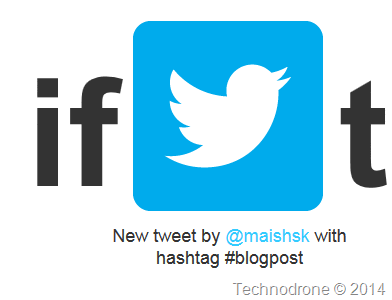
Two major issues here. One I only want to push certain tweets – not everything. That could be solved by changing the trigger to a tweet by me with a hashtag 
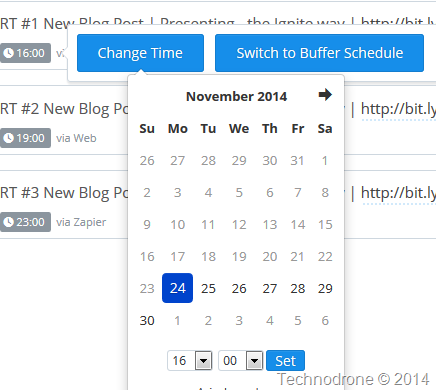
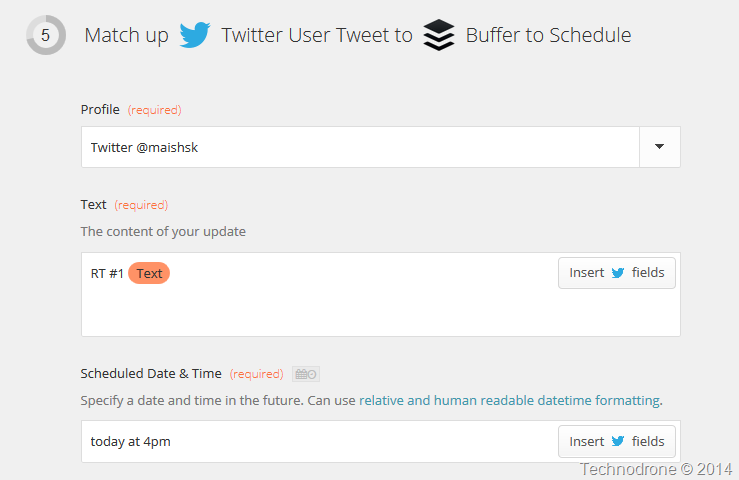
But my biggest problem was that I have not control of when the tweet should be scheduled something which I can do with the buffer interface as you can see below. 
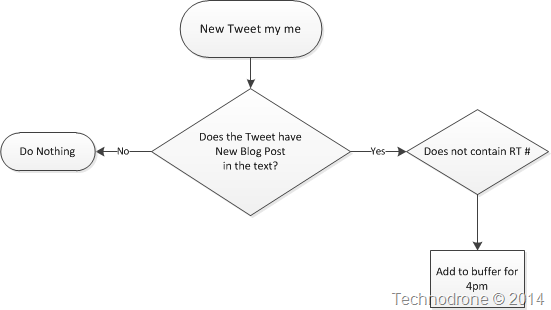
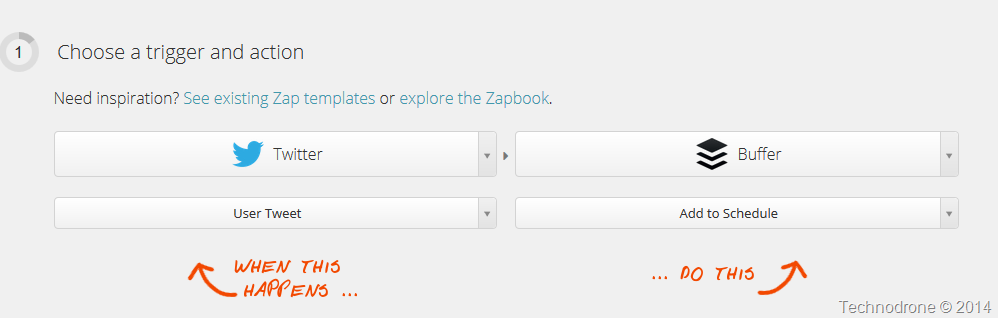
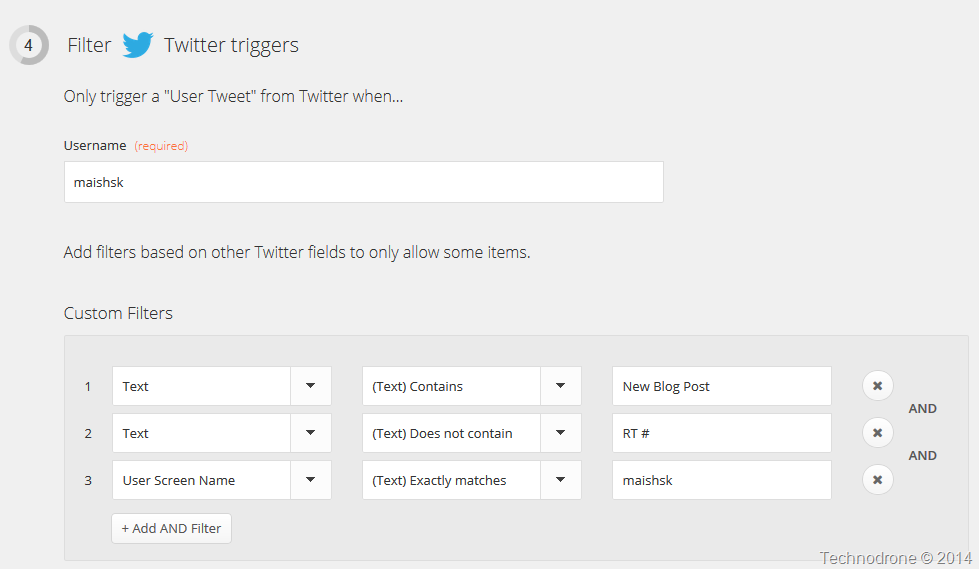
Zapier to the rescue. The basic account is free for 5 zaps (recipes in IFTTT language) and 100 tasks per month. My first tweet is always done manually after I publish the post. The format is always as follows: New Blog Post | <Blog_post_title> – <URL> So the logic behind my automation was as follows 
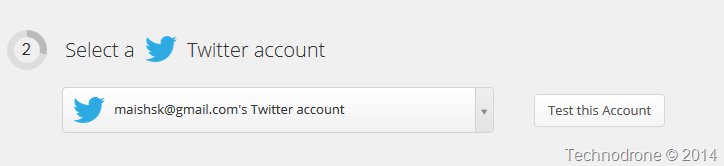
It will look for a text – and also check if this is already a retweet of my previous post – otherwise I will get an endless loop. Then schedule it for a specific time. Zapier does not enable me to do multiple actions – which is OK – so I created another 2 zaps for the additional times I wanted to schedule the tweets. This is what the zap looks like 


Hope this is useful. Just a small note as to why I re-tweet multiple times. because of time zone differences and exposure – that is all.
The event was organized by the VMUnderground crew. The idea here was to have an activity – community driven – to give people who were interested in something to do on the day before VMworld – Sunday. Yes you could mess around and go sightseeing – all of that is fun – but most of us are techies at heart – and we need our tech fix, so unless you were part of Partner Day or TAM day, there was not much you could do today. So many of you turned up at the City View at Metreon where there were 6 sessions you could choose from, all with panelists. I volunteered to act as a panelist on the Architecture and Design – the panelists were So of course there was an incentive for people to come – because they wanted to get in on the best party WUPaaS (Warm Up party as a Service) a tradition over many a VMworld. If you ask anyone they will say that this is most probably one of the best evening events throughout the week, again I think because it is community driven. Yes there are sponsors, quite a number of them actually, but the event is not driven by any single vendor. And of course – it is for the community. Cost is minimal (yes you have to pay to get in) but I personally do not mind spending those $10 to support the wonderful people of our community
(I am thankful that the majority of the costs are covered by the sponsors – so we can continue to enjoy this event) We were the third and last session on the roster, so I assume that the crowd had warmed up with asking questions and interacting with the previous panels, so they were not shy. Question were asked, it was a great flowing discussion and as always I learned a lot (and I hope the audience did as well). Embedded below is the session recording and the full playlist of all the sessions can be found here. More VMworld posts to follow.
VMworld is almost upon us. I am personally looking forward mostly to the social networking part and of course also delivering my first VMworld presentation (NET3160-SPO). 
I wrote a summary post last year VMworld 2013 has Come and Gone where I described my experience from last year. Today I would like to touch on a slightly sensitive topic – because it is a two edged sword (so bear with me please). VMworld is the place where everyone comes to – it is the VMware show of the year, attendance grows each and every year and sometimes it makes me wonder if something new –0 something that has not yet been done before – will happen at this years show. Any and every vendor that is connected with VMware in some way will probably be there. Have you ever noticed how many people change companies after VMworld? It is not something that I have performed a scientific study on – I do not have exact numbers. It dawned on me – after a few conversations in the hang space last year - that several people were there to look how to advance their career. Some of them had specifically set up meetings during the show in order to interview candidates or to apply for a position. And that is quite natural. I think that many of the vendors at the show are looking to recruit talent, talent that they have the option to meet in person, get to know them and see if they are a “match made in heaven”. I will not be naming any names (of companies or individuals), but I distinctly remember at least two vendors that had recruiting agents at their booths, on the Solutions Exchange floor. One individual (who asked to remain anonymous) answered my question. Q: Do you know of any other people who changed companies as a result of attending VMworld? A: Not specifically because of VMworld. I think the changes were already underway, or people were already thinking about it before VMworld. It just happens that a lot of key people end up being at VMworld. So I think it's more a result of everyone being together at one place that helps make things happen.I'm sure the other big trade shows are the same as well. Matthew Brender also got back to me with this answer (and he was so kind to offer that you contact him if you have additional questions) Q: Did you change companies as a result of an offer you got during / after VMworld? A: My job shift didn't have to do with VMworld directly, but is a direct result from attending for the last few years. It's connected me into the pieces of the tech community that lead me down a path. I began looking at VMworld and received incredible mentorship there. .. I'm not sure of anyone who can trace their transition right back to VMworld. What I appreciate about that point is something I think you believe as well: your social good will does not come to a climax at VMworld. Success in our space is about *continually showing up.* Dots are connected at shows, though bonds are built over time. You can't leapfrog the required effort. I do think it opens up possibilities, quite a few – but that does not mean that just because you attend VMworld you will get a great job somewhere else. It does take time, a lot of effort and patience to build those relationships, maintain them and sometimes those connections will advance you personally and professionally – but perhaps not. Why I mentioned the double edged sword before – is because it might be possible that when a manager would read this post they might say, “I don’t want to send my employees to VMworld – they will get snatched away”. This could be a valid concern. I would like to stress that this is not the purpose of this post and also why this concern should not affect your decision to send members of your team to VMworld. - If you are afraid that you might lose your staff as a result of them being snatched up – then they were not yours to begin with. A satisfied employee will stay where he is – and this usually means they are happy with what they do, have security, are compensated well and have a career path in the company. If this is not the case – then they would probably leave sometime – so VMworld was just an opportunity that presented itself – and not the reason.
- Your employees will learn SO MUCH at the show, which I think outweighs (by a ton) the concern that they might go somewhere else. The benefits you will gain from them attending, the benefits your business will gain, the personal benefits your employees will gain from attending are well worth, the satisfaction, the energy, the motivation to try new things learned at the show, outweigh your concerns.
So for those attending VMworld this year – my advice to you would be go out there – and meet people, talk to people, eat lunch (if its edible) with people, chat with others even if you do not know them, you never how the person next to you help you advance your career. Please feel free to leave your thoughts and comments below! And yeah, one more thing. Stop playing the whole time with your phone! 
See you all in 10 days!!
This is a re-post of my article, originally published on The Ravello Blog.  The advent of the cloud has brought with it major changes in the size and nature of networks. These changes pose new challenges for network management. Software-defined networks (SDN) have the potential for helping network managers cope with their ever increasing workloads. The advent of the cloud has brought with it major changes in the size and nature of networks. These changes pose new challenges for network management. Software-defined networks (SDN) have the potential for helping network managers cope with their ever increasing workloads.
In the public cloud, the network could be very different from what it is in the datacenter. By enabling the automation of network configuration, Software-Defined Networks make it possible to manage network interfaces in the same way as software. SDN presents the network administrator with the option of handing some or all aspects of network provisioning and management to a third party. The configuration of the network, which includes things such as host names, IP address and firewall rules, is an essential part of an application’s configuration. The configuration can be performed on-demand through the same interface or using an API. This approach is particularly relevant for large-scale enterprise deployments, where large workloads necessitate automatic on-the-fly configuration, and sometimes even multiple replicas of identical networks, maintaining complete segregation. The SDN Market The main players in today’s SDN market are Cisco and VMware. With the acquisition of NSX, VMware is currently promoting its SDN offering as the next step in the evolution of virtualization. NSX lays down an “overlay” network on top of your existing network with the aim of saving time on configuration, improving performances, and lower costs. Cisco, on the other hand, offers a solution that combines SDN and infrastructure. It enables you to define and enforce policies through application-centric infrastructure. Unfortunately, SDN implementation is not easy – it is not compatible with default networks, and requires a lot of work on infrastructure. Prospects for SDN Adoption Despite the optimism of SDN proponents, it is likely to take time before the adoption of SDNs truly catches on. When the concept of server virtualization was first introduced, it was difficult to convince the enterprise that it was reliable to virtualize their workloads – to recognize their potential and make the necessary adjustments to enable their adoption. Similarly, the spread of SDN adoption will probably be gradual. SDN faces the challenge of overcoming decision-makers’ fears of losing control. It takes time to establish trust in any new technology and changes in organization culture rarely occur overnight. Ongoing developments in network virtualization and SDNs definitely merit monitoring and consideration.
This is a re-post of my article, originally published on The Ravello Blog.  Over the last year, as enterprise awareness of the cloud has increased, more and more enterprises outsource their workload deployments to the cloud, in most cases to a single cloud provider or vendor. But the market is rapidly changing with more and more options becoming available from a variety of public IaaS providers, including Amazon, HP, IBM, RackSpace as well as private offerings such as Openstack and VMware. Over the last year, as enterprise awareness of the cloud has increased, more and more enterprises outsource their workload deployments to the cloud, in most cases to a single cloud provider or vendor. But the market is rapidly changing with more and more options becoming available from a variety of public IaaS providers, including Amazon, HP, IBM, RackSpace as well as private offerings such as Openstack and VMware.
The new deployment options make it possible to mix and match platforms and cloud providers, as well as to set up hybrid clouds where you keep some of your resources in your on-premises datacenter or private cloud while migrating parts of your workload to one or more public clouds. In this post I will elaborate more about the challenges, as well as the benefits of a multi-cloud environment.
Challenges of multi-cloud deployment
- Complexity – The biggest challenge of multi-cloud is its inherent complexity – different technologies, different interfaces, different services, and different terminology. There is currently no standardization of terminology, instance sizes, or methodologies across cloud vendors.
- Interoperability – or lack thereof – between different cloud vendors. This necessitates using workarounds or APIs to make the application set up work on different platforms and clouds. Specialized tools, such as Ravello, can be used to achieve seamless deployment on different external cloud providers.
- Management overhead – Multi-cloud requires a higher level of expertise in determining what to move to the cloud, where, when and why. This brings with it an increase in overall management overhead, including investments in VPN connections and monitoring. The implementation of different platforms requires expertise in a more diverse range of subjects.
And of course, as with any public cloud solution, the issues of compliance, security, and availability must always be taken into consideration.
Benefits of multi-cloud
- Autonomy – The ability to deploy your applications on different cloud providers has the clear advantage of reducing dependency on a single vendor. The resulting lower level of lock-in improves your position in negotiating with vendors for better SLA and/or costs. The ability to easily switch vendors means that you can take advantage of the most attractive offers available at any given time.
- Hybridity – You can keep some applications on-premises and others on one or more public clouds, based on a variety of considerations, such as security, performance or cost optimization. For example, a hybrid cloud solution can also be used to provide faster service, particularly if your customers are located in different countries. Deploying your applications on a cloud that is closer to your customer’s geographical location can result in better response time and performance.
- Extended capabilities – Different cloud providers support different platforms and offer constantly changing packages of capabilities. Some features, for example, Database as a Service, might not be supported by all cloud providers. It might be a good idea to shop around, comparing the various cloud offerings to identify which providers offer the best fit for you. You might prefer to pay more for specific deployments if it means you get special capabilities, while continuing to take advantage of lower costs offered by a different provider for resources where those capabilities are not relevant.
Bottom line
IMHO, the benefits of utilizing multiple platforms heavily outweigh the challenges. If cloud management is in place, including policies, automation and transparency, moving to a multi-cloud platform configuration can help you lower costs and improve performance. Over time, focusing on product development that is not dependent on a specific single cloud provider will also contribute to creating a better, more robust product that is supported on multiple platforms.
Last year I asked you Please do not vote for Me! and I still stand by every single word I said in that post last year – nothing has changed. I would like to re-iterate who I think you should be be voting for and why: Try not to make this into a popularity contest.
Judge the bloggers on their content.
Judge the bloggers on their writing skills.
Judge the bloggers on their passion.
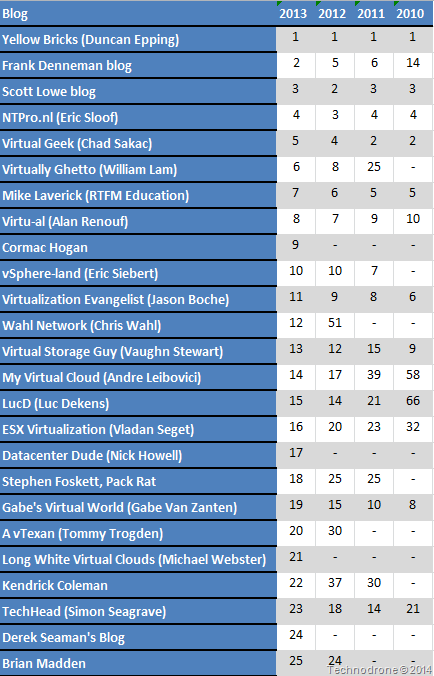
Judge the bloggers on who they are – not just because they work for company A, B or C. This year I would even like to take this one step further (and perhaps I might be making a mistake here – but this is the what I feel is right). Let’s look for a moment at the current top 25 bloggers and where they have been ranked over the past 4 years. 
11 of these bloggers have been ranked in the top 25 for past 4 years.
7 of the current top 25 are VCDX’s (which is an amazing accomplishment in its own right)  To all of those on this list - I salute you. I really do! You guys are doing an amazing job, creating content that is up to date, interesting, and informative, is an extremely difficult job. And of course I would say that the overwhelming majority of the people on the entire list of bloggers do not do this for a living – this is a side project, something they enjoy doing – a passion. All of the hard work and investment is well recognized. To all of those on this list - I salute you. I really do! You guys are doing an amazing job, creating content that is up to date, interesting, and informative, is an extremely difficult job. And of course I would say that the overwhelming majority of the people on the entire list of bloggers do not do this for a living – this is a side project, something they enjoy doing – a passion. All of the hard work and investment is well recognized.
Each of the bloggers in the top 25, are leaders in their field, they are speakers at events, guests on podcasts, authors, well recognized in the industry, and have worked extremely hard to achieve what they have accomplished. It is time to freshen the ranks, accept new blood, and rejuvenate the community. “How would like to do that?” - I might hear you ask – well actually quite simple. I would like to see more new and upcoming bloggers enter the top 25. In 2013 there were 6 bloggers who came into the top 25 from either having no rank the year before, or a rank below 25. In 2012 there were  a lot less. a lot less. It looks like we are on the right track. That is why I will not be voting for any of the top 25 bloggers from last year – but rather choosing bloggers who are
not so high in the rankings – for the sole purpose
of giving them more exposure. I will stick to my guns and vote for the bloggers, based on the principles I noted above. It is better for them, and when it is better for them, it is better for the community as a whole, and better for us all. I do not think that the traffic and exposure of the current top 25 will take a substantial hit – because they are already well established, and well known. They will keep on doing what they have been doing for past 4 (or more years) regardless of their ranking, which will keep them at their current level of exposure (and hopefully continue to grow and advance) . What do you think? Please feel free to leave your comments and thoughts down below. (Disclaimer: I am one of those people who are below the top 25.
I would do exactly the same even if I was ranked in the top 25).
 Historically, VMware – the pioneer in virtualization – has always been a software/solutions vendor. They were never in the business of selling hardware, they left that to the hardware vendors. With the advent of the cloud, VMware established partnerships with third-party service providers, who have developed cloud-based solutions on top of VMware’s vCloud product. In this way they have continued to be leaders and have advanced cloud technology, without providing a cloud service of their own. Historically, VMware – the pioneer in virtualization – has always been a software/solutions vendor. They were never in the business of selling hardware, they left that to the hardware vendors. With the advent of the cloud, VMware established partnerships with third-party service providers, who have developed cloud-based solutions on top of VMware’s vCloud product. In this way they have continued to be leaders and have advanced cloud technology, without providing a cloud service of their own.
Approximately a year ago, rumors began to emerge that VMware would come out with a public cloud offering. Considering the billion-dollar market already enjoyed by Amazon, Rackspace and others, this wasn’t a total surprise.
VMware’s vCloud hybrid service About six months ago, VMware announced vCloud Hybrid Service. What is this new hybrid cloud service? In essence it is a vCloud environment that lets you deploy applications onto their public cloud and also allows you to connect seamlessly between the two VMware environments. The actual environments are owned and operated by VMware themselves, but the datacenter belongs to a third party. VMware has already deployed the service in a number of datacenters in the United States and announced the beginning of Beta operations in the UK, although expansion can be expected in the future. VMware’s entry into the public cloud market has been a source of contention for its partners, concerned about retaining their own market share. VMware partners, however, can continue to offer added benefits, in the form of contract conditions and additional functionality.
How does vCloud compare with pure cloud offerings? Amazon is the clear leader in the public cloud market. It is the most experienced, with the largest customer base. Amazon cloud offers unique features and services, such as the DBaaS or EBS, that are not available from other providers. Different providers offer various services, including load balancing and scalability. The cloud is about providing resources on-demand, with infinite capacity and scalability. At present, the vCloud offering does not provide full on-demand infinite capacity and allows for only limited scalability. It uses different terminology, which translates into a greater learning curve for users who are accustomed to platforms such as AWS. Using Amazon or other cloud providers, you can set up an infinite number of machines and you can get these in matter of seconds, the exact response time will be dependent on a large number of factors. When you choose a VMware cloud offering, you reserve a certain capacity on a monthly basis. You cannot exceed that capacity. This translates into less flexibility and a need for the traditional IT capacity planning. Overall, VMware’s approach to the cloud has a different feel to it. Whereas most cloud providers tend to treat their virtual machines like cattle – use it and replace it, VMware is treating their cloud offering as a treasured pet, carefully developing and tending it.
VMware – past and future
With the native growth of the native public clouds such as Google and Amazon, their traditional ”growing through partners” approach places them at a disadvantage in today’s cloud market. As a software company, they will expand to provide additional cloud services, including software solutions for networking, storage and more. Today, vCloud Hybrid cloud Service is VMware’s public cloud. Although VMware started late, I believe that their solution could be a suitable one for many workloads and will evolve to become a significant market player in the future.
This is a re-post of my article, originally published on The Ravello Blog.  The cloud has brought a change in how we view and manage virtualization, especially for enterprises that need to deploy their sophisticated enterprise workloads around the world. Traditionally, the preferred method was to copy and deploy a virtual machine over a WAN. This can be a difficult and time-consuming process, especially for large VMs and complex IT environments. In recent years, deployment to the cloud has rapidly increased in popularity owing in part to its relative costs and ease of implementation. The cloud has brought a change in how we view and manage virtualization, especially for enterprises that need to deploy their sophisticated enterprise workloads around the world. Traditionally, the preferred method was to copy and deploy a virtual machine over a WAN. This can be a difficult and time-consuming process, especially for large VMs and complex IT environments. In recent years, deployment to the cloud has rapidly increased in popularity owing in part to its relative costs and ease of implementation.
As you contemplate the potential for moving to the cloud, inevitably one of the first decisions you will need to make is if you should build your VM from scratch or import it based on a set of templates. Some Background Although there is a natural tendency to assume that it would be easier to import an existing VM using one of the migration tools delivered by the cloud provider, this is not always the case. I first encountered the use of templates for VMs around six years ago, when I became aware of VMware’s Clone or Deploy from Template option, which creates a copy of your virtual machine while leaving the original machine untouched. This approach provides a really easy way to duplicate VMs. However, if you need to deploy your VM on different platforms, which is usually what your developers are looking for, multiple templates will be needed, one for each platform. Ideally, you would try to create a template based on the lowest common denominators, and then add the applications on top of the resulting VMs as needed with your Configuration Management tool of choice. This works pretty well for deploying VMs, but will not be the same as your physical builds. You would still need to have a separate template for physical builds. Create your Golden Image Sometimes, it might be easier to just create the VM from scratch. For example, the process of installing a new virtual machine on Amazon, OpenStack, and other cloud providers, is fairly straightforward. If your service installation is performed in an orderly fashion, you can simply follow the instructions and build a new clean application environment. It is important to state that the ease of rebuilding VMs in the cloud depends on the complexity of the software stack, e.g., database or network-specific configurations. Migrating a VM as part of a whole enterprise IT environment can by very challenging. If you choose to migrate from a VMware environment to take advantage of the cost benefits offered by the cloud, most cloud providers enable you to choose between creating a VM or importing an existing VM using their respective proprietary tools. Some of these tools are not mature, therefore you might hit some bumps on the way. It is best to always start from a clean image that reflects the most basic common denominators – this will be your “golden” image – your template. This means removing everything you don’t really need from the image. For example, you probably don’t need to include the Windows Media Player or some of the other accessories that are included in a standard Windows installation. There are tools available to help you prepare a clean installation. For example, Microsoft’s SysPrep tool will help you generalize an installation of Windows. It is important to remove passwords, drivers for default hardware not in use, and basically anything else that you don’t need. A similar tool is also available for preparing a Linux installation, virt-sysprep. Make sure you remove any MAC addresses, passwords, IDs, etc., to provide the next user with a clean installation. Once you have created and saved your clean “golden” image, make sure to configure access control, defining specific permissions for authorized users only.
Using these tools works, but not all of the time. Learn how Building or creating an individual VM in the cloud can be easy however as noted above, migrating a whole environment including database, storage and network is a much more challenging task for the enterprise IT. The environment components’ configurations and specific enterprise-grade appliances might require great investment and efforts in order to be migrated to the cloud “as-is” with the same on-premise capabilities and performance. Or, it might not be possible at all – and then another solution must be found.
Size does matter
Two of the key factors to consider in planning your deployment are the size of your VM’s and the potential of portability between different platforms. Of course, when you create cloned copies of your VM, the size is identical. The larger the VM, the harder it is to move or the longer it takes to import. Today, you can choose from a wide range of virtualization options and cloud providers. Unfortunately, there is no conformity between the VMs created by the different cloud providers, not to mention your on-premises images. There are no agreed upon formats or industry-wide standards in place. For example, Amazon uses the Xen, while OpenStack, Google and others are based on variations of KVM. At present, there are no clear methods to allow portability between platforms, be it a public cloud, private cloud or on-premises. New technology players such as Ravello Systems provide the closest approximation to such a solution. By placing a layer between the VM and the hypervisor, Ravello Systems allows you clone your multi-tiers enterprise applications and deploy it on multiple platforms, using different cloud providers without requiring further modification.
This is a re-post of my article, originally published on The Ravello Blog.  Cloud adoption is on the fast track, companies of all size are seeking ways to adopt cloud while eliminating the traditional IT project risks. The largest enterprises in the world view the private cloud as one of the most appealing ways to start, while utilizing the already made investment of their on-premises resources. CIOs and IT leaders that are thinking about creating their own cloud need to make sure to consider the current viable options and prepare a plan for the future that will suit their specific enterprise grade IT requirements. It is definitely not a decision to be taken lightly. In this post I will provide you with some guidelines and tools to help support you on your new journey. Cloud adoption is on the fast track, companies of all size are seeking ways to adopt cloud while eliminating the traditional IT project risks. The largest enterprises in the world view the private cloud as one of the most appealing ways to start, while utilizing the already made investment of their on-premises resources. CIOs and IT leaders that are thinking about creating their own cloud need to make sure to consider the current viable options and prepare a plan for the future that will suit their specific enterprise grade IT requirements. It is definitely not a decision to be taken lightly. In this post I will provide you with some guidelines and tools to help support you on your new journey.
What is a private cloud and why would you want one? In my humble opinion, a private cloud is a way to facilitate IT resources provisioning, regardless of the infrastructure, to empower the organization’s internal users. It removes the traditional IT hassles while maintaining the business’ policy yet providing the end developer or business user great agility. Moreover, the private cloud creates better control of your resources. For example, it adds values in terms of the cost analysis, driving better efficiency hence enhancing IT management. A significant advantage of the private cloud over the public cloud, lies in its ability to enforce corporate security policies and meet traditional compliance and regulation rules. Cloud Adoption is a Strategic Move Before you go any further, you need determine whether or not your enterprise high level management is committed to making the move to the cloud, and whether or not the necessary resources will be made available. This will be a key element in the success of your project. It is important that you reach out to the invested parties in the company, not just the folks in IT. Try and identify the pain points and strategies for remedying them. Bottom up adoption of cloud is only natural, and if you look around carefully, don’t be surprised to find that your organization developers and testers are already using platforms such as AWS cloud. While they may benefit from agility, they might also challenge your organization’s compliance policies. Today, it is not unusual to find business units within the organization that already have a cloud-based “rogue” IT infrastructure in place. Knowledge Acquisition and Time to Market Do your internal teams have the necessary knowledge? Probably not. Do they have the skills to quickly learn and start to deploy? If not, do you want to hire the necessary resources or would it be best to use an integrator? These questions are crucial when an organization wants to adopt any new technology or knowledge. Here time to market is of an essence. The process of migrating in-house legacy applications to the cloud can be very challenging, and you should expect that some things just won’t work. For example, it is a known fact that Oracle and MSSQL databases were built to rely on specific infrastructure configurations, and due to compatibility issues, moving these databases to the cloud is not that straight forward. What’s the best solution for your Private Cloud? If you decide to go deploy a private cloud, you should carefully research the available options. Check out what I see as the three most critical factors: cost, support, and resource reusability. There are two main approaches to creating a private cloud, each type of platform with its own advantages and disadvantages: - Open source platforms, such as Openstack or CloudStack, let you build your own cloud using your choice of hypervisors. These solutions are free, but they are complex to deploy and maintain. They also do not provide support services per se. You can go the self-support route or you can buy support from a third party. Either way, support is bound to cost you something down the road.
- Hosted cloud platforms, such as Microsoft’s Azure cloud platform, make it easy for you to build, deploy and manage applications on your own cloud, which is hosted by them. These platforms are not free, but ongoing support services are typically included.
If you are reselling to external customers, the ability to receive and provide ongoing support from an established vendor can be a very important consideration. You also want to find out whether or not each potential solution will require you to deploy everything from scratch or whether you might be able to continue to utilize some of the resources already in place. What, if any, new equipment is needed, and what are the requirements and costs of that equipment? Final Words In the future, we are likely to see a trend where companies have more than a single cloud even if it’s a private one. The multi-cloud deployment not only enables them to compartmentalize data, but also enables them to deploy the same applications to different clouds with different providers and technologies, improving availability and achieving true cloud redundancy. The use of the cloud will continue to expand in years to come and there will always be resources that the company wants to control for whatever the reason may be. The private cloud is a viable option to enjoy the cloud features such as cost efficiency, agility and optimal resources utilization … all within your own data center.
There are a number of posts out there on the WWW with great guides on how to make the most of your time at VMworld, two of them are mentioned here below: These are great resources.  I would like to share with you, some advice of how I would make good use of my time, AS A BLOGGER, while at VMworld. This year I will be part of the Cisco Social Media effort at the conference. Get Social with Cisco at VMworld 2013 (Your Ticket to Community Activity) Why would attending VMworld be any different than for a regular attendee? For a number of reasons. - As a blogger, this is the Virtualization conference of the year, and being there not only provides a huge amount of energy for you and your blog but also a huge amount of material for you to write about.
- You have your view, that most of the attendees do not, sometimes positive, other times not so. Your interests will be different from those of the regular customer, the regular attendee.
- You are at an advantage, because being part of the media (albeit not the traditional kind), people want to talk to you, hear your opinion, and get your feedback. It is important to them.
It was stated perfectly in the song Class of 99..
Ladies and Gentlemen of the class of '99 '13
If I could offer you only one tip for the future, sunscreen would be it.
The long term benefits of sunscreen attending VMworld have been proved by scientists
whereas the rest of my advice has no basis more reliable than my own meandering
experience... I will dispense this advice now. Don't attend too many sessions Why? I thought that was the reason that we were coming to VMworld, wasn't it? Well Yes and No. All the sessions are recorded, and are available afterwards for your offline viewing. The only exception to this rule (IMHO) are the group discussions (the sessions that are marked as GDxxx). The reason being here is that they are not recorded, you have a (relatively) small intimate group of usually highly technical people with direct access to the SME on that particular subject who is interested in hearing your feedback, and will be providing some really good information on the subject. These sessions are not recorded (or at least they have not been in previous years) so if you miss it, then that's it. HOL (Hands on Labs) This used to be a must on my list, but not any more. VMware has stated that the labs will be available for consumption after the show, and I am pretty sure that as an attendee, you will have access. I would find a quiet time to go and do a single lab, something that really interests you, and that can write something about. Remember, you are going there to have fun, but your ulterior motive should be to create content. General Sessions Bloggers will get special treatment as part of the Press with a "good seat" and perhaps access to a table and media Wi-Fi. Assuming that is if you go into the main hall to attend the session. I would advise against it. There will be thousands of people in the session. Yes, you will have the whole splashed in you face with these huge screens. Yes, you will get to see Stephen Herrod Pat Gelsinger on stage. Ok.. And… I prefer to this from the comfort of the hangspace. - The screen is more than big enough.
- There is place at the blogger tables, usually with better internet.
- You will be able to exchange your views with other bloggers and like-minded people who are sitting next to you.
Bloggers Table Make time in your schedule to go and sit at the the bloggers tables in the Hangspace area. At any time of the day, you will always find a familiar face, to talk, chat and just have a good laugh. We are all going to VMworld to work, but also to have a good time. The area is big enough , but not too large, which gives you enough quiet to get some writing done and catch up on the huge amount of news that will be coming out of the conference. vBrownbag The vBrownbag Techtalks were a great success last year. Personally, I think one of the highlights of the conference. This year's schedule is no less spectacular. Speaking to the presenters, the vendors who are there, and the people who just come to listen/watch. That is what it is all about. Social Parties This is one with mixed feelings for me. There are so many different gatherings and meetups, and so many of them are overlapping one another, that it will be impossible to attend them all. Not enough time in the day night. Solutions Exchange Do you homework beforehand. Go over the list of vendors that will be at the conference and pick out those that interest you, and that you would like to go and speak to. My list for this year is as follows: - Skyera
- MAXTA
- Xceedium
- Vormetric
- Maginatics
- Metacloud
- Scality
- ElasticBox
- Cloudpassage
- Asigra
- Actifio
- AirVM
- Cloudbyte
- Parasoft
- PlumGrid
- TwinStrata
- Zadara
- Kaminario
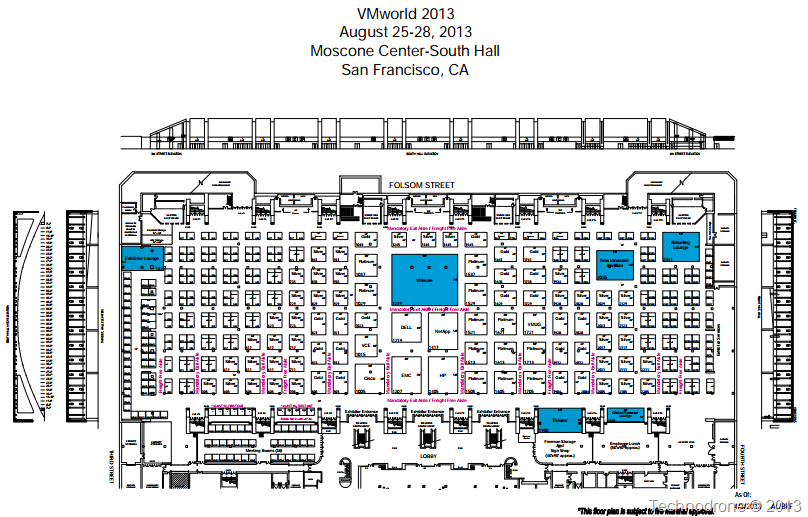
Usually - these companies will not be in the middle isles - where of course it costs a  lot more to have a booth. They are on the sidelines, go at seek them out, and speak with them. lot more to have a booth. They are on the sidelines, go at seek them out, and speak with them. Reach out to the companies beforehand and ask if they can set up some time with you during the show, to get a more detailed overview of the product, or perhaps even a small briefing before the show. VMworld is a mad house. From a vendor standpoint they would like to get their message across to as many potential customers as possible, so your time can be limited, and perhaps a detailed meeting would not be best at the show. Go and introduce yourself, and if need be get the name of the person you would like to speak after the show. It is always beneficial both to your blog, and to the vendor, to get an deep dive into their product. Say no more! Blog Posts This one might come as a shocker to most of you, but here goes. Do not expect that content you publish during the show will get the amount of publicity you expect, and let me explain why. The amount of posts that will be going out during the week of VMworld, will be at least 5 times the usual. Why because everyone is there, there are going to be so many announcements made (hint, hint) that will make your head spin. People cannot read it all. It is physically not possible. Your post will be one of 20 that will say the same, "VMware has announced…. ", "VMware plans to dominate the world …." Several bloggers are already privy to information beforehand, due to them being part of certain focus programs, and they have already put together a batch of blog posts on X, Y or Z beforehand. My advice would be to prepare your content, gather the material, gather your thoughts and get your inspiration from the conference. Tweet as much as you like, Share, interact, but if you want your post to get the exposure you are hoping for, do not post it during the conference. I would suggest letting the hype die down slightly, and then get your message out there. Live Blogging I know very few people who can actually live blog a session, Scott Lowe is one of those few. If you are good at this - and are able to portray the message from a session - then go for it. Your audience will thank you. And last but not least… But trust me on the sunscreen... 
Many bloggers have their sites hosted somewhere. Personally I find it very convenient having my blog hosted under Google's Blogger service. Since I am having issue with my provider and mentioned it on Twitter, several people asked if I found a good new host, if I would not mind sharing the details with them. I assume that none of you know that I used to run a private webhosting service as a side gig for a decent number of years, and I think that some of the knowledge I have accumulated over the year could be of great use in choosing the right Webhost for your blog. First let's dive into what kind of services a webhost will usually provide. Shared Hosting Shared hosting means that you are get a certain amount of space on a shared server (it could be a physical server, or a virtual machine somewhere) where you can do a number of things. these usually are (but are not limited to) - Create web pages
- Install Software - usually web interfaces to software like Wordpress, Forum software (phpBB). Softaculous is one such example.
- Configure email accounts
- Look at Web statistics
- FTP accounts
- Create MySQL databases
- Create Sub-domains or add-on domains if your account allows those features
All of these options are accessible through a control panel which is web based. If you like to administer your environment through a shell command and the host allows it (it will usually be a jailed shell - which is limited) then you can. Pros - This is usually the cheapest option. Shared hosting goes for around anything from $2-$10 per month.
- You do not need to manage anything regarding the operating system - your provider will take care of this.
Cons - The noisy neighbor - usually you are sharing the same server with a number of other people - sometimes an excessive amount of people it can go up into the hundreds… If one of them causes problems on the server then you all suffer.
- You are usually quite limited in your resources, how many databases you can create, email accounts, disk space etc. etc.
- Support is dependent solely on your provider, and more than often enough you know more about how things work than they do.
- Disk space is limited
- Resources you have to disposal are also limited including bandwidth, so if you have a popular site you will either have to go to a higher package or to the next level.
- You have no guaranteed resources in terms of CPU/RAM/Network.
Reseller Hosting
This is very similar to the shared hosting, except you are placed in the "Junior Manager Role". Here you have the option to to create usually an almost unlimited number of accounts, host a large number of domains. This would be suitable if you are interested in hosting more than one domain and you are not interested in paying for a shared account for each and every domain. Pros - Same as the shared account.
 - Prices go for anything from $5 a month to $60 per month depending on the provider and the resources you are using.
- You can sometimes outsource the end-user support to the hosting provider, if they provide that kind of service
- Your provider will support you regarding problems with the hosting software.
Cons - Again the same as the shared account
- Here you usually have little / no limitations in the amount of resources you can create
- The limiting factors here are bandwidth and disk space.
- You have no guaranteed resources in terms of CPU/RAM/Network.
- You are limited to the software on the server, i.e. if you want a certain version of PHP or MySQL and the server does not have installed the you are stuck
VPS
A VPS is sort of a semi dedicated server, I would compare this in a very general way to a hypervisor with several VM's but not a Type-1 hypervisor. Pros - You have your own Operating system. All to your self, do what want with it - for better or for worse.
- You have the option to choose what flavor of OS you would like - Ubuntu,Debian, Centos, etc…
- You have your own IP - it is not shared.
- You have a guaranteed set of resources, RAM, disk space and bandwidth
- Your RAM resources have an option to expand to burstable level for short periods of time.
- Your resources are guaranteed and isolated from your neighbors.
- You have a Web interface that will allow you to restart your VPS (and OOB management interface)
- Shell access is standard.
- Changing plans is a no-brainer.
- Re-installation is simple.
Cons - Your CPU resources are usually not guaranteed
- Neither are your disk or network resources.
- Unless you are using a managed (that means your provider is taking care of the VPS for you) then you are in charge of the VPS. Security, updates, software installation - the whole works.
- There is a limit to how much the hardware can handle - so if your provider oversells (i.e. oversubscription in the VMware world) then you will have problems.
- Prices are not cheap - and can run from $25 - $200 per month depending on the resources and you package.
Dedicated Server
If your site needs a dedicated server then you have either really very busy site - or your website utilizes scripts that are not working well, that your provider refuses to let you run on the current solutions (and yes I am speaking from experience) Pros - You are the sole ruler of your kingdom.
- Root access
- Full CPU/RAM/Disk resources
- Out of band management
- You can run multiple Operating Systems, perhaps even install ESXi on it if your provider supports it.
Cons - Price - usually starts at over $100 per month and also requires a $50-$100 setup fee.
- Hardware changes are expensive,
- You are usually limited to 2 hard disks. (some configurations include SSD's
- Network ports are usually 100Mb/s.
- The same as a VPS unless it is managed
There are other options of course, new ones like cloud hosting, or Colocation, but I think for a blog these are overkill. Now that we have gone over all the options, where do you actually find a good and reliable host? But first why do you need one? Well the answer to that is obvious. Your blog / brand is your face to the world. If your provider mucks up because they have not backup/DR plan and their server went down - then you are in trouble. If they are trying to make as much money and are overloading the servers, or have not been in business for more than a month then perhaps they are not such a good choice. So how would you find a good and reliable host? I would say the best place I know of would be the Webhostingtalk forums. This is an amazing resource for anything webhosting related. The forum is always busy and I would say is the best place to find information. They have an offers forum for Shared Hosting, Reseller Hosting, VPS, Dedicated servers. The method I would advise for finding a reliable webhost is as follows, and I will take the VPS forum as an example. 
Firstly you have the sticky posts - these are usually the bigger hosts who have a really good name and reputation in the forums, and they have probably paid to have the posts put up at the top of the list. Underneath that you will see a great deal of posts with a lot of offers. How do you know which ones are reliable. Well first thing is to look for a post with a number of replies greater that 10 
If a post has a number of replies it could either because it is a really cheap deal, or perhaps because it is a very good deal. 
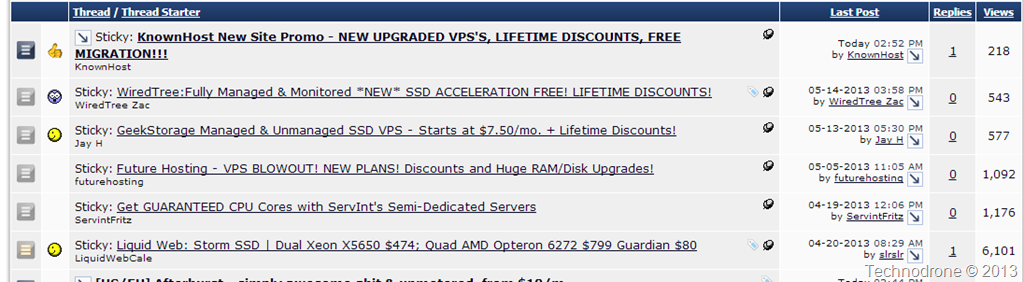
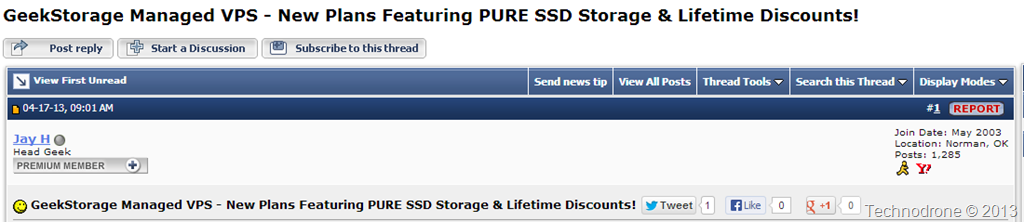
I look at the when the member joined, and how many posts he has and also what kind of member they are. This one looks like he has been here for a while, and reputable. Looking at another post with no replies 

The user has been around for a year or two but not active. Perhaps not a great idea. So you found a good deal. Next thing you should do is search the forums to see what reviews others have posted regarding the company that you are looking at. I guarantee you, that if they do not provide decent service, or have not been honest - the thread will pop up in your search. One last thing. Go the website of the provider, see if they have a support forum, go over the posts to see if people are happy with the service. Then open a support ticket, see how fast the response times are, check if they know what they are talking about. Checking these things before hand will save you a huge headache in the future.. To sum up this I would like to give you my recommendations of Webhosts from personal experience and some I currently use today. Knownhost - By far the best company I have used over the years - they only deal in VPS servers and up. They are not cheap but the service they provide is fantastic!! Every support ticket I opened was responded within minutes, no matter what time of day it was. Again superb service, superb availability. ResellerZoom - They deal in practically everything. Service was good, they have a very good budget plan, infrastructure is solid. 123Systems - They are budget provider, I have a VPS with them at the moment. Infrastructure is solid and support is very quick, but here you get what you pay for? One last thing. Most bloggers use Wordpress as their platform for their blog, and I have seen several questions about who is a good Wordpress webhost. I think that is the wrong question, because almost every single provider you can fins, especially those that use dedicated webhosting software like cPanel or DirectAdmin will offer you the option to install Wordpress and usually through a simple installation process. So you can use almost any host you want, just go through the due diligence beforehand, otherwise you could regret it in the future.
 I mentioned last week on The Unofficial VMware Visio Stencils post that it is by far the most popular post on my blog. I mentioned last week on The Unofficial VMware Visio Stencils post that it is by far the most popular post on my blog.
We all have a most popular post - one that usually stand out amongst the rest. I started thinking - why not compile a list of each of our most popular blog posts. It does not necessarily have to be Virtualization related, I think it should - but you can decide. So this is how it will work. If you are interested, and would like to add it to the list below… Please leave a comment below [or send me a message on Twitter or contact me at
maishsk (at) gmail (dot) com] with the following : Name:
Your Twitter Name:
Post URL:
Screenshot of the number of all-time Pageviews for your post: No number is too great or small - let me have it! Be it 100/1,000… /1,000,000 - It does not matter. This is by no means a competition, just an opportunity to showcase your finest and shiniest piece of work. I will add the entries below (in the order they are received) Will you accept the challenge?
So you are all the winners, for participating, for voicing your opinions and making your vote count! Today Eric Siebert posted the results for the top 2013 VMware and Virtualization Blogs. I asked you Not to vote for me but it seems that did not work. The full results and podcast can be found here. In short. - I was ranked at No. 41 in the total count
- 7th in the Scripting blog category
- 8th in the Independent blogger category.
I would like to thank you again all for you support! Some of my own analysis on the results. - There is only one independent in the top 10 - Eric Sloof
- Only eight of the top 25 do not work for a vendor. (EMC, VMware, HP, Dell, VCE, NetApp)
- 7 out of the top 10 bloggers work for VMware, 1 for EMC and one for HP.
- There are 4 new bloggers in the top 25.
- There is 1 new blogger in the top 10.
- The biggest drop in the list was from 18 to 229 (211 spots)
- The biggest climb in the list was from 149 to 38 (111 spots)
- The vBrownbag crew is doing an amazing job - and people appreciate it.
- The favorite storage blogger - does not even work for a storage vendor, he works for VMware.
- The top scripting blogger's preferred scripting language is not PowerCLI - it is Perl.
Congratulations to all the other bloggers on their achievements this year. It is a great list. Thank you Eric Siebert for a job well done!! You can follow all the bloggers on Twitter in the following updated lists: Top 25 VMware/Virtualization Bloggers Top 50 VMware/Virtualization Bloggers Top Independent Bloggers Favorite Scripting Bloggers Favorite Storage Bloggers
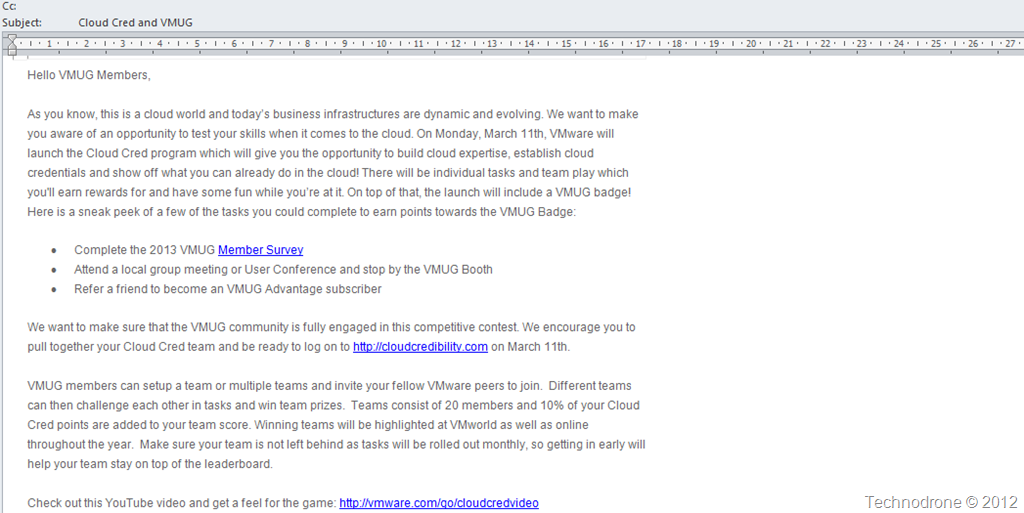
At VMworld 2012, at the vExpert briefing - we were introduced to an upcoming social idea that VMware were working on - Cloud Cred. Today I received an email from the VMUG organization (screenshot below) 
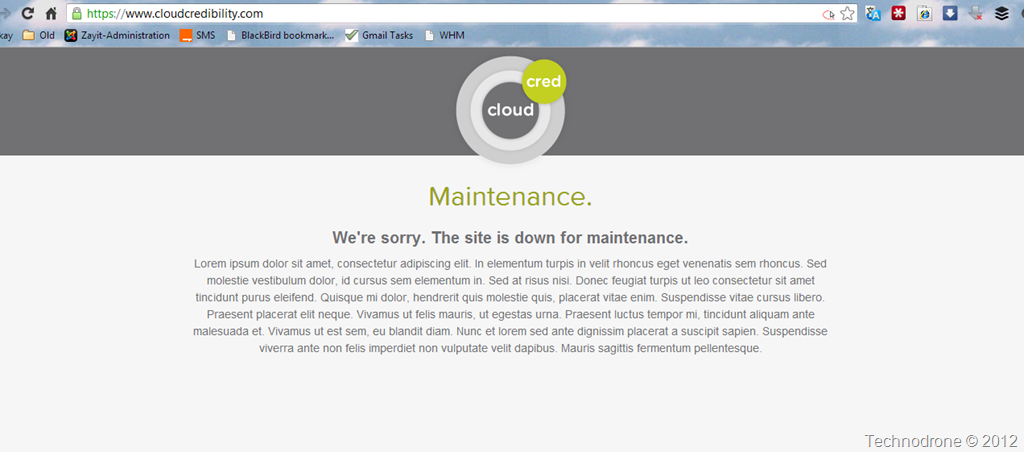
Currently the site is not yet available (according to the mail above - it will be on March 11th) - as you can see from the screenshot below. 
So what is Cloud Cred - I will leave this to VMware to explain.. An Overview and Demo is also available here. If I remember correctly the whole idea was not received very well at the briefing. Making the whole thing into a "game" where you are receiving points, and can get "stuff" for getting the highest scores and even "win" the grand prize of a trip for 2 to VMworld Barcelona - seems to diminish a good amount of what all the VMware evangelists, bloggers, vExperts do. We are not doing it for the points or trinkets, but because we believe in what we do. I think the commoditization of the blogging and evangelizing - will only reduce its value. Time will tell. What do you think? PS. Thanks to Jake Robinson who pointed out that VMware just also launched their Cloud Credits program, which is not the same as the above. Cloud Credits and Cloud Credibility close but not the same.
For those of you who follow the PlanetV12N aggregation feed of anything and everything that is virtualization – you might have noticed that the feed has been stale for over 10 days.

The reason being.. – well I do not really know – it usually is a problem with one of the feeds in the list – which causes the whole process to commit harakiri. It is extremely annoying. I know. I miss my daily fix of virtualization news. I really missed it during VMworld in Europe last week.
So here was the chain of events (through my twitter stream) that led me to create my own list of all the blogs that are currently in the feed.
The lack of having updates from PlanetV12N is really annoying. Eric Siebert has a feed of the top 50 blogs here - http://feeds.feedburner.com/PlanetVsphere-land – but as I stated tonight on Twitter:
So I collected all the links on the PlanetV12N page – and have made a temporary aggregate feed that you all can follow, until John Troyer can get this mess fixed up.
I think I got all of the blogs that were listed on the site (there were 314). I stripped out the Youtube channel links and all of those that were not working. This leaves 257 blogs that you can now get in one feed.
Just to make things clear once more.
- This is not the definitive list
- This is temporary – until Planet V12N is fixed
- I will not add / remove feeds from the list – so don’t ask.
Please feel free to add TempPlanetV12N to RSS readers.
It seems like only yesterday when the last survey was conducted, and I was actually not going to write this post – because I hate “me too” posts. So let us try and do this slightly differently. On my No. 32 - Thank you all so much! post I stated some observations – which I hope you will consider this year, when you choose which blogs you wish to rank in the top 10. Try not to make this into a popularity contest.
Judge the bloggers on their content.
Judge the bloggers on their writing skills.
Judge the bloggers on their passion.
Judge the bloggers on who they are – not just because they work in company A, B or C. It is great that there are some changes in this year’s survey: Bloggers for certain categories:
Storage blog
Cloud Computing blog
End User Computing (VDI) blog
News & Information website
Favorite Scripting blog
Favorite Podcast
Official VMware blog
Best Videos used in a blog
Favorite New Blog (less than a year old)
Favorite Independent blogger If you find that my blog or my writing deserves your vote or it fits any of the above mentioned categories,
I would be most thankful. Good luck to all the bloggers!! 
As always – once the results are published you can follow the Top 25 Bloggers on Twitter.
|