Showing posts with label ESXi. Show all posts

2013-08-08

Access the DCUI from a Remote SSH Session

I posted a tweet tonight.

I needed to restart the management agent on a ESXi host (it would not reconnect to vCenter)

Restarting the Management agents on an ESXi or ESX host (1003490) is the correct KB for information on how to do it.

If you are at the console - you go in through the DCUI.

There is a not well known fact that you can also invoke the Direct Console User Interface (DCUI) from a remote SSH session as well.

Accessing Direct Console User Interface (DCUI) from an SSH session(2039638)

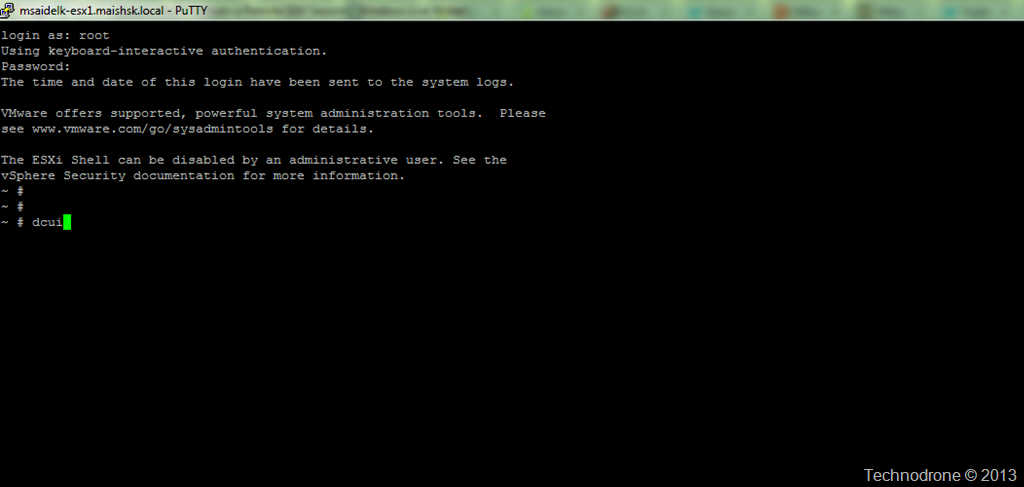
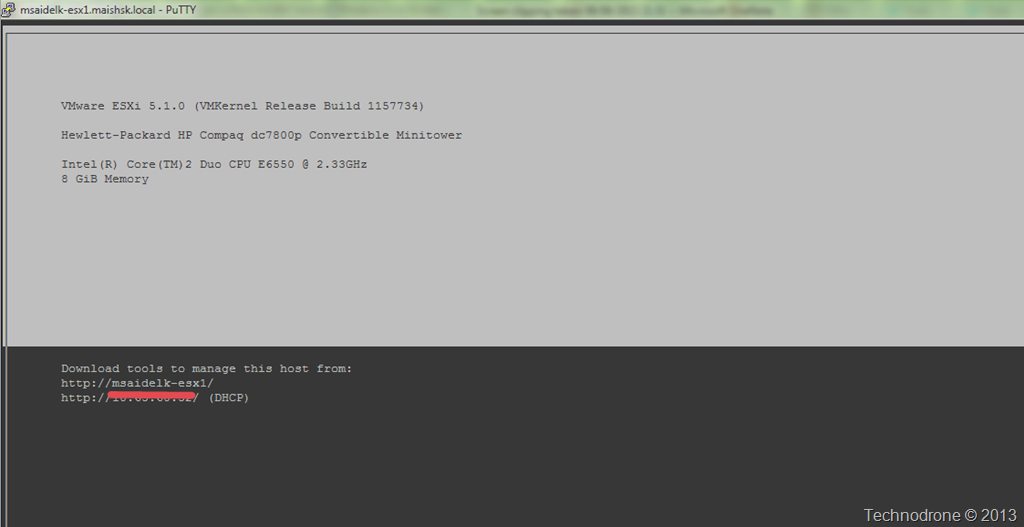
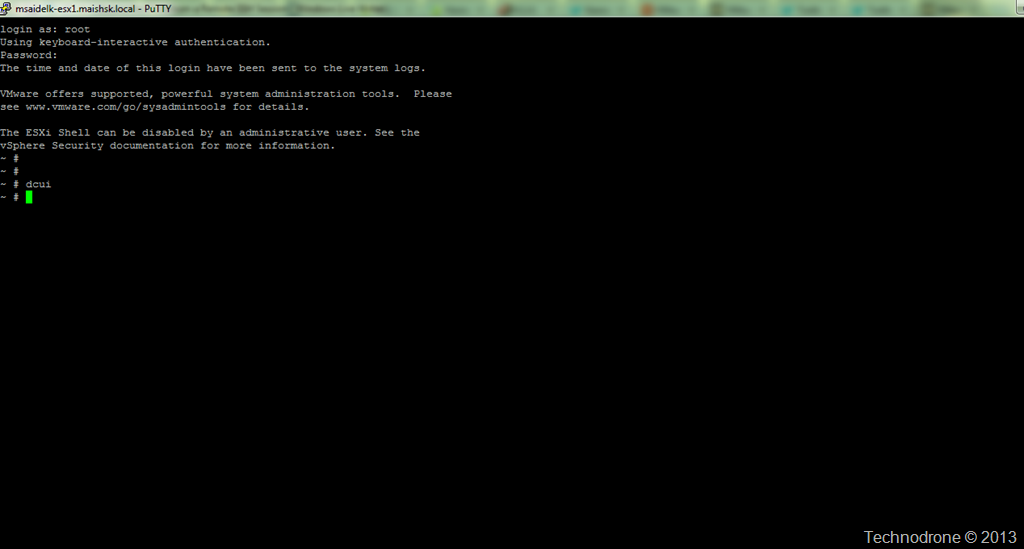
Very simple, just type dcui from the shell prompt. When you are done, Ctrl+C.

Before..

SSH session

After

DCUI invoked

Exit with Ctrl+C

Just have to read the KB's…

2013-06-19

All I Did Was Add a VMkernel Interface (Routing)

That was the call I got today.
"All I did was add a VMkernel interface and my host lost connection to vCenter".

On went my troubleshooting hat.

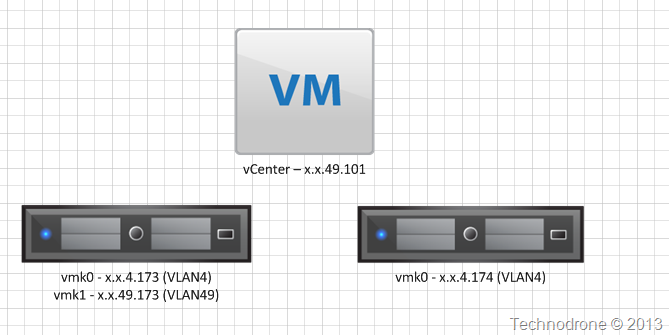
First the environment (simplified)

Environment

The physical interfaces on which the VMkernel interfaces reside were trunked with multiple VLANs. In this case VLAN(4) and VLAN(49).

vmk0 was used for ESXi management - with a default gateway of x.x.4.254

When the user added vmk1 - the host would become disconnected, he removed vmk1 - the host reconnected to the vCenter.

While the host was disconnected, we tried to ping the vmk0 interface - replies were fine.

While the host was disconnected - we tried to connect to the host directly with SSH and the vSphere client - both worked.

While the host was disconnected - we tried to ping the vCenter server with its IP - there was no response.

While the host was disconnected - we tried to ping the external network - replies were fine.

We then looked at the settings on vmk1 - and I noticed that the user had not set the VLAN49 tag on the VMkernel interface. Obviously this was not set correctly, and by adding VLAN(49) to vmk1 - everything worked correctly. The Host reconnected to vCenter.

So the problem was solved - VLAN(49) was missing on vmk1. ????

I was puzzled and tried to understand why this misconfiguration would cause the host to disconnect from the vCenter - then I realized why, and therefore the reason for this post.

When configuring a VMkernel interface, a new entry is added to the routing table. There will only be one default gateway - and that will the one defined on the Management interface. The additional VMkernel interfaces will not have a gateway defined.

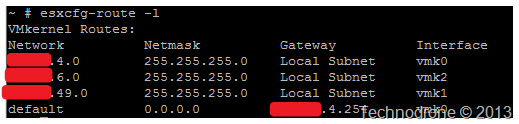
This was the printout of the esxcfg-route -l from the Host.

image

Just to explain the output in plain English.

Anything on Network x.x.4.0 on that subnet will go out through vmk0.
Anything on Network x.x.6.0 on that subnet will go out through vmk2.
Anything on Network x.x.49.0 on that subnet will go out through vmk1.
Everything that does not match the above - will go out the Default Gateway x.x.4.254 through vmk0.

So the user had configured vmk1 on x.x.49.0. That meant any traffic trying to go out to the vCenter server - would go out through vmk1 - it was on the same subnet.

But… the user had not assigned the appropriate VLAN(49) tag to the interface - which meant that the interface would send out packets onto the network but without the correct VLAN tag on the packets, and therefore the Host could not communicate with the vCenter.


Photo by Jelle Oostrom (flickr)

Always follow the route..
2012-11-27

vCloud Suite Licenses and (NO)vRAM

Yes I said the “v”- word again. That “dirty” term that was abolished at VMworld 2012 this year.
(forgive the cynicism)

To my surprise – it is still haunting me – and I suppose soon us all.

A week ago I received my first vCloud Enterprise Suite license.

license

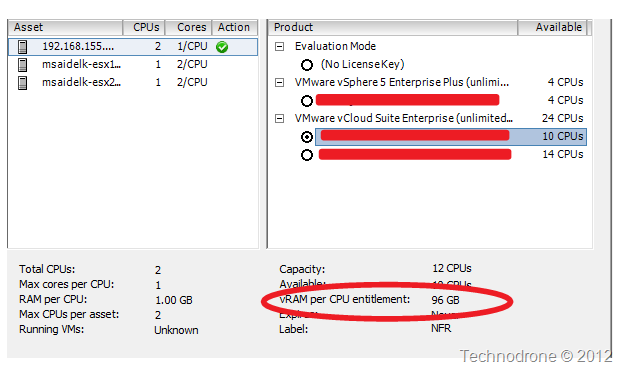
Happy as can be, I added it into my vCenter Server and then I realized something which was strange..

vSphere Client

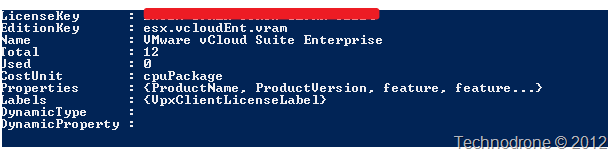
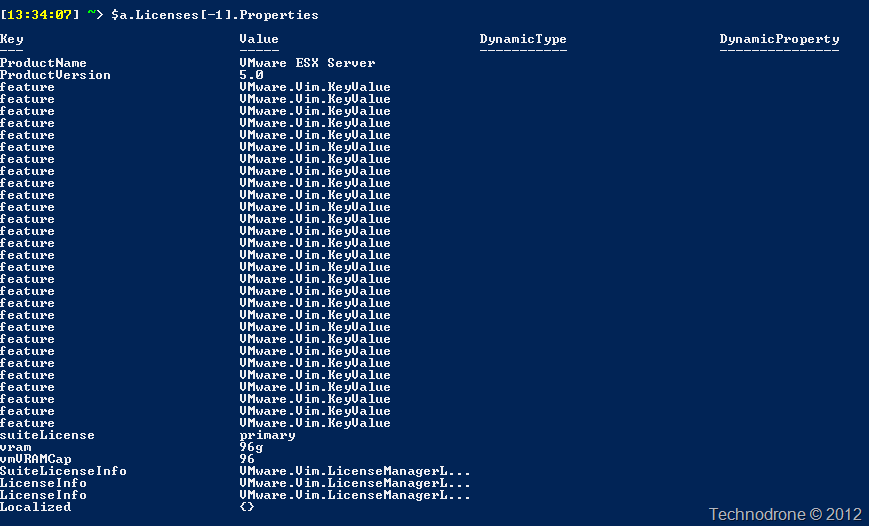
I checked the API as well.

API

API2

The license itself definitely has a vRAM entitlement embedded into it – of 96GB per CPUNO VRAM.

I reached out to John Troyer who got back to me almost immediately (thanks John!!) with an answer. This is still listed in the license – and was not ripped out in time for the 5.1 release – and can safely be ignored. I received the same answer as well from Mike Laverick 

I opened an SR for clarification – and am waiting on an official answer – I assume this will be the same as I received above.

At the moment KB 2032903 - Managing licenses on ESXi hosts using the vSphere Web Client states the more or less same thing.

KB

I just do not understand if this property is a feature embedded within the license itself (and if so then it should be easy to remove – and so it should have been!), or is this property expected within the API – and if removed will break something.

I will update with my findings.

**Update 29-11-2012**

I received an answer (as expected) from VMware customer support that there is no vRAM limit on ESXi licenses anymore. This seems to have been a problem with the generation process of the vCloud Suite licenses which should now be fixed. The entitlement can be safely ignored.

2012-09-12

vESXi with 10Gb Ethernet Using VMXNET3 - Yes You Can!!

I have asked for this…. Begged for …… Ok not begged, but I did ask nicely.. a number of times, a great number of times!!!!
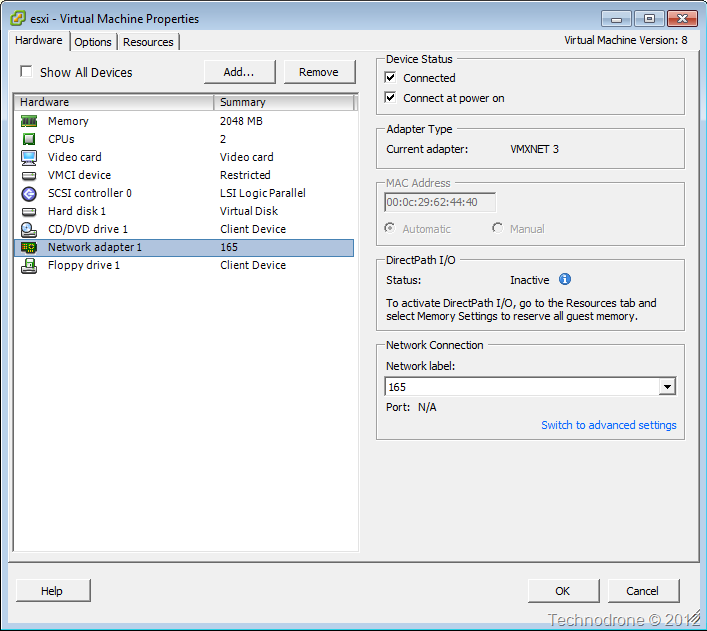
One of the slight drawbacks of working in vESXi is that you could not configure a virtual 10Gb Ethernet card. Why would you? Because you can of course but also because if you wanted to see what would happen in a lab before implementing 10Gb Ethernet in your Production environment– the only way to do it was with a physical server and a physical NIC. This would have been ideal for testing the implementation of NIOC for example.
And why was this – because the only Virtual Network Adapter type that worked up until now was E1000. VMXNET3 would not work. As you are aware – VMXNET3 presents itself as a 10Gb adapter to to Guest Operating Systems.
Until ESXi 5.1.
I noticed this in the release notes.
Release Notes
What was that VMXNET3 in a VM running ESX?
So I tried it out
And lo and behold…..
Ladies and Gents… I present to you a vESXi with 10Gb Ethernet adapter.
VMXNET3
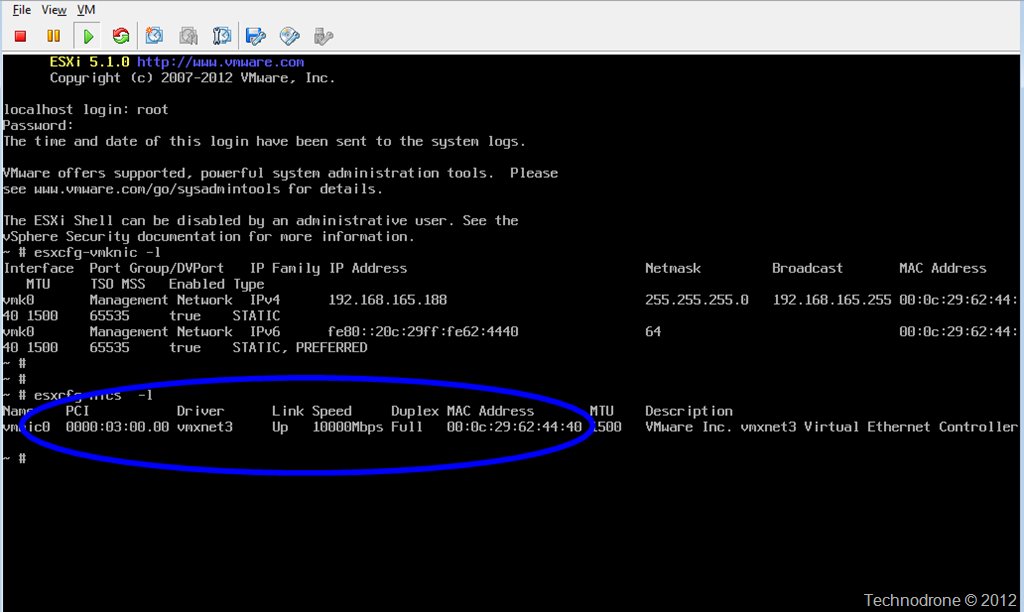
And how do I know that it is 10Gb? I looked in the console.
10Gb
Besides the fact that vESXi is not supported – as noted above – this could cause your
vESXi host to crash.
You have been warned…!!
But it is cool!!!!!

2012-07-04

IBM ESXi Customized Offline Bundle

Oh…..  how I have searched for this… For hours… really. And to just come across this by chance today. Duh!

Search for a customized bundle for HP hardware and it is very easy to find.

Try the same search for IBM – no…….

My frustration has been expressed on Twitter a number of times – because this is not the way it should be.

I would like to thank Darryl Miles for his post IBM’s customized ESXi 5.0 FAQ’s – and just by chance – I see that he had another post about the VIB’s IBM VIBs for VMware ESXi 4.1U2 and 5.0 – which I had never noticed before.

Thank You!! Thank You!! Thank You!!

1. Package Contents  =================================================================
This is a VMware ESXi patch for IBM IMM CIM providers. The following CIM providers are included:

fupb                  5.01-7.170
concretejob           500-2ACE12AUS
filetrans             500-2ACE12AUS
fwupdate              500-2ACE12AUS
hwckvm                500-ESXI01ACN
immpassthru           500-2ACE12AUS
pciinfo               500-PRIVATE
soibms                500-ESXI01ACN
ilfu              500-1.01.20120504
brcmfwup          500-1.00.20120507

2. Hardware Support =================================================================
The bundle can be applied to the following servers:

http://www-03.ibm.com/systems/info/x86servers/serverproven/compat/us/

3. OS Support
===================================================================
The bundle can be applied on the following OS platforms:

    * VMware ESXi 5.0u1 build 623860

4. Additional Notes ===================================================================
1. This IBM bundle only includes the providers created by IBM.
2. ilfu/brmfup have no added value without LSI and Broadcom providers installed.

After the bundle is installed on ESXi system, IBM ToolsCenter UpdateXpress System Packs Installer can be used to upgrade ESXi system, or to update firmware of IMM, uEFI, pDSA and FPGA. IBM ToolsCenter Dynamic System Analysis can be used to get information of IBM IMM and other hardware devices.

The links he provided there did not really work for me – IBM’s search engine did not find what I wanted. Here are the correct links (you will need an IBM ID to download) – I did not find any differences between the models – so here are the links to each package

IBM Fix Central - IBM CIM Providers for VMware vSphere Hypervisor 5.0u1

IBM Fix Central - IBM CIM Providers for VMware vSphere Hypervisor 5.0

IBM Fix Central - IBM CIM Providers for VMware vSphere Hypervisor 4.1 U2

This is what is inside the package that you download.

Package

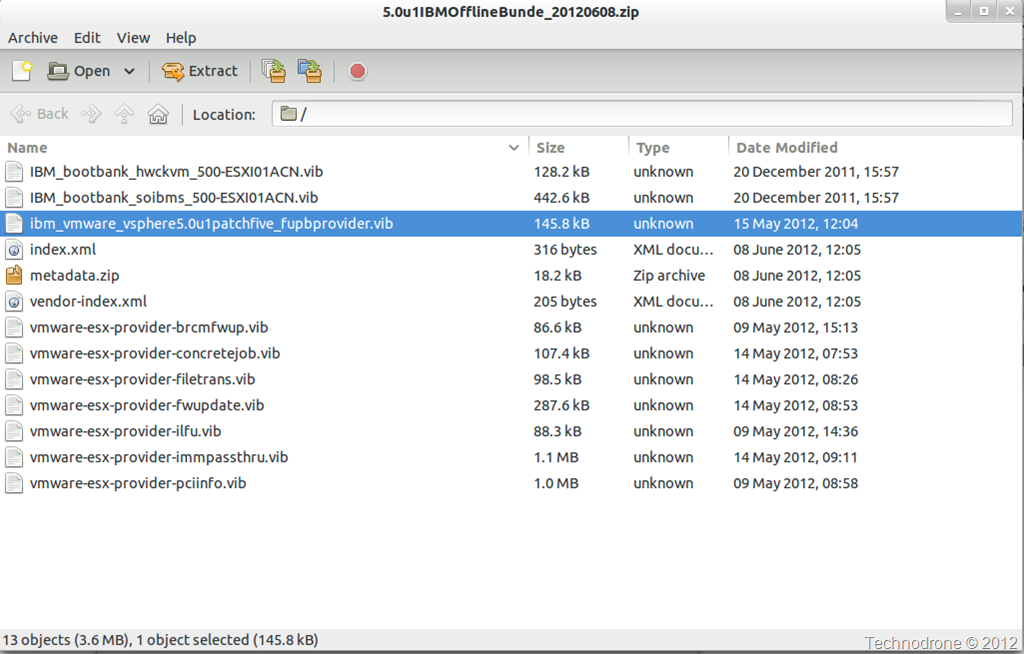
And the bundle itself contains

Bundle

One last request to IBM. Please make this available as a depot so that it can be added to Update Manager and the CLI tools. PLEASE!!!

Perhaps I should just create my own depot….. (but I do not know how legal that is…)

2012-06-25

ESXi Shell history

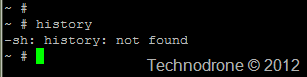
Someone asked me this question this week – how do I see the history of my commands in the the ESXi shell?

There is no history command on an ESXi host..

history

So how do you go about getting the history of the shell commands?

William Lam posted an answer today on the VMware Communities.

The command history is located in /var/log/shell.log

shell.log

Of course also there is a KB stating this information as well - KB2004201

2012-04-12

What Happens When No Swap Volume is Available?

Have you ever asked yourself that question?

A customer of mine a small number of VM’s on one host that were continuously crashing. He would power them up and within less than 5 minutes – they would get powered off.

In this case – the host had a swap partition configured not with the default setting but rather as a separate shared datastore.

Swap location

So what happened?

The swap_12 datastore was not accessible (the reason – is not relevant at the moment), and then they powered on a number of machines.

Going to the vCenter event logs showed this:

image

Notice that the error message is not that descriptive. Inside the guest OS there was no additional clues to the cause for the power off of the VM

But if you look closely you will see the last line mentions this -

*** VMware ESX internal monitor error *** vmk: vcpu-0:Unable to read swapped out pgNum(Ox27dca) from swap slot(Oxl000fb8a) for VM(1717757)
Which of course leads to the direction of the VMware Swap file not being available.
You cannot run a VM without an accessible Swap volume… Winking smile

2012-03-06

Removing ^M Characters from Files in ESXi

As part of a build process for an ESXi server – on of the stages are to upload a valid SSL certificate to the ESXi server.
When copying the certificate over to the host with pcsp for some reason they file is always malformed when going over. If you do a cat rui.crt you will see no issue, but if you do a vi rui.crt then you will see that each and every line has a ^M at the end of it – this is because the file is a dos format file.
dos format
I finally found a to remove them – and it was not easy to find.
Both tr and dos2unix are not available on ESXi
sed 's/'"$(printf '\015')"'$//
s/'"$(printf '\032')"'$//' rui.crt > rui.new

That produces a clean file.
unix format
Phew – now I can rest easy…

Update:
Thanks to the comment received from JR below it is even easier

sed 's/.$//' < rui.crt > rui.new

2012-02-23

How to Set CDP on a vSwitch–the #PowerCLI Way

We all know that you get CDP information in a number of ways (also PowerCLI), KB 1007069 provides a number of ways to do it.

But how would you go about setting CDP on the vSwitch?

That can be done on the host itself in a number of ways:

esxcfg-vswitch –B both vSwitch0

but also with esxcli

esxcli network switch standard set –c both –v vSwitch0

That got me thinking…. esxcli… where had I used that before – of course Netstat for ESXi.

So why not try and do the same here?

The quick and dirty way (I will update later with a proper function)

$esxcli = Get-EsxCli -VMHost $myhost
$esxcli.network.vswitch.standard.set("both","1500","vSwitch0")

Why all 3 Parameters and where did they come from?

$esxcli.network.vswitch.standard | gm

The set method is described as follows:

Name          MemberType    Definition
set              CodeMethod   boolean set(string cdpstatus, long mtu, string vswitchname)

And where do get the values that are valid for “cdpstatus” ? esxcli of course

# esxcli network vswitch standard set

Error: Missing required parameter -v|--vswitch-name

Usage: esxcli network vswitch standard set [cmd options]

Description:
  set                   This command sets the MTU size and CDP status of a given virtual switch.

Cmd options:
  -c|--cdp-status=<str> The CDP status of the given virtual switch. It can be 'down', 'listen', 'advertise' or 'both'
  -m|--mtu=<long>       The MTU size of the given virtual switch.
  -v|--vswitch-name=<str>
                        The name of virtual switch to apply the configurations. (required)

Update: March 06, 2012

I promised to update with a proper function on how to do this, and here it is:

Function Set-VirtualSwitchCDP {

      <#

            .SYNOPSIS
                  Set the CDP setting on a Standard Virtual Switch.
            .DESCRIPTION
                  Using the Get-Esxcli cmdlet you can changed the CDP Settings 
                  on virtual switch on an ESX host.
            .NOTES Author: Maish Saidel-Keesing
            .PARAMETER  VMHost
                  ESX server to perform the function.
            .PARAMETER  MTU
                  The MTU settings of the vSwitch, default is 1500.Valid values are 
                  between 1500-9000
            .PARAMETER  CDP
                  The CDP setting for the vSwitch. 
                  Valid values are 'down', 'listen', 'advertise' or 'both'.
            .PARAMETER  vSwitch
                  The Name of the Standard vSwitch on which to perform the action.
            .EXAMPLE
                  PS C:\> Set-VirtualSwitchCDP -VMhost esx1 -MTU 1500 -CDP both -vSwitch vSwitch0
            .EXAMPLE
                  PS C:\> Get-VMhost Myhost | Set-VirtualSwitchCDP -vSwitch vSwitch0
            .LINK
                  http://technodrone.blogspot.com/2012/02/how-to-set-cdp-on-vswitchthe-powercli.html
      #>

    [CmdletBinding(SupportsShouldProcess=$true,ConfirmImpact='High')]
    Param(
    [Parameter(Position=0,Mandatory=$True,ValueFromPipeline=$True)]
    [String]
    $VMHost,

    [Parameter(Position=1)]
    [ValidateRange(1500,9000)]
    [Int]
    $MTU = 1500,

    [Parameter(Position=2)]
    [ValidateSet("down","listen","advertise","both")]
    [String]
    $CDP = "both",

    [Parameter(Position=3,Mandatory=$True)]
    [String]
    $vSwitch
    )


      Process
      {
       if ($pscmdlet.ShouldProcess($VMHOST,"Updating $vSwitch with MTU $MTU and CDP setting of $CDP"))      {
                  foreach ($hostobject in (Get-VMHost $VMHost)) {
                        $esxcli = Get-EsxCli -VMHost $hostobject
                        $esxcli.network.vswitch.standard.set($CDP,$MTU,$vswitch)
                        $esxcli.network.vswitch.standard.list()
                  }
            }
      }
}

2012-02-09

Windows 8 Developer Preview on ESXi5

Thank you William Lam @lamw!!!!!!!

Due to William's How to Run Windows 8 on vSphere 5 (for reals) post I can now try out
Windows 8 Developer Preview on my ESX boxes.

This was resolved in patch ESXi500-201112001 - it just seems that no-one told us until now.. It would be very interesting to hear what actually changed in this patch.

Running on Workstation was not a good option for me. My lab is on ESX boxes.

But now I am happy - and I can start to finally get to know the new OS.

Windows 8

2011-09-18

Connecting a USB device to an ESXi 5.0 VM

This is something we have been asking for years and it was only available up until now in VMware View. We can finally connect a USB device to a VM running on ESXi. No additional licensing required!!!!!

From the What's New in vSphere 5.0

What's New

Could it be that simple? Well actually yes it is.

This is my host (in this case the free vSphere Hypervisor)

image

Here you have a VM Virtual Hardware version 8 (I was not able to test with Version 7 so if you would like to try and add a comment here - that would be great!!)

VM details

Add a USB Controller to the VM

Add Hardware

You can choose either USB 2.0 or USB 3.0

USB 2.0USB 3.0

And here is the VM Configuration after the addition.

VM Config

After adding the USB controller to the VM, these parameters are added to the VM's configuration (.vmx) file.

vmx1 

After the machine has come up it now has a USB controller in its device manager.

Device Manager

In the vSphere Client I can now attach USB devices that are connected to the my computer to the VM running on this ESX host.

connect USB

When I connect the USB device to the VM I get this warning - which is similar to the one you get when doing the same with Workstation

warning

Once connected to the VM - it shows up in the Device manager and in this case also as a local drive.

New Disk

New Disk2

And of course the details are updated in the .vmx itself

vmx2

This opens up a whole new world of connecting peripheral devices to the VM. I do wonder though what it will mean to all of the companies that have created solutions that were able to solve these issues until now with a USB-over-IP solution. (Digi)

It would be interesting to hear what kind of use you could make of this new feature in your environment. Feel free to drop a comment below.

2011-09-13

netstat for ESXi

The title of the post is actually misleading - on purpose - because there is no netstat for ESXi. The reason that I bring this up today is because of a Twitter conversation from today regarding SSH access and VMkernel interfaces. I was looking to see which ports were open and what interfaces were listening.
But that is a different post.

What is netstat? according to Wikipedia:

netstat (network statistics) is a command-line tool that displays network connections (both incoming and outgoing), routing tables, and a number of network interface statistics. It is available on Unix, Unix-like, and Windows NT-based operating systems.

Why would you use it? For one thing for example, to check if a host has an open connection on a certain port, if it is listening on a certain port - for troubleshooting purposes would be the proper answer.

So how do you get that information on ESXi?

Trying netstat on an ESXi host does not work - because that command is not there - see the screenshot below.

No netstat

Well that is not good - if the command is not in the busybox console then how would you go about getting that information? Well of course the clever people at VMware have already thought about this and have exposed all this information through esxcli. William Lam wrote a great set of posts on esxcli
esxcli Part1 - What is esxcli?, esxcli Part2 - Automating esxcli using vMA and esxcli Part3 - Automating esxcli using PowerShell

This is how you would go about getting the information from esxcli. (Be aware the command differ according to the different versions - 4.x is not the same as 5.x)

esxcli network ip connection list

esxcli1

That is fine and dandy - but to get that info you need to either:

  1. have access to the DCUI (and have it enabled of course)
    or
  2. access remotely with SSH (and also have it enabled of course)

But what if you do not want to enable neither of the above - that means you have to do it remotelyand for that you have two options, vCLI or PowerCLI.

The vCLI way

esxcli --server esx1.maishsk.local network ip connection list

vcli1

But me being more of PowerCLI guy I would do it like this.

The PowerCLI way

$esxcli = get-esxcli -vmhost esx1.maishsk.local

$esxcli.network.ip.connection.list() | ft

PowerCLI1

Output is almost identical - just that in the case of PowerCLI the values are returned as a set of objects - a  VMware.VimAutomation.ViCore.Impl.V1.EsxCli.EsxCliObjectImpl object to be precise. Once these presented as objects I can start to mold and dice my results to my liking.

For example - I would like to check if there is any connections open on port 80 (http) - with vCli - this is not so simple - because you are working essentially in a DOS window - so filtering is not the easiest with findstr. Using the console or SSH is easier - a simple grep will work as you can see below.

esxcli network ip connection list | grep :80

esxcli2

With PowerCLI

$esxcli.network.ip.connection.list() | where { $_.LocalAddress -like "*:80" } | ft

PowerCLI2

I hope you can see that the options this way are pretty much endless - like filtering all connections to show only those from a specific IP, or a complete subnet.

So that is how you netstat on ESXi….