
Showing posts with label Server. Show all posts

2013-02-03

The 99c/Hour Computer vs. Buy Your Own Server (BYOS)

Amazon announced a few days ago the availability of EC2 for In-Memory Computing - The High Memory Cluster Eight Extra Large Instance, here are the specs:
  • Two Intel E5-2670 processors running at 2.6 GHz with Intel Turbo Boost and NUMA support.
  • 244 GiB of RAM.
  • Two 120 GB SSD for instance storage.
  • 10 Gigabit networking with support for Cluster Placement Groups.
  • HVM virtualization only.
  • Support for EBS-backed AMIs only.

Pricing starts at $3.50 per hour for Linux instances and $3.831 for Windows instances, both in US East (Northern Virginia). One year and three year Reserved Instances and Spot Instances are also available.
High-Memory Cluster On-Demand Instances
Eight Extra Large $3.500 per Hour

High-Memory Cluster Reserved Instances
Eight Extra Large $2474 - $1.54 per Hour (1 year) - $3846 - $1.225 per Hour (3 years)


This looks pretty much like a typical High-End server I would buy for a high-performance application – or an ESXi Host.

Let us take those numbers for a minute and translate them to something that we actually can use.

On Demand – $3.5 x 24 (hours) x 365 (days per year) = $30,660

Reserved – $2,474 + $1.54 x 24 (hours) x 365 (days per year) = $15,964.40 (1 year)
Reserved – $3,846 + $1.225 x 24 (hours) x 365 (days per year) x 3 (years) = $36,039 (3 years)

Firstly – it is obvious that the Reserved instances are so much cheaper than their On-Demand counterparts – so proper planning can save a whole lot of money on AWS. I assume the serious AWS users will use Reserved instances.

(****** of course this does not take into account everything else like IP addresses, IN/OUT data transfer, monitoring, etc. ******)


I checked what a similar hardware spec would cost for BYOS (Buy Your Own Server)
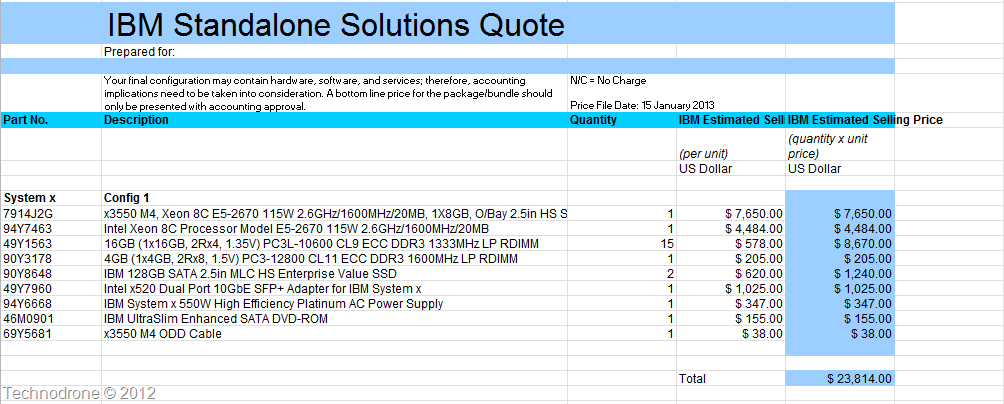
BYOS 
The price was $23,814 – this was list price - including 3 years 24x7x4 on-site support. (No Enterprise actually pays list price – and a 30% discount would be more than reasonable (if not more) – which would bring the price to $16,670).

And to be completely fair convert this into per hour:
$16,670 / 3 (years) / 365 (days) / 24 (hours) = $0.634 (per hour)

I could not find many (reputable) hosting providers that were offering something similar to this configuration online so that I could not compare properly the cost of a such hardware as a Hosted Dedicated Server.

The price of the hardware is not the only cost involved of course, and there are other elements should be added in (some of them listed below):

  • Lead-time
  • Administration
  • Setup & Installation
  • Maintenance & administration (people)
  • Power & Cooling
  • Backup & DR
  • Network

And also having the flexibility of not actually having to run such a machine 24x7 was not factored  – but I do think it is safe to assume – that if you are going to actually need such an AWS instance – it will be highly utilized.

So I cannot say that BYOS is half the price – because of all of the above. It could be cheaper – but it also99c could be more expensive. Mileage will vary.
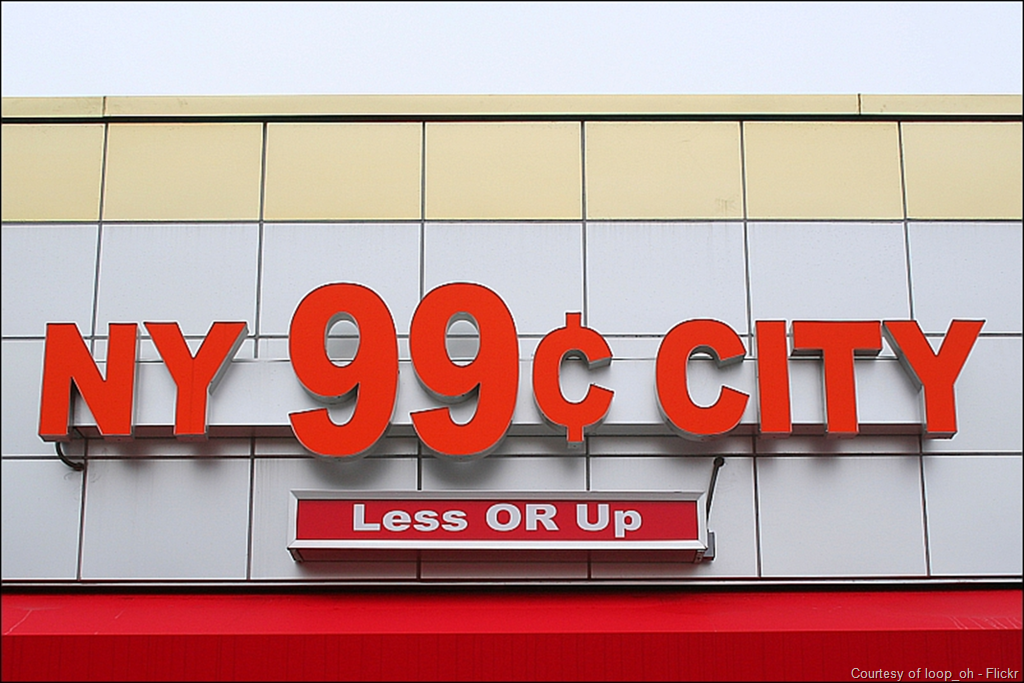
I can’t help feeling that this reminds me of the 99 cents marketing methods that stores use. It always seems cheaper than $1 and $1.54 does not really seem like a whole lot of money to spend per hour. But when you accumulate all those hours into days, weeks, months and years – it doesn’t look that bright and shiny any more.

(As a side note – I recently learned that one of our departments had spent approximately $500,000 on AWS in the past 18 months – which is not what they thought it would cost them when they started out)
We are (too much so – unfortunately) a consumer world, we buy things. Vendors know that – and try every trick in the book to get us to buy as much as they are able to sell. AWS sell cloud instances.
Just because things are there – and look like they are cheap does not necessarily mean that they always are.

To be honest – I think it would only be fair that AWS (or any cloud provider for that matter) should give prices not only per hour, but also per day and per month. This will be better for the consumer and easier for us to compare.

Crunch the numbers!

Comments and feedback are always welcome.

2012-02-09

Windows 8 Developer Preview on ESXi5

Thank you William Lam @lamw!!!!!!!

Due to William's How to Run Windows 8 on vSphere 5 (for reals) post I can now try out
Windows 8 Developer Preview on my ESX boxes.

This was resolved in patch ESXi500-201112001 - it just seems that no-one told us until now.. It would be very interesting to hear what actually changed in this patch.

Running on Workstation was not a good option for me. My lab is on ESX boxes.

But now I am happy - and I can start to finally get to know the new OS.

Windows 8

2010-01-15

A bit of housekeeping – Powershell

I have been busy with using Powershell in these past few days.

I would like to share with you two of the scripts that I used lately. They were both used because of a password change that was made on a service account.

Now the thing about service accounts in Windows 2003 is, they are good, they need elevated privileges in some cases, and since the account is used for the specific purpose then you know that you have to change it once in a while and you know where. Problem is though unless you catch them all – and someone – somewhere  did not update the password somewhere, then you will start having issues with account lockouts.

First is to get all the services from all the computers in my OU, and change the password

   1: $logfile = "c:\temp\results.log"
   2: $serviceaccount = "svcmacct"
   3: $password = ""
   4:  
   5: $serviceslist = Get-QADComputer -SearchRoot "OU=Public Servers,DC=maishsk,DC=local" -OsName window* -searchscope "subtree" -ErrorAction SilentlyContinue | ` 
   6: ForEach-Object {
   7:     (Get-WmiObject -Class Win32_Service -ComputerName $_.Name -ErrorAction  `
   8:             SilentlyContinue | where {
   9:                 $_.'StartName' -like $serviceaccount
  10:             }
  11:     ) 
  12: }
  13:  
  14: [System.Reflection.Assembly]::LoadWithPartialName('system.serviceprocess')
  15:  
  17:     ForEach ($line in $serviceslist) {
  18:         Write-Host Processing $line.Systemname
  19:         $service = Get-WmiObject win32_Service -ComputerName $line.Systemname -Filter "Name='$($line.Name)'"
  20:         Write-host Stopping Service $line.Name
  21:         (new-object System.ServiceProcess.ServiceController($($line.Name),$($line.Systemname))).Stop()
  22:         (new-object System.ServiceProcess.ServiceController($($line.Name),$($line.Systemname))).WaitForStatus('Stopped',(new-timespan -seconds 90)) 
  23:         if ($? -eq $true) {
  24:         $service.Change($null ,$null ,$null ,$null ,$null ,$null , $serviceAccount, $password )
  25:         Write-host Starting Service $line.Name
  26:         (new-object System.ServiceProcess.ServiceController($($line.Name),$($line.Systemname))).Start()
  27:         (new-object System.ServiceProcess.ServiceController($($line.Name),$($line.Systemname))).WaitForStatus('Running',(new-timespan -seconds 40)) 
  28:         write-output $(get-date -DisplayHint time)` --` Service` $($line.Caption)` on` $($line.SystemName)` has` been` updated` and` restarted >> $logfile
  29:         } else {
  30:         write-output $(get-date -DisplayHint time)` --` Service` $($line.Caption)` on` $($line.SystemName)` update` failed >> $logfile
  31:         }
  32: }

Line 5 – get all the computers in the desired OU and get the services.

Line 22 – Here is a wait statement for the service to stop, otherwise this will cause issues with the rest of script. Please remember that the time span is there to ensure that if something goes wrong – then you script will continue, otherwise you will have to close the shell window - Ctrl+C will not work.

Line 28 – logs the results to a file including a time stamp.


Second script was to change the passwords for all the scheduled tasks using this same service account

   1:  
   2: $mycomps = Get-QADComputer -SearchRoot "maishsk.local/Public Servers" -SearchScope Subtree -SizeLimit 0 
   3:  
   4: $logfile = "c:\temp\tasklist.csv"
   5: $results = "c:\temp\results.log"
   6:  
   7: $report = @()
   8: $mycomps | ForEach-Object -ErrorAction SilentlyContinue {
   9:     schtasks.exe /s $_.Name /query /v /fo csv >> $logfile 2>>c:\temp\errors.txt
  10:     }
  11: $report = import-Csv $logfile
  12:  
  13: ##Get all tasks that are run under a certain user
  14: $svcaccount = Read-Host "Please Enter Service account Name (Domain\Username)"
  15: $mytasks = ""
  16: $mytasks = $report | Where-Object {($_."Run As User" -like $svcaccount) -and ($_."Next Run Time" -ne "Disabled")} | select Hostname, TaskName
  17: #Remove unwanted Characters
  18: $mytasks | ForEach-Object {
  19:     $_.TaskName = ($_.TaskName).Trimstart("\")
  20:     }
  21:  
  22: ##Change credentials for the task
  23:  
  24: foreach ($task in $mytasks) {
  25:     schtasks.exe /change /S $($task.HostName) /TN "$($task.Taskname)" /RP $password >> $results 2>>c:\temp\errors.txt
  26: }

Line 9 – schtasks.exe is the was I decided to go to get the info – I could not find anything else in Powershell that would extract the info.

Line 18-19 – the output came back with an extra “\” in the beginning – I used the Trimstart method to remove it.

Line 25 – This actually took a while to find the exact syntax that I was looking for.

If you have any comments or  improvements I would appreciate you input.

2009-09-23

How To Manage VMware Server 2.0.x ?

When VMware released the free product VMware Server 2.0.0 version, they decided to get rid of the Console client application.

Was this a good thing? Some say no, some say that it was, personally - I think it was a mistake to ditch the Console.

A bit of background.

When you install Server 2.0.x, bundled with it you get an Apache/Tomcat installation on your host.

image

image

Now this is something that I find personally annoying. Take for example a Windows Host. Windows has IIS built in. So why do I need to add another Web server to the machine. Same goes for Linux by the way, this will install its own Web Server, regardless if you are already using Apache on you Linux host

And it uses resources..

image

This is the management console that you receive.

image

There are certain use cases for running Server instead of ESXi, to name a few - non compatible hardware, access to USB devices, sound etc. that you cannot get with using ESXi

But never fear, and this is not a very well documented feature, but it is available. Some of you might have heard about a management tool that can help. It is free, it is a VMware product and most of you are already using it.

If you have not already guessed, I am talking about the vSphere Infrastructure Client.

So how would you go about doing this? Well it is pretty simple. When managing your host through the Web interface you went to the following ling (my host IP = 10.0.0.5) https://10.0.0.5:8333/ui/#

So what you should do is open the VIC and in the host field connect to the host but on port 8333 like this:

image

Login with your credentials and then you get a familiar screen

image

Note the subtle differences though

image image

image

image

image

image

image

And last but not least a remote console to a working VM

image

This is fully functional. You can create VM's, change resources, Snapshots, the works!

And of course I do not need apache running and using resources.

image

image

Why did I find it important to bring this to your attention? With this method it allows you use a single tool and application to manage all your virtual hosts, be they:

  • VMware Server
  • ESXi
  • vCenter

I find it useful in my mixed VMware environment.

Hope you Enjoyed the ride!

2009-09-17

Windows 2000 - R.I.P.

From this this post on Technet - we can finally say that if you have a Windows 2000 Server in your enviroment - GET RID OF IT!!!!!! (or at least before July 13, 2010)
Another small thing to note - Service Pack 2 for Windows 2003 - was the last, there will be no no SP3.
Here is the short version.
Windows 2000 Server
Extended Support for Windows 2000 Server will end on July 13, 2010. At this time, Windows 2000 Server will no longer be publicly supported.  You will be able to continue using "Self-Help Online Support"*
Windows Server 2003 and Windows Server 2003 R2
Also on July 13, 2010, Windows Server 2003 and Windows Server 2003 R2 (at a supported service pack level) will move from the Mainstream Support phase to the Extended Support phase.  During the Extended Support phase:
  • Microsoft will continue to provide security updates and paid support (Example: Premier and Essential support, per-incident telephone/web support, etc.)
  • Customers will continue to have access to all security updates and Self-Help Online Support options (Example: Knowledge Base articles, online product information etc.)
  • Non-security hotfixes developed during the Extended Support phase will be provided ONLY to customers who enroll in Extended Hotfix Support (EHS).
Please note: If you'd like to enroll in EHS, customers must already have a Premier Support contract. In addition, customers must enroll in EHS within the first 90 days of the Extended Support phase.  Program and per fix fees may also apply.  Customers with Software Assurance can enroll in EHS at any time.  
Service Pack 3 for Windows Server 2003
We have received inquiries from our customers and partners on whether or not there will be a need for a Service Pack 3 for Windows Server 2003.  Microsoft will not have a SP3 release for Windows Server 2003
To Summarize...
  • Self-Help Online Support* will be available for Windows 2000 Server after Extended Support before it ends on July 13, 2010.
  • Windows Server 2003 and Windows Server 2003 R2 will begin an extended support phase on July 13, 2010
  • There will be no Service Pack 3 for Windows Server 2003
Go forth and upgrade!! (or retire)

2009-04-12

Is P2V always the best solution?

I saw this post post on Simon Gallagher's Blog Using Virtualization to Extend The Hardware Lifecycle. Simon made a good point. Can we take the physical hardware out of the equation? Well I guess that is exactly what VMware and virtualization is doing. We are no longer dependant on physical servers any more.

I would like to however raise another point of view. Correct, the easiest solution for a system residing on aging hardware is to P2V the system to a VM – and it seems that I have solved my problem. But have I? I posted a question about 9 months ago with this exact same thought.

Do you really want to carry over legacy Operating Systems and applications and continue to support them forever?

You might find yourself with legacy operating systems, applications that Vendors no longer support, personnel do not have enough knowledge of these old operating systems, and will not know how to solve problems when they arise.

Classic example: A Windows NT4 Server that has a legacy application was installed on it. The product was developed and installed over 6 years ago. A new system was requisitioned and designed to replace the old, for obvious reasons. The original company that developed the product no longer exists, staff that understand and support the application are no longer employed by the company. A project was planned and executed over the period of a year to replace the old system. The project was completed on schedule with close to 100% success. The new application Owner agreed that the old system would stay available for a period of maximum 6 months after going live with the new system and the old data would not be required to be migrated to the new system. Those six months have come and passed. When push came to shove – and we wanted to power off the server – the application owner (and thereafter it became a management decision) demanded that the old server stay online.

The hardware was over 7 years old. No parts, no service, and no guarantee that it could be restored successfully if the hardware was to die. The only solution that we were able to come to was to P2V the machine to a VM. Of course the process works, but now the organization is stuck with a NT4 server that has to be supported. Operating System upgrade to Server 2003 is being planned and tested.

I do sincerely suggest that you create a policy that a VM/Server should have its lifespan defined according to your company’s requirements. Any VM/Server that has passed that lifespan should not be automatically migrated to a VM to remove the hardware dependency – but should be installed as a new OS and have the applications on the old VM/Server migrated to the new OS. Just the same as if your hardware would come of age and have to be replaced.

Do not blindly P2V systems, just because you can.

You will regret doing so in the long run.

I for one do not want ancient Windows/Linux systems in my datacenter. Would you?

2009-04-02

New VMware Product Releases

NO! it is not the new ESX version! (there are other products that VMware sells besides ESX you know)

Besides Update 4 for ESX and ESX3i that were released last week:

VMware Player 2.5.2

VMware Workstation 6.5.2

VMware Server 2.0.1

What's New

With this release of VMware Player, certain new features and support have been added.

Support for New Guest Operating Systems
VMware provides support for the following operating systems for Player 2.5.2:
  • Windows Vista Service Pack 1 and Service Pack 2
  • Asianux Server 3.0 Service Pack 1
  • openSUSE 11.1
  • Ubuntu 8.10
  • Ubuntu 8.04 LTS
VMware provides experimental support to the following operating systems for Player:
  • Asianux Server 3 Service Pack 1
  • Fedora 11
  • FreeBSD 7.1
  • Mandriva Linux 2009
  • Microsoft Windows 7
  • Novell SLE11.0
  • Red Hat Enterprise Linux 5.3
  • Red Hat Enterprise Linux 4.8
  • Sun Solaris 10 Update 6
  • Ubuntu 9.04

Besides the new operating systems that were supported – there are several other issues that were addressed with each release.

Go forth and Virtualize!!

2009-03-22

I Wonder what HP have planned?

Hp started a new campaign "The Guy Who Lives in the Server Room"

How you can follow us to freedom

Step 1: Admit you have a problem
Fear not, HP is here; seek refuge from your data center woes on our HP ProLiant Facebook page. Share your stories, post your pictures, help a fellow “Guy Who Lives in the Server Room,” but best of all – sign up to watch releases of all 6 episodes. Will he find his way out?

Step 2: Plan your escape
Join our viewing party on 03.30.09 to be enlightened by HP ProLiant’s newest generation of servers. Be the first to watch the world premiere of Episode 2. Need we say more?

Step 3: Share the sanity
Do you know someone else who lives in their server room? Start them on the path to freedom by sharing these resources:


2009-03-16

SCVMM 2008 R2 Beta

I found this in my inbox this morning ( I saw that this was mentioned here as well:
Dear SCVMM beta tester, As a past beta tester of the System Center Virtual Machine Manager 2008 software, we wanted to notify you at that new Beta release of the "R2" release for VMM 2008 is now available on Microsoft Connect for download. What is VMM 2008 R2 Beta and what are its new capabilities? VMM 2008 R2 Beta is a comprehensive management solution for virtualized infrastructure that takes advantage of many of the great new features of Windows Server 2008 R2 Beta including:
  • Live Migration: Enables the movement of running virtual machines from one virtual host to another with no downtime.
  • Clustered Shared Volumes: Helps enable Live Migration and eliminates the previous one LUN per virtual machine requirement thus simplifying SAN administration.
  • Hot addition/removal of storage: Allows the addition and removal of new virtual hard disks (VHDs) and iSCSI pass-through disks running on virtual infrastructure.
  • Networking optimizations: two new technologies -- Virtual Machine Queue (VMQ) and Chimney - provide increased network throughput while reducing CPU load.
So who is ready or will to try it out? You can sign up for the Beta here

2009-02-22

Hyper-V Technologies - Wrong Information

Well this is nothing new, we see this all the time, but today it really annoyed me. During a lecture I participated in today with a Microsoft Partner at Microsoft offices in Israel today, one of the slides were comparing costs between VMware and Hyper-V.
1 Host - 4 guest VM's
 Hyper-VVmware
Windows 2008 Server
$2,500
$2,500
Hypervisor
- (Built-in)
$5,800 (3.5 Enterprise)
System Center
$1,500
-
Virtual Center
-
$5,800
Total
$4,000
$14,100
Now Come on!!!!! - Where did they get these numbers? I guess that Microsoft think that people do not know how to compare technologies one to another.
  1. If you are only using one host - then why do you need Virtual Center?
  2. Let's say you need the functionality to deploy templates etc. - then you cannot get away with a Standalone License - but the Bundles are much cheaper than what was presented above.
  3. For one host - you will not need an Enterprise License ($5,800) - for the same features that Hyper-V provides - a Foundation license ($1,000) will be more than overkill - you will probably be able to get away with a ESX3i free license (if you do not need central management).
  4. Comparing System Center to Virtual Center is not accurate (and if I was to put it less diplomatically - pure nonsense!!!).
Get your facts straight - and as I have said more than once - compare apples to apples - not apples to oranges.


2009-02-18

Small Present for you all - VMware Visio Stencils

*****Update June 11, 2012******

The new version is available here

*****************************

Remember a few days ago VMware released a nice present for us all a great set of graphics that we can use Library VMware Icons and Diagrams?? Well the first thing that I heard was - WOW! Great! Wonderful! Thanks! Uhmmmm... Can we get this to use in Visio? So here you all are! My contribution to VIOPS VMware Icons and Diagrams - Visio Stencils Enjoy!!!

2009-02-11

vCenter Physical or Virtual?

Every now and again, this comes up. It did again 2 Days ago on Dave Lawrence's Blog

I still feel that in spite of all the benefits and extra redundancy you get with vCenter as a VM, it still feels like putting too much of my precious eggs in one basket.

According to VMware - 60% of all vCenters are Physical - and 95% run of them use an SQL database.

Seems that the majority feel the way I do..

2008-12-24

A new free Ebook

Microsoft have published a new book - granted it is on Virtualization - the Microsoft way, but still should be something to go over. Understanding Microsoft Virtualization This is the book for IT professionals who want to learn more about the latest Microsoft virtualization technologies, including Windows Server 2008 Hyper-V, System Center Virtual Machine Manager 2008, Microsoft Application Virtualization 4.5, Microsoft Enterprise Desktop Virtualization, and Microsoft Virtual Desktop Infrastructure. The book also examines other virtualization-enabling technologies from Microsoft including Windows Server 2008 Terminal Services, Roaming User Profiles, Folder Redirection, and Offline Files. Download here

2008-12-17

Time to change the Passwords again...

Do you all know how one of the biggest headaches you have is changing all the service accounts and administrative passwords on a regular basis? Well I did that this week.

This entailed changing passwords on almost 10 different accounts, local administrator passwords on over 100 servers, Local services, and tasks running under these accounts.

It wasn't so bad though the only real headache is the changing of the local passwords on the servers, the services and the tasks.

Here is how I changed the service credentials (rename the file extensions to .ps1)

changeservicecreds.txt

Change Admin Password on remote computers

changeadminpasswd.txt

Tasks - I have not found a decent script yet to perform this - when I do I will let you all know.

And of course dont forget to run Eventcombt to check that you have not missed anywhere (or naturally there are places that you never knew about in the first place :) ) to catch all those incorrect loin attempts.

Have a good one - it is about time I went to sleep..

2008-12-15

Comparisons... Comparisons....

Ahh..... Come On!!!!!!!!! VMware vs Hyper-V comparison. Jason and Scott have said more than enough on the matter. People should get their facts straight!!!!

2008-12-11

The New online hardware Compatibility guide for Vmware

So yesterday VMware released a new application online that allows you to search for your hardware to see if it is supported with ESX systems

We got this one from John Troyer (and thanks to Duncan for letting us know).

But...

The the small print at the bottom says:

THE HARDWARE COMPATIBILITY GUIDE IS UPDATED FROM TIME TO TIME WITHOUT NOTICE. FOR THE LATEST HARDWARE COMPATIBILITY GUIDE, PLEASE GO TO THE FOLLOWING LINK: http://www.vmware.com/resources/compatibility


So I guess I will still be downloading/accessing the HCL PDF every time I buy a new server.

It is a great move in the right direction though!!

2008-12-09

Active Directory Health Check

Well I have spent the past two days with a Microsoft PFE (Premier Field Engineer) who has been doing a quick health check for issues in our domain.

This does not replace an Active Directory Risk Assessment Process (ADRAP) - but was a highly informative and educating session.

ADRAP Objectives
  • Perform a detailed analysis of an organization‘s Active Directory environment.
  • Review Active Directory configuration.
  • Improve availability by eliminating single points of failure and by verifying that fault tolerant designs are in place.
  • Improve Active Directory performance.
  • Reduce service outages and subsequent downtime by identifying current or imminent issues.
  • Impart knowledge and skills to administer, manage, and troubleshoot Active Directory.
  • Provide tools and methodologies that will enable customers to identify existing problems.
So I have spent the past two days deep-diving into my forest.
It was a fun two days, tons of stuff I have learned, and points taken for fixing and improvement. It is always a pleasure to work with such knowledgeable people - and our PFE is highly qualified and skilled.

2008-11-30

Israeli VMUG will take place on Wednesday Dec. 3rd

On the schedule:

- VMware
- Virtual Desktop Technical Deep Dive
- EMC Recover Point
- Product announcements and upcoming technologies (from VMworld 2008)


It should be a good morning ...

So what to do with 60 or so servers that are falling out their warranty period


I wanted share with you a bit of what is happening with a process on how we can save money with virtualization.

About 3 years ago or more, Virtualization was not the mainstream for most companies, personally, my current employer did not really get into it until about 18 months ago. So... we are doing our yearly review on what hardware warranty will end and at the moment it looks like that I will have over 60 physical servers that will need to be replaced or have a maintenance contract applied to them for the next year.

A bit of Math:

Average server (1QC/2GB RAM/2x73GB 15,000 SAS HD) - US$3,500
A maintenance contract (next business day [NBD]) for a year for the above mentioned 60 servers - $450 per server

So these are the options as I see them...

  1. Replace all Physical servers with new ones - US$210,000
  2. Renew Maintenance contracts for all servers - US$27,000 (per year)
  3. Migrate the machines to Virtual machines:
    2xESX Hosts - US$10,000
    2xESX Enterprise Licenses - US$17,000
    1 TB Central Storage - $3,000

So I guess you can see where I am going with this.. :)

No one in management is going to sign off on option 1.
I think you can see why option 3 is better than option 2. The cost of option 2 over 3 years - US$81,000. Option 2 - $US30,000 (including maintenance and support on VMware software for the period of 3 years).

Now the only thing I need to convince the brass about is that all these servers should not be migrated "as-is" to Virtual Machines, but re-installed to a new OS just as they would do if it would be migrated to new hardware. I really and truly do not want to drag over Windows NT 4.0 and Windows 2000 Server Operating Systems and continue to support them..

But that is a whole different ballgame, and for another post....

2008-06-29

Vmware to the rescue again

Well a colleague of mine had an issue today. A physical server running VMware server with 2 vm's on it. One VM's disk "exploded" and we were left with 0% (yep that is right) free space on the HD of the physical server.

Now if this was a small VM then that would not be a problem but the vmdk was 120 GB in size (even though inside the VM it was only using 40GB). So to remove the file from the server would have taken too long.

Solving the problem was one of two options:
  1. Run Vmware converter and therefore resize the disk.
  2. Hook up to the the Physical server via a share from a machine running VMware workstation.
We chose the latter (which was a bit more difficult to accomplish because the physical server was running Linux). Installed Samba and configured a share on the physical server. Opened the VM from a workstation. Added an additional HD (vmdk) with 50gb of space, and ghosted Disk 0 to Disk 1.

Process took something like 30 minutes. Booted the machine off the new vmdk. Ran through the tests and deleted the old 120GB vmdk.

You gotta love VMware products!!!