Showing posts with label Security. Show all posts

2019-03-11

The Anatomy of an AWS Key Leak to a Public Code Repository

Many of us working with any cloud provider know that you should never ever commit access keys to a public github repo. Some really bad things can happen if you do.

AWS (and I assume all the cloud providers have their equivalent) publish their own best practices about how you should manage access keys.

One of the items mentioned there - is never to commit your credentials into your source code!!

Let me show you a real case that happened last week. 
(of course all identifiable information has been redacted - except for the specific Access key that was used - and of course it has been disabled)

Someone committed an access key to a public github repository. 

Here is the commit message 

commit xxxxxxxx26ff48a83d1154xxxxxxxxxxxxa802
Author: SomePerson <someone@some_email.com>
Date:   Mon Mar 4 10:31:04 2019 +0200

--- (All events will be counted from this point) ---

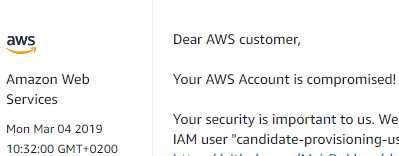
55 seconds later - I received an email from AWS (T+55s)

From: "Amazon Web Services, Inc." <no-reply-aws@amazon.com>
To: john@doe.com
Subject: Action Required: Your AWS account xxxxxxxxxxxx is compromised
Date: Mon, 4 Mar 2019 08:31:59 +0000

1 second later (T+56s) AWS had already opened a support ticket about incident


Just over 1 minute later (T+2:02m) someone tried to use the key - but since the IAM role attached to the user (and its exposed key) did not have the permissions required - the attempt failed!!

(This is why you should make sure you only give the minimum required permissions for a specific task and not the kitchen sink..)

Here is the access attempt that was logged in Cloudtrail


Here is where I went in and disabled the access key (T+5:58m)


Here was the notification message I received from GuardDuty which was enabled on the account (T+24:58m)

Date: Mon, 4 Mar 2019 08:56:02 +0000
From: AWS Notifications <no-reply@sns.amazonaws.com>
To: john@doe.com
Message-ID: <0100016947eac6b1-7b5de111-502d-4988-8077-ae4fe58a87c9-000000@email.amazonses.com>
Subject: AWS Notification Message


Points for Consideration

There are a few things I would like to point out regarding the incident above (which we in the categorized to one of a low severity). 

  1. As you can see above the first thing that the attacker tried to do was to run a list keys. That would usually be the first thing someone would try - to try and understand which users are available in the system (assuming that the user has the permission to perform that action)

    You can read more about how a potential hacker would exploit this in this series of posts.

  2. I assume since the attacker saw that they do not have enough permissions - they decided this was not a worthy enough target to continue to try the exploit. Why waste the time if you are going to have to work really hard to get what you want. That is why we only saw a single attempt to use the key.

    If I was the hacker - I would just wait for the next compromised key and try again.

  3. The reason this attack was not successful - was because the role attached to the User (and its access keys) was built in such a way that they did not have permissions to do anything in IAM.

    This was by design. The concept of least privilege is so important - and 10 times more when you are working in the cloud - that you should implement it - in every part of your design and infrastructure.

  4. AWS responded extremely fast - that is due to them (I assume) scraping the API of all public github commits (for example). It could have been that I was just in time for a cycle - but based on my past experience - the response time is usually within a minute. It would be great if they could share how they do this and handle the huge amount of events that flow through these feeds.

    They still have to match up the exact compromised key to the account, and kick off the automatic process (email+ticket). All of this was done in less than 60 seconds.

    I am impressed (as should we all be).

  5. One thing I do not understand is that why AWS would not immediately disable the key. The business implications of having a key out in a public repo - are so severe - and the  use case that would require a key in the open - is something that I cannot fathom as being a valid scenario. If AWS already find a compromised key, know which account it belongs to, and kick off a process - then why not already disable the key in the process??

    The amount of time and work that AWS would have to invest (in support tickets and calls) working with a customer to clean up the account, forfeit the charges incurred because of the leak - are above and beyond anything they would incur by automatically disabling the key in the first place.

    AWS has started to take a stance on some security features - by disabling thing by default (for example - public S3 buckets) to protect their customers from causing harm to themselves.

    I for one would welcome this change with open arms!


  6. It took me over 5 minutes to actually act on the exposed credential - in 5 minutes, a malicious actor can do some real and serious damage to your AWS account.

  7. GuardDuty - was slow, but it obvious why this was the case. It takes about 15 minutes until the event is delivered to CloudTrail - and GuardDuty then has to analyze based on previous behavior. So this product should not be used for prevention - but rather - for forensic analysis after the fact. There is no real way to identify this data on your own and analyze against your baseline for behavior - so this product is in my honest opinion still very valuable.

  8. How does one stop this from happening?

    There are a number of ways to tackle this question.

    In my honest opinion, it is mainly raising awareness - from the bottom all the way to the top. The same way people know that if you leave your credit card on the floor - there is a very good chance it will be abused. Drill this into people from day 1 and hopefully it will not happen again.

    There are tools that are out there - that you can use as part of your workflow - such as
    git-secrets that prevent such incidents from even happening - but you would have to assure that every single person, and every single computer they ever work on - would have this installed - which is a much bigger problem to solve.

    Install your own tools to monitor your repositories - or use a service such as GitGuardian that does this for you (not only for AWS - but other credentials as well). 
As always please feel free to share this post and leave your feedback on on Twitter @maishsk
2019-02-22

Separate VPC's can do More Harm Than Good

I have come across this a number of times of the past couple of months. Environments that were born in the datacenter, have grown in the datacenter - in short people who are used to certain (shall we say - ‘legacy’) deployments, and they they are in the midst of an attempt to mirror the same architecture when moving to the cloud.

I remember in my old days that our server farm had a separate network segment (sometimes even more than one) when I was using physical servers, (while I write this - I actually think it has been about 4 years since I actually touched a physical server, or plugged a cable/disk/device into a physical server) for our Domain controllers, Applications servers, and users had their own network segments that were dedicated only to laptops and desktops.

In the physical/on-prem world - this made sense - at the time - because what usually happened was the dedicated networking team that managed your infrastructure used access lists on the physical network switches to control which networks could go where.

Fast forward to the cloud.

There are people which equate VPC’s with Networks (even though it makes more sense to equate subnets to networks - but that is besides the point) - and think that segregating different kinds of workloads into multiple VPC’s will give you better security.

Let me give you a real scenario that I was presented with not too long ago (details of course have been changed to protect the innocent … )

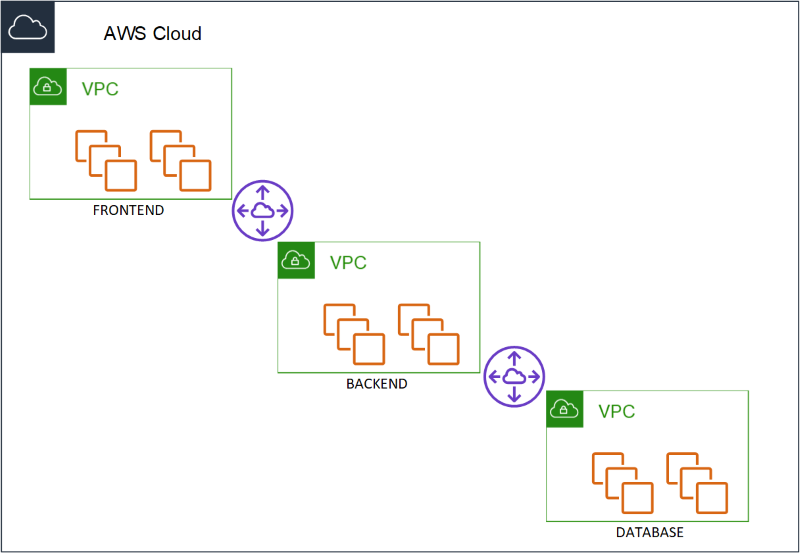
A three tier application. Database, Application and a frontend. And the requirement that was laid down from the security team was that each of the layers must reside in the their own VPC. Think about that for a minute. Three VPC’s that would be peered to ensure connectivity between them (because of course the 2/3 layers needed to communicate with each other - Database - application and application to frontend). When I asked what was the reason for separating the three different layers in that way, the answer was, “Security. If for example one of the layer was compromised - it would be much harder to make a lateral move to another VPC and compromise the rest.”


So what is lateral movement? I know that there is no such a thing as a 100% secure environment. There will always be hackers, there will always be ways around any counter measures we try and put in place, and we can only protect against what we know and not against what we do not. The concept of lateral movement is one, of compromising a credential on one system and with that credential moving to another system. For example - compromising a Domain admin credential on an employees laptop - and with that credential moving into an elevated system (for example a domain controller) and compromising the system even further.

So how would this work out in the scenario above. If someone would compromise the frontend - the only thing they would be able to connect to would be the application layer - the frontend - does not have any direct interaction with the database layer at all, do your data would be safe. There would be a peering connection between the Frontend VPC an the Application VPC - with the appropriate routing in place to allow traffic flow between the relevant instances, and another peer between the Application VPC and the Database VPC - with the appropriate routing in place as well.

What they did not understand - is that if the application layer was compromised - then that layer does have direct connectivity with the data layer - and therefore could access all the data.

Segregating the layers into different VPC’s would not really help here.

And honestly - this is a risk that you take - which is why the attack surface you have - exposed on your frontend - should be as small as possible - and secure as possible.

But I came back to the infosec team and told them - what if I would provide the same security and segregation that you were trying to achieve but without the need of separate VPC’s ?

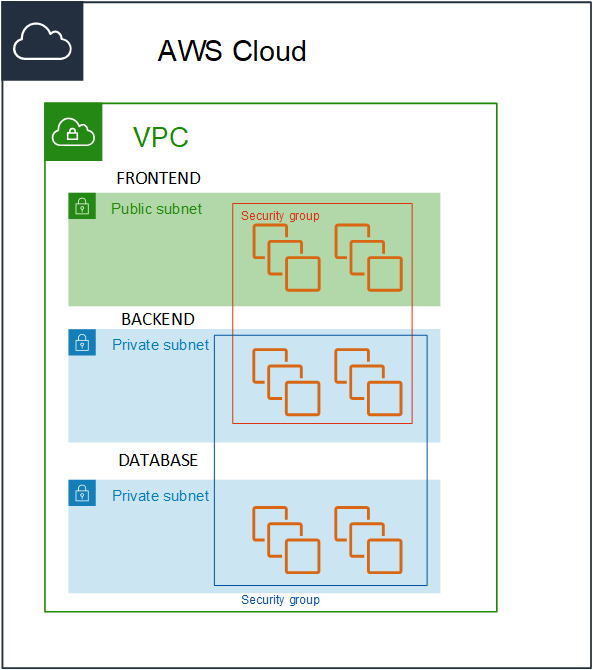
I would create a Single VPC - with three subnets and three security groups, Frontend, Application and Database. Instances in the frontend security group would only be allowed to communicate with the instances in the application security group on a specific port (and vice-versa) and the instances in the application security group would only be allow to communicate with the instances in the database security group (and vice-versa).


The traffic would be locked down to the specific flow of traffic and instances would not be able to communicate out of their security boundary.


As a side note - this could have also been accomplished by configuring very specific routes between the instances that needed to communicate between the VPC’s, but it does not scale to an environment larger than a handful of instances. Either you need to ensure that the IP addresses in a manual fashion, or keep on adding multiple routes in the route tables.

It goes without saying that if someone managed to compromise the frontend, and somehow managed through the application port to gain control into the application layer - they could gain access (in theory) to the data in the data layer.

Which is exactly what happened in the same scenario with 3 separate VPC’s. No less secure - no more.

But what changed??

The operational overhead of maintaining 3 VPC’s for no specific reason was removed.

This includes:

  • VPC Peering (which has a limit)
  • Route tables (which has a limit)
  • Cost reduction

I could even take this a bit further and say I do not even need different subnets for this purpose - I could actually even put all the instances in a single subnet and use the same mechanism of security groups to lock down the communication. Which is true. And in an ideal world - I probably would have done so - but in this case - it was a bit too revolutionary to already have made the step of going to a single VPC - and to go to a single subnet - was pushing the limit - maybe just a bit too far. Sometimes you need to take small victories and rejoice and not go in for the jugular.

I would opt into option of using separate VPC’s in some cases such as:

  • Different owners or accounts where you cannot ensure the security of one of the sides.
  • When they are completely different systems - such as a CI system and production instances
  • A number of other different scenarios

The bottom line of this post is - traditional datacenter architecture - does not have to be cloned into your cloud. There are cases where it does make sense - but there are cases where you can use cloud-native security measures - which will simplify your deployments immensely and allow you to concentrate as always on the most important thing. Bringing value to your customers - and not investing your time into the management and maintenance of the underlying infrastructure.


Please feel free contact me on Twitter (@maishsk) if you have any thoughts or comments.

2014-07-07

M&M's, Snickers and Security in the Cloud

I cannot take credit for this one - I heard it last week at a very interesting talk by Adrian Cockroft at the Speed and Scale Meetup last week in Herzeliya.

The analogy was a very simple one, but very much to the point, and I feel that it was a great way on how we should be looking at security in the cloud.

M&M's - A lot of themM&M's are the one thing that me kids always ask me to bring back for them when I go to the States, especially the ones without the peanuts.

What is great about M&M's? They have a hard shell, that protects the great soft chocolate inside. The shell is not unbreakable, but hard enough to protect the the great stuff on the inside.
But once the shell is broken, you have nothing but chocolate.

snickersA Snickers bar on the other hand, has a nice soft chocolate on the outside, but inside there are many crunchy nuts, each of them are hard and do not need the chocolate to protect them, because they are hard enough to look after themselves.

OK, enough about chocolate, what the heck does this have with cloud and security?

Traditionally, we are used to having a perimeter devices that protect everything behind them, and within the perimeter we are good to go, there is an elevated level of trust, just like the hard shell of an M&M and the soft chocolate inside.

I do not think this will suffice in a cloud environment. I don’t think you should either. Each of the above methodologies have their advantages but they have disadvantages as well.

In the cloud, you do have the option using a perimeter devices, creating VPC's with most of the providers today.

I think that we should treat our cloud environment like a Snickers bar. The outside is always soft, vulnerable, untrustworthy. You will not know what instances/vm’s are running on the same host as you are. Do they have access to the network subnet you are using? So what protects us? Only ourselves, the hard nuts.

Each and every cloud instance should assume that the environment it lives in is hostile. It will be constantly under attack from the dark side of the force.

That is why it should be locked down and its own security as tight as possible. This can be done in a number of ways which could include:

  • Minimal operating system with no bloated software or unnecessary packages
  • Minimal privileges to users running applications, everything should be access controllers sudo for example, SELinux also
  • iptables on the instance – allowing only certain services to be open to external traffic
  • SSH Key authentication to the instances – no passwords
  • Security group access – defining what traffic will be allowed within your cloud – between the instances.

I am always looking for simple ways to explain sometimes complex terminology or concepts to people – and I found this one to be highly useful.

2013-06-17

Security in VMware Virtual Appliances

Today I got a reminder of a post I have been meaning to write about security best practices and VMware Virtual Appliances.

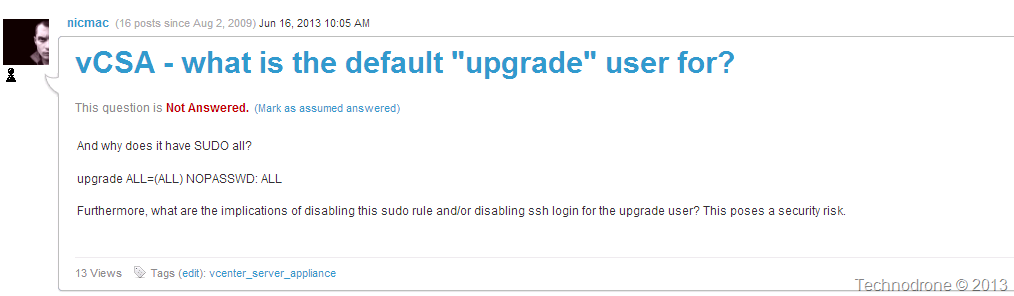
A question was raised on the VMTN community VCSA - what is the default "upgrade" user for?

VMTN question

That is a very legitimate question!! Giving a user all rights with no password can become an issue. But in this case since it is used (most probably) for the purpose of the upgrade of the VCSA from version to version - then it might OK (or not… ).

Which leads straight into the next subject - what users (and what are their rights) exist on the vCenter Server Appliance?

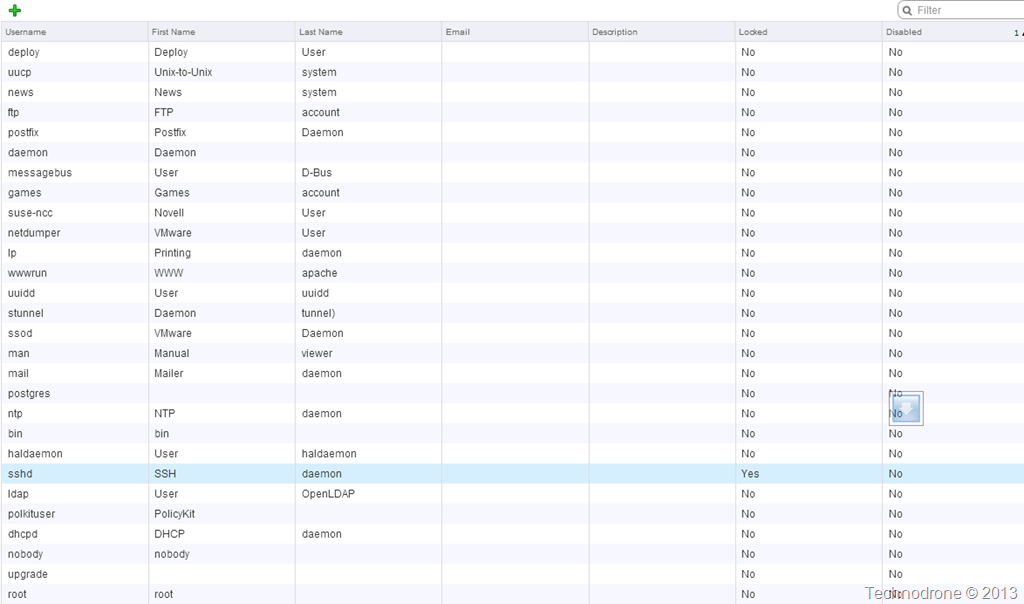
Let's have a quick look at what users there are on the VCSA (screenshot is all the local users on my VCSA that are both not locked or disabled)

locked+disabled users

So firstly let me say that is a hell of a lot of users in the server that in essence is one of (if not the most) important part of your Virtual infrastructure.

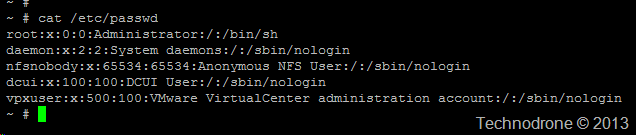
You might say (and rightfully so) that even if the users are defined - that does not mean that they can actually log into the system - for that they would need some kind of shell access. So I checked which users actually have shell access. That would be users who do not have /bin/false or /sbin/nologin in their profile. This is what I got

shell enabled users

Let's concentrate on some of the users in the list.

lp Access to printer hardware; enables the user to manage print jobs.
ftp FTP user
man Used for man
games Access to some game software
news Used for news application
uucp Serial and USB devices such as modems, handhelds, RS-232/serial ports.

For someone that values security - all our Linux boxes are hardened (as they should be), so the first thing we do is run the following:

# userdel shutdown
# userdel halt
# userdel reboot
# userdel games
# userdel news
# userdel gopher
# userdel ftp

(Just to clarify - I do not advise running any of the above commands on your vCenter Server without proper testing and approval from VMware and doing so might void your support.
Be warned!!)

If you were to ask me - most of the users listed above have absolutely no business being on a production box… especially not on my vCenter!!!!

In VMware's defense I should say that I checked which users were available on other VMware appliances - such as the vCOPS appliances and the new Log Insight appliance - and most of these users were not present on either of them. Perhaps this is the way going forward.

VMware have made progress - but I still do not feel 100% comfortable with the vCenter virtual appliance even after I wrote my post last year - Should You Patch the vCenter Server Virtual Appliance? 

vCenter has all the keys to the kingdom - and VMware must make the utmost effort to make sure that no possibility of exploit can used by leaving silly holes and possible security vulnerabilities open in the underlying operating system.

The same way that a ESXi host is locked down - there is no reason why the vCenter server should users like games on them.

ESXi Users

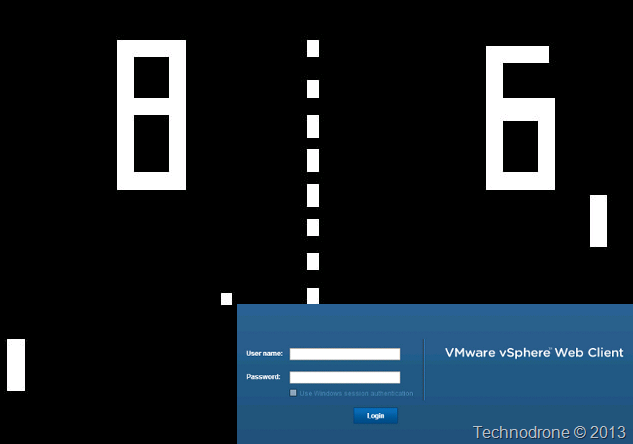
Imagine if we had Pong on our vCenter…

Game of Pong?

2013-01-23

The SSH Key Problem With Cloned Linux VM’s

First let me start off this by saying – the way this is effects you will differ entirely on your organizational procedures and security requirements.

We all love templates – don’t we? I mean they are the best! You configure your VM to your liking, OS patches, company policy settings etc.. etc.. and every new VM that you deploy – will have the exact same baseline.

Standardization… conformity… in the enterprise – all great.

Except.. a short while a go I found out something which is not exactly the best security practice (to put it mildly)

In vSphere you can create a Guest Customization specification and deploy your VM.

For Linux you can enter in some information, but not much

(Today I found out – that you also can run a custom script to configure the VM Configure a Script to Generate Computer Names and IP Addresses During Guest Operating System Customization in the vSphere Client )

But let’s get back on track.

So you have deployed a VM from a template – it now has an IP – and what is the first thing you would most probably do? SSH into the VM – because you now want to start doing the real work (amazing how we take the deployment of an OS for granted these days).

So if this is the first time you are connecting you will most probably get something like this:

Host key warning

Which to explain in simple terms is saying, “Hey – I don’t know this server – here are its details and RSA key. Do you still want to connect?”

And you would usually say – yes and enter your password – and all is fine and dandy.

What this does is add an entry to the .ssh/known_hosts file

known_hostsBut not only did I deploy one VM from this template – I deployed 2. So let’s repeat the process again.

Host key warning

So where is the problem? If you look carefully – you will see that key fingerprint on vm1 is the same as on vm2

30:d6:df:54:ca:26:b2:a4:df:65:e5:33:9f:21:df:55

Identical.

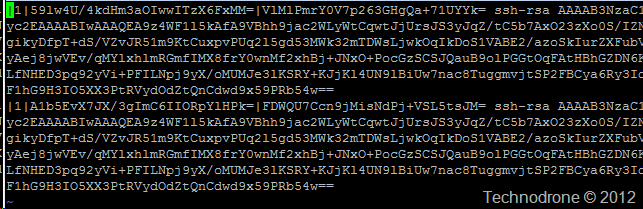
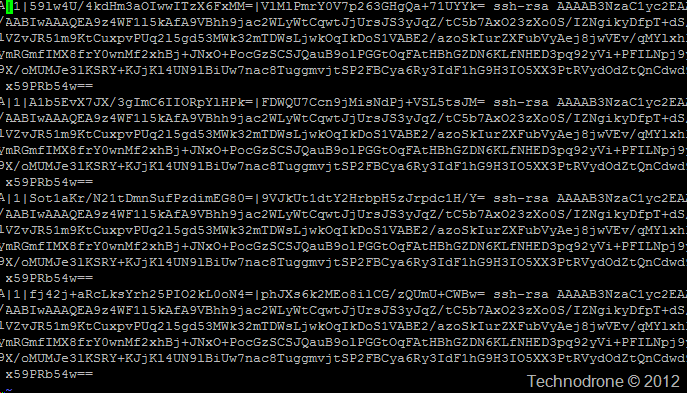
And if we would now look into the known_hosts file then you would see this:

image

All exactly the same (each host created two lines for some reason on Ubuntu – usually it is one).

But why is that? Shouldn’t every VM be unique? I mean they have different MAC addresses, different UUID’s, different IP’s – VMware usually takes care of that.

Well it is pretty simple really – when SSH is installed, the OS package usually creates these files for you. But remember we are cloning from a template – after SSH was installed (that will usually be the case).

That now means – that every single VM that was deployed from the template now has the same exactly identical key.

That could be acceptable in your environment – maybe. Maybe not.

But take this example. You are providing vCloud services and your VM’s are spawned from the same templates. All … of… them!!!

Here you could have the same public keys in different organizations – different companies, I am sure you can see how bad this might become from a security perspective.

This can also cause havoc on certain monitoring systems and also will create a number of problems with SSH key authorization.

So how do you solve this? Unfortunately – there is no built-in way to do this with the current functionality in vSphere today. PowerCLI scripts – or other orchestration tools will need to be used to get around this.

What I would personally like is an option to run a guest OS script as part of the deployment process. Yes I know this exists for Windows VM’s today – but there is no such functionality for Linux.

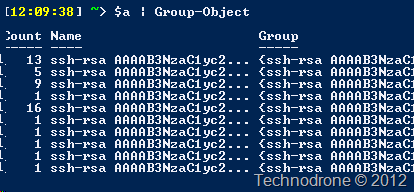
I did a quick check on some of the VM’s in one of the environments I have access to - 50 VM’s

Duplicates

There are duplicates – actually I was surprised to see that there some were actually unique.

Some food for thought… (which reminds me – time for me to go out for lunch).

Thanks to @brian_smi for the background information from his blog post!

It would be interesting to hear your thoughts and comments on how or if this might pose a problem in your environment. Please feel free to leave them in the comments below.

A quick update to this article. Thanks to Erik Bussink

Twitter

At the moment my recommended solution would be to remove the ssh_host_* files on the VM
before you power it down. The files will be recreated once the VM starts up (or a new VM is deployed from this template). Just make sure.. When you power on the template for maintenance – you must remove the files before your power it down again.

Thanks Erik!

2012-04-16

Should You Patch the vCenter Server Virtual Appliance?

With vCenter 5 came the release of the the vCenter Server Virtual Appliance. This move was applauded by many due to the fact that VMware made the first step in the direction of removing their dependency on Microsoft’s Windows OS and finally making the move to a Linux based platform.

If you would ask me (and this is my personal opinion – not based on concrete info) the days of a Windows based vCenter server are  numbered, if not in the next version – then the one after that – there will only be a Linux Virtual appliance. It makes complete sense.

But here is where I find lies an issue – which could become quite a serious problem.

VMware have announced that they will no longer be using Update Manager for patching the Guest OS – which I think is quite logical. VMware should concentrate on what they do best – and that is the virtualization stack. Shavlik, WSUS, Landesk (just to name a few) do a pretty good job for providing patches to guest operating systems and their underlying applications.

But what about the vCenter Server appliance? Who should be the one to patch that?

I put in a Support Request yesterday with with the following question

Patch Update for vCenter virtual appliance
The virtual appliance is installed on top of OpenSuse 11 SP1. Since it was released almost 2 years ago and since then there have been a number of bug fixes and security patches released.
Who is the responsible to apply these patches? VMware? Me the customer? If you when will these patches be released? If it is me the customer is there a list of approved patches by VMware that will assure I will not break anything?
In addition when will an updated version of the appliance be released so that it matches the one released for Windows?

The answered I received today – was what I expected.

As a follow up from our phone conversation - with regards to your question of patching the Guest OS of the vCenter Appliance - we would advise to not patch the guest OS directly. However VMware would recommend to apply any vCenter Appliance patches as they are released and if there are Guest OS patches required, they will be included in the Appliance patches.

Maybe there were no patches released for the Operating system you might ask?

I went to the Novell Patch Finder to check to see what patches were released for the OS. I selected only the Mandatory patches that were released after August 23 2011 (I will explain why this date in a moment), and lo and behold – yes there were patches – a whole lot of them (210).

Patches

To clarify a few things about how I got to my data.

This is the kernel of the vCenter appliance:

localhost:~ # uname –a
Linux localhost.localdom 2.6.32.29-0.3-default #1 SMP 2011-02-25 13:36:59 +0100
x86_64 x86_64 x86_64 GNU/Linux

The Linux version of the vCenter appliance

localhost:~ # cat /etc/issue
Welcome to SUSE Linux Enterprise Server 11 SP1 for VMware (x86_64) - Kernel \r (\l).

Why did I choose the date of August 23, 2011?
Here is the list of the last 15 RPM’s installed on the vCenter appliance.

localhost:~ # rpm -qa --queryformat '%{installtime} (%{installtime:date}) %{name}\n' | sort -n | tail -15

1314096829 (Tue Aug 23 10:53:49 2011) oracle-instantclient11.2-odbc
1314096829 (Tue Aug 23 10:53:49 2011) vmware-studio-vami-service-services
1314096831 (Tue Aug 23 10:53:51 2011) VMware-sps
1314096834 (Tue Aug 23 10:53:54 2011) VMware-vpxd-agents-eesx
1314096836 (Tue Aug 23 10:53:56 2011) stunnel
1314096836 (Tue Aug 23 10:53:56 2011) syslog-collector
1314096837 (Tue Aug 23 10:53:57 2011) VMware-vpxd-agents-esx3
1314096838 (Tue Aug 23 10:53:58 2011) vmware-open-vm-tools-kmod
1314096839 (Tue Aug 23 10:53:59 2011) vmware-open-vm-tools-common
1314122043 (Tue Aug 23 17:54:03 2011) vmware-studio-vami-login
1314122043 (Tue Aug 23 17:54:03 2011) vmware-studio-vami-service-core
1314122044 (Tue Aug 23 17:54:04 2011) vmware-studio-vami-service-system
1314122045 (Tue Aug 23 17:54:05 2011) vmware-studio-vami-service-network
1314122046 (Tue Aug 23 17:54:06 2011) vmware-studio-appliance-config
1314122047 (Tue Aug 23 17:54:07 2011) vmware-studio-vami-service-update

VMware say that I should not patch the Guest OS. You might say that not all those 210 patches are relevant. Most probably yes – that is true. But there are several that are relevant – very relevant.

Take for example the Linux Kernel.

The current Kernel is 2.6.32.29-0.3-default

The kernel has been updated 4 times

These are not minor security patches and holes. These are security updates for the kernel.What would your auditor tell you if you had not installed a patch on a Server of yours for over 18 months?

Would you leave your ESX Servers unpatched for 18 months?

Then my question to you all – and to VMware …

Why is it acceptable to not update the central (and some might say – the most important) component of my virtual infrastructure against known security vulnerabilities??

If you pass over the responsibility to me (the admin) to update my Windows vCenter – then you should either do the same for the vCenter Appliance – or VMware should be the one to provide the patches (regularly!!) – but not leave it in a state that leaves it vulnerable.

I do think that providing your customers with virtual appliance means that you should maintain that appliance – including all aspects – your software and the underlying operating system as well.

Did we all think this through when going to the virtual appliance model? Who is the responsible party for the Guest OS ? The vendor? You? And if so what should the patch cycle policy be? Once in 8 months is not a good track record.

Going the way of using Update Manager to patch the Virtual Appliance will probably be the way to go, but that will still have its implications as well.

Oh yes – one more thing.. Same goes for vCloud appliance, Orchestrator, vCOPS, CapacityIQ, ADM, the vFabric family?

I would be very interested in hearing your thoughts on this..

2010-11-16

New Patch released - VMSA-2010-0016

This was just released. KB 1027027 (ESX) and KB 1027753 (ESXi)

I wanted to point out that is should deal with several issues that include a patch to solve this Host crash because of ESX Active Directory Integration.

Here is the info from the KB 1027021

When an user who is a member of more than 32 groups attempts to log into an ESXi host by using KVM, any one of the following issues might occur:

  • ESX/i host restarts
  • ESX/i host becomes unresponsive

Note: With this patch, a user who is a member of more than 128 groups can access the console, but loses any group information beyond the 128th group.

And also the 8 character password issue that William Lam posted about here

If passwords of more than eight characters are set for ESXi 4.1 system users, the set password is truncated to eight characters, and the system evaluates only the first 8 characters of the password submitted for authentication.
Note: To implement this fix, reset the password of the existing ESXi 4.1 system users after applying the patch.

As always - Test before deployment

2010-10-04

Stuxnet & Virtualization Targeted DOS

Stuxnet for those of you have been unaware to the what has been happening with one of the most talked about worms since Conficker is an industrial rootkit targeted at Siemens software.

Now conspiracy theories aside:

  • Who was this targeted at?
  • Who created it?

I started to think how can or could this reflect on a Virtual Infrastructure?

What would happen if you had a worm / virus targeted at virtual machines or even worse at the ESX host themselves?

Let me give the following scenario.

You have a 30 Windows VM’s each using 1 vCPU on your ESX host. The host has 2 Quad core Processors, a pretty sensible VM:core ratio (3.75). All of a sudden every single VM on the host – jumps to 100% CPU utilization – which in turn brings your host to a stall.

This is a perfect DOS attack but in this case it is directed at the ESX host by causing the load on the VM.

This was also an issue before without Virtualization, but with all of the VM’s spiking at the same time - this issue is extremely amplified.

The thing is though it does not have to be a virus with malicious code that causes the load. You could easily do it as well with Calc.exe (which is on EVERY SINGLE WINDOWS MACHINE)

  1. Run calc.exe and switch to scientific mode
  2. Type a large number (eg. 12345678901234567890), press the 'n!' button.
  3. Calc will ask to confirm after warning this will take a very long time
  4. 100% CPU utilization will now occur (essentially forever)

For a Linux machine

  1. cd /usr/src/linux
  2. make -j8 &
  3. ping -l 100000 -q -s 10 -f localhost &
  4. 100% CPU utilization will now occur (essentially forever)

I am sure that this can be scripted in some way.

So here you have it, a DOS attack not only on the VM – but also on the host itself.

I am not sure that the AV vendors will recognize this as malicious activity, because you are running a legitimate Windows Application.

Security experts are wary of the dreaded Blue Pill which compromises the hypervisor. How ready are the Vendors against such a kind of attack? How ready are the Hypervisors for such an attack?

You will get alerts instantaneously regarding the abnormal CPU usage. But it will require manual intervention to solve the issue.

I would hope that in the future there will be an option to perform operations in an attack like this. It would require some additional Intelligence built into the product.

An example would be:

  • Virtual A machine CPU usage spikes to 100% for more than 5 minutes.
  • Virtual machine B, C, D, E, F, G, H, I, J, K, L, M…… CPU also spike to 100% for more than 5 minutes.
  • Evidently there is something wrong!!!
  • Create Resource pool with a CPU limit (to ensure proper operation of the host)
  • Move all these VM’s into the above Resource Pool, thereby reducing the load on the Host
  • Shoot out appropriate alerts.

Of course the automation is more or less limitless, once you have the proper technology in place.

I  would be interested in hearing your ideas and comments on this one.

2010-05-14

Set a Time Limit on Group Membership

One of the most surprising things that Microsoft have not yet provided in Active Directory management - is allowing you to set a time limit on assigning membership of a user to a group.

Let me explain the use case for this kind of feature.

You have resource (be it a file, web site - what ever). You want to assign the permission to a user, but you only want to do it until the end of the day, of for the next hour. Unfortunately there is no functionality like that is Active Directory. Sure you can set expiration on an account - but not on group membership.

I was asked to provide a solution to this problem for a specific use-case problem. I would like to point out that a great part of the original logic of this script was done by a fellow team member - who is a great scripter - So thanks Natan. I did change the script in order to accommodate a few more features.

The users were not allowed to be members of this group for more than 7 days, and they should be removed automatically after that period

So the logic was as follows:

The user would call in to the helpdesk, and get added to the group. Once a day, the members of the group would be checked and compared to a list of users in a file (from the previous run). If they were there, then their Countdays field in a file would be reduced by one (until reaching zero). If they were new additions to the group (and they would not be in the file) then add there info with a default counter. If their record had reached zero - then remove them from the group.

Here is a more graphical explanation

image

Here is the script

# ==============================================================================================
# NAME: erase-after-days.ps1
# 
# AUTHOR: Maish Saidel-Keesing
# DATE  : 12/05/2010
# 
# COMMENT: script erase-after-days is for erasing users from a security after predefined number of days
# Changed by Maish Saidel-Keesing (12/05/2010)
# Added 3rd field SubmittedBy, changed logic to Compare-object
# Requires Quest.ActiveRoles.ADManagement Snapin
# ==============================================================================================

# Check for Snapin
 if ((Get-PSSnapin Quest.ActiveRoles.ADManagement -ErrorAction SilentlyContinue) -eq $null) {
 	add-PSSnapin  quest.activeroles.admanagement
	}

#Establish Connection	
Connect-QADService -service maishsk.local   	

#Define default number of days
$days = 7

$GroupName = "My_time_limit_group"	
$infile = "\\server\time_limit.txt" 

$GResults = Get-qadgroupmember $GroupName
$in1 = Import-Csv $infile

# Create variable to look for matches
$compare = @(Compare-Object $in1 $GResults -Property "DN" -IncludeEqual | `
	Where-Object {$_.SideIndicator -eq "==" } | select DN)
# Variable to hold new additions to Security Group 
$nomatch = @(Compare-Object $in1 $GResults -Property "DN" -IncludeEqual | `
	Where-Object {$_.SideIndicator -eq "=>" } | select DN)

#Run for each object that is already in the Security Group
foreach ($object in $compare) {
	$record = ""
	$record = $in1 | Where-Object {$_.DN -eq $object.DN}
	if ($record.CountDays -gt 0) {
		$record.CountDays -= 1
		if ($record.SubmittedBy -eq "" ) {
			$record.SubmittedBy = "Script"
		}
	} else {
	#If member counter is equal to 0 then remove from Security Group
	Remove-QADGroupMember -Identity $GroupName -Member $record.DN -WhatIf
	}
}
$in1 = $in1 | Where-Object {$_.CountDays -ne 0 }

#Run for each new user that was detected
	if ($nomatch.Count -gt 0) {
	$out1 = @()
	foreach ($object in $nomatch) {
		$row = "" |select DN,CountDays,SubmittedBy
		$row.DN = $object.DN
		$row.CountDays = $days
		$row.SubmittedBy = "Script"
		$out1 += $row
		}
	$in1 += $out1
	}
	
$in1 | export-csv -Path $infile -Force -notype
Disconnect-QADService


Line 13 Check for Quest Cmdlets

Lines 18-28 Define the variables

Line 30 Compare both variables and find the instances where the DN field in each variable matches - the results that is received from a match is "==". The -includeEqual switch will show the matches (otherwise you do not get any output)

[23:54:55] ~> Compare-Object hello hello -IncludeEqual

InputObject                                                 SideIndicator
-----------                                                 -------------
hello                                                       ==


Line 34 Compare both variables and find the instances where the DN exists in the Security Group but not in the file - which means it is a new user.

Line 38-49 First we work on the matched users. Here we retrieve the matching record and perform the logical query. If the days are larger than 0 - decrement. If not (which means that the user has been in the group for 7 days) then remove them. All of this is updating the $in1 variable

Line 51 Recreate the variable without the entries that will be removed

Line 54 Check for the number of items in $nomatch - if there is nothing then there is nothing to run

Line 56 Now we add the new users from all $nomatch variable.

Line 63,66 Combine today's results with $in1 and export the file back out.

The script runs daily as a scheduled task.

Now of course you could always expand on this and add functionality - such as automated email notification before user is removed, I am sure that You can expand the also to have this monitor multiple groups.as well.

Now all I have to wait for is for Microsoft to add this functionality to Active Directory

2010-03-09

Generate a Random Password - Powershell

A task that I do quite often when building a new System is to create random password a local user on the machine – Don’t ask – it is a an OPSEC requirement from way before my time.

So instead of Running my fingers of the keyboard in a random way and having my colleagues ask what I am doing each time I decided to simplify this Powershell.

Dmitry Sotnikov’s post set me in the correct direction, the result below is a function that will prompt you for the length you want, create a password and put it in your clipboard

#========================================================================
# 
# NAME: Generate-password
# 
# AUTHOR: Maish Saidel-Keesing
# DATE  : 09/03/2009
# 
# COMMENT: Will generate a random password according to required length
#
# ========================================================================

function Generate-Password () {
    param ()
    PROCESS {
         if ($args.count -eq 0)  {
                do {
                $length = Read-Host "How many characters long should the password be?"
                } until ($length -ne $null)
            } else { $length = $args[0] }

    #load Assembly
    [Reflection.Assembly]::LoadWithPartialName("System.Web")
    $password = [System.Web.Security.Membership]::GeneratePassword($length,3) 
    $password | clip
    Write-host The password is now in your clipboard
    }
}


Line 16-20. If there is no argument passed then it will prompt you for the number of characters needed in the password

Line 23. load the System.Web.Security Namespace

Line 24. Generate the password. The two parameters that are needed are password length and numberOfNonAlphanumericCharacters

Line 25. clip is a command line utility for the clipboard. In this case I piped it into the clipboard so I could paste it into the password window.

2010-02-17

ESX 4.0 Active Directory Authentication

There are numerous posts about how to use Active Directory to authenticate your ssh logins to your ESX servers.

Jason Boche,Travis Laird, Geert Baeke

The idea is pretty simple

  1. Configure the ESX server with esxcfg-auth as in the above posts
  2. Add the desired users locally on your ESX Server
  3. Login away

But….

Once this is enabled  all authentication will be done against Active directory – INCLUDING THE root USER

Jason mentioned this on his post

Warning:  One thing to watch out for would the existance of a root account in AD in which you are not the owner of.  By implementing AD authentication, a root account in AD is going to be granted root level Service Console access on the ESX host!  Take the necessary precautions here.

Travis did as well and provided a solution as well

If you are not using root login through SSH and you want to exclude the root user login from attempting Active Directory authentication, modify the /etc/pam.d/system-auth file and add the parameter minimum_uid=1 to the following line so it reads:

auth sufficient /lib/security/$ISA/pam_krb5.so use_first_pass minimum_uid=1

Geert as well..

A couple of other things to think of:

  • If you create a user in AD with account name root, you can logon as root with its AD password.
  • If you don't want AD authentication for root, you can edit /etc/pam.d/system-auth. On the line that starts with auth and also includes pam_krb5.so, add this to the end: minimum_uid=1. Authentication for root (uid=0) will now be done locally only.

Now of course ssh login is disabled for root. But when trying to login I saw in the logs /var/log/secure that root was trying to authenticate against the domain.

Feb 17 10:32:08 esx2 sshd[5838]: pam_krb5[5838]: authentication fails for 'root' (root@MAISHK.LOCAL): User not known to the underlying authentication module (Clients credentials have been revoked)

(the root account exists in the domain, but is disabled)

So I wanted to add the solution as published above.

These are the contents of the /etc/pam.d/system-auth file

#%PAM-1.0

account      required pam_per_user.so   /etc/pam.d/login.map
auth         required pam_per_user.so   /etc/pam.d/login.map
password     required pam_per_user.so   /etc/pam.d/login.map
session      required pam_per_user.so   /etc/pam.d/login.map

As you can see, no auth sufficient or /lib/security/$ISA/pam_krb5.so in the file…

Hmmmmm….

So I gather that this has changed for ESX 4.0, session pointed to /etc/pam.d/login.map

These are the contents of the /etc/pam.d/login.map file

vpxuser  : system-auth-local
*        : system-auth-generic

OK. so all users except vpxuser are pointed to /etc/pam.d/system-auth-generic

These are the contents of the /etc/pam.d/system-auth-generic file

#%PAM-1.0
# Autogenerated by esxcfg-auth

account         sufficient      /lib/security/$ISA/pam_krb5.so
account         required        pam_unix.so

auth            required        pam_env.so
auth            sufficient      pam_unix.so         try_first_pass nullok
auth            sufficient      /lib/security/$ISA/pam_krb5.so              use_first_pass
auth            required        pam_deny.so

password        required        /lib/security/$ISA/pam_passwdqc.so          min=8,8,8,7,6 similar=deny match=0
password        sufficient      pam_unix.so         try_first_pass use_authtok nullok shadow md5
password        sufficient      /lib/security/$ISA/pam_krb5.so              use_authtok
password        required        pam_deny.so

session         optional        pam_keyinit.so              revoke
session         required        pam_limits.so
session         sufficient      /lib/security/$ISA/pam_krb5.so
session         [success=1 default=ignore]      pam_succeed_if.so           service in crond quiet use_uid
session         required        pam_unix.so

Yep! There it is!

So added the minimum_uid=1 to the file

auth            sufficient      /lib/security/$ISA/pam_krb5.so       use_first_pass minimum_uid=1

Feb 17 10:58:51 ilesx2 sshd[11906]: pam_unix(system-auth-generic:auth): authentication failure; logname= uid=0 euid=0 tty=ssh ruser= rhost=msaidelk-server.xxx.xxxx.com  user=root

And now I see in the log when logging in as root the authentication is
pam_unix(system-auth-generic:auth)
and not pam_krb5

My Active Directory Authentication process is complete!!

Update:
Thanks to Armin van Lieshout for pointing this out to me. you can do this all with the command line as well    esxcfg-auth --enforce-local-auth=root

This will force local authentication for the defined user

2010-02-10

New Hyper-V Security Vulnerability

Many eons ago there was talk about patch footprints - comparing ESXi to Hyper-V, footprints and security patches.

So today I came across this one.

Microsoft Security Bulletin MS10-010 - Important

General Information

Executive Summary

This security update resolves a privately reported vulnerability in Windows Server 2008 Hyper-V and Windows Server 2008 R2 Hyper-V. The vulnerability could allow denial of service if a malformed sequence of machine instructions is run by an authenticated user in one of the guest virtual machines hosted by the Hyper-V server. An attacker must have valid logon credentials and be able to log on locally into a guest virtual machine to exploit this vulnerability. The vulnerability could not be exploited remotely or by anonymous users.

This security update is rated Important for all supported x64-based editions of Windows Server 2008 and Windows Server 2008 R2. For more information, see the subsection, Affected and Non-Affected Software, in this section.

The security update addresses the vulnerability by correcting the way Hyper-V server validates encoding on machine instructions executed inside its guest virtual machines. For more information about the vulnerability, see the Frequently Asked Questions (FAQ) subsection for the specific vulnerability entry under the next section, Vulnerability Information.

So what is so different about this one - I mean Microsoft release patches once a month (and in certain extreme cases - more often).

Read the fine print…

An attacker must have valid logon credentials and be able to log on locally into
a guest virtual machine to exploit this vulnerability.

From the details:

An attacker must have valid logon credentials and be able to log on locally to a Hyper-V virtual machine to exploit this vulnerability. The vulnerability could not be exploited remotely or by anonymous users.

What is the scope of the vulnerability?
This is a denial of service vulnerability. An attacker who exploited this vulnerability could cause the affected Hyper-V server to stop responding and require it to be restarted. Note that the denial of service vulnerability would not allow an attacker to execute code or to elevate their user rights, but it could cause the affected system to stop accepting requests.

What causes the vulnerability?
This vulnerability is caused by Hyper-V server incorrectly validating the encoding of specific machine instructions executed inside the guest virtual machines. Due to this lack of validation, processing of these instructions may cause the Hyper-V server application to become non-responsive.

What might an attacker use the vulnerability to do?
An attacker who successfully exploited this vulnerability could cause a user’s system to become non-responsive until the system is restarted. Note that exploitation of this vulnerability could cause the actual Hyper-V server to stop responding, including all guest virtual machines hosted by that server.

How could an attacker exploit the vulnerability?
An attacker would have to be an authenticated user in one of the guest virtual machines hosted by the Hyper-V server and would need to have the ability to execute arbitrary code on the system. An attacker could then run an untrusted executable on the system that invokes a malformed sequence of machine instructions and thereby cause the Hyper-V server to become non-responsive.

And again the importance is the details..

Note that exploitation of this vulnerability could cause the actual Hyper-V server to stop responding, including all guest virtual machines hosted by that server.

And yep..

Restart Requirement

Restart required?

Yes, you must restart your system after you apply this security update.

HotPatching - Not applicable.

Pot calling the kettle black ??

image

2010-01-15

A bit of housekeeping – Powershell

I have been busy with using Powershell in these past few days.

I would like to share with you two of the scripts that I used lately. They were both used because of a password change that was made on a service account.

Now the thing about service accounts in Windows 2003 is, they are good, they need elevated privileges in some cases, and since the account is used for the specific purpose then you know that you have to change it once in a while and you know where. Problem is though unless you catch them all – and someone – somewhere  did not update the password somewhere, then you will start having issues with account lockouts.

First is to get all the services from all the computers in my OU, and change the password

   1: $logfile = "c:\temp\results.log"
   2: $serviceaccount = "svcmacct"
   3: $password = ""
   4:  
   5: $serviceslist = Get-QADComputer -SearchRoot "OU=Public Servers,DC=maishsk,DC=local" -OsName window* -searchscope "subtree" -ErrorAction SilentlyContinue | ` 
   6: ForEach-Object {
   7:     (Get-WmiObject -Class Win32_Service -ComputerName $_.Name -ErrorAction  `
   8:             SilentlyContinue | where {
   9:                 $_.'StartName' -like $serviceaccount
  10:             }
  11:     ) 
  12: }
  13:  
  14: [System.Reflection.Assembly]::LoadWithPartialName('system.serviceprocess')
  15:  
  17:     ForEach ($line in $serviceslist) {
  18:         Write-Host Processing $line.Systemname
  19:         $service = Get-WmiObject win32_Service -ComputerName $line.Systemname -Filter "Name='$($line.Name)'"
  20:         Write-host Stopping Service $line.Name
  21:         (new-object System.ServiceProcess.ServiceController($($line.Name),$($line.Systemname))).Stop()
  22:         (new-object System.ServiceProcess.ServiceController($($line.Name),$($line.Systemname))).WaitForStatus('Stopped',(new-timespan -seconds 90)) 
  23:         if ($? -eq $true) {
  24:         $service.Change($null ,$null ,$null ,$null ,$null ,$null , $serviceAccount, $password )
  25:         Write-host Starting Service $line.Name
  26:         (new-object System.ServiceProcess.ServiceController($($line.Name),$($line.Systemname))).Start()
  27:         (new-object System.ServiceProcess.ServiceController($($line.Name),$($line.Systemname))).WaitForStatus('Running',(new-timespan -seconds 40)) 
  28:         write-output $(get-date -DisplayHint time)` --` Service` $($line.Caption)` on` $($line.SystemName)` has` been` updated` and` restarted >> $logfile
  29:         } else {
  30:         write-output $(get-date -DisplayHint time)` --` Service` $($line.Caption)` on` $($line.SystemName)` update` failed >> $logfile
  31:         }
  32: }

Line 5 – get all the computers in the desired OU and get the services.

Line 22 – Here is a wait statement for the service to stop, otherwise this will cause issues with the rest of script. Please remember that the time span is there to ensure that if something goes wrong – then you script will continue, otherwise you will have to close the shell window - Ctrl+C will not work.

Line 28 – logs the results to a file including a time stamp.


Second script was to change the passwords for all the scheduled tasks using this same service account

   1:  
   2: $mycomps = Get-QADComputer -SearchRoot "maishsk.local/Public Servers" -SearchScope Subtree -SizeLimit 0 
   3:  
   4: $logfile = "c:\temp\tasklist.csv"
   5: $results = "c:\temp\results.log"
   6:  
   7: $report = @()
   8: $mycomps | ForEach-Object -ErrorAction SilentlyContinue {
   9:     schtasks.exe /s $_.Name /query /v /fo csv >> $logfile 2>>c:\temp\errors.txt
  10:     }
  11: $report = import-Csv $logfile
  12:  
  13: ##Get all tasks that are run under a certain user
  14: $svcaccount = Read-Host "Please Enter Service account Name (Domain\Username)"
  15: $mytasks = ""
  16: $mytasks = $report | Where-Object {($_."Run As User" -like $svcaccount) -and ($_."Next Run Time" -ne "Disabled")} | select Hostname, TaskName
  17: #Remove unwanted Characters
  18: $mytasks | ForEach-Object {
  19:     $_.TaskName = ($_.TaskName).Trimstart("\")
  20:     }
  21:  
  22: ##Change credentials for the task
  23:  
  24: foreach ($task in $mytasks) {
  25:     schtasks.exe /change /S $($task.HostName) /TN "$($task.Taskname)" /RP $password >> $results 2>>c:\temp\errors.txt
  26: }

Line 9 – schtasks.exe is the was I decided to go to get the info – I could not find anything else in Powershell that would extract the info.

Line 18-19 – the output came back with an extra “\” in the beginning – I used the Trimstart method to remove it.

Line 25 – This actually took a while to find the exact syntax that I was looking for.

If you have any comments or  improvements I would appreciate you input.