Showing posts with label Appliances. Show all posts

2015-03-19

Deploying the VCSA 6.0 Appliance directly into vCenter

Hey… Is that even possible? It seems that it is not – at least that is what I heard this week over Twitter.

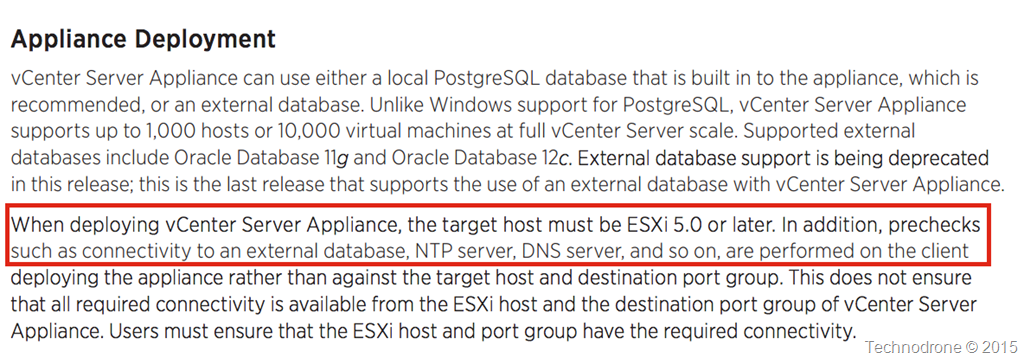
The documentation also says the same thing.

Documentation

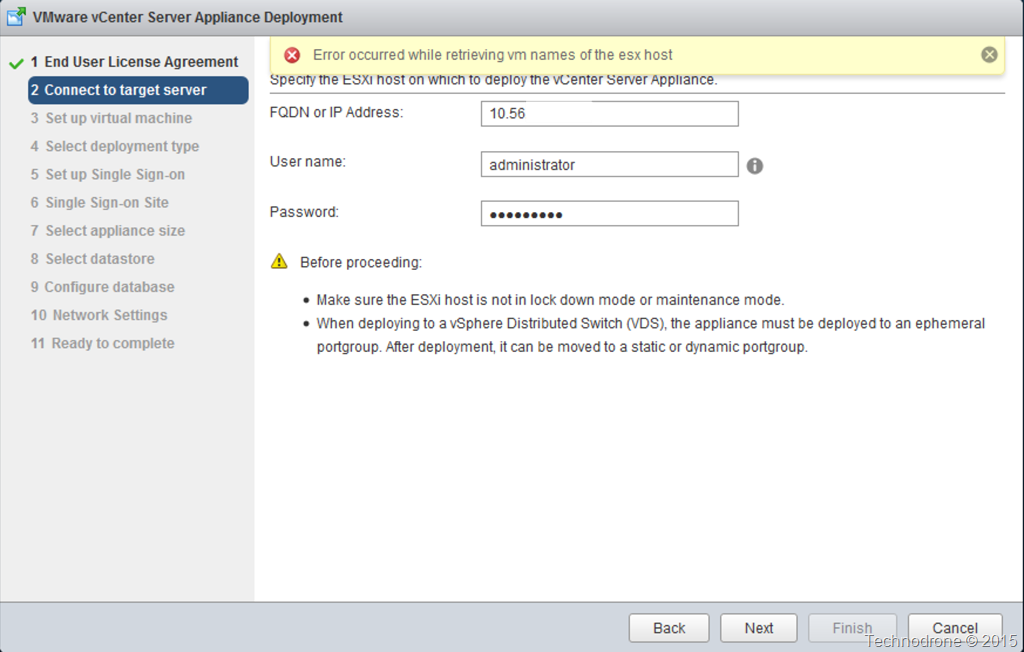
When trying to put in a vCenter as the target for deployment it will throw an error.

Error

I actually find this really silly and a really weird move on behalf of VMware. Why limit this to connecting directly to an ESXi host?

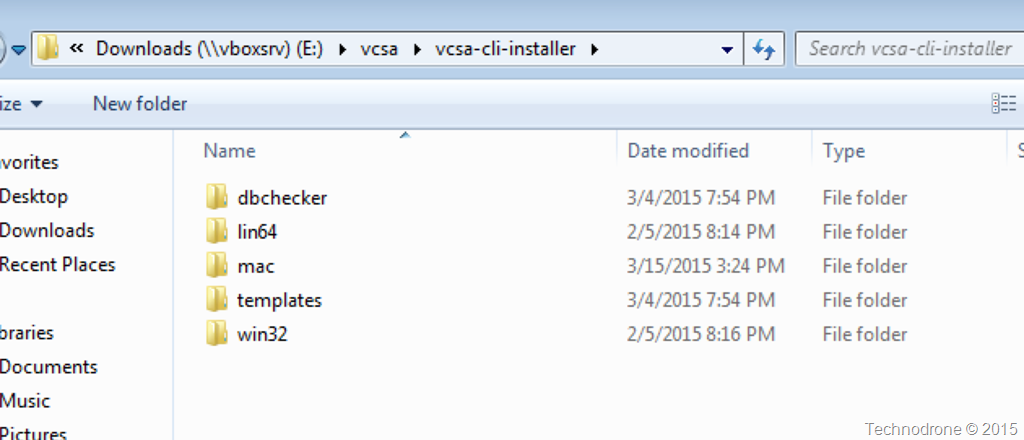
Also I am quite intrigued to know what is the benefit of using such a tool for deployment. I do understand that VMware wanted to provide a generic tool that could be used on any platform to deploy a vCenter Server. If you look at the ISO that is provided for download – you will see a folder structure there for all platforms in the vcsa-cli-installer

Multi Platform

But this got me thinking. The VCSA is appliance after all – which means it is probably an OVF – like most of VMware’s appliances.

Disclaimer – This is probably not supported – definitely not endorsed by VMware – so use it at your own risk!

I went and did some detective work. The ISO is about 3GB in size which means that it actually has to be appliance is probably there somewhere. It was not hard to find.

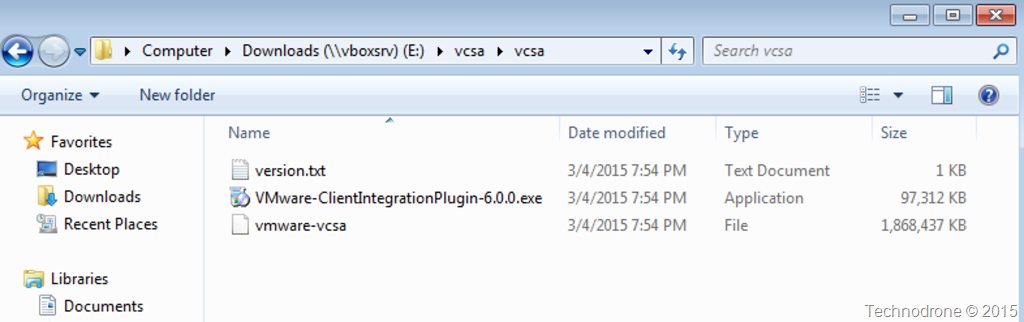
In the VCSA folder you will find a file vmware-vcsa which is almost 2GB in size.

vmware-vcsa

It is obvious that the file is not an OVF – but probably an OVA – because of its size.

So for my test I copied the vmware-vcsa file and added the .OVA extension to the file

Create OVA

I then proceeded to deploy this appliance as I would any virtual appliance. I even went so far as to use the vSphere Client!

I was skeptical to see if there was actually anything extra that was put into the installer – because we all know that it most of the customization is provided within the OVF itself. I checked to see if the same functionality is available from both the new installer and a regular vSphere client deployment. The feature parity seems to be equal at least – with some addiitonal functionality that is available only when deploying as a virtual appliance.

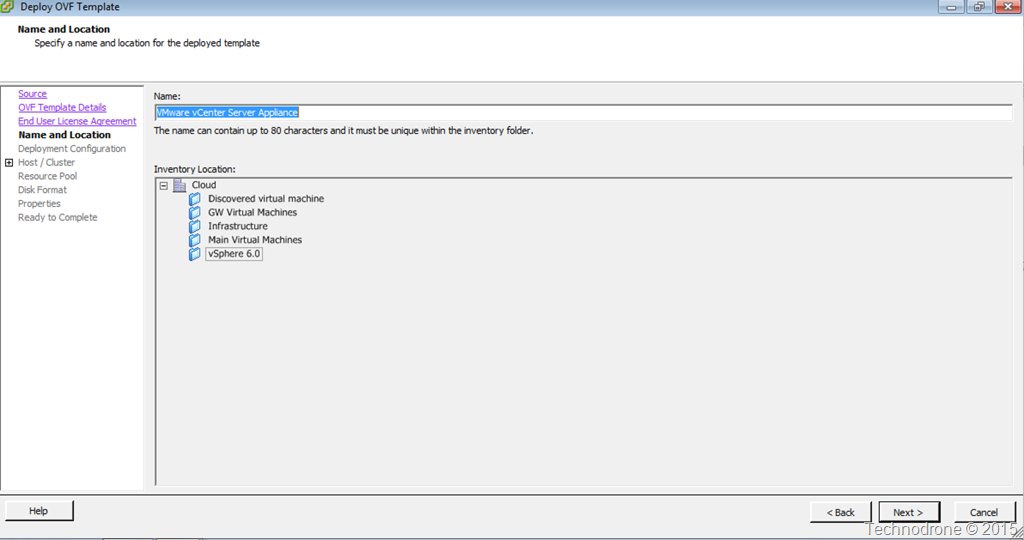
Such as Inventory Location

Inventory

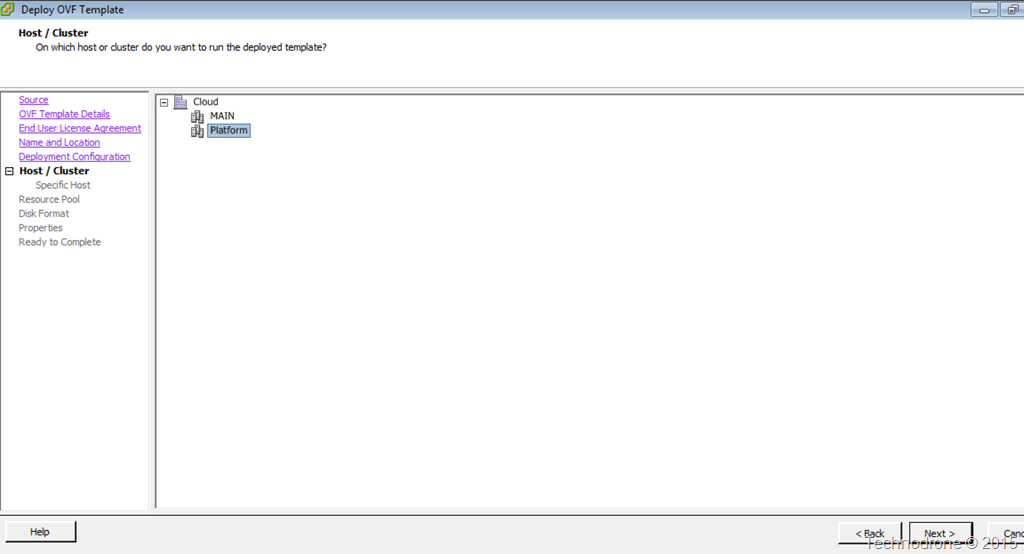
Choice of Cluster / Host

Host/Cluster

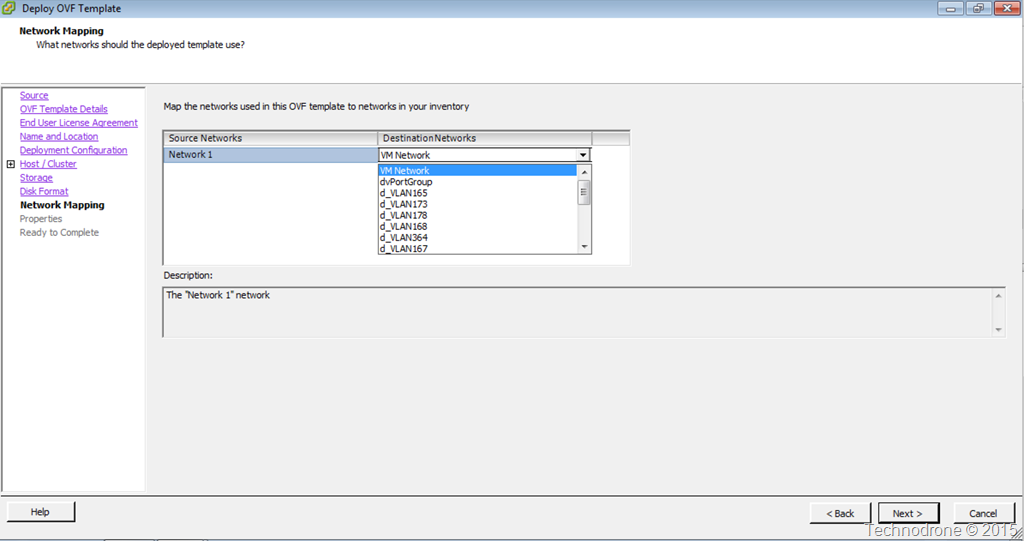
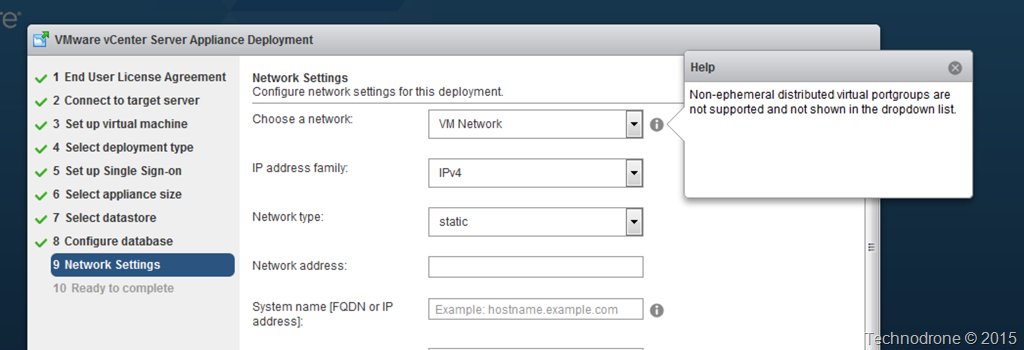
And most importantly – the option to deploy to a Distributed vSwitch – something that is not possible when directly to a host. It would only recognize a Standard vSwitch

dvSwitchvSwitch Only

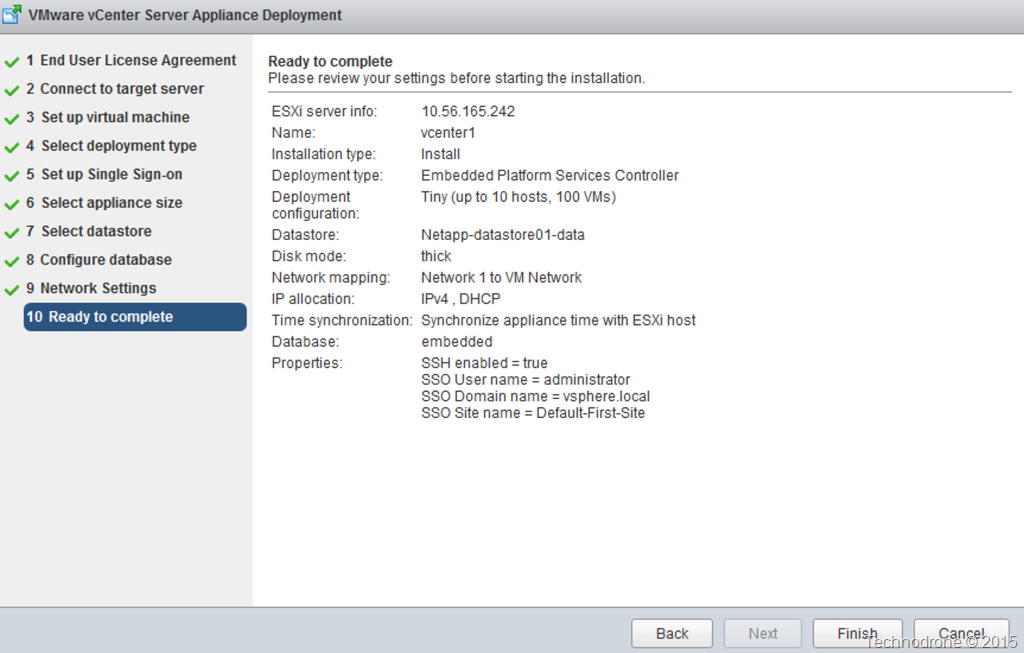
All the rest was mostly all the same.

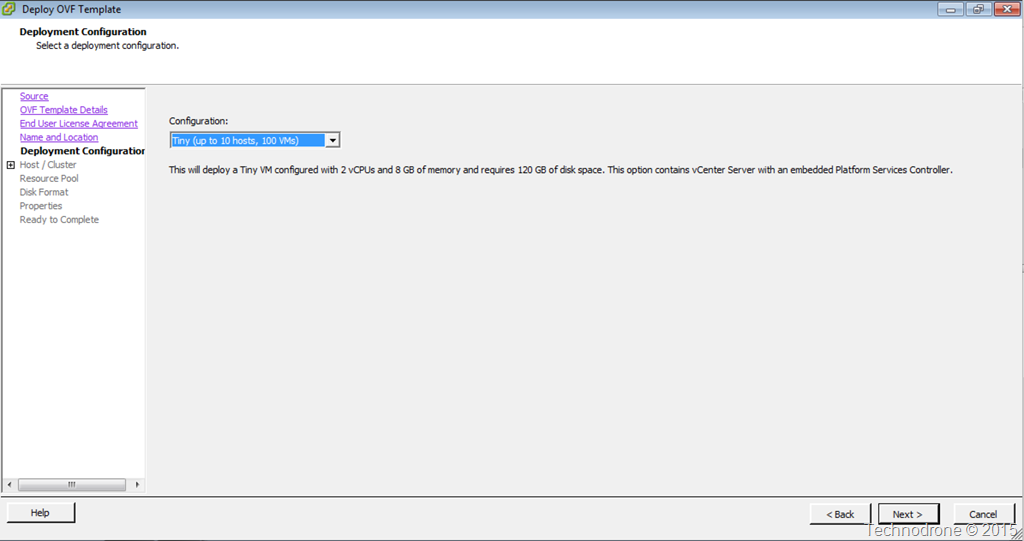
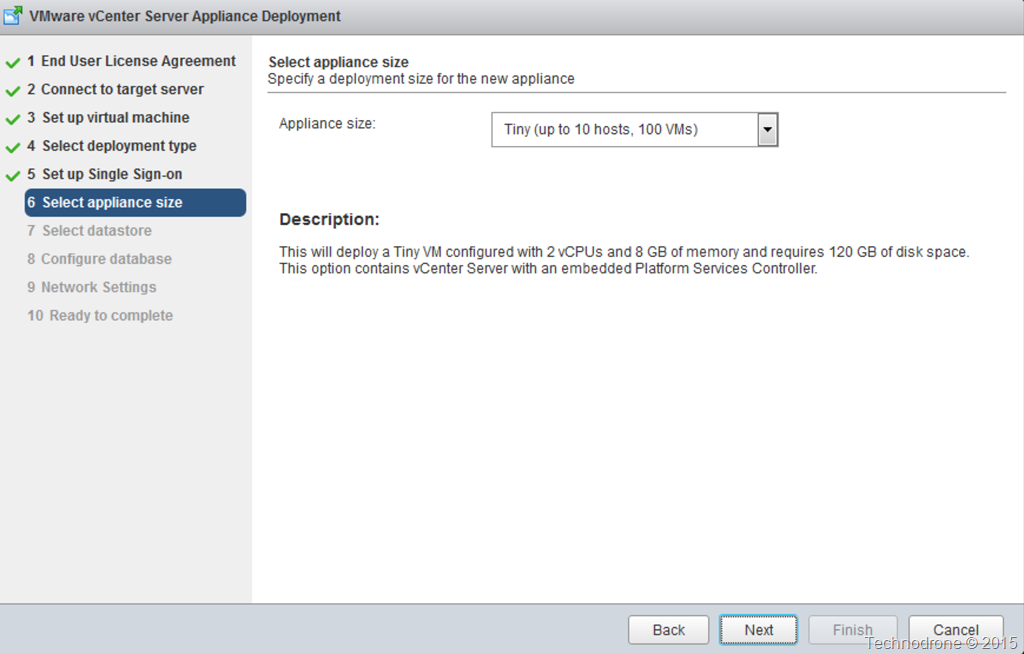
Size1 Size2

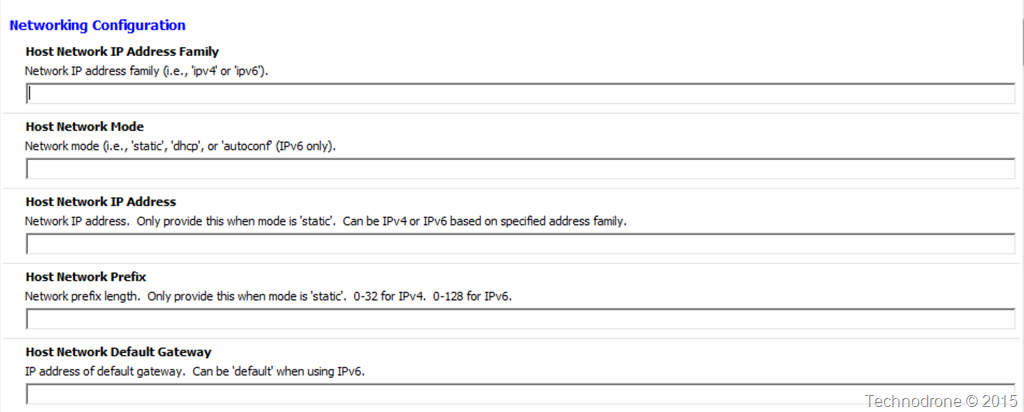
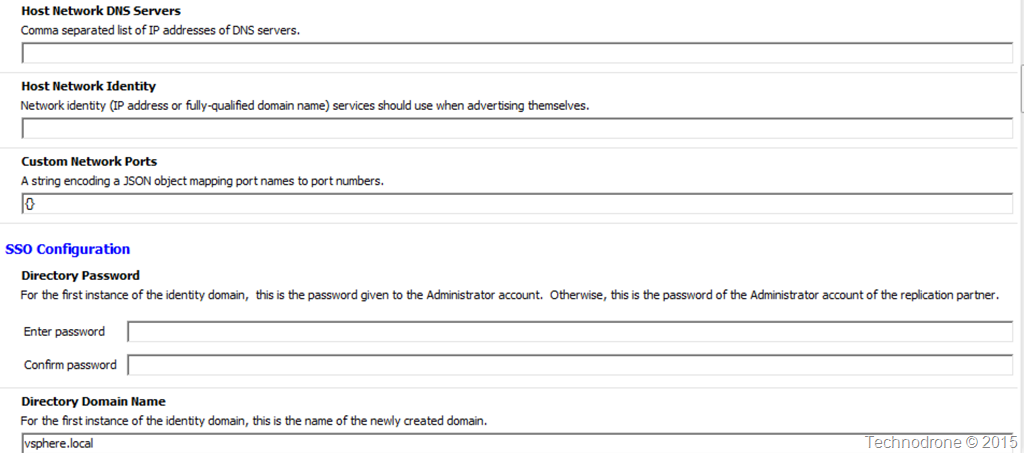
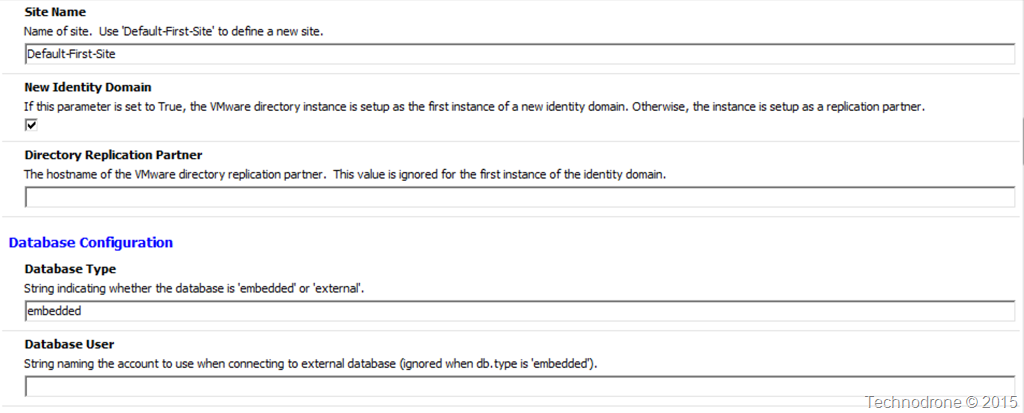
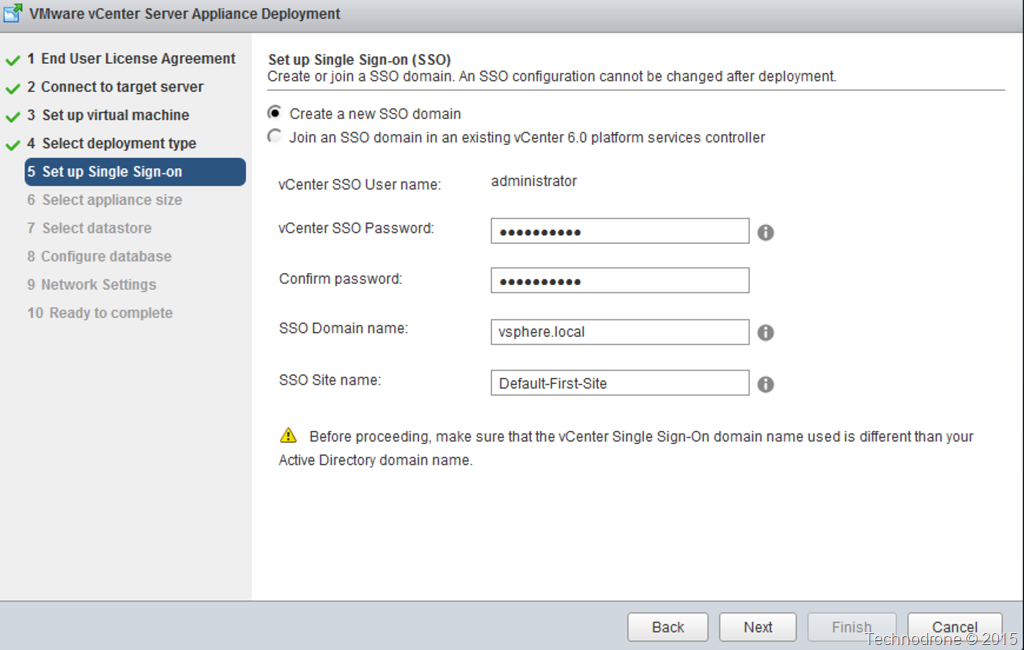
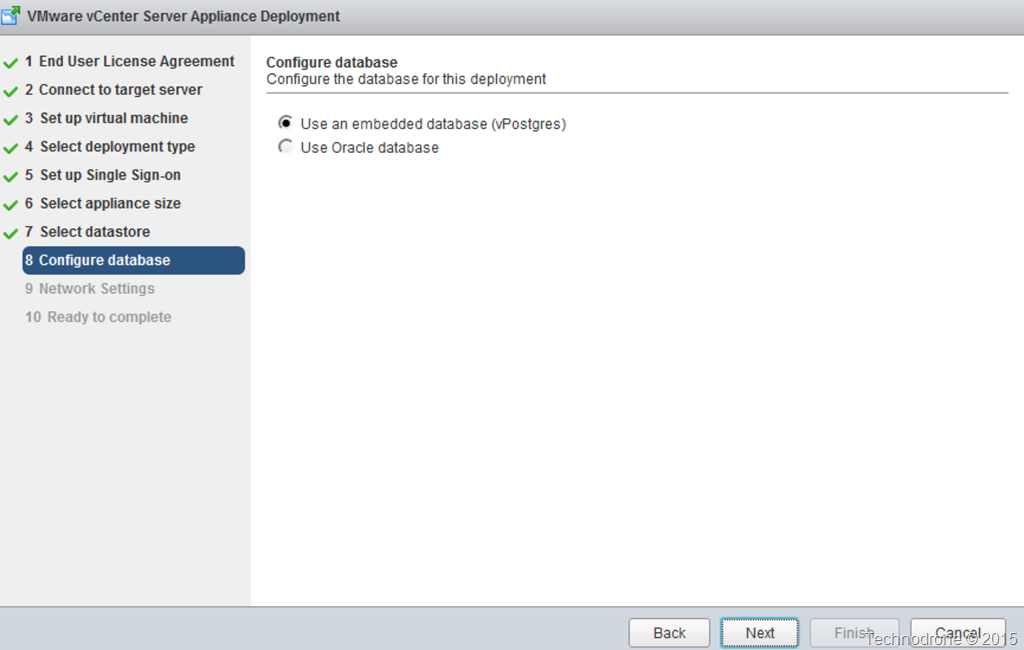
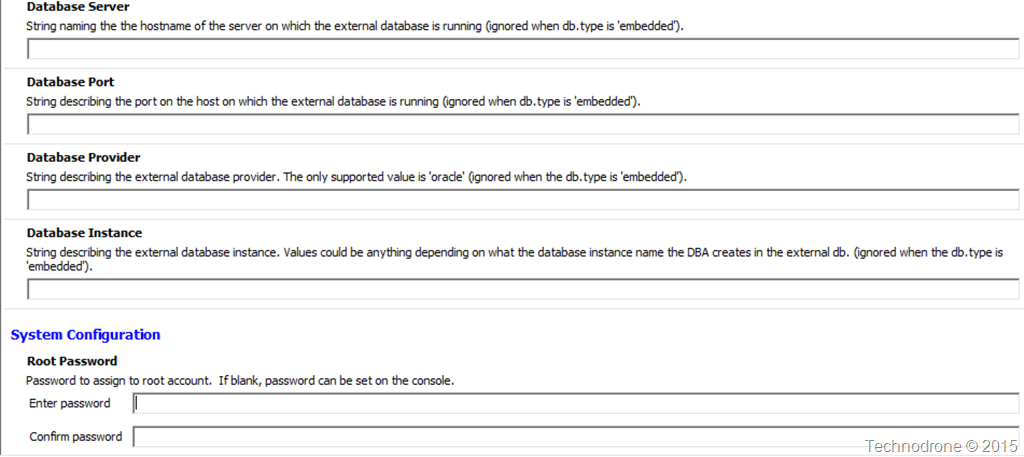
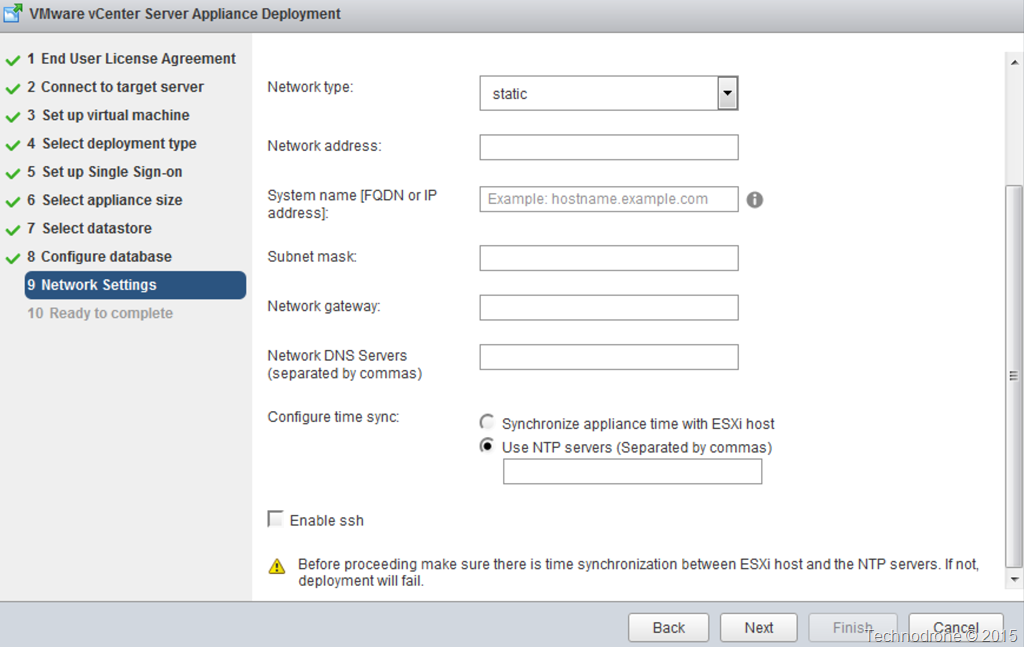
IP_1 IP_2SSO1 SSO2Embedded1 Embedde2

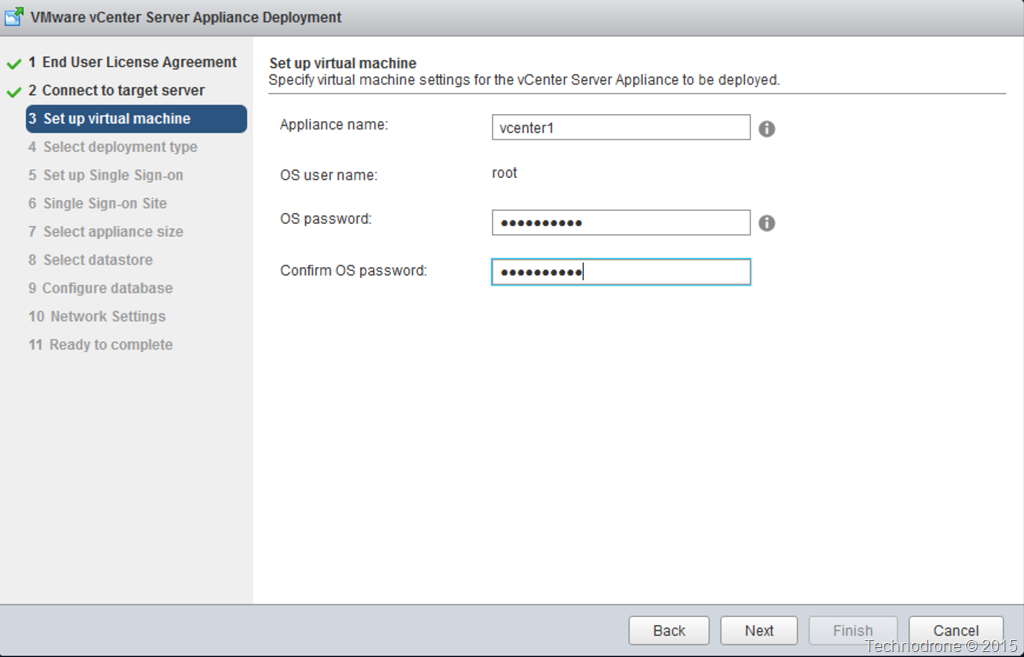
Credentials1Credentials2

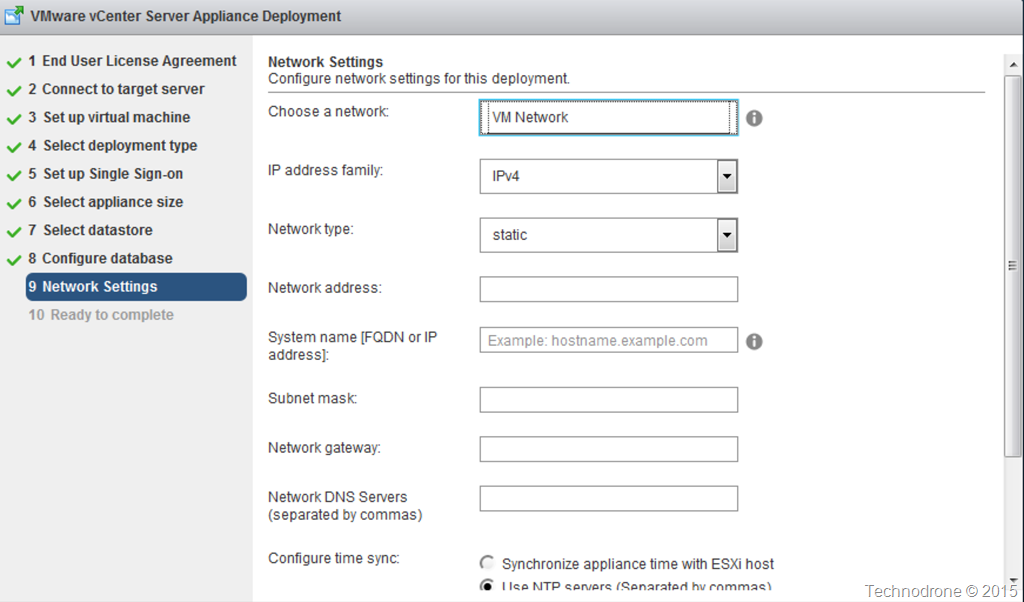
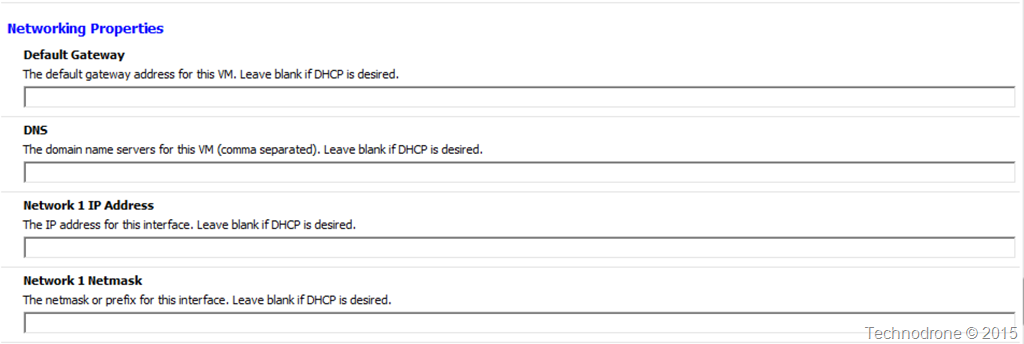
Network3 Network4Network5

Summary1 Summary2

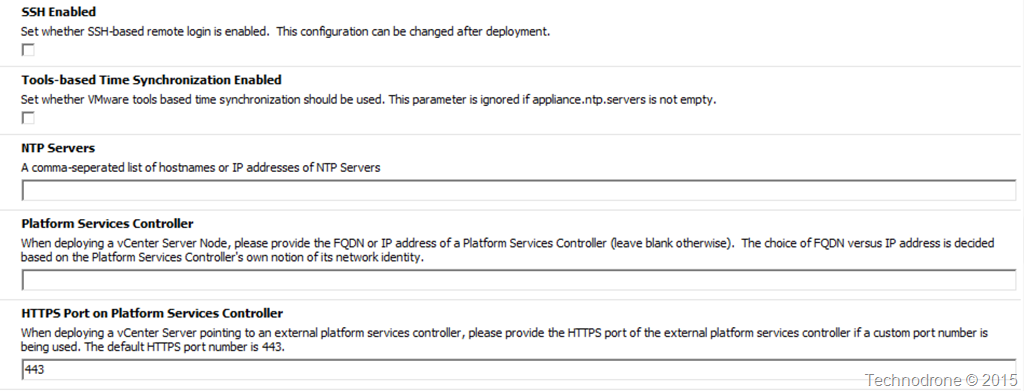
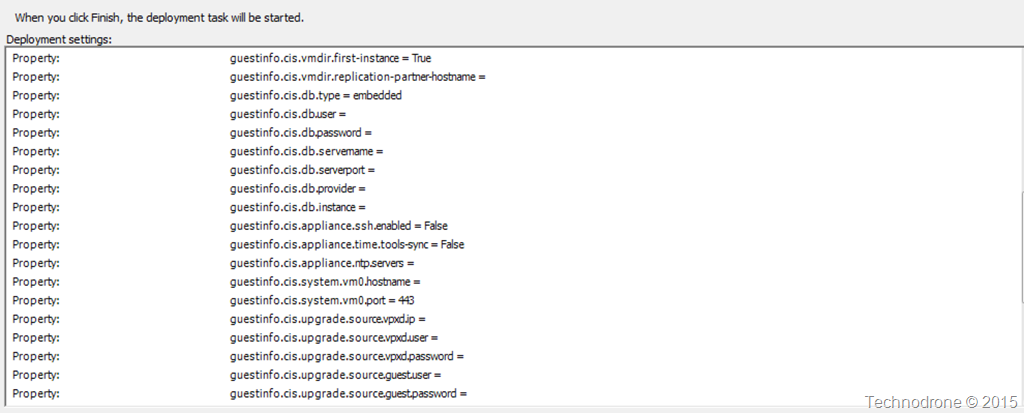
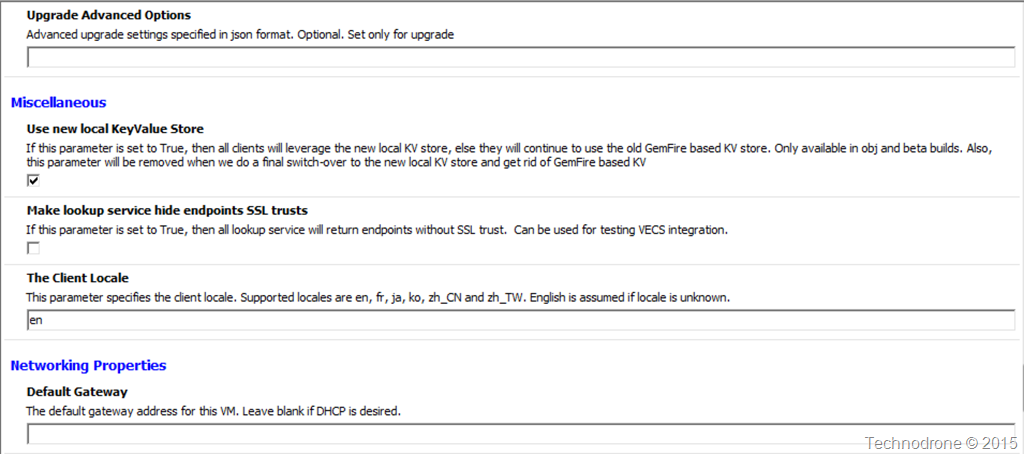
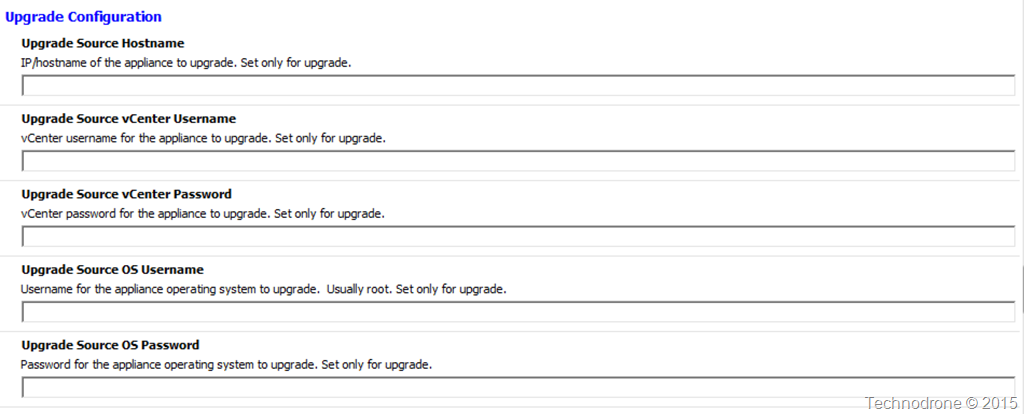
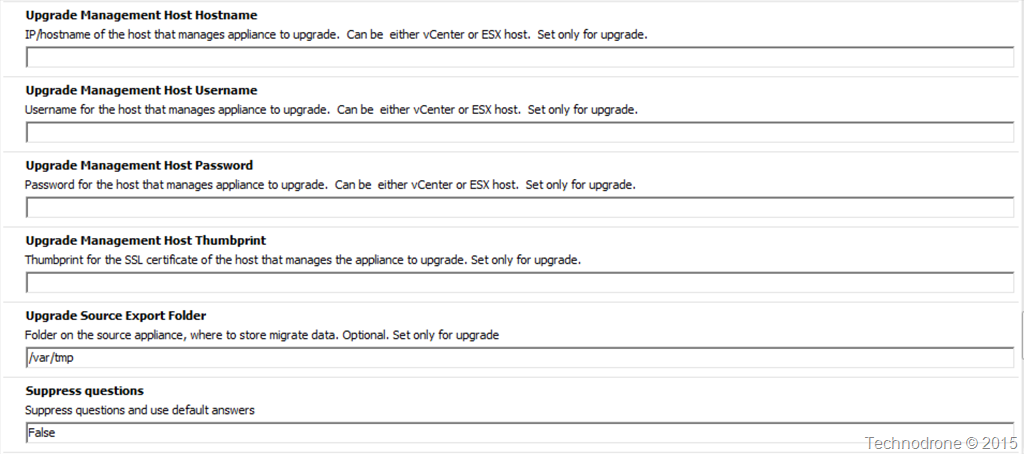
Now of course there a things that are not visible in the regular installation interface – things that related to the upgrade.

Upgrade1Upgrade2Upgrade3

So there you have it – Deploying a vCenter Server Appliance – directly into an existing vCenter.

Sometimes the stuff we are used to is the stuff that is also the easiest way to do things.

If anyone has any insight to problems that might occur using this method please feel free to leave them in the comments below, and of course – please feel free to leave any other thoughts or comments as well.

2013-06-17

Security in VMware Virtual Appliances

Today I got a reminder of a post I have been meaning to write about security best practices and VMware Virtual Appliances.

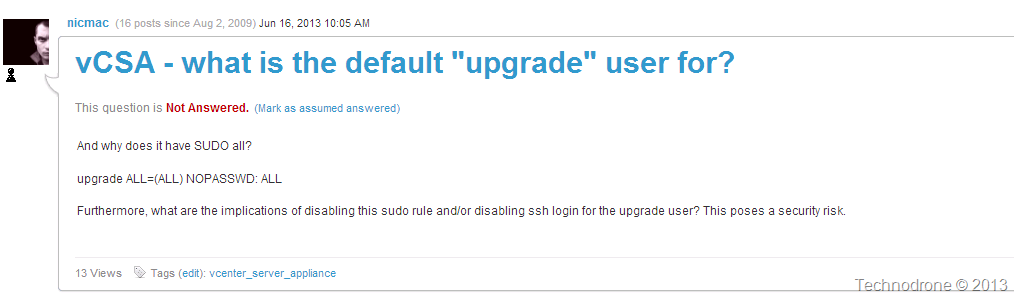
A question was raised on the VMTN community VCSA - what is the default "upgrade" user for?

VMTN question

That is a very legitimate question!! Giving a user all rights with no password can become an issue. But in this case since it is used (most probably) for the purpose of the upgrade of the VCSA from version to version - then it might OK (or not… ).

Which leads straight into the next subject - what users (and what are their rights) exist on the vCenter Server Appliance?

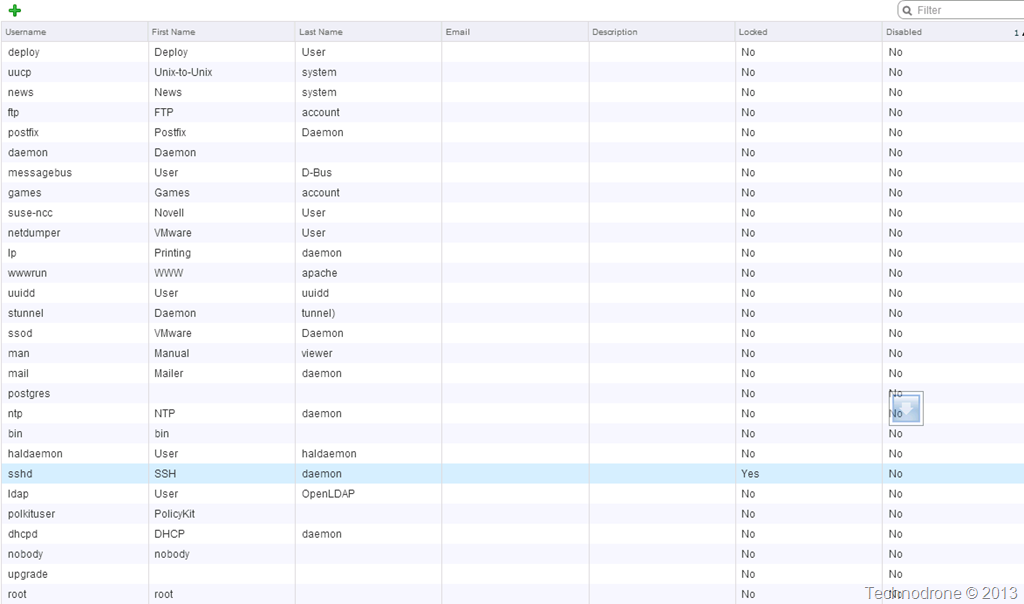
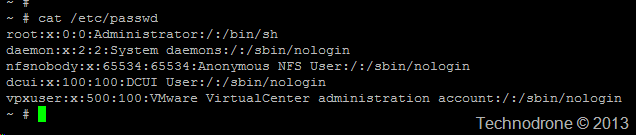
Let's have a quick look at what users there are on the VCSA (screenshot is all the local users on my VCSA that are both not locked or disabled)

locked+disabled users

So firstly let me say that is a hell of a lot of users in the server that in essence is one of (if not the most) important part of your Virtual infrastructure.

You might say (and rightfully so) that even if the users are defined - that does not mean that they can actually log into the system - for that they would need some kind of shell access. So I checked which users actually have shell access. That would be users who do not have /bin/false or /sbin/nologin in their profile. This is what I got

shell enabled users

Let's concentrate on some of the users in the list.

lp Access to printer hardware; enables the user to manage print jobs.
ftp FTP user
man Used for man
games Access to some game software
news Used for news application
uucp Serial and USB devices such as modems, handhelds, RS-232/serial ports.

For someone that values security - all our Linux boxes are hardened (as they should be), so the first thing we do is run the following:

# userdel shutdown
# userdel halt
# userdel reboot
# userdel games
# userdel news
# userdel gopher
# userdel ftp

(Just to clarify - I do not advise running any of the above commands on your vCenter Server without proper testing and approval from VMware and doing so might void your support.
Be warned!!)

If you were to ask me - most of the users listed above have absolutely no business being on a production box… especially not on my vCenter!!!!

In VMware's defense I should say that I checked which users were available on other VMware appliances - such as the vCOPS appliances and the new Log Insight appliance - and most of these users were not present on either of them. Perhaps this is the way going forward.

VMware have made progress - but I still do not feel 100% comfortable with the vCenter virtual appliance even after I wrote my post last year - Should You Patch the vCenter Server Virtual Appliance? 

vCenter has all the keys to the kingdom - and VMware must make the utmost effort to make sure that no possibility of exploit can used by leaving silly holes and possible security vulnerabilities open in the underlying operating system.

The same way that a ESXi host is locked down - there is no reason why the vCenter server should users like games on them.

ESXi Users

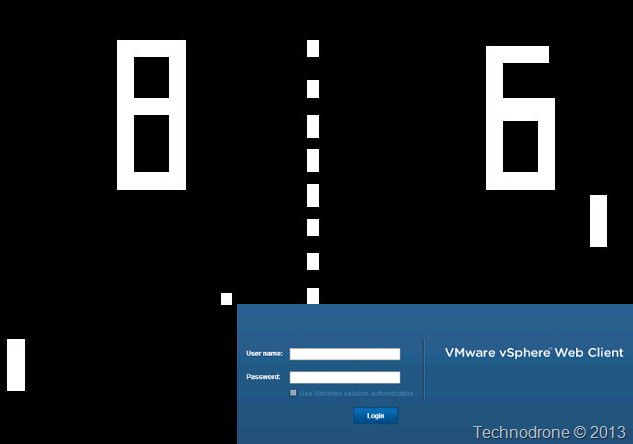
Imagine if we had Pong on our vCenter…

Game of Pong?

2013-02-20

Migration Path for the VCSA from vPostgres to.. ??

Wait… there is no way to do that – is there? Is there?

Today I would like to address a point that is perhaps pretty obvious but not really well known, and that is the lack of a migration path out of the vCenter Server Appliance installed with an embedded database.

To understand the issue – let us first understand the process if you were to use a vCenter Server installed on a Windows Server machine.

When you want to try out vCenter, you will install the software on a Windows Server, usually with the embedded SQL EXPRESS database that is provided with the software. VMware stress (and rightfully so) that this should not be used for a production environment and this will only be will be suitable only for 5 hosts and 50 VM’s. But since you only want to try out the software – that should not be an issue.

Fast forward a few months (or weeks or perhaps even days because we know that you will want to have this in production as soon as possible) and you see that this will provide great benefit to you and your company – and now you want to move it into production. This will of course require you to move the database out of the embedded SQL Express instance and put it into a proper SQL Server.

The process is pretty straight forward and has been documented a number of times. VMware even has a KB explaining how this should be done.

Once complete you now have the same VMware environment that you started out with and have been using, including the permissions, the folder structure the statistics and all.

So how would we go about doing the same with the VCSA?

You install the vCenter Server Virtual Appliance and follow the steps including the using the embedded vPostgres database. Again this is not for production use and VMware sizes such a deployment for not more than 5 Hosts and 50 VM’s.

Fast forward again…

You now want to move into production – which means the database will have to be migrated to one that will be able to accommodate growth. Supported databases (for the current version 5.1a) are Oracle and vPostgres.

In most companies I have encountered, the databases that are used in production will be either Microsoft SQL or Oracle.

So how can you migrate out of the vPostgres database?

So here is the catch!!

VMware has no documented way to move the data out of the Embedded vPostgres database into a production, supported database.

Actually – there hardly any documentation – except perhaps this KB – about how you should backup a VCSA appliance.

No export, no migration,  nothing. This means that if you made the assumption of trying out a VCSA and then moving into production…

Yep you guessed correctly – everything has to be rebuilt – again. If your database goes kablooie then pray that you have a full image backup.

Re-register all your hosts, re-create permissions, rebuild the folder structure, etc… etc... etc…
(not that this is not possible – I actually wrote a script quite a while back for this - vCenter PowerCLI Migration Script) it just will take a lot of tinkering. Not to mention of course that you will lose all your statistics collected until the migration.

If VMware could create a migration script between DB2 and vPostgres for the upgrade from 5.0 to 5.1 – then I should hope that they will provide a script to move out of vPostgres as well.

As always – if you would like to share your thoughts – please feel free to do so in the comments below.

2012-07-03

Things I Don’t Like About the vCenter Virtual Appliance

VMware are looking to move everything to a virtual appliance model. That is pretty obvious. And of course the most central component is your vCenter,

I wrote a post a while back about Should You Patch the vCenter Server Virtual Appliance? but since then I am finding more and more issues with the VCVA (vCenter Virtual Appliance) and differences in functionality between the Windows and Linux Versions of Virtual Center.

Lets Start. (Items are marked with my opinion of their impact Green, Yellow, Red)
  1. Patches (Red) – see  the above post.
  2. vCenter Orchestrator (Green - another VM to manage) – is bundled with the Windows version – but requires a separate VM in addition to the VCVA.
  3. vSphere Update Manager (Green - another VM to manage) – not bundled with the VCVA – requires a separate Windows VM – and is usually installed on the vCenter (Windows) itself.
  4. Management of the bundled DB2 database on the VCVA (Yellow)
    Does anyone know how to manage the database?
    How many DBA’s do you know that know how to deal with DB2?
    How do you back it up?
    How do you restore it?
    How do you troubleshoot it?

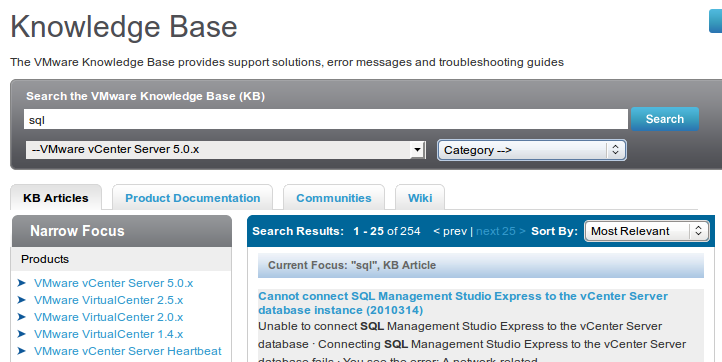
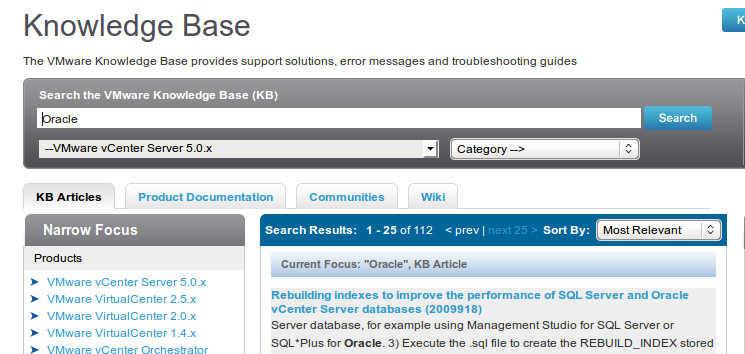
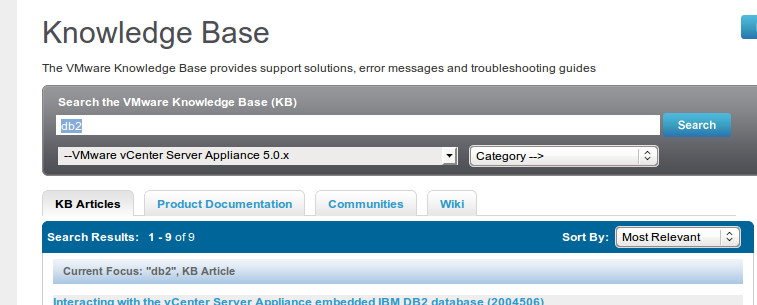
    Compare the number of KB articles that are on the VMware Knowledge base relating to DB2 to those relating to Oracle or SQL.

    SQLOracleimage
    Either DB2 just works – or it is so new in VMware – that no-one knows how to use it properly yet.
  5. Migration path away from a VCVA (Yellow) with a bundled DB is non-existent. At least with the bundled SQL database – there is a way to move over to a fully licensed SQL instance when your environment grows. What happens if I start out with the embedded DB2 and want to move over to a production database after that – be it Oracle or SQL – is there a migration path? I do not think so. So that means a complete re-install.
  6. CLI interface on the vCenter Server (Yellow). This is useful – very useful. Be it vCLI or PowerCLI – both of these can be used to run scripts on the vCenter itself. Where does this become useful? If you would like to perform an action with the trigger of an alarm in vCenter – you can.
    Try doing that with the VCVA – you cannot install vCLI on the VCVA – believe me I have tried. So you will need all kinds of workarounds. But the functionality is not there.
  7. Minimum resources (Green) needed for VCVA – 4GB/ 2vCPU’s – by default – it is deployed with 8GB/2vCPU’s – which is usually too high.
There are of course a large number of benefits with the VCVA – and I do think that this is the future – but until some of these items are addressed – I cannot whole-heartedly recommend to deploy a VCVA in your production environment.

I will update this post with more points as they come along. Please feel free to add your thoughts in the comments below.

2012-04-16

Should You Patch the vCenter Server Virtual Appliance?

With vCenter 5 came the release of the the vCenter Server Virtual Appliance. This move was applauded by many due to the fact that VMware made the first step in the direction of removing their dependency on Microsoft’s Windows OS and finally making the move to a Linux based platform.

If you would ask me (and this is my personal opinion – not based on concrete info) the days of a Windows based vCenter server are  numbered, if not in the next version – then the one after that – there will only be a Linux Virtual appliance. It makes complete sense.

But here is where I find lies an issue – which could become quite a serious problem.

VMware have announced that they will no longer be using Update Manager for patching the Guest OS – which I think is quite logical. VMware should concentrate on what they do best – and that is the virtualization stack. Shavlik, WSUS, Landesk (just to name a few) do a pretty good job for providing patches to guest operating systems and their underlying applications.

But what about the vCenter Server appliance? Who should be the one to patch that?

I put in a Support Request yesterday with with the following question

Patch Update for vCenter virtual appliance
The virtual appliance is installed on top of OpenSuse 11 SP1. Since it was released almost 2 years ago and since then there have been a number of bug fixes and security patches released.
Who is the responsible to apply these patches? VMware? Me the customer? If you when will these patches be released? If it is me the customer is there a list of approved patches by VMware that will assure I will not break anything?
In addition when will an updated version of the appliance be released so that it matches the one released for Windows?

The answered I received today – was what I expected.

As a follow up from our phone conversation - with regards to your question of patching the Guest OS of the vCenter Appliance - we would advise to not patch the guest OS directly. However VMware would recommend to apply any vCenter Appliance patches as they are released and if there are Guest OS patches required, they will be included in the Appliance patches.

Maybe there were no patches released for the Operating system you might ask?

I went to the Novell Patch Finder to check to see what patches were released for the OS. I selected only the Mandatory patches that were released after August 23 2011 (I will explain why this date in a moment), and lo and behold – yes there were patches – a whole lot of them (210).

Patches

To clarify a few things about how I got to my data.

This is the kernel of the vCenter appliance:

localhost:~ # uname –a
Linux localhost.localdom 2.6.32.29-0.3-default #1 SMP 2011-02-25 13:36:59 +0100
x86_64 x86_64 x86_64 GNU/Linux

The Linux version of the vCenter appliance

localhost:~ # cat /etc/issue
Welcome to SUSE Linux Enterprise Server 11 SP1 for VMware (x86_64) - Kernel \r (\l).

Why did I choose the date of August 23, 2011?
Here is the list of the last 15 RPM’s installed on the vCenter appliance.

localhost:~ # rpm -qa --queryformat '%{installtime} (%{installtime:date}) %{name}\n' | sort -n | tail -15

1314096829 (Tue Aug 23 10:53:49 2011) oracle-instantclient11.2-odbc
1314096829 (Tue Aug 23 10:53:49 2011) vmware-studio-vami-service-services
1314096831 (Tue Aug 23 10:53:51 2011) VMware-sps
1314096834 (Tue Aug 23 10:53:54 2011) VMware-vpxd-agents-eesx
1314096836 (Tue Aug 23 10:53:56 2011) stunnel
1314096836 (Tue Aug 23 10:53:56 2011) syslog-collector
1314096837 (Tue Aug 23 10:53:57 2011) VMware-vpxd-agents-esx3
1314096838 (Tue Aug 23 10:53:58 2011) vmware-open-vm-tools-kmod
1314096839 (Tue Aug 23 10:53:59 2011) vmware-open-vm-tools-common
1314122043 (Tue Aug 23 17:54:03 2011) vmware-studio-vami-login
1314122043 (Tue Aug 23 17:54:03 2011) vmware-studio-vami-service-core
1314122044 (Tue Aug 23 17:54:04 2011) vmware-studio-vami-service-system
1314122045 (Tue Aug 23 17:54:05 2011) vmware-studio-vami-service-network
1314122046 (Tue Aug 23 17:54:06 2011) vmware-studio-appliance-config
1314122047 (Tue Aug 23 17:54:07 2011) vmware-studio-vami-service-update

VMware say that I should not patch the Guest OS. You might say that not all those 210 patches are relevant. Most probably yes – that is true. But there are several that are relevant – very relevant.

Take for example the Linux Kernel.

The current Kernel is 2.6.32.29-0.3-default

The kernel has been updated 4 times

These are not minor security patches and holes. These are security updates for the kernel.What would your auditor tell you if you had not installed a patch on a Server of yours for over 18 months?

Would you leave your ESX Servers unpatched for 18 months?

Then my question to you all – and to VMware …

Why is it acceptable to not update the central (and some might say – the most important) component of my virtual infrastructure against known security vulnerabilities??

If you pass over the responsibility to me (the admin) to update my Windows vCenter – then you should either do the same for the vCenter Appliance – or VMware should be the one to provide the patches (regularly!!) – but not leave it in a state that leaves it vulnerable.

I do think that providing your customers with virtual appliance means that you should maintain that appliance – including all aspects – your software and the underlying operating system as well.

Did we all think this through when going to the virtual appliance model? Who is the responsible party for the Guest OS ? The vendor? You? And if so what should the patch cycle policy be? Once in 8 months is not a good track record.

Going the way of using Update Manager to patch the Virtual Appliance will probably be the way to go, but that will still have its implications as well.

Oh yes – one more thing.. Same goes for vCloud appliance, Orchestrator, vCOPS, CapacityIQ, ADM, the vFabric family?

I would be very interested in hearing your thoughts on this..

2011-02-03

Viewing a WebEx on the Road

Today I wanted to join in on Simon Seagrave's EMC Live Webcast:

Install & Run the EMC Celerra Virtual Storage Appliance 

But I was not able to view it from the comfort of my desk, I was on the way back home - on the bus.

I decided not give the webcast a miss so I decided to view on my laptop using my phone as my internet connection. I have a an HTC Wildfire with Android Gingerbread courtesy of Cyanogenmod. One of the benefits of Froyo is Wireless tethering - which allows you to set your phone up as a Wi-Fi hotspot.

I use this great application 3G Watchdog to monitor my Mobile Internet usage.

The statistics from today from my phone during the WebEx:

image 

A quick PowerShell line to give that in numbers that I can understand:

Write-Output "Data Received: $("{0:N2}" -f (81121147 /1MB)) MB" "Data Sent: $("{0:N2}" -f (5838872/1MB)) MB"

image

I was happily surprised to find for a webcast that took over hour - including audio, the amount of bandwidth used was negligible.

That means I do not need to give up live webcasts on the ride home.

Thanks Simon for the great webcast!

2011-01-19

Do You Really Need the vMA?

This post was triggered by a very informative conversation I had with William Lam this week. Thanks William!

<Begin Quote>

vMA - vSphere Management Assistant, is a virtual machine that includes prepackaged software such as a Linux distribution, the vSphere command‐line interface, and the vSphere SDK for Perl. Basically it is the missing service console for ESXi. But it's more than that too.

This allows administrators to run scripts or agents that interact with ESX/ESXi and vCenter Server systems without having to explicitly authenticate each time. vMA can also collect ESX/ESXi and vCenter Server logs and store the information for analysis.

</End Quote>

Ever since VMware announced that ESXi will be be the de-facto platform going forward for the hypervisor starting from 4.1 - a large amount of speculation was raised about how to continue forward, and how we will continue to perform what we were doing up until now on the service console - with the console that is gone.

VMware is pushing all of us to move to the vMA to do all this administration.

Now let me share a trail of thought with you. (I would like to stress, these are my thoughts - and are based on my speculation)

Does the vMA have a future? Will there be a need for it down the road? Up until now one of the two limiting factors that were not available in was esxcli and esxtop. Since PowerCLI 4.1.1 this is no longer a limitation.

ESXCLI now available through PowerCLI and ESXTOP Available Through PowerCLI

So my question to you is, what do we need to keep the vMA for? If someone would tell me because of the built-in syslog server which is available - that does not sell me.

The amount of API objects that are currently available for use in PowerCLI - that are not available or exposed through the Perl SDK, has continuously been rising with each new version released.

What is the reason to keep the vMA around in the future? What (if anything) is the necessity for you to have a vMA? Is there anything that you cannot do today with PowerCLI that can only be done with the vMA?

And if that is case - why go down that route and add another VM that has to be managed, has to be patched and will use up resources on your vSphere infrastructure?

I look forward to your comments and your thoughts.

2010-02-16

Is 100mb Enough for the Service Console?

It is accepted practice amongst most of the virtualization world that you can use a 100mb/s link for your Service Console port, because there is not much traffic that is flowing over that link.

Well in the majority of the cases that is true.

For example. vmnic0 is running the Service Console. This link is connected at 1000mb/s

image

As you can see in the screen shot there is nothing really running through the Service Console (vmnic0)

But how about this

image

Now you would (and should) most definitely ask what is running through vmnic0 that is causing that amount of traffic.

It is not a Backup agent, no VMkernel on vmnic0 either. It was a regular virtual machine import.

image

A bit more of an explanation. How often does it happen that you are asked to import a virtual machine from somewhere?  A virtual appliance? A new image that has to go onto the ESX?

When importing a virtual machine into an ESX host, the traffic goes directly through the service console and it's vmnic.

As you can see that amount of traffic can easily surpass 100mb/s.

But if you have the option of only running a SC on 100mb/s then you will have to take into account the virtual machine imports will take longer - they can take much.. much longer if you run multiple simultaneous imports. I do not know what impact it will have on the other traffic that has to run on the Service console. I do not know of any QOS on ESX that will ensure that some kind of traffic is more important than others.

Finding a 100mb/s NIC is something that you will have to go on a treasure hunt for - we are at the time and age that a 1Gb is default and soon 10Gb will become the norm. the issue here is not the NIC - it is the switchport. Not everything can run on 1Gb end-to-end, so here is your limitation.

Solutions?

  1. Run your SC on 1Gb
  2. Share your SC with other ESX Network components (Vmkernel / VM Traffic) and lower the level of security for your ESX
  3. Create an aggregate to widen the "pipe"
  4. Run your SC on 100mb/s and take into account that virtual machine imports will take longer

Thanks to Tom Howarth, Scott Lowe, Roger Lund, Dave Graham, Mike LaSpina and Tommy Hall for joining in on the discussion.

2009-11-30

Deep Security 7 - Trend Micro & VMsafe

Trend Micro have now joined Altor Networks and Reflex Systems with their new offering that utilizes VMware's VMsafe technology. I expect we will be seeing more and more of the Security Companies release their products that will utilize VMsafe

From the Product Page

Protect physical, virtual and cloud servers from malicious attack


Trend Micro Deep Security 7 provides advanced protection for servers in the dynamic datacenter, whether physical, virtual or in the cloud. Brought to Trend Micro through the acquisition of Third Brigade, Deep Security combines intrusion detection and prevention, firewall, integrity monitoring and log inspection capabilities in a single, centrally managed software agent.

Deep Security protects confidential data and critical applications to help prevent data breaches and ensure business continuity, while enabling compliance with important standards and regulations such as PCI, FISMA and HIPAA. Whether implemented as software, virtual appliance, or in a hybrid approach, this solution equips enterprises to identify suspicious activity and behavior, and take proactive or preventive measures to ensure the security of the datacenter.

From the datasheet

ARCHITECTURE

  • Deep Security Virtual Appliance. Transparently enforces security policies on VMware vSphere
    virtual machines for IDS/IPS, web application protection, application control, and firewall protection—
    coordinating with Deep Security Agent, if desired, for integrity monitoring and log inspection.
  • Deep Security Agent. This small software component deployed on the server or virtual machine
    being protected enforces the datacenter’s security policy (IDS/IPS, web application protection,
    application control, firewall, integrity monitoring, and log inspection).
  • Deep Security Manager. Powerful, centralized management enables administrators to create
    security profiles and apply them to servers, monitor alerts and preventive actions taken in
    response to threats, distribute security updates to servers, and generate reports. New Event
    Tagging functionality streamlines the management of high-volume events.

DEPLOYMENT AND INTEGRATION

  • VMware integration with VMware vCenter and ESX Server enables organizational and operational
    information to be imported into Deep Security Manager, and detailed security to be applied to an
    enterprise’s VMware infrastructure
  • Integration with VMsafe™ APIs enables rapid deployment on ESX servers as a virtual appliance to
    immediately and transparently protect vSphere virtual machines
  • Detailed, server-level security events are provided to a SIEM system, including ArcSight™, Intellitactics, NetIQ, RSA Envision, Q1Labs, Loglogic, and other systems through multiple integration options
  • Directory integration with enterprise-scale directories, including Microsoft Active Directory
  • Configurable management communication minimizes or eliminates firewall changes typically
    needed for centrally managed systems by enabling either the Manager or the Agent to initiate
    communication
  • Agent software can be deployed easily through standard software distribution mechanisms such
    as Microsoft® SMS, Novel Zenworks, and Altiris.

DEEP SECURITY MODULES

Deep Packet Inspection

  • Examines all incoming and outgoing traffic for protocol deviations, content that signals an attack, or policy violations
  • Operates in detection or prevention mode to protect operating systems and enterprise application vulnerabilities
  • Defends against application-layer attacks, SQL injection, and cross-site scripting
  • Provides valuable information, including who attacked, when they attacked, and what they attempted to exploit
  • Automatically notifies administrators when an incident has occurred Intrusion Detection and Prevention
  • Protects against known and zero-day attacks by shielding known vulnerabilities from unlimited exploits
  • Automatically shields newly discovered vulnerabilities within hours, pushing protection to thousands of servers in minutes without a system reboot
  • Includes out-of-the-box vulnerability protection for over 100 applications, including database, web, email, and FTP servers
  • Smart rules provide zero-day protection from unknown exploits that attack an unknown vulnerability, by detecting unusual protocol data containing malicious code Integrity Monitoring
  • Monitors critical operating system and application files, such as directories, registry keys, and values, to detect malicious and unexpected changes
  • Detects modifications to existing file systems and new file creations and reports them in real time
  • Enables on-demand, scheduled or realtime detection, checks file properties (PCI 10.5.5), and monitors specific directories
  • Delivers flexible and practical monitoring through includes/excludes and auditable reports Web Application Protection
  • Assists compliance (PCI DSS 6.6) to protect web applications and the data they process
    Defends against SQL injection, cross-site scripting, and other web application vulnerabilities
  • Shields against vulnerabilities until code fixes can be completed

Application Control

  • Provides increased visibility into, or control over applications accessing the network
  • Uses application control rules to identify malicious software accessing the network
  • Reduces vulnerability exposure of servers

Bidirectional Stateful Firewall

  • Decreases the attack surface of physical, cloud, and virtual servers
  • Centrally manages server firewall policy, including templates for common server types
  • Features fine-grained filtering (IP and MAC addresses, ports), design policies per network interface, and location awareness
  • Prevents denial of service attacks and detects reconnaissance scans
  • Covers all IP-based protocols (TCP, UDP, ICMP, etc.) and all frame types (IP, ARP, etc.)

Log Inspection

  • Collects and analyzes operating system and application logs for security events
  • Assists compliance (PCI DSS 10.6) to optimize the identification of important security events buried in multiple log entries
  • Forwards events to SIEM system or centralized logging server for correlation, reporting, and archiving
  • Detects suspicious behavior, collects security events and administrative actions across your datacenter, and creates advanced rules using OSSEC syntax

2009-08-31

VMware Studio 2.0 - GA

Release Notes

General Availability Release | 31 August 2009 | Build 1017

Last document update: 25 August 2009

New Features in VMware Studio 2.0

The following features were added between VMware Studio 1.0 and 2.0:

  • Ability to create multiple-VM appliances, or vApps, to run on VMware vSphere.
  • More provisioning engines including ESX/ESXi 3.5 and 4, VMware Workstation 6.5.1, and VMware Server 2.0.
  • Build support for Windows Server 2003 and 2008 (32-bit and 64-bit) virtual appliances.
  • Build support for 64-bit Red Hat Enterprise Linux (RHEL) and SUSE Enterprise Linux Server (SLES).
  • Build support new Linux distributions RHEL 5.3, CentOS 5.3, and Ubuntu 8.04.1.
  • Extensible management services allow you to customize an interface into a new tab.
  • An Eclipse™ plug-in helps you package applications and create management services.
  • Automatic dependency resolution for application packages installed on Linux-based virtual appliances.
  • Existing VM build (input-as-VM) for Linux virtual appliances.
  • DMTF standard OVF 1.0 and open virtual appliance (OVA) packaging. VMware Studio 1.0 supported OVF 0.9.

Can be downloaded from this link


2009-03-20

VMware vCenter Mobile Access

So today a little surprise was released by VMware, vCenter Mobile Access.

Below is a short demo released with the announcement.


A small excerpt from the product overview:

Ever wish you could restart a virtual machine or migrate it to another host from the convenience of your mobile phone? With VMware vCenter Mobile Access, you can...

VMware vCenter Mobile Access allows you to monitor and manage VMware Infrastructure from your mobile phone with an interface that is optimized for such devices. Specifically, it allows you to:

  •    Search for virtual machines in your data center
  •    Migrate virtual machines from one host to another using vMotion
  •    Execute recovery plans using VMware Site Recovery Manager
  •    Access Scheduled Tasks, Alarms and Events

   And much more...

The release date for the technology preview is set for April 2009.

I wonder how much more we think we can squish into such a small screen???

2009-02-23

vCenter on Linux - Beta

As was mentioned by Duncan Epping - the beta for Virtual Center on Linux is out.

  • Comes an OVF package so it can be imported easily into all Vmware products.
  • It is based on Centos using Just Enough Operating System (JEOS)
  • You will need a an Oracle 10 Database
  • Does Not support

    • Monitoring
    • Alarms
    • No LDAP
    • No VM Customizations
    • No VI Web Access
    • No Plug-ins
    • No Local DB
    • Scheduled Tasks
    • Maps
    • Update Manager
    • SRM
    • Converter Enterprise
    • Guided Consolidation


More info here

2009-02-18

Debian 5.0 VMware Image

Duncan Epping posted on twitter a few days ago Debian now has a new version out, and of course in no time at all, Simon has released a VMware image of the OS.

If you would like to receive the announcements here the link.

Below is the announcement.

Thanks Simon!
Good evening!

== Debian Lenny (Debian 5.0)

The Debian Lenny ThoughtPolice VMware image is available for immediate
download:
http://www.thoughtpolice.co.uk/vmware/#debian5.0
Torrents and http downloads available, the torrent faster.

Press release (with lots of technical info)
http://www.debian.org/News/2009/20090214

Release information
http://www.debian.org/releases/lenny/

Release notes
http://www.debian.org/releases/lenny/releasenotes

This release is the first release with OpenJDK, and features fewer setuid binaries, gcc hardening for security critical packages.
Also the FHS v2.3 and LSB v3.2.

Review from The Register
http://www.theregister.co.uk/2009/02/16/debian_lenny_review/

This is the first ThoughtPolice release in both 32-bit and 64-bit! More to follow.

Enjoy,

Simon
www.thoughtpolice.co.uk/vmware/


2009-02-03

So where is virtualization heading?

Chad Sakac works for EMC, and has blog of course.

He wrote a wonderful post last week about getting the most you can out of IP storage for ESX. The post itself was great because it was a joint project from 6 different people from 5 different companies all working together to share great info for the virtualization community. The post can be found here.

Another great post he made today - So... What's the "BIG picture stuff " going on under the covers?

I highly recommend it!

2009-01-23

Exporting Virtual Machines to another computer

A potential client (hopefully will be a major client in the future) came to me with a requirement to consider ESX3i as their next platform for a stand-alone lab (x30). The major setback at the moment was the ability to easily export VM's from one Lab to another. They needed to exprt the image off of host relatively often. Now why they were not using ESX in the first place and why they are continuing not to do so, and why they would not go for an enterprise solution, that is a whole different story, which I will not get into. And neither why ESX does not really compare to Xensource.

They are using Citrix Xensource 3.2 - which is a quick Right-click -> Export ... Choose your location -> Save.

Since each VM is something like 40gb in size, this can be a very time consuming process.

So they started out by trying with thick disks (40GB) and to transfer that kind of a disk over the network can take mmmmm.... quite a while..

Not acceptable!

They went for Thin-disks (yes - I know that it sucks performance-wise..). Well when we created the disks it showed the size of 40GB on the VM's settings, when ls -la on the Console (yeah yeah not supported - I know..) but when looking at it through the Datastore Browser - lo and behold - 8GB in size, exactly what we were expecting.

So we tried to move the VM off of the Host, with the Virtual Infrastructure Client GUI, with WinSCP, with ssh, with FastSCP, we all go the same results (as was expected), as soon as the files was exported off, it grew to 40GB in size, and therefore took too long to export the VM.

Again Not acceptable!

So what was left, and I have Edward again here to thank for reminding me, the export feature.

Aha!!

In the VIC, when the machine is powered off, when you select your VM and then from the top Menu, File -> Virtual Appliance -> Export, you have the option to Export the VM out to any location accessible from your computer. Me be the skeptic I am, I thought that it would not make much of a difference in size and time, but I was wrong.

Test 1: Export VM with 40GB Thin disk to local C: drive
Time to completion: 12 minutes
Size of OVF: 1.2 GB

Test 1: Export VM with 40GB Default Thick disk to local C: drive
Time to completion: 15 minutes
Size of OVF: 1.7 GB

So not only do they have their export feature, not only are the VM image sizes manageable, not only is the timeframe more than acceptable, the disks will stay Thick by default which I am sure will improve the performance, and also make Edward happy.

So, perhaps I have convinced the client that ESX3i is more than a suitable and worthy candidate that will match and even improve on that feature from Xensource any day (not to mention almost any other feature as well). And if all goes as I hope, we will have another happy client that will benefit from using ESX, and in the future they will go with the product they are supposed to be using the first place - VMware Lab Manager.

2008-12-15

My Top Virtual appliances

EWeek posted their Top 5 Virtual appliances. They are all good applications, but all of them are products that cost moent and cost a lot. So I thought about how about compiling a list of my own most used Appliances (in no particular order) from the Virtual Appliance Marketplace

If I come up with some more, I will let you know.