Showing posts with label Licensing. Show all posts

2013-02-14

Host Profiles Should Become a Standard Feature

Can you name the features that are only available in vSphere Enterprise Plus edition?
If you need a reminder you can get the information here

Feature Comparison

A while back I asked for your feedback in this poll

Twitter Poll

I have to say that I totally agree with the results, and I was not at all surprised by them either

If I were to rank the top 3 features of Enterprise Plus Edition they would be (in order):

  1. dvSwitch
  2. Storage DRS
  3. NIOC/SIOC

I am not saying that the other features are not important – but these would be my top 3. In my humble opinion I think that these are the 3 features that are most used by the enterprise market (or whoever purchases Enterprise Plus licenses).

So let’s get back to the tile of this post. Take a look at this Twitter conversation.

Host Profiles conversation

Every single word in this thread is absolute gold.

Host Profiles. They allow you to create a "template" for your ESXi hosts and with the click of a button, or the Enter key (it should be scripted of course) you can set the configuration of your ESXi host – practically down to the last bit. All your hosts will be the same and of course you can have different templates for different purposes.

But why does this have to be a feature only available in the top-tier editions?

As you can see in the poll above – people do not prioritize this as a highly useful feature, that does not mean they do not use it (although that could possibly be deducted from the poll – that would not be accurate).

From my perspective. I do not use Host Profiles – for the following reasons.

My ESXi builds are all exactly the same. I have them down to a fine art, usually a custom kickstart script which configures exactly what I need. The post-configuration is then done with Powershell. How long did it take me to perfect it? Well .. a while – but now that it there – a deployment is 100% accurate – 100% of the time. Always works (as it should). Host profiles – works almost all of the time, and was just too picky to get it working. I have heard this from a great number of people – so it not just me.

Most people I know do not use Host-Profiles to check Host compliance. If they are already using it – it will be for deployment – not for compliance – and if my deployment is already covered by some other method - why do I need to use Host Profiles? Before Autodeploy was introduced, we used other tools, like Ultimate Deployment Appliance or the ESX Deployment Appliance. They were great solutions – for their time, but I suppose since Autodeploy was released – they are not really used for ESXi deployment that much any more.

Having your hosts configured exactly the same – should be a standard feature. It is in VMware’s best interests. It means less support calls, less anguish from customers, better customer adoption – there are more than enough reasons. Over the years a large portion of the “Enterprise” features have slowly but surely been moving down to the lower editions vSphere Replication, HA, vMotion, Edge, FT, sVmotion – just to name a few. These are all features that were available once upon a time in the Enterprise and above editions and are now part of the Standard product. I think VMware realized that this was what every customer was asking for, allowed for better customer adoption – and placed their features on par with those of Microsoft who were constantly badgering VMware for being too expensive (they still are and probably always will).

We have evolved, technology has evolved and today, Host profiles can be done other ways – be it in house scripts or the way I think it will evolve in the future - by an external 3rd-party tools (such as Puppet/Chef - I expect that Nick Weaver will have some news for us on this front at VMware PEX). A large number of companies are already using these tools for all their machine life-cycle management for their physical servers (if they have any), for their VM’s – and soon I assume for their Hypervisors as well. I foresee Pretty Pleasethat the day is not far off when these tools control not only the provisioning of VM’s to cloud environments (like they do today) but also control the configuration of these cloud environments as well. After all – it is all API’s so how far off can we really be?

The real Enterprise features should and always will stay in the top-tier editions. The dvSwitch is a must-have for any big environment – specifically if you are using vCloud. SIOC and NIOC as well.

I think it is time to review what should actually be considered an “Enterpise Plus” feature.

And while we are at it .. VMware this applies to Autodeploy as well.

Pretty please??

Please feel free to add your comments and thoughts below.

2012-11-27

vCloud Suite Licenses and (NO)vRAM

Yes I said the “v”- word again. That “dirty” term that was abolished at VMworld 2012 this year.
(forgive the cynicism)

To my surprise – it is still haunting me – and I suppose soon us all.

A week ago I received my first vCloud Enterprise Suite license.

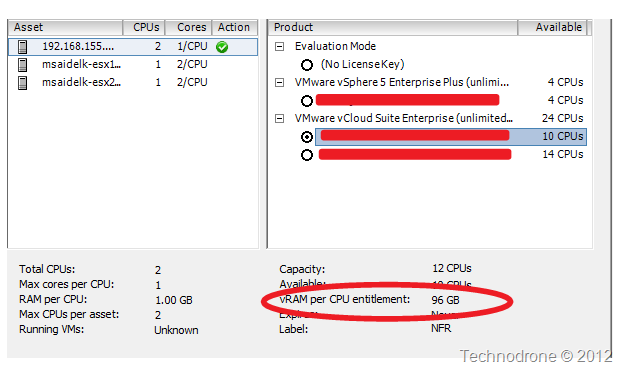
license

Happy as can be, I added it into my vCenter Server and then I realized something which was strange..

vSphere Client

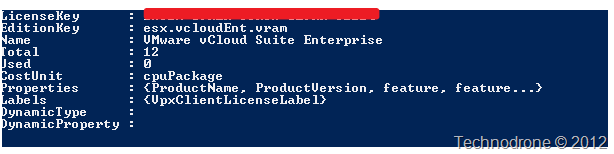
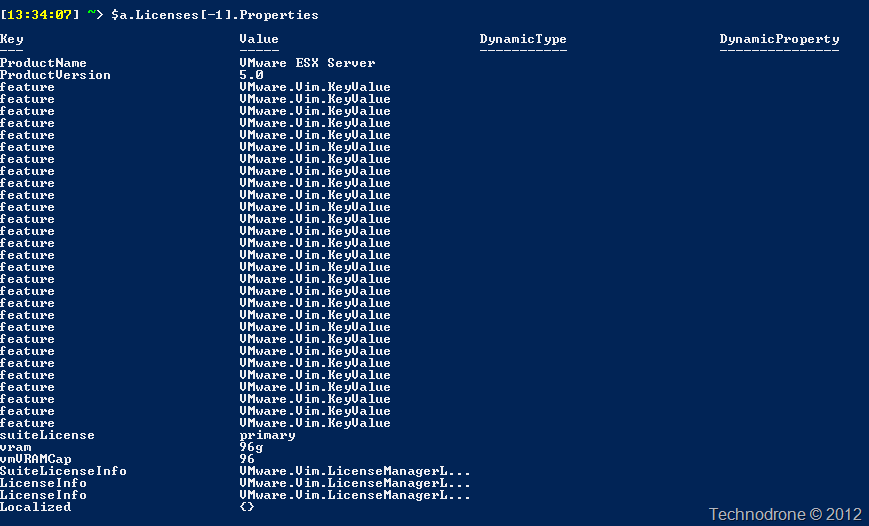
I checked the API as well.

API

API2

The license itself definitely has a vRAM entitlement embedded into it – of 96GB per CPUNO VRAM.

I reached out to John Troyer who got back to me almost immediately (thanks John!!) with an answer. This is still listed in the license – and was not ripped out in time for the 5.1 release – and can safely be ignored. I received the same answer as well from Mike Laverick 

I opened an SR for clarification – and am waiting on an official answer – I assume this will be the same as I received above.

At the moment KB 2032903 - Managing licenses on ESXi hosts using the vSphere Web Client states the more or less same thing.

KB

I just do not understand if this property is a feature embedded within the license itself (and if so then it should be easy to remove – and so it should have been!), or is this property expected within the API – and if removed will break something.

I will update with my findings.

**Update 29-11-2012**

I received an answer (as expected) from VMware customer support that there is no vRAM limit on ESXi licenses anymore. This seems to have been a problem with the generation process of the vCloud Suite licenses which should now be fixed. The entitlement can be safely ignored.

2012-10-24

vCloud Suite Upgrade – There is No Free Lunch

As you should have heard by now vCloud Suite will be available as a free – well almost free.

According to the VMware vCloud Suite Upgrade Promotion you have until December 15, 2012 at 11:59pm Pacific Time (PT) if you have purchased vSphere Enterprise or vSphere Enterprise Plus as of August 27th, 2012 and you have an active Support and Subscription agreement to upgrade to vCloud Standard Edition

So for the Enterprise Plus customers this is a no-brainer … or is it???

What many people do not understand is that from a CAPEX perspective you come out on top. But OPEX is where you will feel the hit - with your renewal of your support. Brian Knudston started to address this in his article.

From the Support FAQ

Q. Is Subscription and Support (SnS) required?
A. For the “$0 upgrade” from vSphere Enterprise Plus to vCloud Suite Standard, the existing SnS contract will persist and no additional SnS is required at time of purchase and the new SnS rate will be charged at the next renewal When the upgrade is selected, the same level of support must be chosen for the upgrade that covered the original vSphere Enterprise Plus license. For example, if the vSphere Enterprise Plus was covered by VMware Basic Support, then the upgrade to vCloud Suite Standard must also have VMware Basic Support.

Let’s put this into numbers for a minute. I have taken the list prices from the VMware site.

List Prices

(Of course not many people pay list price so your exact number will differ)

Take the following example. My infrastructure has 50 vSphere Hosts (Dual socket) with Enterprise Plus edition. My SnS expires on December 31, 2012.

$874 x 100 = $87,400 to renew my Support and Subscription for one year. Free Lunch?

I decided to take VMware up on their generous offer and upgrade all my Enterprise Plus hosts to vCloud Standard for a huge amount of 0$.

Sweet deal!! I now have vCloud Director which I can deploy in my Enterprise – and it did not cost me anything.

Along comes January 1st, 2013 and I have to pay for my SnS renewal.
Here is the math.

$1,249 x 100 = $124,900 to renew my Support and Subscription for one year.
Hey – my support costs just jumped by – yep… 43%.

Is this worthwhile – I think that each and every organization will have to do the math for themselves. If your SnS is already paid up for the next 3 years then you might even save money. If you were already going to invest in vCloud director then it could be that will come out on top.

There is no such a thing as a free lunch.

2012-02-27

50 Free licenses of VMware Horizon App Manager

VMware is offering 50 Free Licenses of VMware Horizon Application Manager 1.5 on certain purchases of VMware SKU’s.

FAQ

Q. What is the current offer?
A. During this promotion, eligible orders will receive 50 user licenses of VMware Horizon Application Manager 1.5 and one (1) year of Basic Support and Subscription (SnS) no additional charge. Eligible orders must include a qualifying VMware vSphere 5 product SKU.

Q. What is the timeframe for this promotion?
A. This promotion is valid for eligible purchases made between February 23, 2012 and June 15, 2012 at 11:59 p.m. Pacific Time (PT). Redemptions must be made by August 31, 2012 at 11:59 p.m. Pacific Time (PT).

Q. What is the benefit of VMware Horizon Application Manager 1.5?
A. VMware Horizon Application Manager provides a cross-platform solution that manages, secures, and delivers SaaS, Web and Windows applications to end users. A policy-driven enterprise catalog centralizes application management, while a secure workspace provides a simple way to connect end-users to applications.

Horizon Application Manager simplifies, manages and connects your organization to the Cloud through:

  • Lower operating expenses by unifying your applications into an enterprise app catalog for fast, secure  access to users
  • Higher quality of control with enterprise-scale and user-centric policy-driven management
  • Increased productivity of users with simple, secure access to all your applications

Q. Is there a detailed SKU list posted for eligible products that must be purchased on the order to take advantage of this promotion?
A. Yes. Please refer to the list of eligible SKUs.

Q. What if I buy through a channel partner, will my order be eligible?
A. This promotion is available to all end-user customers who place an order containing an eligible vSphere 5 SKU  from a VMware authorized reselling partner, from the VMware website or directly from VMware, including true-up orders. This promotion is not available on any orders received by VMware from EMC.  It is also not available to OEM partners ordering directly from VMware, except orders via Enterprise License Agreements or purchase orders where customer’s name, address, email address and ship-to information is provided to VMware.

Redemption:

Q. When will I be able to redeem the promotion offer?
A. You will receive a notification email within 30 days of VMware Horizon Application Manager 1.5 general availability or within 30 days after you place the eligible order, whichever is later. The promotion offer must be redeemed by August 31, 2012 at 11:59 p.m. Pacific Time (PT).

Q. Who will receive the Promotional Code email?
A. Promotional code emails are sent to the Sold To Contact on the qualifying order. The Sold To Contact for an order is typically the person who had placed the order.

Q. What happens if I lose or don’t redeem the promotion offer before it expires on August 31, 2012 at 11:59 p.m. Pacific Time (PT)?
A. To take advantage of the promotion, you must redeem the offer on or before August 31, 2012 at 11:59 p.m. Pacific Time (PT). If you lose the redemption code, please contact VMware Support. 

Q. Can I get temporary keys for this offer today?
A. No. Horizon Application Manager 1.5 license will only be fulfilled when Horizon Application Manager 1.5 becomes generally available or within 30 days after you place an eligible order, whichever is later.

Support:

Q. What Support and Subscription (SnS) offering is included for the Horizon Application Manager 1.5 promotion?
A. Included in this promotion is one (1) year of Basic Support and Subscription (SnS) for the promotional licenses, at no additional charge.

Read the Terms and Conditions

Read more on Promotion Eligibility

Eligible Product List

2011-08-03

vSphere 5. 0 vRAM Entitlements are to be changed

The first rumor of this was mentioned here by Gabrie van Zanten

The original levels were as follows:

Current vRAM

As I mentioned on a previous post of mine vSphere 5 Licensing is (some kind of) per-VM licensing - VMware took a huge amount of flack from this. People were very verbal - very blunt and on the competition's side very, very pleased. The thread below has been extremely busy since the announcement, reminds me of the good old days..

Community Thread

The first sign of the change was with the announcement Update on VMware Service Provider Program (VSPP) - where the mention of a maximum cap of allocated vRAM (reserved) to be counted - in this case 24GB

VSPP1VSPP2

Then came along Gabrie's post and another from Derek Seaman

And these are the new entitlements

New Entitlements

In my previous post on Licensing I explained where this would really hit people hard.

Essentials 
So how does this change help the Essentials customers with a the raise from 24 -> 32GB Ram per Socket?

In essence - not that much. The extra addition of 16GB of RAM will not help those who have already gone beyond the 64GB ram. But to tell you honestly - if you are already packing your server with amounts of RAM above that - then you should not be using the Essentials bundles - From a business perspective,  the amount of VM's (or the kind of critical VM's - i.e. High resource VM's) on such high capacity servers, should have much stronger features backing them which are only possible to get in the Enterprise and up editions.

High-density

And what about high density servers? well here there is a different story. Those with such big servers will usually purchase the high-end licenses. And in this case the potential damage caused by the previous levels has been alleviated. Most 2 socket ESX hosts I know are under 192 GB of RAM - so they should be ok. and the same with 4 socket servers - under 384 GB RAM.

I would like to stress on more time - these levels are not installed RAM but currently, powered on VM's allocated RAM

One more loud complaint was the free vSphere Hypervisor that was limited to 8GB vRAM.

vSphere Hypervisor

Raising the limit to 32GB of RAM was the right thing to do. A small note, the physical limit is still in effect - no  more that 32GB of Physical RAM per vSphere Hypervisor.

My take on the change (and this is my personal opinion only).

This was either something planned from the start. The move to a vRAM model is the right thing. The entitlements were set low - on purpose - to generate the discussion - and get people looking at how / what their environments are using. After the idea had seeped through into our conscience then give the extra "present" of double entitlements - which covers I think more than 80% of the deployments out there - and gives the client the feeling of a win-win situation for both sides. Most people that have checked their current environments have come back with the answers that they would not need more licenses (and that was before today's announcement).

It also could have been a money grab attempt as has been said publicly more than once. But since the amount of loud feedback received caused some big-wigs in VMware to panic - and scramble with a more realistic solution that would not cause such an uproar.

If you ask me - the second option is not logical - I do give a company of VMware's size and market share a bit more credit.

Still - this did cause a lot of negative publicity, but more importantly it did something else. It took away the spotlight from all the great and upcoming features and improvements in the new release. And now that the biggest obstacle has been removed - VMware (and the virtualization community) can focus on the important stuff.

Just in time for VMworld!!

A last note regarding some things not well known about vRAM.

vApps - and Management products
vRAM entitlement - includes all the vApps - and mgmt products in use for example vMA, CapacityIQ, vCenter. These are counted  towards your vRAM entitlement. This is something that was raised to VMware to see how these could be removed and perhaps will be solved in a future version.

96GB Memory Cap
The maximum amount of memory that will be counted for a single VM is 96GB. That means the Monster VM is on! 1TB of vRAM will still only be counted as 96GB.

vRAM shared between vCenter Servers in Linked Mode
This can only be on a per-region basis. That means if you have a vCenter in the US and another in Europe - you cannot use both of these vCenters to as a vRAM pool. This is due to pricing differences between the different regions.

Oh yeah - and I hate to say - told you soo…..

Told you so

2011-07-14

vSphere 5 Licensing is (some kind of) per-VM licensing

After a rocky two days on the blogosphere, the forums, Twitter, and practically everywhere else, I would like to add in my 2 cents. My apologies if this turns out to be a long post.

Firstly let me say - the release announcements made on Tuesday - are amazing!!  The amount of new features, improvements, the scalability - are amazing. Congratulations on the great work and all the new additional features.

But all of this has been overshadowed by Licensing. Twitter, this thread, numerous amounts of articles on the blogosphere (more than 30% of the articles published on Planet V12N in the last two days) - with examples of how this is good or how this is bad, Power CLI scripts here and here which will help you check what your current status is and how this will effect you.

The official Whitepaper is available here.

There are two parts to this - and unfortunately almost everyone is only focusing on the first - but they are missing out on the second.

These are:

  1. License entitlement when I upgrade.
  2. Adapting to a new licensing scheme - which is more aligned to a per-vm model.

I would actually like to start with the second, and then get to the first.

Yesterday it dawned on me. VMware has (intentionally or not) moved to a per VM pricing model when licensing your ESX hypervisor. This started a while back with some vCloud, CapacityIQ and a number of other products as well.

Let me explain in more detail what I mean. vRAM Entitlements are defined per License Level. You get a license to power on X number of virtual machines with allocated memory as per the limits below:

  • Essentials - 24GB per socket (max 144GB)
  • Standard - 24GB per socket (no max)
  • Enterprise - 32GB per socket
  • Enterprise Plus - 48GB per socket

Let me explain with an theoretical example. I have a cluster with 3 dual 6-core servers with 96GB RAM in each server. License level is Enterprise Plus.

That comes out to 48GB * 2(sockets) * 4(hosts) = 288GB vRAM Entitlement

My environment is standardized. I have 2 types of VM's (disk is not really relevant to this discussion)

  • Type1 - 1vCPU, 2GB RAM
  • Type2 - 2vCPU, 4GB RAM

Let's assume that I would like to allocate 100% of my RAM. This will still leave me with additional spare Physical memory to to back the VM's in the case of failure, because some of the VM's will be sharing common memory.

I could in this case have:

  • 144 * Type1 = 288GB allocated RAM
  • 72 * Type2 = 288GB allocated RAM
  • 50 * Type1 + 47 * Type2 = 288GB allocated RAM
  • Any other number of options apply.

So how is this connected to per-vm licensing? Very simple. If I now know I can run a defined number of virtual machines according to my entitlement.

  • 144 Type1 / 6 licenses = 24 VM's per License
  • 72 Type2 / 6 Licenses = 12 VM's per License

Using this calculation - I can now assign a cost to every VM that is in-use. Granted this is not the only parameter to to be taken into account. Disk usage, CPU, ESX hardware and a large number of other factors. But I can definitely attest to the fact that a every 1GB of RAM that a powered-on VM has allocated to it is definitely 1/<entitlement>, either 1/24, 1/32, or 1/48 - and each license has a cost. 

Up until now, it was not so simple to estimate how much virtual memory costs. You have over allocation, page sharing, and other factors. Now it is a clear-cut calculation.

image

So if we take my previous cluster scenario (using list price) each GB of RAM allocated costs $3,495 / 48 = $72 / per GB.

So how does this help you as an a consultant, an architect, an admin? This actually makes your job a whole lot easier. Now have a definite number to grasp. This will provide you the option to present the cost (and if need be - charge for it) for every single VM that is created.

Is this the be-all and end all of the equation? Not by a long shot.This does not take into account how long the VM was active. This does not take into account CPU usage, Network usage, Hardware costs, SnS, Storage tier and consumed space. This does simplify and give a definitive number to start to work with.

Gone are the days where you can cram as many VM's as you want, overcommit like crazy and hope for the best. VMware have in fact enforced a best practice and a proper design element into your vSphere environment.

Get with it. Pricing is has moved to per-vm. But not just a simple per-vm price - this is smarter. VM's that have 512MB are not equal to those that have 16GB of ram allocated to them, at least not in this round. Some of VMware's other products, this is not so, a vm is a VM, not matter what the resources it has allocated to it.

Now back to the first point. The sizes of vRAM Entitlement blocks. This is what is causing the biggest uproar.

Customers are not happy. VMware has forever being pushing over-commitment of RAM on a host as a feature, that was a unique feature of VMware's until not so long ago. Microsoft were sweating blood with Hyper-V to get their version of this out the door as soon as they could.

The way I see it there are two main areas that are going to be hit by this and hit very, very hard.

  • Customers with Essentials Bundles
  • Customers with 2-way servers with more than 96GB RAM per server and those with 4-way servers with over 192GB of RAM.

Why Essentials customers? A year / two ago VMware released the Essentials Bundle. This included:

  • vCenter
  • 3 * 2 socket servers.

Never mind that the transition path from the this package to an full-blown vCenter with STD. and upwards licensing was a royal PITA, but many small organizations saw this as an investment

I will invest in the Essentials bundle, invest in a Central storage array of some sort, and buy 3 ESX hosts and pack them with as much RAM as I can - 64/128/256. That way I am sure that my needs will be more than covered for the next few years. My machines don't use that much CPU anyway, the thing that everyone is telling me is that I will hit a RAM constraint much quicker, so the investment in the extra RAM will be well worth my while.

In comes vSphere 5.0 with vRAM entitlements. and instead now you are telling me that in order to use all the RAM I will have to invest a whole lot of money to update or keep my environment relevant.

And why the high density servers? Well that is pretty obvious. Anything above the 2 * vRAM Entitlement will entail additional charge. This is something that large organizations have built themselves upon and have managed to build high very high consolidation ratios. This of course has been all in accordance with VMware's vision.

But even more so - all the hardware vendors have been going the same way. More RAM slots on each server, blade. IBM and Dell even went as far as to invent their own RAM expansion device - to cram even more RAM into the same rack space in your datacenter - now they have been left out to dry.

I think that VMware will come round on the limits, I think they will most probably double - at least for the higher-end licenses. The same thing happened the last time around with vSphere 4.0 and the retirement of Enterprise plus. VMware originally announced that they would remove the Enterprise edition - but negated on that move. Because of the bad publicity that produced.

The lack of official response from VMware regarding this licensing uproar has been too quiet. The attempt to move the focus of attention to the benefits of the new features and away from licensing - is not working. People are vocal - and even more vocal when it touches where it really hurts - their pockets. Many threats of moving away from VMware to other platforms are becoming more and more visible. But that move is not so simple.

The strategy is changing - VMware is coming out with the official tools to help you assess how this will affect you. More information about licensing changes (or lack of) in View licensing. more and more data. But I think this should have all been ready from day 1.

One last thought - and 3 pieces of advice to all of you out there.

  1. Take a deep breath….
  2. Take another one.
  3. Do the math - and then do it again. Review exactly what you have, what you need and most importantly how this will affect you in the future.

I am sorry that this raised the percentage of posts that are related to licensing and not to the great new features available.

More on that another time.

Your comments and feedback would be highly appreciated.

2011-02-27

Lab Manager (retired) to vCloud - Update

I received the answer back from VMware on the conversion ratio that I was waiting for from my
previous post.

  • Customers who bought LM before 9/1/2010 (Sep. 1) can exchange 1 CPU of LM
    for 20VMs of vCD.
  • Customers who bought LM after 9/1/2010 (Sep. 1) can exchange 1 CPU of LM
    for 10VMs of vCD.

Lab Manager goes for $1,495 per CPU

image_thumb11_thumb

And vCloud Licenses for a 25 VM  bundle for $3,750

image_thumb

So I put the question out on Twitter

Quick question for those using VMware Lab Manager - how many VM's do you have per host (vm/CPU ratio)?Wed Feb 16 19:59:32 via TweetDeck

The answers I got - which were completely reasonable - were approximately 4 vCPU's per per core (and that was quite conservative)

A small bit of math. Most ESX hosts today are 2 Quad Core CPU's.

4 vCPU's x 8 cores = 32 VM's

Taking the answer that I received from VMware this can be divided in two scenarios.

  1. You have Lab Manager Licenses from before Sep. 1, 2010.
    I trade my Lab Manager Licenses for 40 VM licenses of vCloud Director
    I am covered and I am happy!
  2. You purchased Lab Manager after Sep. 1, 2010.
    I trade my Lab Manager Licenses in for 20 VM licenses of vCloud Director and I now have to add another $3,750 to cover my licenses.
    I am not happy!!!!!!!!

I asked Support the question which I found to be the most obvious.

Why was the cutoff point defined at Sep. 1, 2010?

The answered I originally received was that there was a public announcement made stating that this would be the case. As far as my memory serves me there was not such announcement made, and
September 1st 2010 was smack in the middle of VMworld  in San Francisco. I asked for a link to that public announcement. Support retracted their previous statement and indeed said there was no previous statement issued about the conversion option.

Personally, my environment is not largely affected by this "strange" decision, but I am sure there are others that this change will have a much larger impact, and if so then I would suggest you take it up with your local representative. I do think that VMware are making a mistake here but because there is no other product that is anything like this on the market, we as the consumers have little / no choice. It does not leave the customer with a "warm fuzzy feeling" about VMware and their transparency.

Now I am not going into functionality features that are not available (in the current version) of vCloud Director - like linked clones, and the fact that you are tied to an Oracle DB at the current version. I am pretty sure these will all be non-issues in the upcoming versions of vCloud Director, and that's enough said.

What do you all think?

2011-02-16

vCenter Lab Manager to be Retired - Told You So?

Jason Boche - The Future of VMware Lab Manager, Ian Koenig - Lab Manager is dead.. Long Live Lab Manager and Mike Laverick - VMware Lab Manager vs. VMware Cloud Director: Another Case of "Spanners" and "Hammers?" - the writing was on the wall.

For those of you who saw this - my apologies, but if not, VMware has posted an update on Lab Manager - announcing that there will be no more major releases for Lab Manager

We want to provide you with an important update about the vCenter Lab Manager product.  As customers continue to expand the use of virtualization both inside the datacenter and outside the firewall, we are focusing on delivering infrastructure solutions that can support these expanded scalability and security requirements.  As a result of this focus, we have decided to discontinue additional major releases of vCenter Lab Manager.  Lab Manager 4 will continue to be supported in line with our General Support Policy through May 1st, 2013.

As VMware continues to invest in our customers' journey to cloud computing, we are focusing on delivering secure multi-tenant enterprise hybrid clouds with VMware vCloud Director.  vCloud Director is a new software solution that provides the scalability and security necessary to deliver catalog-based self-service provisioning across different workload types, across multiple enterprise tenants, and across both private and public deployment models.

As a customer of Lab Manager, we would like to offer you a special opportunity to leverage the scale and security of vCloud Director.  Customers who are active on SnS may exchange their existing licenses of Lab Manager to licenses of vCloud Director at no additional cost.  This exchange program is entirely optional and may be exercised anytime during Lab Manager’s General Support period.  This provides you the freedom and flexibility to decide whether and when to implement a secure enterprise hybrid cloud.

The part in bold is something that I am interested in hearing an answer from VMware about. At present Lab Manager is licensed per CPU

per-vm Licensing

And as you may know vCloud is per VM.

vCloud Pricing

From my experience the conversion rates are not always in the customers favor. What will the conversion rate be?

SR has been submitted, looking forward to a reply.

2010-11-18

Upgrade to Enterprise Plus promotion - ends soon

Act Now to Get More Value from vSphere

That is the title of the promotion valid for less than one month from today.

START PROMOTION


For a limited time, you can get VMware vCenter CapacityIQ and/or VMware View for free, depending on which version of VMware vSphere you upgrade to or purchase, making the ROI better than ever.

If buy vSphere Standard, Advanced, or Enterprise or Enterprise Plus, upgrade to any of these editions, or purchase any vSphere acceleration kit that contains these editions
between August 9, 2010 and December 15, 2010
and get 15 VMs of VMware vCenter CapacityIQ, a robust virtualization capacity planning solution that helps you utilize your datacenter and desktop capacity in the most efficient and cost-effective manner. Review the list of qualifying SKUs or read the FAQs for more details.

Buy or upgrade to vSphere Enterprise Plus
between August 9, 2010 and December 15, 2010
when you purchase or upgrade to vSphere Enterprise Plus and get 50 free licenses of View Premier Add-On plus 15 VMs of vCenter Capacity IQ.
Review the list of qualifying SKUs or read the FAQs for more details.

image

As an additional, ongoing benefit, qualifying purchases will also be entitled to the SUSE Linux Enterprise Server for VMware operating system with subscription to patches and updates at no incremental cost. To learn more, visit the SUSE Linux Enterprise Server for VMware product page and read the terms and conditions and list of eligible SKUs.


END PROMOTION

Add-on packages mean you need to have a current license of VMware View.

Regular price for 10 View Premier 4.5 add-on licenses goes for $1,500 (+$375 SNS for one year).

Approximate price for one VM license of CapacityIQ is $75/vm (+$19 SNS for one year)

In total - $10,785 value for the promotion.This looks like a great deal - seriously, so if you have the opportunity I would advise you use it.

And if this is done in 3 eligible orders it goes up to $32,355. Kachinggggggg………..

So just to clarify here - from the FAQ.


Q. What is included in the View Premier 4.5 add-ons that will be included for free as part of this promotion?
A. The View Premier Add-on seats will include:

  • VMware View Manager with VMware View Composer
  • VMware vShield Endpoint
  • VMware ThinApp (client and packager)
  • VMware Workstation

Q. View Premier 4.5 add-on is limited to orders of vSphere Enterprise Plus, upgrades to vSphere Enterprise Plus, and upgrades to Enterprise Plus Acceleration Kits. Is there a detailed SKU list posted?
A. Yes. Please refer to complete list of SKUs. <-There is a long list so please check

Q. If I buy through a channel partner, will my orders be eligible?
A. Orders placed through VMware resellers are eligible for this promotion. This promotion is not available for OEM partners ordering directly from VMware, except orders via Enterprise License Agreements or purchase orders where customer’s information is specified.

Q. This promotion has a maximum of 3 eligible orders per customer. Can you define customer in this case?
A. For the purposes of this promotion, “customer” is defined as an entity that has a unique customer name. For example, if there are 4 orders from a customer with the same name (regardless of the address), only 3 of the 4 orders will receive the View and/or CapacityIQ bundles.

Redemption:

Q. How will the license keys be provided?
A. You will receive a promotion code on or before December 15th, 2010, which is redeemable for the license key at the vmware.com online store. Promotion codes must be redeemed by February 15, 2011.

Q. Who will be the recipient of the email with the promo code?
A. The promotional email will generally be sent to the person listed as the company contact listed on your VMware order.

Q. What do I do if I lose my promo code?
A. Please send a customer service request and include your VMware Order ID. We will resend the promo code that was issued to you.

Q. What happens if I don’t redeem my code before it expires on February 15, 2011?
A. The promo codes are only good for a limited time. If you do not redeem the code prior to its expiration, we will not be able to issue you a new code.

Q. Can I get temporary keys for this promotion offering today?
A. No. CapacityIQ 1.5 licenses will be fulfilled within 30 days of general availability or within 30 days of when you place the order, whichever comes later. The VMware View Premier 4.5 bundle will be fulfilled within 30 days of general availability or within 30 days of placing the order, whichever comes later.

Support:

Q. What Support and Subscription (SnS) is included as part of the CapacityIQ 1.5 and View Premier 4.5 add-On Bundles?
A. When you redeem the promotion code for the View and/or CapacityIQ bundles, you will automatically receive one year of VMware Production Support at no charge.

Q. When will the Support and Subscription (SnS) start on this View or CapacityIQ bundle? What happens after the first year?
A. Your SnS agreement will begin on the day you redeem the promo code and will end one year from that date. Approximately 90 days from the expiration of the agreement, you will receive a quote to renew at then-current list prices.

Q. Once I redeem the promo code and install the license keys, how do I receive support?
A. When you redeem the promo code, a one-year support agreement will be created. The Primary License Administrator can add additional Support Administrators to the agreement via the Contract Management portal.

Q. Who can I contact if I have questions?
A. Please contact your VMware authorized reselling partner or VMware account representative if you have any questions.

2010-09-17

vCloud - Enterprise as well not only Enterprise Plus

After having a Twitter conversation with Massimo Re Ferre' - VMware vCloud Architect,
(his article is a great read - you should definitely make the time to get to understand it -
vCloud Director Networking for Dummies)
he was surprised that the whole conversation was going on because as far as he knew the Ent. Plus was not a pre-requisite for vCloud Director (even though the information states so on the VMware website)

These are the updates that he posted today.

RT @maishsk: @mreferre Any news regarding the Licensing and cloud? <- yes. Ent is supported. Web will be updated.Thu Sep 16 17:46:23 via TweetDeck

@maishsk @hany_michael @jasonboche @langonej to recap ... I got confirmed Ent is supported (along with Ent Plus) with vCDFri Sep 17 08:06:44 via TweetDeck

*** Updated 22/09/2010 ***

The information on the Website has now been changed to reflect that Enterprise is supported, but Enterprise Plus is Strongly recommended

image

Well I guess this closes this previous post VMware vCloud Director - Enterprise (Plus) only? 

I am really pleased to see that the proper people are paying attention to the feedback coming from the community are are quick to react on it. Thank you.

Now it will be interesting to hear what happens regarding - The Future of VMware Lab Manager

2010-05-21

vCenter Essentials - 3 Host Limit (not 6 CPU)

vSphere Essentials is a package that is for the SMB. At present there is a promotional offer
(Until June 15, 2010) reducing the price from $995 to $495.

In this package you receive vCenter and 3 ESX host licenses (up to 6 CPU Licenses)

Of course this a basic package - with only the basic features - no HA, Vmotion etc.

This is ideal for a small business starting out.

I tried today to see if the limit is actually 6 CPU's or 3 hosts.

Here I have an Essentials License with 3 ESX hosts - but each of them only have 1 Physical CPU

image

Trying to add the 4th host I got this

image

What I did find strange though was that it did take up an extra CPU from my license

image

The new host was disconnected but still taking up a CPU license

image

After removing the Host - it went back to the correct state

image

What did I learn from this experience?

  • The limit is 3 ESX hosts - not the amount of CPU's
  • This is still an amazing package for a lab setup!!

2009-11-25

"Need have have" - revisited

If you remember about 6 months ago I wrote an article about the fact that hot add of any kind of virtual hardware in the free free version of ESXi. I thought I would revisit the problems I had now that Update 1 was released last week.

The host has been upgraded to ESX4i Update 1

image

I took a Windows 2008 Guest OS.

image

Firstly, I noticed - CPU Hot plug was not available. Regarding memory Hot Add - I did have the option to turn on / off.

I powered on the machine. And started my journey again to add a new hard disk to the VM while it was powered on.

image

image

Edit Settings -> Add -> yada yada yada….. (you know the drill…)

I did not receive any errors

image

And Lo and Behold:

image

Tried the same with a second NIC

image

And Lo and Behold:

image 

Last thing I tried - (you remember the memory/CPU hot-add from before.

This is not a feature that is offered with the free version of ESXi - but what the heck - the option was there, so I figured I would try it.

image
image

And I got shot down - as expected:

image

The questions I asked my previous article were:

  1. The error message of course is not very well phrased - and I would love to know what "need have have" is?
  2. Why in heaven's name would you take away the most basic functionality that has been in every single VMware product (besides Player) for the past 5 years? VMware? Please tell me that was a mistake?

So as you can see, the first has been fixed, and William Shakespeare will no longer be turning over in his grave.

Regarding the second one, I guess VMware realized the mistake, and have remedied the situation that arose with ESX4i. Thank you for correcting the problem

And of course - the removal of the above mentioned hardware (HD and NIC) works on a live machine as well.

Hope you enjoyed the ride!

2009-09-10

How to Prepare for Enterprise Plus?

Last week I prepared a short explanation of what changes there are in vSphere Licensing in anticipation of the upcoming date of December 15, 2009 whereas we will no longer be able to purchase vSphere ESX Enterprise.

Think this is a good summation of what your options are, and thought that I would share it with the community.

It is always good idea to be pro-active, instead of re-active.

With the release of vSphere at the end of May 2009, the licensing Structure for vSphere has changed  from the previous structure that we are accustomed to in VMware Virtual Infrastructure 3.5 (VI3)

1. There is no change in vCenter Server Licensing.

2. vSphere is now sold per physical CPU. The VI3 license was always for 2 CPU's. As of the change to vSphere it is priced per CPU, so please take care when placing your orders.

3. The editions in which ESX are now offered have changed from what was available in VI3

Editions Available in ESX 3.x were:

                Foundation

                Standard

                Enterprise

Editions available in ESX 4.x are:

- Essentials / Essentials Plus (Bundle)

- Standard

- Advanced

- Enterprise (*This is a special case that will explained later in detail)

- Enterprise plus

Below is a schematic as to how the different editions map between the versions
(all Prices in the document are VMware List Price)

clip_image001


Here is the feature breakdown for the new versions

clip_image002

Most of the Servers deployed today in our company are using the ESX Enterprise version, and using the Enterprise features of: VMotion, Storage VMotion, and DRS.

In order to accommodate customers VMware decided to continue the Enterprise License - but only until the End of the year (December 15, 2009). Thereafter, this edition will not be available for purchase. This has been confirmed with VMware support and licensing departments and on numerous locations in the Virtual community.

What does this mean for customers and for company in particular?

1. Starting December 16, 2009 - Enterprise will no longer be an option for purchase.

2. The Enterprise version will continue to be supported after the deadline mentioned above.

3. We will have to choose which version we will purchase instead - Enterprise Plus or Advanced.

  • Advanced

    We will be able to continue to use most of the features we have been using until now - besides two important features

    - Storage VMotion (migration of VM's from one storage device to another in real-time)

    - DRS (Dynamic Resource Scheduling of optimal placement of Virtual machines  - based on their 
      utilization)
  • Enterprise Plus

    This will include all previously used features plus the new features of Host Profiles, Distributed vSwitch and 8-way vSMP.

Important issues to note if upgrading to Enterprise Plus

  • If you currently use the features of SVMotion and DRS and plan to do so in the future then you will have to purchase the Enterprise Plus license. 
  • The new features that come with Enterprise plus will only work if all of the hosts in that cluster are at the same level.

That leaves you with some choices

  • Create separate clusters with only Enterprise Plus licenses (which will limit redundancy in your clusters)
  • Upgrade your entire cluster to Enterprise Plus (50% discount on upgrade until mid-December, but includes mandatory maintenance fees for additional year)
  • Mix your cluster with Enterprise and Enterprise Plus and continue to utilize SVMotion and DRS, forfeit the new features, but leave place for future growth
  • Purchase Advanced instead and save the extra expense but give up on the SVMotion and DRS.

In addition, the new Essentials/Essentials Plus Package - are ideal for for small environments / lab solutions - the package includes:

vCenter (limited to manage 3 hosts)          

6 CPU licenses of ESX

clip_image004

To recap and summarize

- Licenses are now per single Physical CPU

- Enterprise will be available for order only until mid-December 2009

- Enterprise Plus will have planning issues which can be solved by:

  • Separate Clusters
  • Upgrade current Enterprise to Enterprise Plus (better to do before mid-December)
  • Evaluate if the features are needed, and if not go down to Advanced

- Essentials/Essentials Plus can be a cost-effective solution for small environments/ labs.

Hope you enjoyed the ride!