Showing posts with label Orchestrator. Show all posts

2014-01-26

vCenter Orchestrator - Finally Gaining Traction

I have stated before (here), vCenter Orchestrator was the least utilized and least understood product in the VMware product suites, which is a shame – because the capabilities in Orchestrator are pretty much endless.

I started to do some number crunching and the results are quite interesting (although obvious).

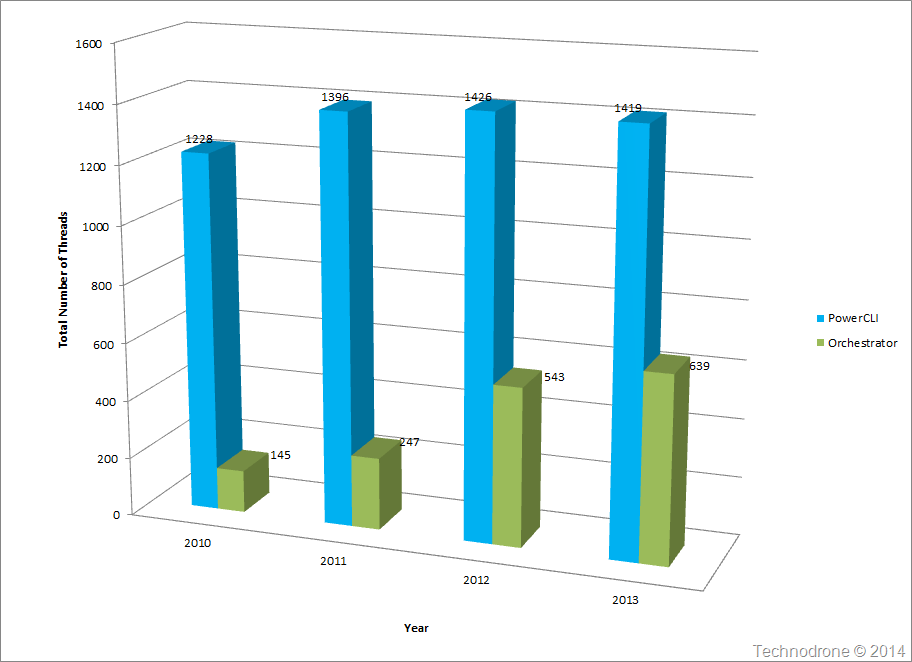
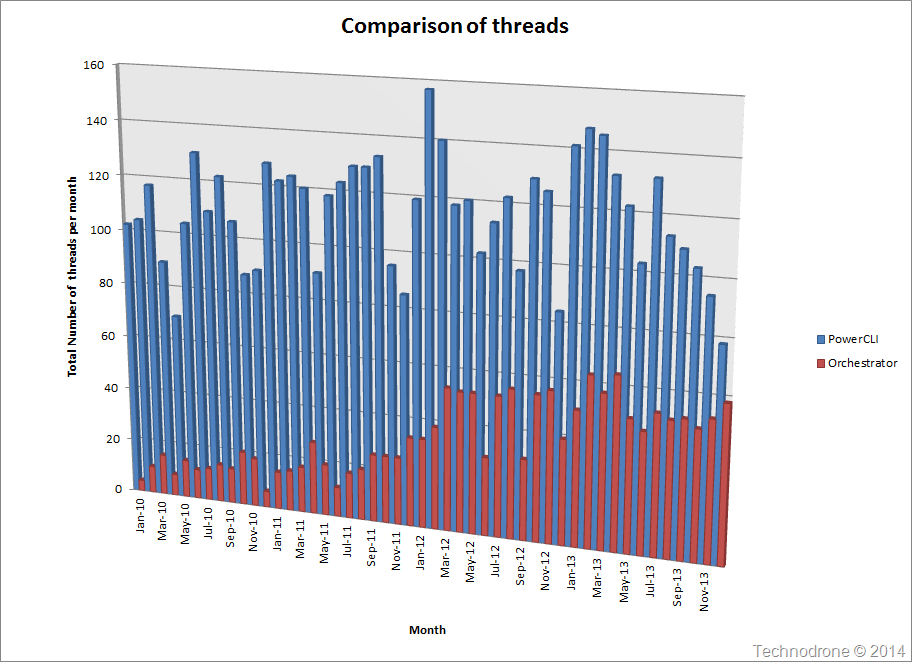
Let us have a look at the number of threads in the PowerCLI community vs. the Orchestrator community over the past 4 years

Total posts per month

You can see of course that Orchestrator is far behind and that PowerCLI is the most popular over the years.

Let’s have a look at a different perspective – by the total number of threads per year

Total posts per year

Again PowerCLI seems to be the most popular.

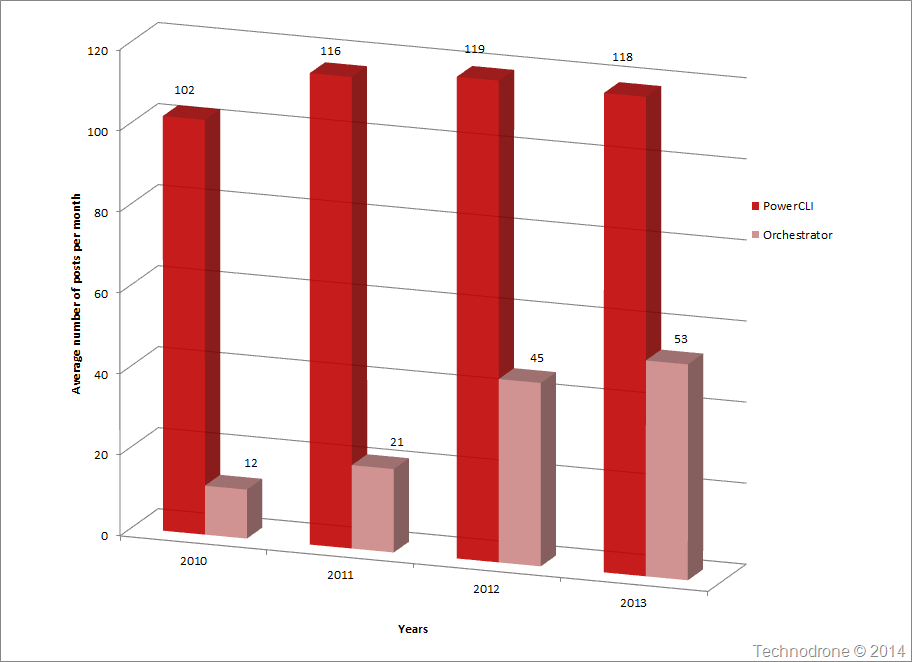
How about how many posts were there in each of the communities on average per month?

Average posts per month

Obvious results again.

Some of my analysis on the data above.

  1. The number of threads that people posted in the forums does not necessarily correlate to the number of people who actually use the product – but I think it is safe to assume that the number would represent the actual use in the field.
  2. vCenter Orchestrator 4.0 was released in February 2008. The number of people who used it in the following 3 years was minimal – and an in my opinion that is because the documentation was horrible. There was no definitive guides, not enough information and and not enough VMware people pushing the product.
  3. That changed in March 2012 – and why was that – well I think because of the Automating vSphere: With VMware vCenter Orchestrator book by Cody Bunch. This was the first decent piece of literature that allowed people to try the product.
  4. If we would compare the ratio of amount of questions asked every month between the PowerCLI and Orchestrator communities from 2010 to 2014 you would see that it would be (approximately) 10:1 in 2010 and 4 years later it is now 2:1. That is a great leap – and if you ask me this gap will get smaller and smaller.
  5. I think the reason is – we have evolved, matured. 4 years ago most of the people who were managing VMware environments were the System Administrators, who were extremely comfortable with Windows and PowerShell – so PowerCLI was a natural and sure bet.
    Javascript?? No ways – wouldn’t touch it with a barge pole. But today – people have become more open to other tools, have found that PowerCLI cannot do everything that they want, environments are becoming more complex and the regular Powershell script just does not cut it any more.

I am extremely happy that people are finally getting better use of vCenter Orchestrator. I was suspecting this was the case – and now we finally have the numbers to back this up.

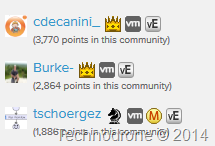
There are 3 very strong VMware employees that are monitoring the Orchestrator community -
Christophe Decanini, Burke Azbill and Jörg Lew – all of them really know their stuff! (I would advise that also follow them all on Twitter if you are not already)

Top Orchestrator Members

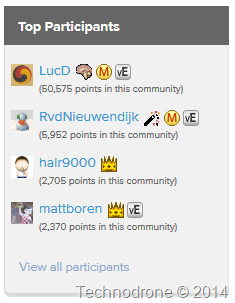
For the PowerCLI community – the one and only Luc Dekens (the man who eats, breathes and sleeps in the community),  Robert van den Nieuwendijk and Hal Rottenberg (all of them should be in your Twitter follow list). As opposed to the Orchestrator community – none of these three are VMware employees, which (in my honest opinion) shows their devotion and dedication – and their continued contribution to the PowerCLI community.

Top PowerCLI Members

The one thing that does come here to mind – is that the other virtualization vendors or the other solutions – do have quite a way to go until they are at the level which VMware has achieved.

I will leave you all with these final words…

Keep calm and automate

2013-07-18

Snowflakes in July?

Unless you live in a very specific part of the world - the chance that you will see snow (I mean the real fluffy stuff - not the artificial muck that people make) is really, really slim. But many of deal with snowflakes each and every single day - and we do not even know it.

So where are all these snowflakes? (in July??)

They don't see each other. They only see what they want to see. They don't know they're dead snowflakes. How often do you see them? All the time. They're everywhere. (I love this quote)

So before I start I suggest that you read this excellent post by @Martinfowler - SnowflakeServer ..

… Great!! You are back.

Our datacenter is full of snowflakes. These snowflakes are our own doing. At least this was the case a few year a go when there were manual build processes. Enterprises realized quite soon that this was not a healthy situation and looked for a way to standardize builds.snowflake

First we started with Norton Ghost images. Then came kickstart scripts for the Linux Servers, and RIS (and thereafter Windows Deployment Services) for the Windows boxes.

There was fiddling with drivers each time a new hardware model came out, a new NIC was introduced, a new HBA etc. etc.. it was a challenge none the less but a pretty automated process.

But for most (I can definitely speak for myself) once the OS was delivered - the application was usually not part of the build. Patches were installed up to a certain point - but then again, there was an build process for IBM hardware one for HP and another for Vendor X/Y/Z.

So yes we have a multitude of servers which are - yes you guessed it - snowflakes. It will be difficult to say that your servers are the same, they are built the same and they will never stay the same. I am not saying that they all should be - but it slowly but surely becomes a nightmare.

But hey… Wait !!! Virtualization solved this for me didn't it? I mean that was the whole idea of having templates wasn't it? A golden image that was the central point of deployment, had to be updated only in one location and from there on in - all VM's would be deployed exactly the same. Well yes - in a way this is true. This changed the snowflakes to some kind of a rubber stamp - exact copies, standardization and hardly any variation.

A couple of months back I was as DevopsCon in Israel and there I was enlightened to the fact that people used Puppet / Chef / Tool X/Y/Z for automated builds - a large part of them was for Continuous Integration or Continuous Development. And there something struck me.

Using an automated build system gave you the exact same OS each and every time.

But.. (and it is a big BUT) - this was only valid for your own environment.

Picture the following scenario. You need to deploy a system that is comprised of:

  1. Bare metal OS (heaven forbid)
  2. VMware VM's - on your environment
  3. vCloud VM's - either on your private cloud - or a Public one
  4. AWS VM's.

This is not a crazy scenario - complicated yes but quite viable.

Now let's examine how you would get the same OS down on to each of the above:

  1. Automated build - using Puppet / Chef /….
  2. Deploy from template - which could possibly have been built with one of the above tools - but I doubt it.
  3. Could be the same template that you have used in-house - but still deployed from a template.
  4. Deployed from a AWS image - or also perhaps also a template that was imported - again I find that not really to be the case.

Here we have at least 3 - and perhaps 4 different ways of getting the same OS down to the different locations and platforms

Now we want to customize the OS's just say Hostname and IP address:

  1. Customize with Orchestration tools (Puppet/Chef)
  2. Use VMware Guest customization
  3. Use vCloud Guest Customization
  4. Customize with your Orchestration tools.

If you are lucky - you can use two methods. If not perhaps 4. If you plan very well - and use the same snowflakes - a lot of themmethod for all 4 - then you are in really good shape - but I assume that most of us are nowhere near that stage today.

Snowflakes… for OS deployment, Snowflakes for configuration, Snowflakes.. Snowflakes.

Enough of what we do not have, and now it's time to talk about how I would like things to be in the future (and I think you should too).

All your Operating systems should be deployed exactly the same way, configured exactly the same way and managed (yep)…. exactly the same way.

  • does not matter if they are physical or virtual
  • does not matter if they are VM's on your vSphere environment or on a vCloud environment
  • does not matter if they are on a VMware public or private cloud, AWS or an Openstack based cloud.

I do not want to have to manage 4 different kinds of deployments one for each environment. I would like to to have one build process that should be able to produce the exact same Operating system (and yes I know there will be differences depending on the hardware or underlying virtual hardware) but the process will be the same. Having four different kinds of snowflake families is better than having hundreds of snowflakes - but still not ideal.

The same Puppet module. The same Chef Recipe. The same automated build..

Are we there yet, no. Will we ever get there - I do not know - perhaps never.

One thing that immediately comes to mind. Since Puppet is now partnered with VMware and are developing a number of projects specifically catered to VMware's needs (or so I hear) - one thing that VMware could do, is allow for the deployment and customization of VMware VM's with Puppet instead of using the guest customization API's. All of course integrated into vSphere.

Just a thought.

Please feel free to share your thoughts and comments below.

2013-03-13

Ravello Systems - and A Bit of Deja Vu

A while back Duncan Epping wrote a wonderful post VMotion, the story and confessions about how people remembered the when they witnessed vMotion for the first time and asked people to add their experiences. I of course remember mine vividly - and also remember that when I first saw vMotion I knew that this would change the way we used computers in the future.

A few weeks ago - I got that feeling again - but this time not with vMotion but rather with a product that IRavello Systems saw for the first time from Ravello Systems.

Some background about the company and its founders

"Ravello was founded in 2011 with the sole purpose of changing the way companies, large and small consume the public cloud. Ravello is brought to you by the team that introduced the KVM hypervisor (now the standard virtualization technology in Linux)

Rami Tamir (Co-Founder, CEO) – was VP of engineering at Red Hat. He joined Red Hat through the acquisition of Qumranet where he was the co-founder and president.

Benny Schnaider (Co-Founder, President and Chairman of the Board) was VP of business development for Red Hat. He joined Red Hat through the acquisition of Qumranet where he was co-founder and CEO.

Navin R. Thadani (SVP, Products) – ran the virtualization (KVM/ RHEV) business line for Red Hat. He joined Red Hat through the acquisition of Qumranet in 2008 which he led as the VP of products.

Ravello Systems is the first company to tackle the problem head-on from an infrastructure perspective. It’s very much like what VMware did back in the early 2000s to the enterprise data center.”

“The leadership team behind Ravello has a track record of developing innovative technologies in the virtualization infrastructure space and backing it up with solid execution,” said Adam Fisher, partner, Bessemer Venture Partners. “Their previous virtualization initiative, KVM has been a tremendous success in the market with record breaking virtualization performance and scalability. This time around, HVX is another ground-breaking technology and if any team can deliver, it’s these guys.”

Enough marketing babble…

I will try and explain to the best of my knowledge how I understand their technology. Ravello have developed what they name a Cloud Application Hypervisor. This hypervisor can be deployed on any cloud provider (at the moment - AWS, HP Cloud and Rackspace are the supported providers, but vCloud environments are expected to be added soon). They name their hypervisor HVX.

So how does it work (at a 10,000 ft. view). You, the user, upload a workload to the Ravello environment, and decide from there where you want to deploy it, it could be on Amazon, Rackspace or another provider. You might ask why is this such a special thing - I mean there are other companies out there that are providing a similar service - for example Cloudify - which allows you to upload an application to virtually (pun intentional)any cloud. Well the difference here is it is not an application you are moving around here - it is a complete VM. You then deploy this VM to a Cloud provider, regardless of what platform they are using underneath.

Think about it for a second. I have a VM running a complex application, in my datacenter, on my VMware environment. Installed with my standard builds, all the correct patches configurations everything I am used to doing in house. I now want to move that workload from my environment to the Cloud. VMware have vCloud Connector which will allow me to move a VM from my vCloud environment to a supported vCloud environment with very little (if any) change needed to perform this migration. That is actually quite amazing if you ask me - but the limitation is - it needs to stay within the VMware platform.

Now you need to do the same - but this time to an Openstack or AWS cloud? How would you go about getting that done? Not as simple… The VMware drivers are not exactly the same and those running on XEN(AWS) or KVM (Rackspace) so how?

Ravello have the technology that allows you to do this.

HVXSo how does it work? When you deploy a VM to a cloud, any cloud, Ravello will deploy a VM that contains an additional layer, a nested hypervisor, that will allow you to run a virtual machine on top of that VM. We have been doing nested virtualization for a while already - vSphere does that very very well. The whole concept of vInception, the VMworld HOL have been using it for years. But here is where the "secret sauce" comes in.

You can deploy a VMware VM on AWS or Openstack and I suppose the plan is to do it on anything. And of of course - vice-versa. HVX will allow you to do that. Please feel free to read about how it works.

I had one briefing with Gal Moav and Navin R. Thadani a few weeks ago where I got a demo of the product.

They have very nice interface where you can upload the virtual images to the Ravello system, and from there deploy them onto the cloud of your choice. Then you can create an application blueprint with a simple interface allowing the connections in between and out of the VM's.

Does it work? Oh YES! very well.

I did some testing with a basic VMware Linux VM - and uploaded it to Amazon. VM powered on - and I felt the urge to confirm - yes it was the same one. VMware tools installed and active in the VM. So there was no streaming of the data portions of the VM - the whole VM was uploaded - as is, encapsulated in their HVX and working. Paravirtualized SCSI drivers and VMXNET3 NIC (if my memory serves me correctly).

One of the interesting use cases that I was presented with - was the economical aspect. Ravello have the ability to identify the VM's needs, and deploy on the most cost effective destination - be it Amazon, Openstack or others in the future. I find that to be a huge advantage for the enterprise. If you are no longer dependent on the cloud infrastructure, you can pick and choose according to a number of considerations, be it cost, location, technology etc… There are several other use cases that they present on their site. Think about how you might use this as well to maximize the use of the Cloud instances you have already. Running multiple VM's the same AWS instance - can save a lot of money.

I plan to get some more information about how exactly the product works and if possible - will be able to post a follow up.

So why Déjà vu? In March 2011 I wrote this post The Datacenter - in a Few Years From Now - where I described the hypervisor for hypervisors.

Hypervisor for hypervisors

Ravello is the first (and only) company that I know of that can do this.

The directions in which this could be taken are more or less endless. And that is what makes me excited about this technology.

Let me give you three examples.

  1. Developers create VM's in their local environment, this could even be on a local laptop, vagrant or what ever they want. Once the application / environment is ready to be moved up the chain to QA / Test / Production - the VM can be imported to the cloud of your choice - whilst maximizing your savings. Minimum or next to no changes needed
  2. Take the other direction - you have an application in the cloud - which is suffering a problem in order to debug - you can either do it in the cloud - but not always is that feasible - so you want to bring it in house - with this kind of technology this will be possible.
  3. Risk management. I do not want to have everything on vCloud or AWS or Openstack - I would like to have my application run in multiple clouds. Up until now that was very difficult to do - I could not deploy the same application the same way to different cloud providers. With this kind of technology this will be possible.

Not all of the features / ideas I have mentioned above are available today - but they will be - and I do not see it being too far away.

The product is not perfect, and has some improvements that can be made over the next few months or years. Performance will improve, support for more Cloud Platforms will be added including in-house cloud environments as well.

There are other companies that have solutions which manage multiple clouds like Rightscale or Enstratius but I think they all do it with software solutions similar to the concept I described here - Orchestration Will Rule Them All #BRC2K11

One last thing. I tried to push the system to a bit of an extreme - and tried to upload a vESXi VM to AWS - but the system did not like it that much …. Perhaps one day we will be able to run ESXi on an AWS instance.

Ravello have a YouTube channel where you can go through their tutorials.

I am excited about the product, and see a real business need for such a technology.

I will keep my eye out on Ravello.

Disclaimer: I received access to Ravello Systems public beta - but it is open to anyone. I was given a briefing on the technology from two of the staff members. I blogging about this because I feel that the technology will make a difference to the way we will consume resources in the cloud, a disturbance in the force if you would like - but one for the better.

2012-10-07

You Can’t Use Onyx with the Web Client

The Web Client will be VMware’s direction going forward. It was stressed more than once. There was even a slide from one the sessions to state that 5.1 will be the last windows based client – as I blogged about before here.

If you stop for a moment to think about this it makes sense. VMware is looking to remove any kid of dependency on the Microsoft operating system. We have seen it with move to a direct of a center appliance and now with the new client. I am sure this will be a glorious day for all the Admins who have a Mac and up until now relied on a Windows VM running onyx.pngin Fusion to manage there vSphere environments. Gone now are those days.

Onyx - remember the fling that VMware have to allow you "peak" into the API? This has proven to be a invaluable tool more than once, not only for me but for anyone who is trying to programmatically perform some kind of operation be it PowerCLI or now more popular – vOrchestrator.

A multitude of posts can be found about the subject – here are just a small few:

But new with the web client this will not be possible (at least not at the moment) until VMware releases an update or some other tool to provide this functionality. Which does become problematic, because there is no way to find the API calls that are now going through the new client. And since a sizeable amount of functionality is no longer available in the Windows client – it will not be so simple to find the correct calls.

I can say that this update is coming - Luc Dekens actually raised this question in session GD26 with William Lam, and they are aware of this problem. When it will be released - I don't know.

This does just show me that this is a perfect example of how things can become complicated, the larger and more intertwined a solution becomes. Who would have thought that Onyx would have become such a useful tool, and that the community would make such good use of it, to a point that they cannot do things without it. And it has to be modified or replaced to continue to support the community.

The new client will make things a lot easier moving forward. It will be interesting to see how people find ways to extend the functionality of the the client. I think we will all be quite surprised.

If anyone has an idea on how to get the API calls going through the new client – please feel free share them in the comments below.

2012-04-16

Automating vSphere With VMware vCenter Orchestrator

I had some time this past week to read Automating vSphere: With VMware vCenter Orchestrator by Cody Bunch.

I stand by my views that vCenter Orchestrator is one of those uncovered gems thatAutomating vSphere with VMware vCenter Orchestrator unfortunately not enough VMware professionals know how to use and do not make enough use of the product and the vast number of options and functionality available with the product (I must confess, I am just guilty as everyone else here).

Orchestrator has been a free product bundled with vCenter ever since the vCenter 4.0 (vCenter Orchestrator 4.0 | 15 April 2009 | Build 4240) and was installed by default with vCenter.

One of my biggest complaints about the product in its earlier version was that the documentation sucked! Really!! There was barely enough info about how to install Orchestrator correctly.

The documentation has improved immensely over the years and Orchestrator is finally being recognized for the useful tool it actually is. What I was still missing was a clear and concise how-to, down-to-earth explanation on Orchestrator and here is where I think Cody has done an extremely good job with this book.

I really liked the real-life scenarios and use-cases that Cody demonstrated. These scenarios are common to most environments and show how certain “annoying” tasks can be simplified in such a way that not only will your boss be amazed – but you will also have the time on your hands to do more important things (like creating even better workflows).

I would highly recommend this book to anyone who is interested in learning more about vCenter Orchestrator.